
How to Choose FPV Goggles for Analog and Digital Systems
The right FPV goggles let you see your aircraft’s live camera feed clearly, fit your face comfortably, and work with the video hardware you own. Start with those three requirements before comparing screen resolution or headline range.
This guide explains analog and digital FPV goggles, the main video ecosystems, and the details that determine whether a complete setup will work. Product and compatibility references were checked on November 12, 2026.
Choose the video system first, then the goggles. Identify your aircraft’s camera and video transmitter, check the exact compatible receiving equipment, and compare fit and total setup cost. A first-time buyer can choose the aircraft and goggles together. An existing pilot should begin with the equipment already in the flight bag.


Start with the video hardware on your aircraft
An FPV camera captures the view. The video transmitter, usually called the VTX or air unit, sends it over the air. A matching receiver decodes the signal, and the goggles display the picture. The receiver may be inside the goggles, installed in a module bay, or housed in a separate VRX.
Find the full VTX name in the aircraft’s specification or order details. An aircraft offered in Analog, HDZero, Walksnail and O4 versions can require different goggles even when the frame and motors look identical. Check the selected variant as well as the product title.
Write down the radio receiver separately. A description such as “O4, ELRS 2.4GHz” identifies an O4 video system and an ExpressLRS control link. You need compatible equipment for both links. Once you have identified the video side, the store’s headset collection provides a starting point for comparing the physical goggles. Browse FPV goggles and headsets.
Analog vs digital FPV goggles
Analog remains a practical choice for inexpensive aircraft, lightweight builds and pilots with an established analog fleet. Digital systems can provide a much more detailed live image, with different trade-offs in latency, hardware cost and ecosystem compatibility.
| Buying question | Analog | Digital |
|---|---|---|
| What does the live image look like? | Standard-definition video. Fine branches and distant detail can be harder to distinguish. | Higher-detail modes are available. The camera, link mode and display determine the result. |
| What happens as reception weakens? | Noise, interference and loss of sync can affect the image. | Behavior varies by system. Expect possibilities such as pixel breakup, reduced image quality, stuttering or loss of picture. |
| How should latency be compared? | Include the camera and display processing. | Compare the complete camera-to-display path in the intended mode. Systems differ in how timing behaves as signal conditions change. |
| What sets the total cost? | Goggles, receiver module when required, antennas and each aircraft’s camera/VTX. | Goggles or VRX, power and accessories, plus a compatible camera/air unit for each aircraft. |
| How flexible is equipment mixing? | Match frequency, channel and supported analog video format. | Match the exact ecosystem, hardware generation and firmware requirements. |
Read latency figures with their test conditions
A display refresh rate, a minimum link delay and an end-to-end latency measurement describe different things. A 100Hz screen refreshes every 10 milliseconds, while the full journey also includes camera exposure, processing, transmission and display timing. Check whether a quoted figure is a minimum, an average or a complete camera-to-display result.
DJI, for example, lists different O4 latency figures for different goggles and modes, with testing conditions attached. Compare the configuration you plan to use. Treat advertised transmission distance in the same way, since interference, antenna placement and the local operating environment affect reception. DJI O4 specifications and test conditions.
For a new analog build, compare the receiver and display features alongside the price. For a digital build, include the cost of equipping your next aircraft with the same ecosystem. Explore analog FPV goggles · Explore digital FPV goggles.
The main FPV goggle brands and video systems
Use the table to narrow the search. Each row identifies a receiving path, while final compatibility still depends on the exact models. Brand names can span several technologies. Fat Shark, for example, has sold both analog and digital models, and Walksnail has distinct Avatar and Ascent families.
| System | Representative receiving equipment | What to check before buying |
|---|---|---|
| Analog FPV | SKYZONE and compatible analog models from Fat Shark or Orqa | Receiver included or separate, frequency/channel coverage, PAL/NTSC support and antenna connectors. |
| DJI digital | Goggles 3, N3, 2 or Integra, depending on the air unit | The precise air-unit/goggle pairing and required firmware. O3, O4 and older DJI-based hardware need individual checks. |
| HDZero | Goggle 2, BoxPro/BoxPro+, or an HDZero VRX with a suitable display | Camera/VTX video modes, receiving equipment and antenna package. Goggle 2 also includes an analog receiver. |
| Walksnail Avatar | Avatar Goggles X, Goggles L, or Avatar VRX | Avatar-compatible air unit, firmware, and the input/output features of the chosen goggles. |
| Walksnail Ascent | Ascent Goggles, Ascent VRX or VRX Pro | Ascent air unit and supported video modes. Direct radio pairing requires the Ascent family. |
| ArtLynk | BETAFPV VR04 HD/HD Pro and supported P1 receiving products | Explicit ArtLynk compatibility, matching firmware and the manufacturer’s market-specific use conditions. |
The manufacturer references describe the current receiving families and their connections. HDZero documentation · Avatar Goggles X · Ascent compatibility FAQ · BETAFPV compatibility and market notice.
HDZero and a mixed analog fleet
Goggle 2 offers HDZero reception, an integrated analog receiver and HDMI input. That combination gives a pilot several receiving paths in one headset. Its built-in analog receiver is a useful generation-specific detail when comparing it with the original HDZero Goggle. Compare the antenna bundle and power requirements as part of the purchase. HDZero Goggle 2 with antenna kit · HDZero equipment.
For the setup steps, read our HDZero Goggle 2 compatibility and connection guide, covering HDZero, analog and external Walksnail receivers.

Watch a pilot review of HDZero Goggle 2
Joshua Bardwell’s August 2025 review includes an analog-receiver comparison and flight tests. The chapter list gives you practical places to examine the mixed-fleet decision discussed above.
Review by Joshua Bardwell · 58 min 11 sec. The creator discloses affiliate links in the video description. Watch on YouTube.
07:22 Analog receiver comparison · 30:00 720p60 flight test · 53:28 Using the goggles with analog and Walksnail
Avatar and Ascent need separate compatibility checks
An Avatar Goggles X owner considering an Ascent-equipped aircraft should budget for an Ascent receiving path. CADDX’s FAQ identifies separate hardware and system architectures. A compatible external Ascent VRX can deliver video to a suitable HDMI-input display, subject to supported video timing. The receiver performs the radio decoding. Keep those details visible when browsing the shared brand range. Official Ascent compatibility FAQ · Walksnail equipment.
ArtLynk has model, firmware and market conditions
BETAFPV identifies VR04 HD and HD Pro as ArtLynk products. Its current VR04 HD page also states that units sold for the US market are intended for surface RC vehicles such as cars, crawlers and boats, with UAV use restricted. Confirm the exact SKU and destination-market conditions before choosing a setup. BETAFPV’s current product notice.
OpenIPC-based equipment is another option for builders willing to check a project’s supported camera boards, receivers, software and display path. Evaluate the complete documented build when comparing it with an integrated goggle system.
Check frequency, protocol and input direction
Compatibility has several layers. Work through them in order before ordering an adapter or changing antennas.
- Identify the video system. Read the complete VTX and receiver model names, including suffixes.
- Check the radio settings. Match the supported band, exact frequency and channel plan. Analog labels such as R1 refer to particular frequencies. Auto-search can land near a strong signal, so confirm the displayed frequency manually.
- Check firmware and mode. Read the manufacturer’s pairing requirements for both ends.
- Check the display path. For a separate VRX, verify the goggles’ input connector, supported resolution and frame rate.
- Check power and antennas. Confirm voltage, connector polarity, antenna connector type and polarization.
What “5.8GHz” tells you
The frequency band describes part of the radio link. Devices also need a mutually supported signal format and system. Analog, HDZero and other digital equipment may use frequencies around 5.8GHz while requiring different receivers. Available frequencies and power levels also depend on the model and region.
Keep the terminology separated on your shopping list. ELRS and Crossfire refer to control links. SmartAudio and IRC Tramp allow compatible flight controllers to configure a VTX. HDMI carries video between connected devices. Each serves a different part of the setup.
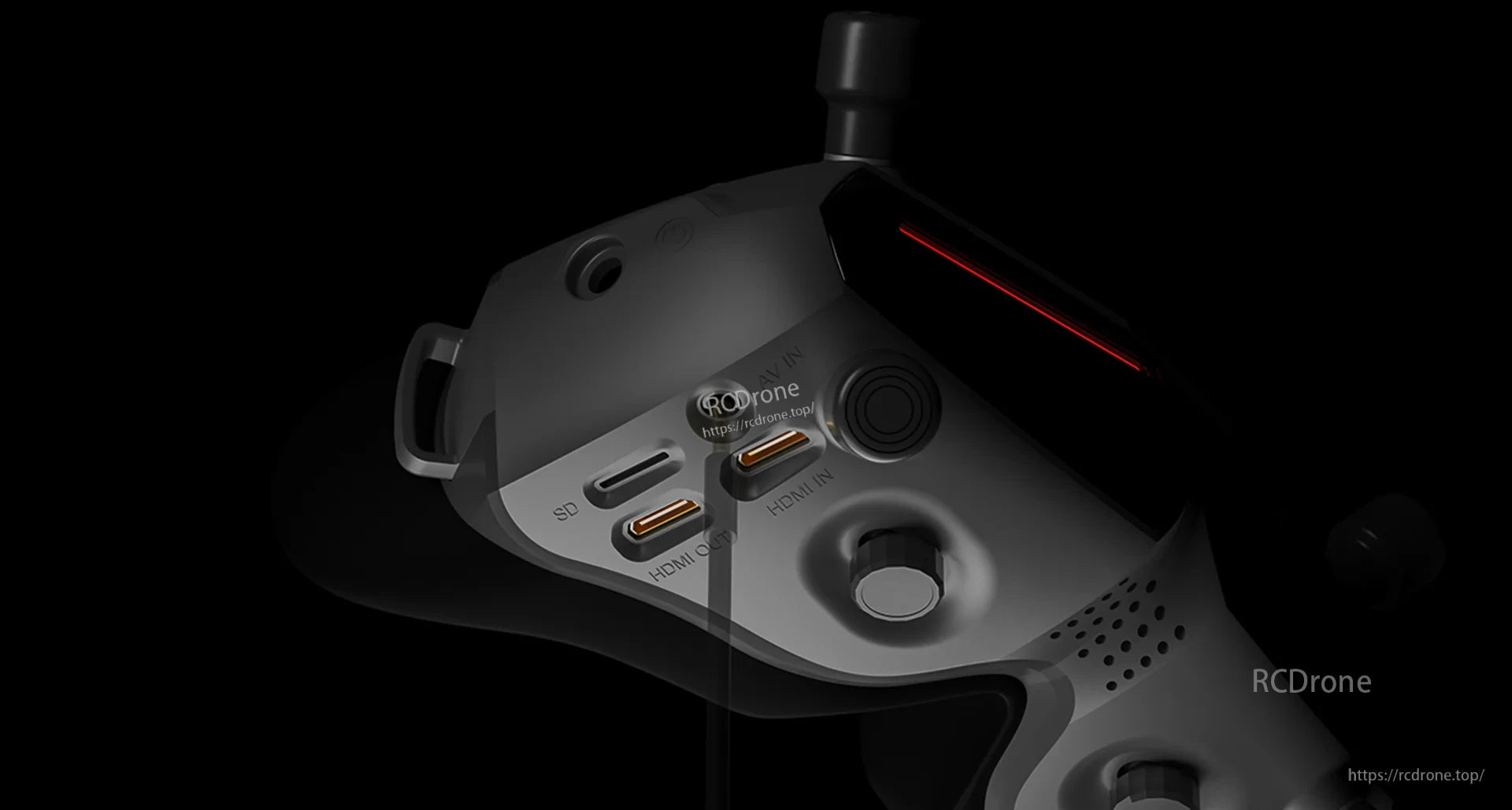
HDMI IN and HDMI OUT serve different jobs
An external VRX sends decoded video through its output. The goggles need a compatible input to display it. For a prospective VRX upgrade, record three things from both manuals—the connector size, supported resolution and supported refresh rate. Then include the VRX’s own power supply and mounting method.
AV input is another route for an external analog receiver. A USB-C socket can support charging, data, video or a subset of those functions. Confirm the function in the specification before treating it as a video connection. Once you know the required system and output, compare the receiving hardware. Browse FPV video receivers.
Choose a display you can see comfortably
Screen specifications become useful after compatibility is settled. A headset needs to show the edges of the image and on-screen flight information clearly while remaining comfortable through a normal session.
Box goggles, dual displays and prescription glasses
Box-style goggles generally use one larger screen and an optical assembly in front of it. Compact goggles commonly use a separate display for each eye. Fit depends on the lens design, faceplate and your prescription as well as the housing style.
DJI describes Goggles N3 as accommodating personal glasses and using a single 1080p screen. That makes it worth considering for an O4-compatible setup when wearing your normal glasses is important. Check that your particular frames fit comfortably. DJI N3 fit guidance · DJI Goggles N3.
IPD, focus adjustment and the edge of the screen
Interpupillary distance, or IPD, is the distance between your pupils. On adjustable dual-display goggles, the optics need to align with your eyes. Diopter adjustment changes focus. A stated adjustment range may still leave a need for prescription inserts, particularly for astigmatism.
When trying a headset, close one eye at a time and adjust each side. Check small text in all four corners, then look with both eyes open. Keep the strap comfortably loose enough to assess the natural fit. Also check for nose pressure, light leakage and whether the foam holds the optics at a comfortable distance.
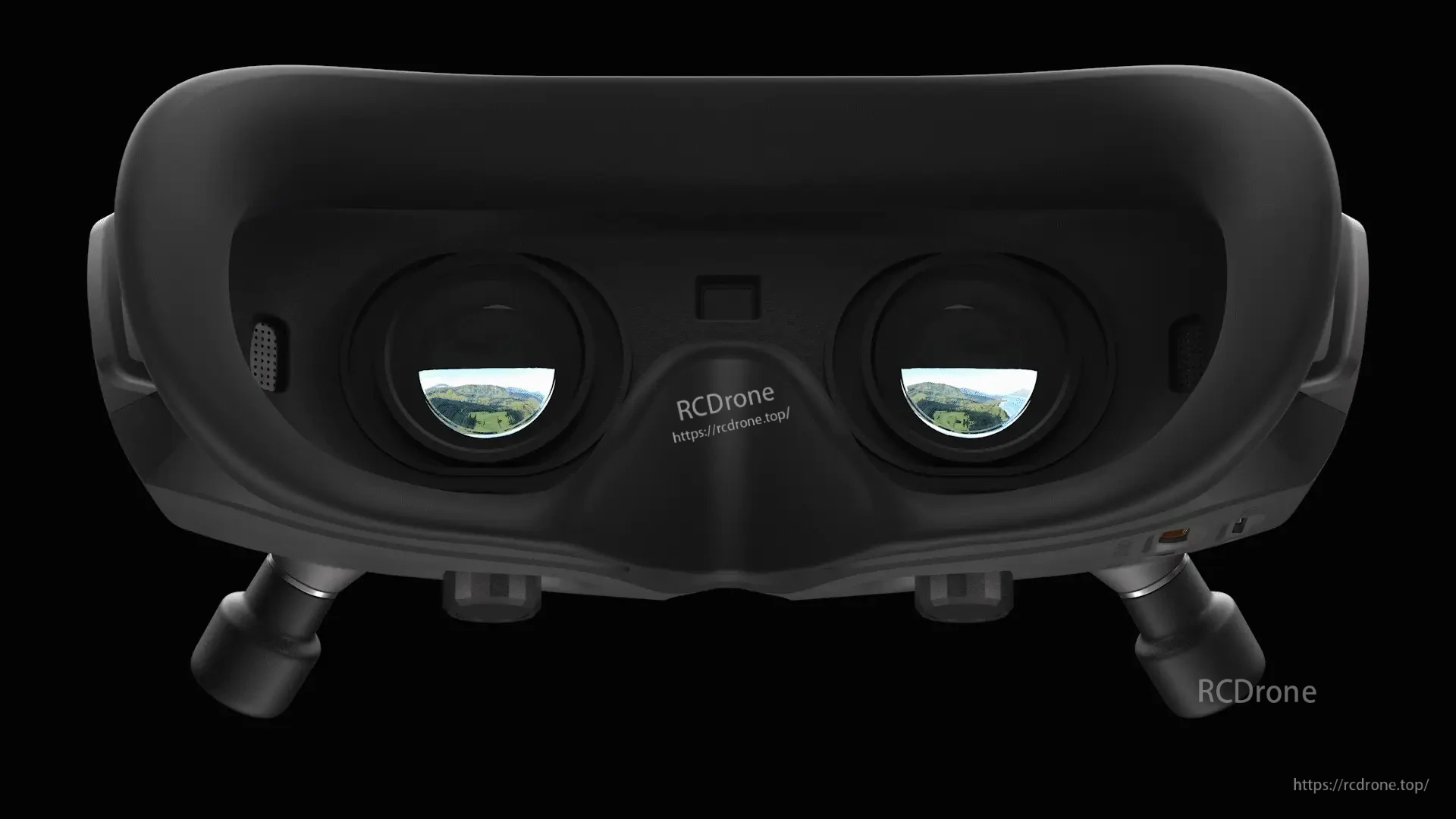
FOV, OLED, refresh rate and DVR
A larger field of view creates a larger apparent image. Some pilots prefer that immersion, while others find a smaller apparent image easier to scan quickly. OLED can provide strong contrast, but usable clarity also depends on the optics, source image and fit.
Check live-view resolution, screen resolution and recorded resolution separately. An air unit that records 4K onboard can send a lower-resolution live feed. The goggles’ DVR records the receiving path supported by that model and mode. Verify which inputs it can record if you plan to use external receivers.
Watch a Goggles L fit review and flight test
Joshua Bardwell’s October 2024 Goggles L review covers the screen, face fit, prescription inserts and flying. Pay attention to the fit limitations he describes when applying the optical checks above. Prices and firmware observations reflect the recording period.
Review by Joshua Bardwell · 22 min 45 sec. The creator discloses affiliate links in the video description. Watch on YouTube.
05:55 Face foam and head strap · 11:03 Prescription lens insert · 13:02 Screen-edge visibility · 14:56 Flight test
Watch the controls and fitting process
DJI’s 4-minute-44-second N3 usage tutorial provides a practical look at operating the headset. Use the current compatibility documentation alongside the video when choosing an air unit.
Video by DJI Tutorials. Watch on YouTube.
Three real owner and reviewer experiences
These first-person accounts show how actual owners and reviewers used their equipment. Each case links to its original source and identifies the hardware involved.
A Goggle 2 owner keeps analog aircraft while adding HDZero
Reddit user 0xSquid described switching from Walksnail to HDZero Goggle 2 to enjoy flying a 65mm Whoop. They reported flying HDZero tiny Whoops while keeping their 5-inch aircraft on analog for park sessions, with HDZero VTX upgrades happening one aircraft at a time.
That experience illustrates a practical reason to choose a headset with both receiving paths: the aircraft conversion budget can be spread out. It is the owner's account of their own equipment, not a promise of identical reception from every analog setup. Confirm your aircraft's video hardware and the selected headset package before buying.
Source: 0xSquid's first-person comment in r/fpv, accessed November 12, 2026. Public owner experience, not an RCDrone customer testimonial.
A glasses wearer tests DJI Goggles N3 with a Neo
In her January 24, 2025 review for Tom's Guide, Nikita Achanta reported using Goggles N3 with a DJI Neo and RC Motion 3. She wears glasses and found enough room to keep them on inside the headset. She also described wearing it for over two hours, briefly removing it for aircraft battery changes, without discomfort.
For a buyer who wears glasses, that is a concrete example of why physical fit deserves attention alongside screen specifications. Test your own frames and face fit, then check compatibility with your intended aircraft. Her reported test used a Neo; it was not an O4 custom-build or ELRS setup.
Source: Nikita Achanta's DJI Goggles N3 review, “Design & controls” and “User experience.” Tom's Guide discloses affiliate commissions. This case cites her wearing experience, not the review's historical compatibility list.
A reviewer adds Avatar VRX to his existing Orqa headset
In his February 23, 2023 review, Oscar Liang showed an Avatar VRX installed on his Orqa FPV.ONE goggles with a 3D-printed adapter. The receiver and goggles shared a battery, and the Orqa connection required a different HDMI cable or adapter. He also described an unsupported-input error when selecting video modes the Orqa could not accept.
The purchase lesson is specific: include mounting, power and the correct cable in the upgrade cost, and choose a mode both devices support. This was an Avatar setup with Orqa goggles, not an Ascent test. For an Ascent aircraft, independently check the Ascent VRX and headset input, or compare a dedicated Ascent headset.
Source: Oscar Liang's Avatar VRX review, “Closer Look” and “Goggles Compatibility.” The review discloses affiliate links; observations refer to the equipment tested at that time.


Build a complete shopping list
Price the equipment you need to reach a working live image. Keep a separate line for each item below and mark what the selected package already includes.
| Component | Detail to confirm |
|---|---|
| Goggles | Exact model, receiving system, optical fit and necessary inputs. |
| Camera and VTX | Compatible camera/air unit combination, supply voltage, mounting space and cooling. |
| Receiver or VRX | Included receiver, optional module or external unit. Check hardware and firmware compatibility. |
| Antennas | Included quantity, supported band, polarization and SMA/RP-SMA or other connector type. |
| Power | Battery, charger, input voltage and connector polarity for the goggles and any separate receiver. |
| Cables and mounting | HDMI connector size, AV cable pinout when applicable, strain relief and receiver mount. |
| Recording and fit accessories | Supported microSD card, replacement foam, prescription inserts and storage case. |
A bundle can simplify sourcing once its contents match your plan. Compare the included components against this checklist and account for any extras needed to finish the setup. Replacement foam and other fit accessories can also affect the long-term usefulness of a headset. Compare FPV goggle bundles · Find goggle parts and accessories.
Before the first session, confirm the firmware combination, set the intended video mode and check the picture with the aircraft safely secured and propellers removed. Follow the air unit’s bench-cooling instructions. Verify the local frequency and power requirements for the equipment you will use.
Frequently asked questions
Can one pair of FPV goggles work with every drone?
Compatibility follows the aircraft’s video hardware and the goggles’ receiving paths. A headset with several inputs can support multiple setups through appropriate receivers. Check each complete signal path individually.
Can digital goggles receive analog video?
Some models provide a built-in analog receiver, a compatible module bay or AV input for an external receiver. HDZero Goggle 2 includes an analog receiver. Other digital models require their own model-specific checks.
Do I need to match my goggles to my ELRS radio?
Your goggles must support the video system. Your ELRS radio must support the aircraft’s control receiver. Features such as an ELRS backpack can coordinate tasks such as channel selection on supported equipment, while video decoding still depends on the receiving system.
Does a higher-resolution screen improve an analog feed?
Better optics and display processing can make the feed more comfortable to view. The original camera and analog signal still limit the detail available in that image.
Which FPV goggles are best for a beginner?
Choose a compatible, comfortable setup with a complete power and antenna package. If you already have an aircraft, identify its video variant first. If you are buying everything together, compare the combined aircraft-and-goggle cost and the cost of adding another aircraft later.
How should I choose between Avatar and Ascent?
List the aircraft or air units you want to use, then compare the complete receiving and display options within each family. Check the exact series when buying through a shared Walksnail brand collection.
Choose your next step
Begin with the aircraft’s video system, then use the compatibility checks to narrow the goggles. Confirm optical fit and complete the shopping list before comparing the final cost. For a closer look at an Avatar headset already covered on RCDrone, continue with the existing Goggles X article and use current manufacturer specifications for version-sensitive features. Read the Walksnail Avatar Goggles X article.