


BETAFPV Nano TX V2 Transmitter Module (ExpressLRS ELRS) 2.4GHz/915/868MHz, 1W/2W, TCXO
BETAFPV Nano TX V2 Transmitter Module (ExpressLRS ELRS) 2.4GHz/915/868MHz, 1W/2W, TCXO
BETAFPV
Couldn't load pickup availability


Overview
The BETAFPV Nano TX V2 Module is an ExpressLRS (ELRS) transmitter module designed for stable, low-latency radio links in FPV racing and long-range flights. It features a T-LED antenna that visually indicates transmission/reception status and antenna connection condition, plus a cooling system with an 1804 fan and heatsink for high-power operation.
Key Features
- T-LED antenna with built-in LED display: regular flickering indicates signal transmission/reception; light flicker/on = transmitting signal; light off = receiving signal. Flicker speed varies with telemetry ratio and packet rate.
- 3 versions: 2.4GHz (max 1W) and 915MHz/868MHz (max 2W). Max packet rate: F1000/200Hz.
- Integrated TCXO (temperature-compensated crystal oscillator) to minimize frequency deviation for stable performance.
- Cooling system: optimized airflow channel + heatsink + high-speed 1804 cooling fan.
- ExpressLRS V3.3 support for Backpack and custom button functions.
- Wide compatibility with radios using EdgeTX V2.8.0 and OpenTX systems (CRSF).
Specifications
| Item | BETAFPV Nano TX V2 Module | ELRS 2.4GHz/915MHz/868MHz |
| Weight | 28g |
| Color | White |
| Antenna connector (module) | RP-SMA (2.4GHz), SMA (915/868MHz) |
| RF power (2.4GHz) | 25mW/50mW/100mW/250mW/500mW/1000mW |
| RF power (915/868MHz) | 10mW/25mW/50mW/100mW/250mW/500mW/1000mW/2000mW |
| Packet rate (2.4GHz) | 50Hz/100Hz/150Hz/250Hz/333Hz/500Hz/D250/D500/F500/F1000 |
| Packet rate (915/868MHz) | 25Hz/50Hz/100Hz/100Hz Full/200Hz/D50 |
| Frequency band | 2.4GHz ISM, 915MHz FCC, 868MHz EU |
| Backpack | Support |
| Input voltage | 7V~13V DC |
| Power consumption (2.4GHz) | 8V, 1000mA@1000mW, 150Hz, 1:128 |
| Power consumption (915/868MHz) | 8V, 1000mA@1000mW, 50Hz, 1:128 |
| USB port | Type-C |
| Fan voltage | 5V |
| Default firmware version | ExpressLRS V3.3.0 |
| T-LED antenna connector / gain | RP-SMA/SMA Connector | 2.0dBi (2.4GHz/868MHz/915MHz) |
Interfaces & Controls
- SMA/RP-SMA Port
- USB Type-C Interface
- Cooling Fan
- State Indicator Light
- Button1, Button2
- CRSF Serial Port pins: NC / 7V-13V / GND / CRSF Serial Port
For product selection, setup help, or after-sales support, contact [email protected] or visit https://rcdrone.top/.
Setup (EdgeTX/OpenTX)
- In EdgeTX: enter MODEL SEL → SETUP, set Internal RF to OFF, enable External RF, and set output mode to CRSF.
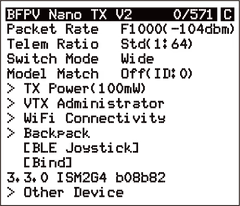
- Module configuration can be done via the ExpressLRS LUA script (elrsV3.lua). Copy elrsV3.lua to the radio SD card: Scripts/Tools, then open Tools and run ExpressLRS.
Custom Buttons
Two reserved buttons support customizable functions.
- Enter WiFi mode by enabling the module or powering it on for 60 seconds.
- Once the RGB state indicator is slow green flashing, WiFi is active (WiFi name: ExpressLRS TX, password: expresslrs).
- Connect and open http://10.0.0.1 in a browser to access custom button settings.
- Select the function in Action, then choose press type and count/duration in Press and Count, then click Save.
Six settable shortcut actions:
- Unused
- Send VTX Settings
- Increase Power Output
- Enable WiFi
- Enter VTX Channel Menu
- Enter Binding Mode
- Enter VTX Frequency Menu
Default button functions:
| Button | Action | Press | Count |
| Button1 (Left Button) | Enter Binding Mode | Short Press | 3 Times |
| Increase Power | Long Press | For 0.5 seconds | |
| Button2 (Right Button) | Go to VTX Channel Menu | Short Press | 2 Times |
| Send VTX Settings | Long Press | For 0.5 seconds |
Note: This transmitter hardware does not support button RGB lights.
Binding & External Power Supply
- Default firmware is ExpressLRS V3.3.0, with no Binding Phrase pre-set. Ensure the receiver is using V3.0.0 or above with no binding phrase.
- Binding: put the receiver into binding mode; quick press Button1 (Left button) three times (factory default), or use Bind in the LUA script. A solid indicator indicates successful binding.
- If the module has been reflashed with a binding phrase, set the same binding phrase on the receiver for automatic binding.
- External power: for 500mW and above, power consumption is higher and may shorten radio usage time. Use the included Type-C male to XT30U male power cable with an XT30-USB adapter cable to connect an external 2-3S battery.
- Power consumption is related to transmit power and telemetry ratio. When using 500mW and above, a higher telemetry ratio can reduce power consumption and extend use time.
Voltage note: When the remote control battery or external battery is lower than 7V (2S) or 10.5V (3S), do not use 500mW and 1W; the module may reboot due to insufficient power supply.
Important Notes
- Assemble the antenna before powering on. Otherwise, the PA chip in the Nano TX V2 Module may be damaged permanently.
- T-LED Antenna only lights up on the Nano TX V2 Module.
- Other antennas such as Moxon and Loop can be used directly on the Nano TX V2 Module (915/868MHz version), but the 2.4GHz version requires an RP-SMA to SMA adapter.
- LiteRadio 3 Pro Radio Transmitter cannot support 500mW due to power supply issues.
FAQ
- Unable to enter LUA script: check Nano pin/socket contact, upgrade LUA script to elrsV3.lua, and set radio baud rate to 400K or above (EdgeTX needs V2.8.0 or above if baud rate setting is unavailable). Target Name: BETAFPV Nano V2 2.4GHz/915MHz/868MHz TX.
- Packet rate cannot be set to F1000 / “Baud rate is too low”: F1000 requires above 400K baud rate. Update baud rate in Model Setup or System → Hardware, then reboot the radio.
- F1000 enabled but packet rate is below 1000: upgrade the EdgeTX version to 2.8.0 or above.
Manuals & Downloads
- Instruction Manual for Nano TX V2 Module
- Firmware for Nano TX V2 Module
- Backpack firmware releases
- Introduction to ELRS Lua Scripts
- ExpressLRS TCXO / crystal frequency error reference
What’s Included
- 1 × Nano TX V2 Module
- 1 × T-LED Antenna
- 1 × USB to Type-C data cable
- 1 × Type-C Male to XT30U Male power cable
- 1 × Instruction manual
- 1 × Service card
Details

BETAFPV Nano TX V2 Transmitter brings ExpressLRS performance in a compact Nano module with a status-indicating T-LED antenna.
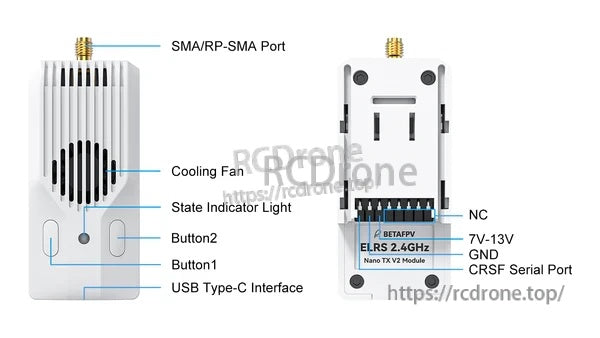
Clear access to USB Type‑C, dual buttons, cooling fan, and CRSF serial pins keeps setup and maintenance straightforward.

Choose the band that fits your flying style, with high RF output options for demanding link performance.
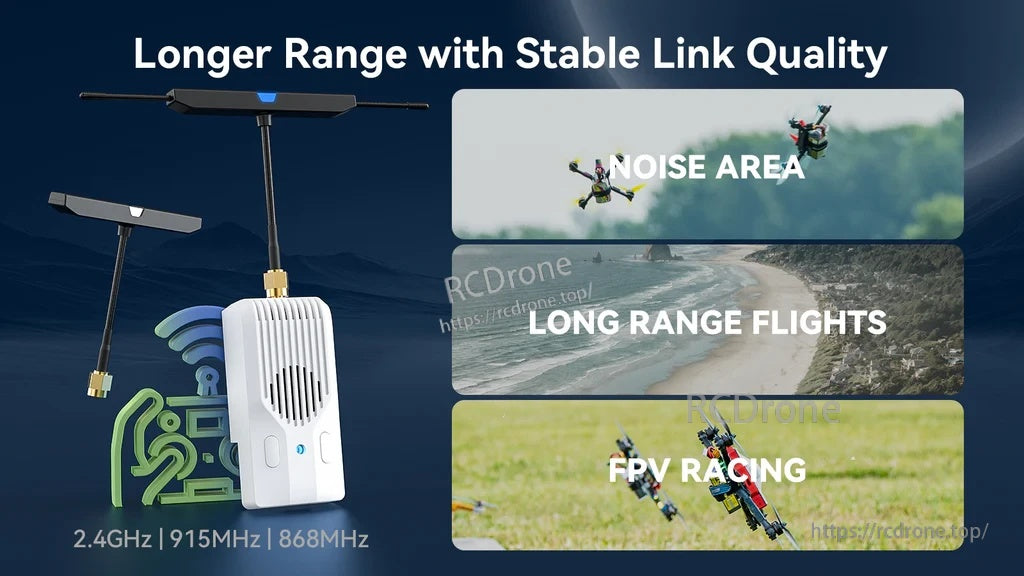
Built for stable link quality across noisy environments, long-range flights, and FPV racing sessions.
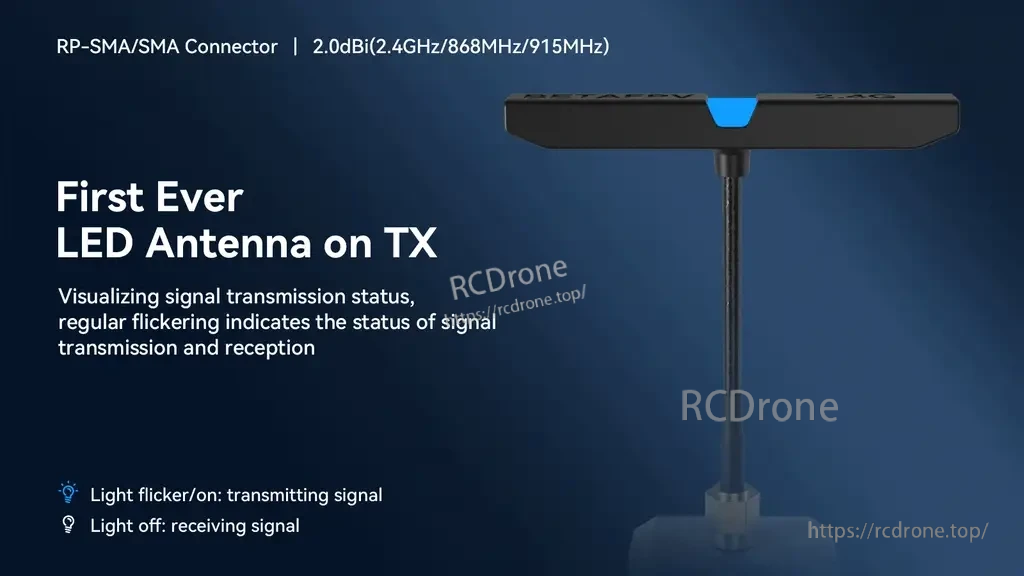
The T‑LED antenna provides an at-a-glance indication of transmission and reception status while you fly.

An active cooling design with heatsink and fan helps maintain stable output during higher power operation.

Backpack support plus two customizable buttons adds flexibility for controls and external device functions.


Part of the ExpressLRS ecosystem, making it easy to match the module with compatible receivers and accessories.
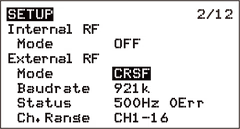
In EdgeTX/OpenTX, set Internal RF to OFF and select CRSF for External RF to use the module.

The ExpressLRS LUA tools provide quick access to key configuration and update functions from the radio.

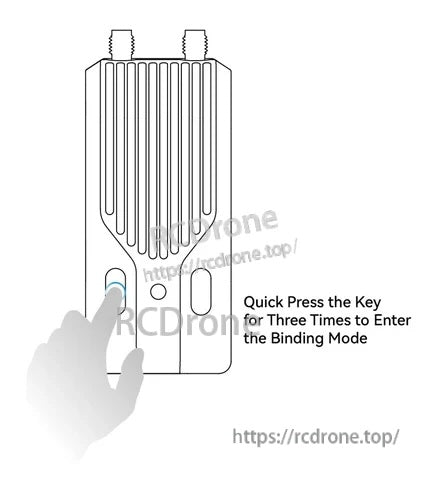
Binding can be triggered directly from the module using the button press sequence.
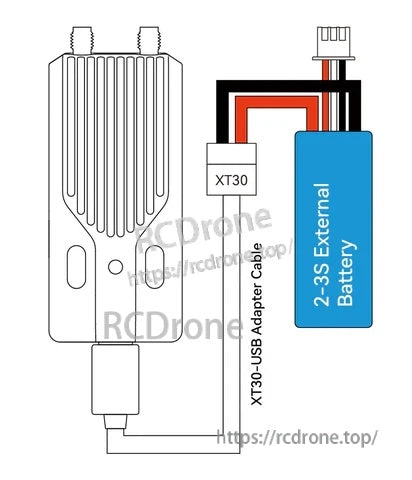
Optional external battery power can be used with an XT30-to-USB adapter cable when needed.

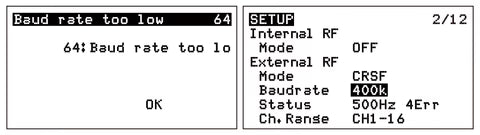
If a baud rate warning appears, confirm the External RF is set to CRSF and adjust baud rate per your radio setup.

Everything needed to get started is included: module, antenna, cables, and documentation.