


ESP32 माइक्रोROS रोबोट कार किट (VM कंट्रोलर), ROS2 हम्बल, TOF लाइडर, 7.4V 2000mAh - मैक समर्थित नहीं
ESP32 माइक्रोROS रोबोट कार किट (VM कंट्रोलर), ROS2 हम्बल, TOF लाइडर, 7.4V 2000mAh - मैक समर्थित नहीं
Yahboom
पिकअप उपलब्धता लोड नहीं की जा सकी


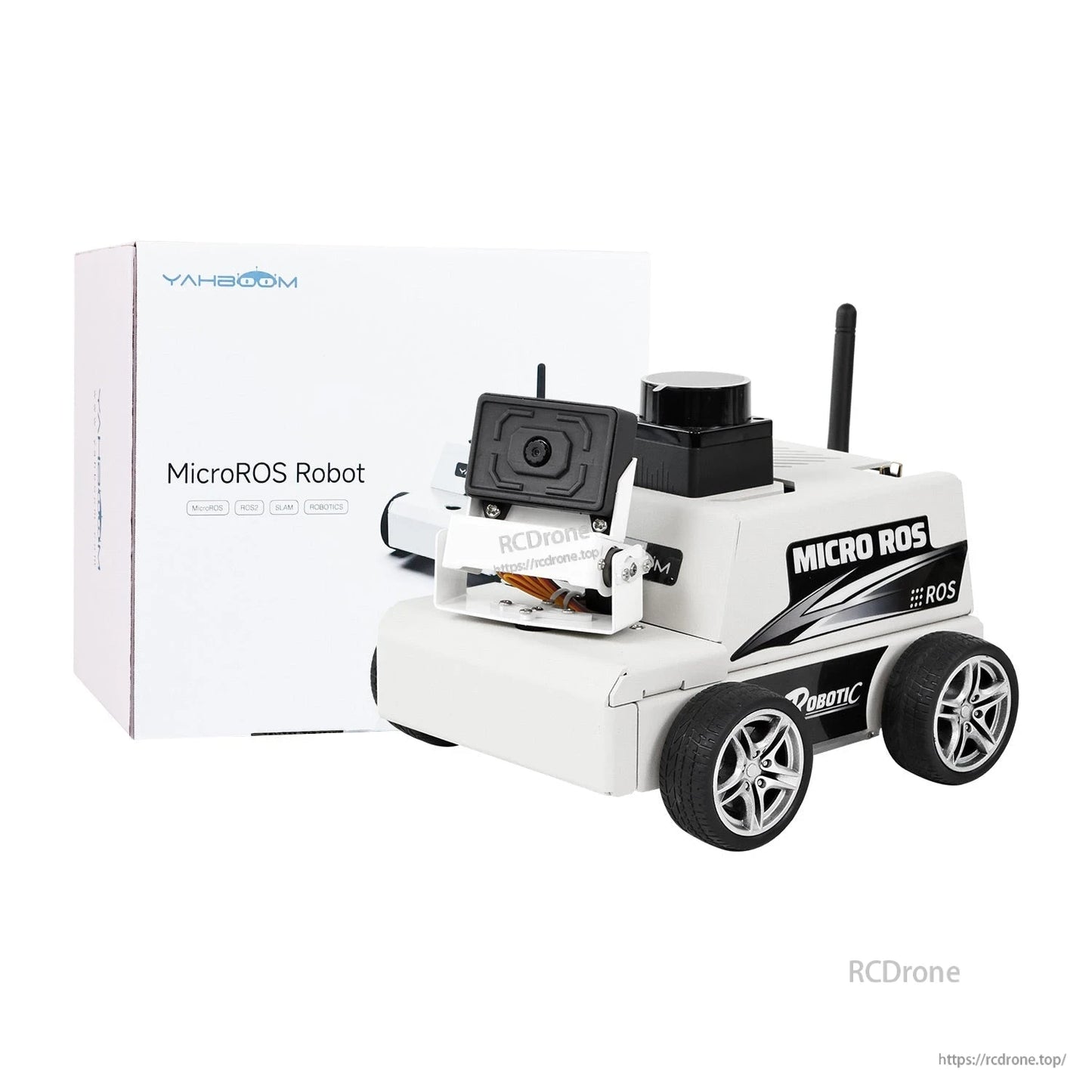
Overview
ESP32 MicroROS रोबोट कार वर्चुअल मशीन को नियंत्रक के रूप में (Mac का समर्थन नहीं) एक ROS2 शैक्षिक रोबोट कार है जो जटिल कंप्यूटिंग कार्यों को एक PC वर्चुअल मशीन वातावरण में स्थानांतरित करती है। रोबोट एक ऑनबोर्ड ESP32 सह-प्रोसेसर और MicroROS WiFi UDP संचार का उपयोग करके सेंसर/डेटा को PC वर्चुअल मशीन में भेजता है, जहां गणनाएँ पूरी की जाती हैं और नियंत्रण निर्णय उत्पन्न होते हैं।
यह प्लेटफ़ॉर्म ROS2 Humble और Python3 प्रोग्रामिंग का समर्थन करता है, और लिडार बाधा से बचाव, अनुसरण, मानचित्रण नेविगेशन, RViz सिमुलेशन, और मल्टी-मशीन समन्वय नियंत्रण सहित सीखने और विकास कार्यप्रवाह के लिए डिज़ाइन किया गया है।
मुख्य विशेषताएँ
- वर्चुअल मशीन मास्टर नियंत्रण: PC-पक्षीय वर्चुअल मशीन का उपयोग मास्टर नियंत्रक के रूप में करता है ताकि सीखने की लागत को कम किया जा सके, एल्गोरिदम कंप्यूटिंग दक्षता में सुधार किया जा सके, और DIY/अपग्रेड का समर्थन किया जा सके। नोट: Mac सिस्टम का समर्थन नहीं किया गया है।
- ऑनबोर्ड ESP32 प्रोसेसर: अंतर्निहित वाई-फाई और ब्लूटूथ कार्य; रोबोट और वर्चुअल मशीन के बीच वास्तविक समय डेटा संचरण के लिए MicroROS का समर्थन करता है।
- ROS2 हम्बल समर्थन: यह उत्पाद ROS2 हम्बल का उपयोग करता है।
- मल्टी-मास्टर समर्थन: पीसी वर्चुअल मशीन मास्टर के अलावा, चेसिस के साथ संवाद करने के लिए Raspberry Pi 5 या Jetson Nano का उपयोग करने का भी समर्थन करता है (सहायक उपयोग दस्तावेज़ और संबंधित सिस्टम इमेज के साथ)।
- TOF लिडार कार्य: लिडार बाधा से बचाव, लिडार ट्रैकिंग, लिडार गार्ड, और लिडार गश्त।
- रिमोट कंट्रोल विकल्प: iOS/Android APP रिमोट कंट्रोल; समकालिक आंदोलनों के लिए वास्तविक समय में मल्टी-मशीन हैंडल/कीबोर्ड नियंत्रण। हैंडल नियंत्रक शामिल नहीं है।
- रोबोट जानकारी जारी: चेसिस रडार, IMU, गति, और बजर जैसे सेंसर से नियंत्रण डेटा वर्चुअल मशीन को जारी कर सकता है।
- चेसिस & शक्ति: एल्यूमीनियम मिश्र धातु शरीर; 4PCS 310 एन्कोडर मोटर; 7.4V बड़ी क्षमता बैटरी पैक।
विशेषताएँ
ESP32 (ऑनबोर्ड प्रोसेसर)
| ESP32 मॉडल | ESP32-S3-WROOM-1U-N4R2 |
|---|---|
| कर्नेल | Xtensa LX7 32-बिट डुअल-कोर माइक्रोप्रोसेसर |
| पिनों की संख्या | 41 |
| GPIOs की संख्या | 36 |
| मुख्य आवृत्ति घड़ी | 240MHz |
| SRAM | 512KB |
| ROM | 384KB |
| PSRAM | 2MB |
| फ्लैश | 4MB |
| ऑपरेटिंग वोल्टेज | 3V~3.6V |
| WIFI | IEEE 802.11 b/g/n; 2.4 GHz |
| BT | V5.0 |
| संचार इंटरफेस | SPI, I2S, I2C, UART, USB OTG, SDIO, JTAG, DVP, LCD |
| संचालन तापमान | -40~85C |
TOF उच्च-प्रदर्शन लिडार (ORBBEC MS200)
MS200 TOF रेंजिंग विधि को अपनाता है, 30Klux की मजबूत रोशनी को सहन करता है, इनडोर और आउटडोर मैपिंग नेविगेशन का समर्थन करता है, मापने की त्रिज्या 12 मीटर तक, मापने का अंधा क्षेत्र केवल 3 सेमी, 2 मीटर के भीतर रेंजिंग त्रुटि 2 मिमी, सैंपलिंग आवृत्ति 4500 बार/सेकंड, और स्कैनिंग आवृत्ति 7Hz~15Hz, 230400bps संचार दर का समर्थन करता है।
| रेंजिंग सिद्धांत | TOF रेंजिंग |
|---|---|
| स्कैन कोण | 360 |
| मापने के कोण की सटीकता | 0.8 |
| पर्यावरणीय प्रकाश तीव्रता के प्रति प्रतिरोध | 30Klux |
| वजन | 40g |
| जलरोधक और धूलरोधक | IP5X |
| मापने की त्रिज्या | काले वस्तु:12m |
| न्यूनतम मापने की दूरी | 0.03m |
| रेंजिंग सटीकता | <=4mm (0.2m~2m), <=15mm (2m~12m) |
| नमूना लेने की आवृत्ति | 4500 बार/सेकंड |
| स्कैनिंग आवृत्ति | 7Hz~15Hz |
| आयाम | 37.7*37.5*33mm |
| संचार दर | 230400 |
| संचार इंटरफेस | मानक असिंक्रोनस सीरियल पोर्ट (UART) |
| ड्राइव मोड | निर्मित ब्रशलेस मोटर |
| पावर सप्लाई | DC5.0 .5V |
| ROS समर्थन | ROS1/ROS2 |
| प्रमाणित फ़ाइल | ROHS2.0,REACH,CE,FCC |
| विंडोज समर्थन | विंडोज पर पीसी सॉफ़्टवेयर प्रदान करें |
7.4V बड़ी क्षमता बैटरी पैक
MicroROS रोबोट 7.4V-2000mAh क्षमता बैटरी से लैस है, जिसकी बैटरी जीवन 5 घंटे तक है।
| रेटेड वोल्टेज | 7.4V |
|---|---|
| रेटेड क्षमता | 2000mAh |
| रेटेड करंट | 15A(7.5C) |
| अधिकतम डिस्चार्ज करंट | 20A(10C) |
| बैटरी | 18650*2 |
| बैटरी का आकार | 67*37*22mm |
| वजन | लगभग 115g |
| डिस्चार्ज वायर की लंबाई | 15cm(AWG14) |
| चार्जिंग केबल की लंबाई | 10cm |
| अधिकतम वोल्टेज | 8.5V |
| कटऑफ डिस्चार्ज वोल्टेज | 5.8V |
| संयोग विधि | पैरालल/सीरीज कनेक्शन |
| रेटेड चार्जिंग करंट | 0.2C |
| अधिकतम चार्जिंग करंट | 1C |
| ओवरचार्ज सुरक्षा | हाँ |
| ओवर-करंट सुरक्षा | हाँ |
| ओवर डिस्चार्ज सुरक्षा | हाँ |
| शॉर्ट-सर्किट सुरक्षा | हाँ |
एन्कोडर के साथ धातु कमी मोटर
मोटर में गति और स्थिति फीडबैक नियंत्रण के लिए एक अंतर्निहित हॉल एन्कोडर है।
| मोटर मॉडल | MD310Z20_7.4V |
|---|---|
| मोटर रेटेड वोल्टेज | 7.4V |
| मोटर प्रकार | ब्रश के साथ मैग्नेट |
| गियर सेट कमी अनुपात | 1:20 |
| आउटपुट शाफ्ट | 3 मिमी व्यास D प्रकार का असमान शाफ्ट |
| एन्कोडर प्रकार | AB चरण वृद्धि हॉल एन्कोडर |
| एन्कोडर आपूर्ति वोल्टेज | 3.3-5V |
| चुंबकीय रिंग तार संख्या | 13 लाइन |
| इंटरफेस प्रकार | PH2.0 6Pin |
| कम करने से पहले की गति | 9000rpm |
| कम करने के बाद की गति | 450 rpm |
| रेटेड टॉर्क | 0.4kg*cm |
| स्टॉल टॉर्क | >=1.0kg*cm |
| रेटेड करंट | <=0.65A |
| स्टॉल करंट | <=1.4A |
| रेटेड पावर | 4.8W |
| एकल मोटर का वजन | लगभग 70g |
| कार्य | पुल-अप रेसिस्टर से लैस, MCU सीधे सिग्नल पल्स पढ़ सकता है |
अनुप्रयोग
- ROS2 अध्ययन और शिक्षण (सिद्धांत + प्रैक्टिस)
- लिडार बाधा से बचाव, ट्रैकिंग (अनुसरण), गार्ड, और गश्त
- SLAM मानचित्रण और नेविगेशन वर्कफ़्लो (RViz सिमुलेशन सहित)
- मल्टी-रोबोट समन्वय नियंत्रण और मल्टी-मशीन नेविगेशन
- MicroROS/ESP32 ड्राइवर और डेटा संचार प्रैक्टिस (WiFi UDP के माध्यम से MicroROS)
ट्यूटोरियल्स & कोड संसाधन
ट्यूटोरियल लिंक:http://www.yahboom.net/study/MicroROS-ESP32
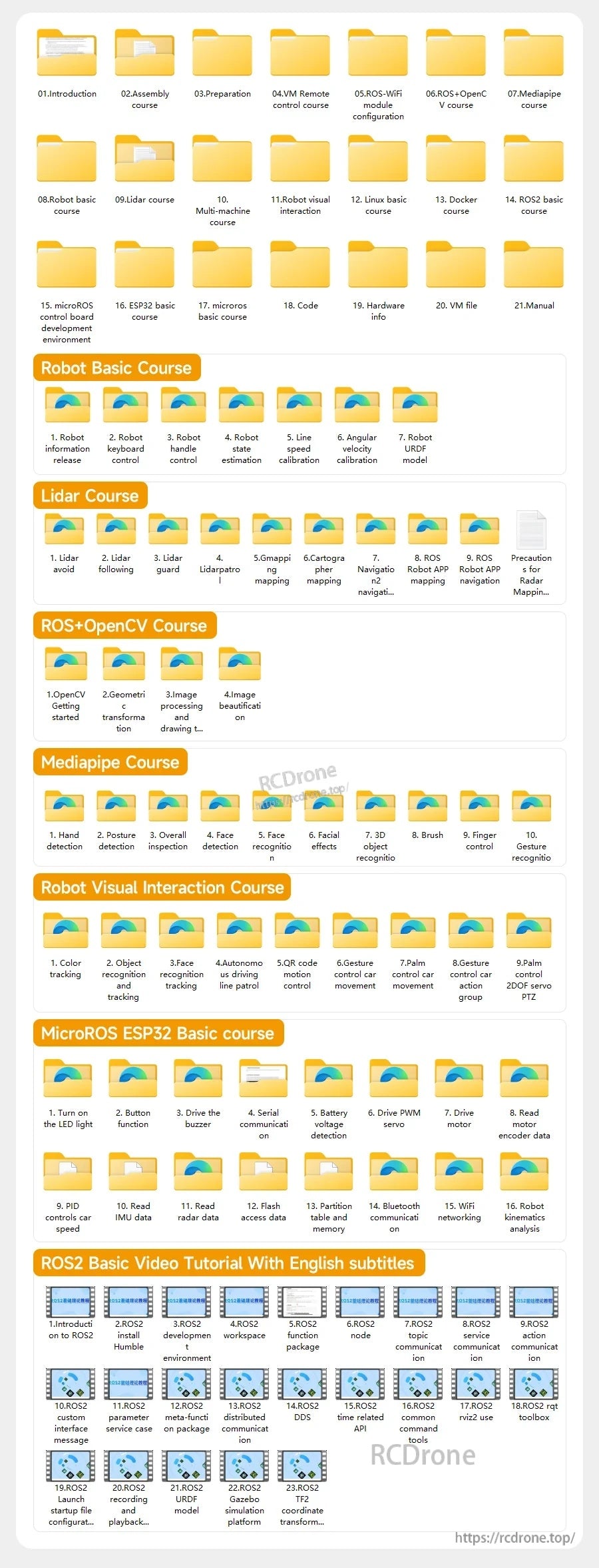
कोर्स रूपरेखा (जैसा प्रदान किया गया):
- 01.परिचय: 1) ReadMe - सीखने का मार्ग 2) लिडार का परिचय 3) माइक्रोआरओएस नियंत्रण बोर्ड का परिचय 4) सामान्य प्रश्न 5) चार्जिंग के बारे में
- 02. असेंबली पाठ्यक्रम: असेंबली के चरण
- 03. तैयारी: 1) फर्मवेयर लिखें 2) VM कैसे स्थापित करें और उपयोग करें 3) माइक्रोआरओएस नियंत्रण बोर्ड कॉन्फ़िगरेशन 4) माइक्रोआरओएस एजेंट से कनेक्ट करें
- 04. VM रिमोट कंट्रोल पाठ्यक्रम: 1) VM कीबोर्ड रिमोट कंट्रोल 2) VM हैंडल रिमोट कंट्रोल
- 05. रोबोट बेसिक पाठ्यक्रम: 1) रोबोट जानकारी जारी करना 2) रोबोट कीबोर्ड नियंत्रण 3) रोबोट हैंडल नियंत्रण 4) रोबोट स्थिति का अनुमान 5) रैखिक गति कैलिब्रेशन 6) कोणीय गति कैलिब्रेशन 7) रोबोट URDF मॉडल
- 06. लिडार पाठ्यक्रम: 1) लिडार से बचें 2) लिडार का पालन करें 3) लिडार गार्ड 4) लिडार गश्त 5) जीमैपिंग मानचित्रण 6) कार्टोग्राफर मानचित्रण 7) नेविगेशन2 नेविगेशन से बचें 8) ROS रोबोट ऐप मानचित्रण 9) ROS रोबोट ऐप नेविगेशन
- 07.मल्टी-मशीन कोर्स: 1) मल्टी-मशीन हैंडल नियंत्रण 2) मल्टी-मशीन कीबोर्ड नियंत्रण 3) मल्टी-मशीन नेविगेशन
- 08. लिनक्स बेसिक कोर्स: 1) लिनक्स सिस्टम का परिचय 2) उबंटू फ़ाइल प्रणाली 3) उबंटू सामान्य कमांड 4) उबंटू सामान्य संपादक 5) उबंटू सॉफ़्टवेयर संचालन कमांड 6) वर्चुअल मशीन स्थापना 7) SSH रिमोट नियंत्रण 8) VNC रिमोट नियंत्रण 9) रिमोट फ़ाइल ट्रांसफर 10) ड्राइवर लाइब्रेरी और संचार 11) स्थिर IP और हॉटस्पॉट मोड 12) डिवाइस ID बाइंड करें 13) क्षमता विस्तार और संसाधन आवंटन 14) सिस्टम सॉफ़्टवेयर स्रोत अपडेट करें 15) रूट पासवर्ड सेट करें 16) sudo फ्री पासवर्ड 17) WiFi नेटवर्क से कनेक्ट करें 18) सिस्टम संस्करण देखें 19) कस्टम सेवा प्रबंधन 20) सिस्टम इमेज का बैकअप
- 09. डॉकर कोर्स: 1) अवलोकन और स्थापना 2) सामान्य कमांड 3) गहराई से समझ और छवियों का प्रकाशन 4) हार्डवेयर इंटरैक्शन और डेटा प्रोसेसिंग 5) रोबोट डॉकर कंटेनर में प्रवेश
- 10.ROS2 बुनियादी पाठ्यक्रम: 1) ROS2 का परिचय 2) ROS2 स्थापित करें Humble 3) ROS2 विकास वातावरण 4) ROS2 कार्यक्षेत्र 5) ROS2 फ़ंक्शन पैकेज 6) ROS2 नोड 7) ROS2 विषय संचार 8) ROS2 सेवा संचार 9) ROS2 क्रिया संचार 10) ROS2 कस्टम इंटरफ़ेस संदेश 11) ROS2 पैरामीटर सेवा मामला 12) ROS2 मेटा-फ़ंक्शन पैकेज 13) ROS2 वितरित संचार 14) ROS2 DDS 15) ROS2 समय संबंधित API 16) ROS2 सामान्य कमांड उपकरण 17) ROS2 rviz2 उपयोग 18) ROS2 rqt टूलबॉक्स 19) ROS2 लॉन्च स्टार्टअप फ़ाइल कॉन्फ़िगरेशन 20) ROS2 रिकॉर्डिंग और प्लेबैक उपकरण 21) ROS2 URDF मॉडल 22) ROS2 Gazebo सिमुलेशन प्लेटफ़ॉर्म 23) ROS2 TF2 समन्वय परिवर्तन
- 11. microROS नियंत्रण बोर्ड विकास वातावरण: 1) microROS नियंत्रण बोर्ड का परिचय 2) ESP32-IDF विकास वातावरण सेट करें 3) ESP32-IDF कॉन्फ़िगरेशन उपकरण 4) ESP32-microROS घटक स्थापित करें 5) microROS एजेंट स्थापित करें और प्रारंभ करें 6) फ्लैश-टूल फर्मवेयर जलाना
- 12.ESP32 बुनियादी पाठ्यक्रम: 1) LED लाइट चालू करें 2) बटन कार्य 3) बजर चलाना 4) सीरियल संचार 5) बैटरी वोल्टेज पहचान 6) PWM सर्वो चलाना 7) मोटर चलाना 8) मोटर एन्कोडर डेटा पढ़ें 9) PID कार की गति नियंत्रित करता है 10) IMU डेटा पढ़ें 11) रडार डेटा पढ़ें 12) फ्लैश एक्सेस डेटा 13) विभाजन तालिका और मेमोरी 14) ब्लूटूथ संचार 15) वाईफाई नेटवर्किंग 16) रोबोट काइनेमैटिक्स विश्लेषण
- 13. microROS बुनियादी पाठ्यक्रम: 1) विषय प्रकाशित करें 2) विषय की सदस्यता लें 3) बहु-विषय सदस्यता और प्रकाशन 4) बजर विषयों की सदस्यता लें 5) PWM सर्वो विषयों की सदस्यता लें 6) गति नियंत्रण विषयों की सदस्यता लें 7) गति विषय जारी करें 8) IMU डेटा विषय जारी करें 9) लिडार डेटा विषय प्रकाशित करें 10) अनुकूलित ट्रांसमिशन इंटरफेस
वीडियो
समर्थन
पूर्व-बिक्री संगतता प्रश्नों (वर्चुअल मशीन सेटअप और नियंत्रण विधियों सहित) या बिक्री के बाद समर्थन के लिए, संपर्क करें [email protected] or देखें https://rcdrone.top/.
विवरण
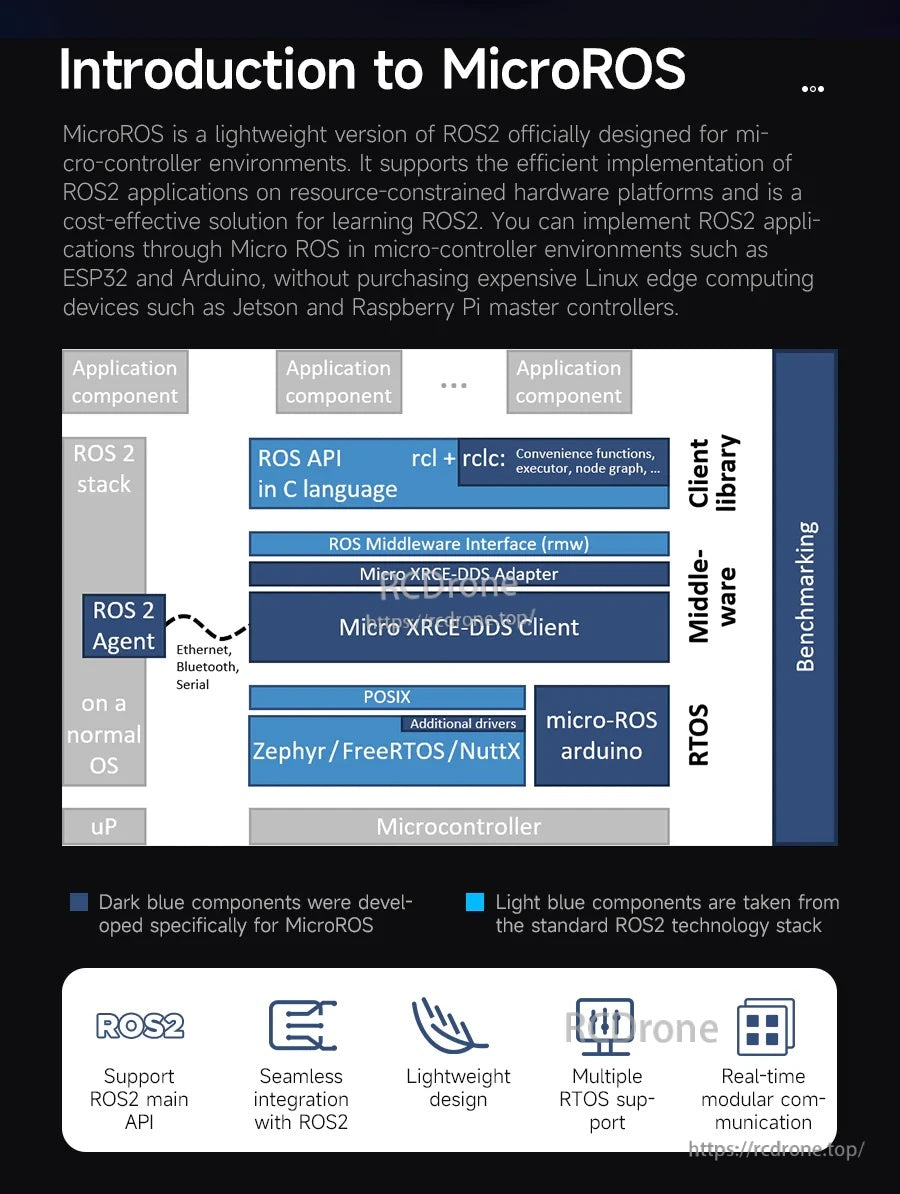
Micro-ROS, ROS 2 को संसाधन-सीमित माइक्रोकंट्रोलर्स तक बढ़ाता है, जो एक एजेंट परत के माध्यम से ROS 2 संचार को सक्षम बनाता है।
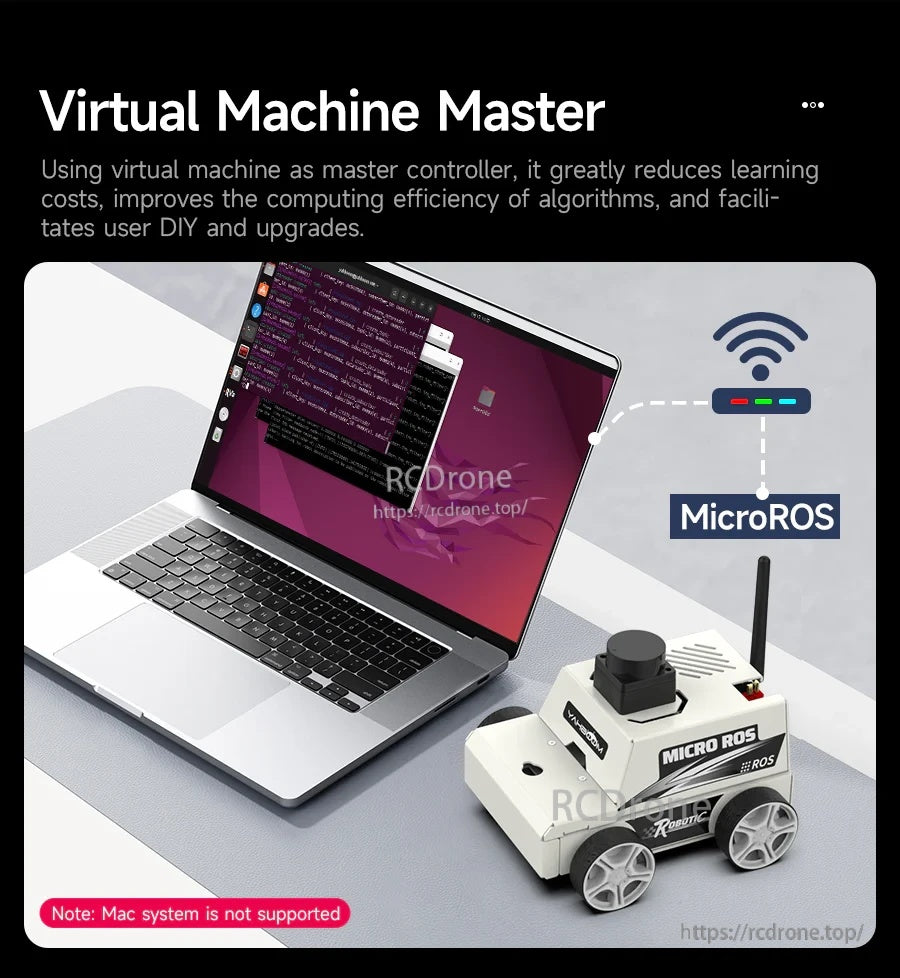
एक पीसी वर्चुअल मशीन भारी ROS 2 गणना कार्य को संभालती है जबकि रोबोट संवेदक डेटा को Wi-Fi के माध्यम से भेजता है ताकि प्रतिक्रियाशील नियंत्रण हो सके।
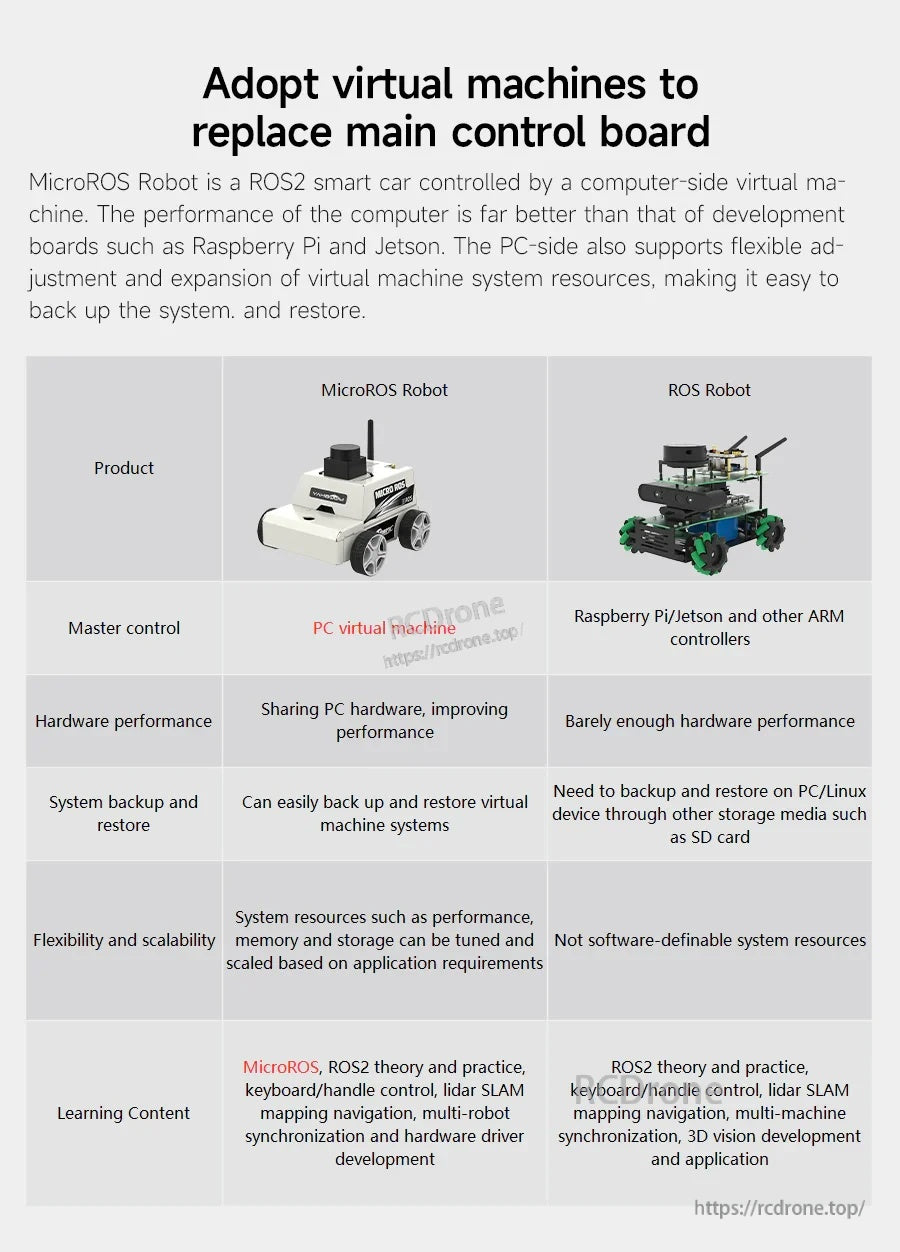
वर्चुअल-मशीन मास्टर नियंत्रण सेटअप को सरल बनाने, पीसी संसाधनों का उपयोग करके प्रदर्शन में सुधार करने, और बैकअप/पुनर्स्थापना को आसान बनाने में मदद करता है।
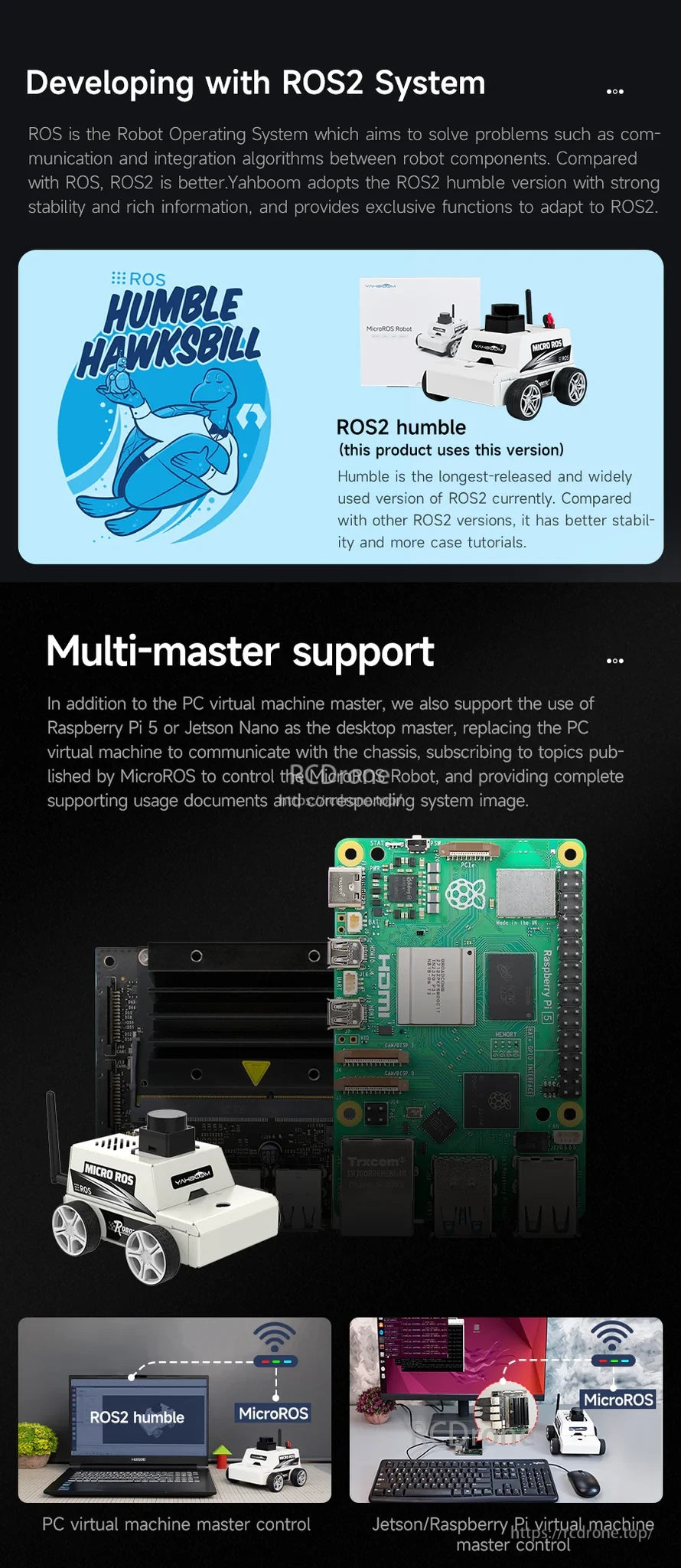
लचीले मास्टर विकल्पों के साथ ROS 2 हम्बल समर्थन, जिसमें एक पीसी वर्चुअल मशीन या संगत एम्बेडेड मास्टर शामिल हैं।
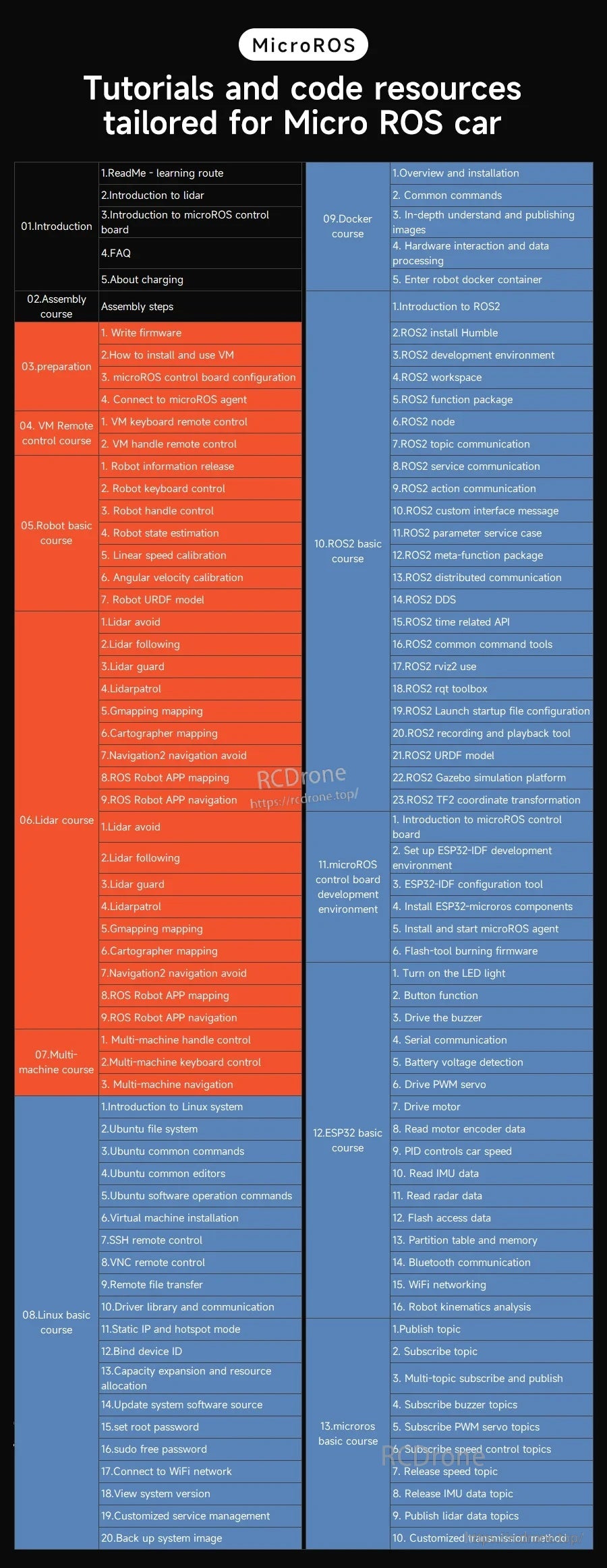
चरण-दर-चरण सीखने की सामग्री और उदाहरण कोड सामान्य ROS 2 रोबोटिक्स कार्यप्रवाह का समर्थन करते हैं, जो बुनियादी से लेकर उन्नत डेमो तक।
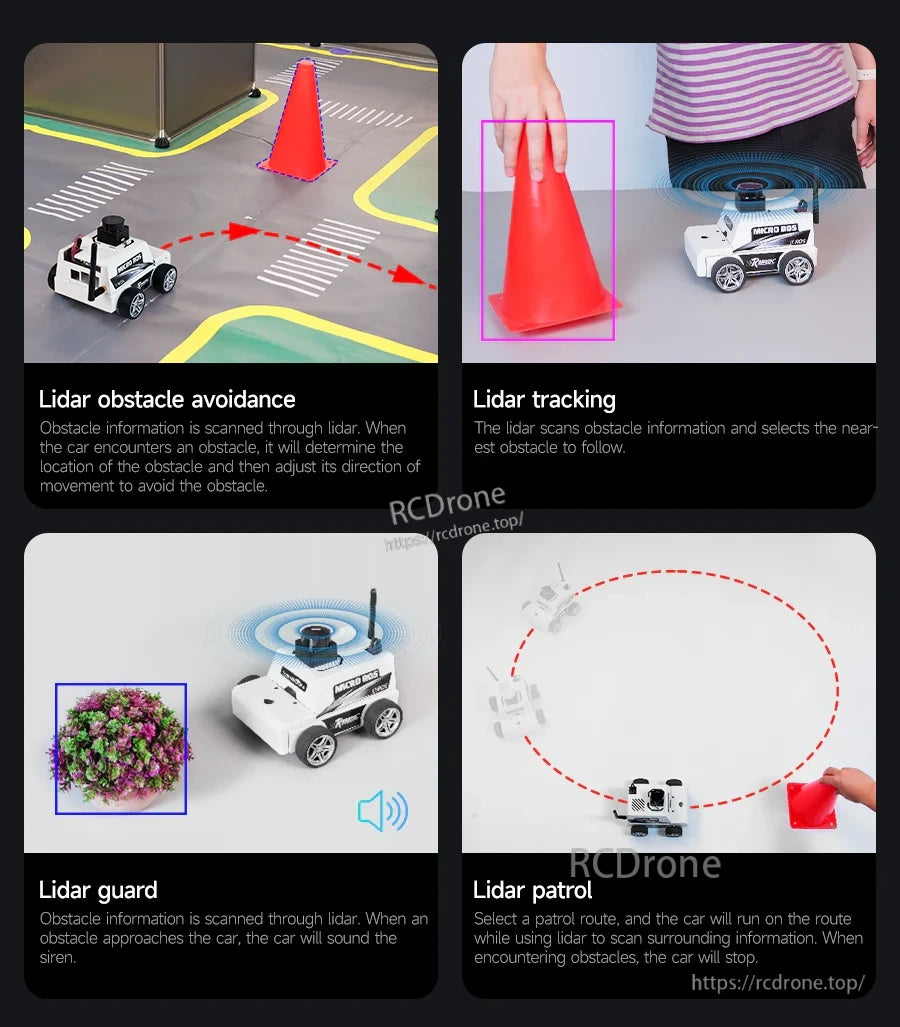
TOF लिडार कार्यों में बाधा से बचाव, वस्तु ट्रैकिंग, गार्ड अलर्ट, और स्वायत्त गश्ती व्यवहार सक्षम होते हैं।
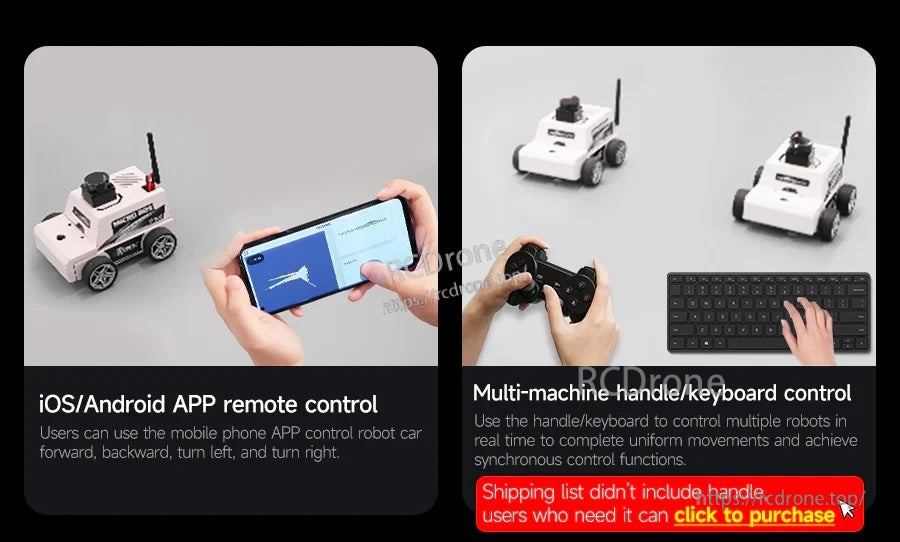
नियंत्रण विकल्पों में iOS/Android ऐप के साथ-साथ हैंडल या कीबोर्ड का उपयोग करके वास्तविक समय में मल्टी-रोबोट समन्वय शामिल हैं।
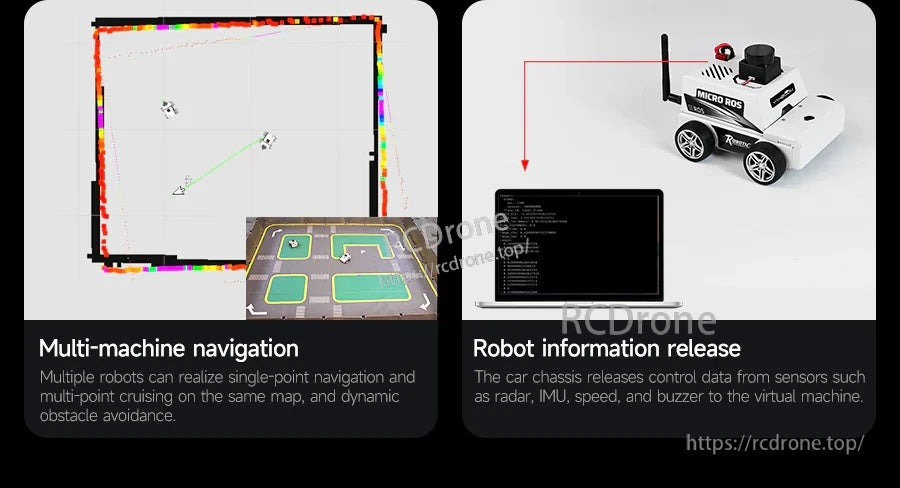
लिडार, IMU, पहिया गति, और बजर स्थिति जैसे सेंसर विषयों को निगरानी और नियंत्रण के लिए मास्टर पर प्रकाशित किया जा सकता है।
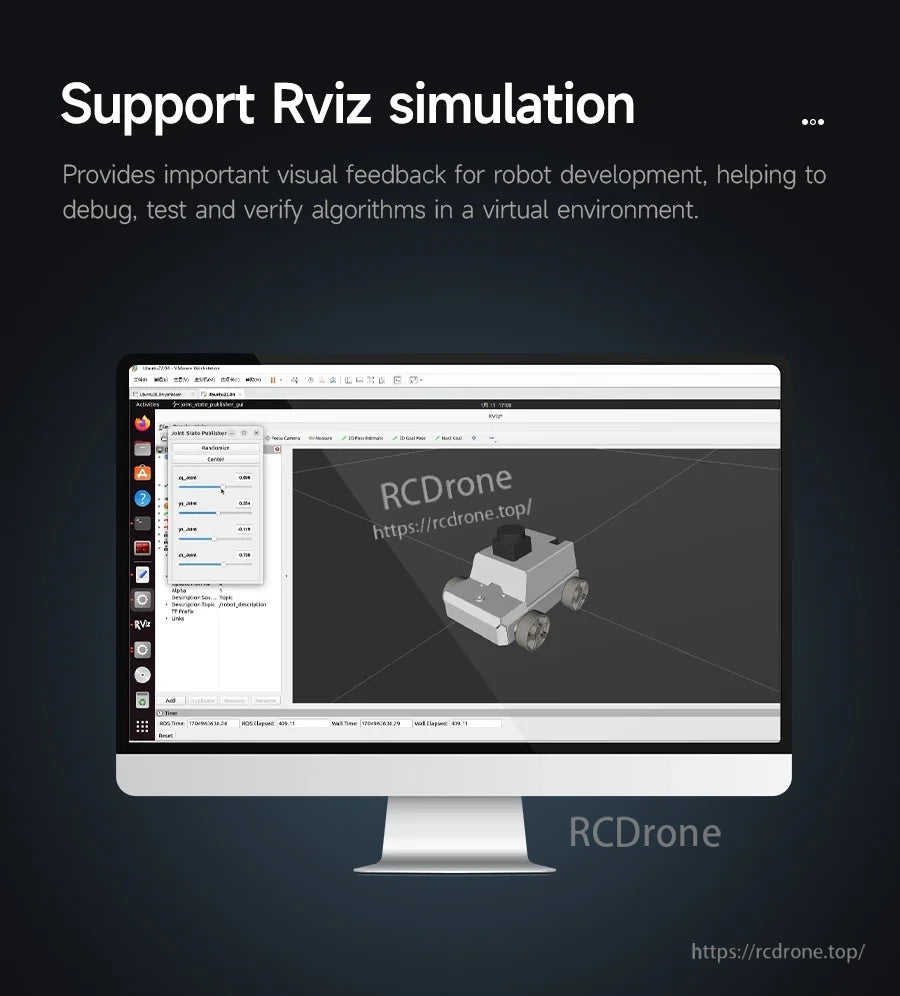
RViz दृश्यांकन ROS 2 अनुप्रयोगों के विकास के दौरान रोबोट व्यवहार का परीक्षण, डिबग और सत्यापित करने में मदद करता है।
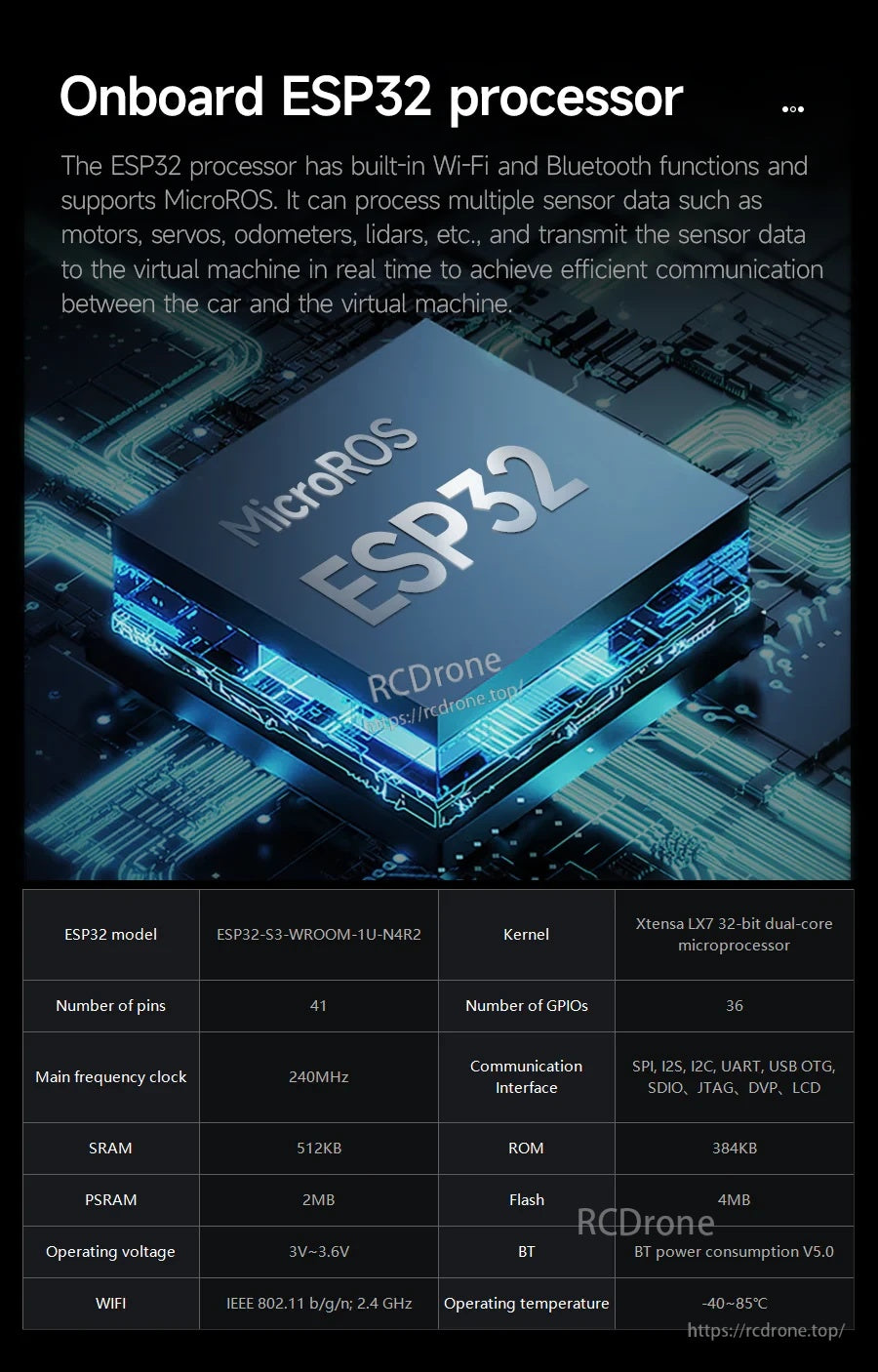
एक ऑनबोर्ड ESP32 सह-प्रोसेसर माइक्रो-रोस संचार प्रदान करता है, साथ ही चेसिस डेटा लिंक के लिए एकीकृत वाई-फाई/ब्लूटूथ।
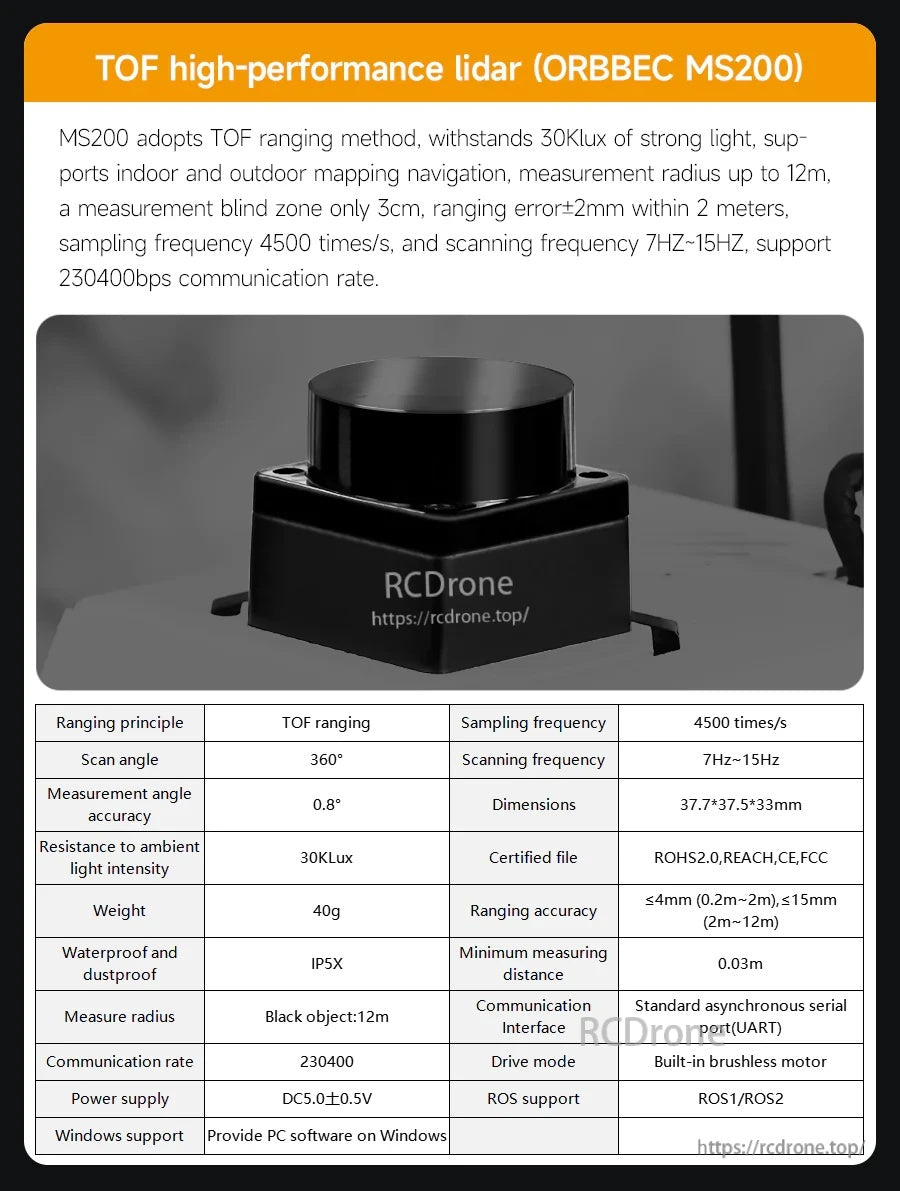
MS200 TOF लिडार तेज सैंपलिंग और विभिन्न वातावरणों के लिए मजबूत-रोशनी प्रतिरोध के साथ मानचित्रण और नेविगेशन का समर्थन करता है।
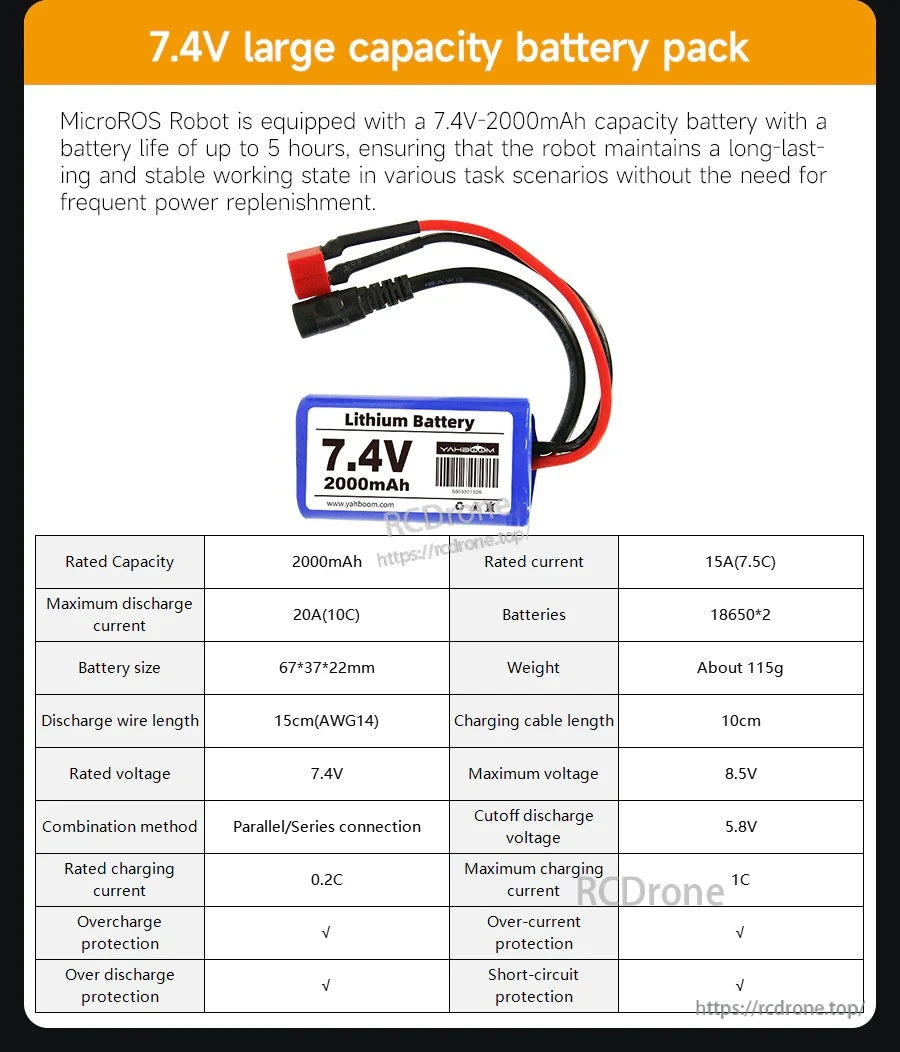
7.4V बैटरी पैक विस्तारित अध्ययन, परीक्षण, और डेमो सत्रों के लिए पोर्टेबल पावर प्रदान करता है।
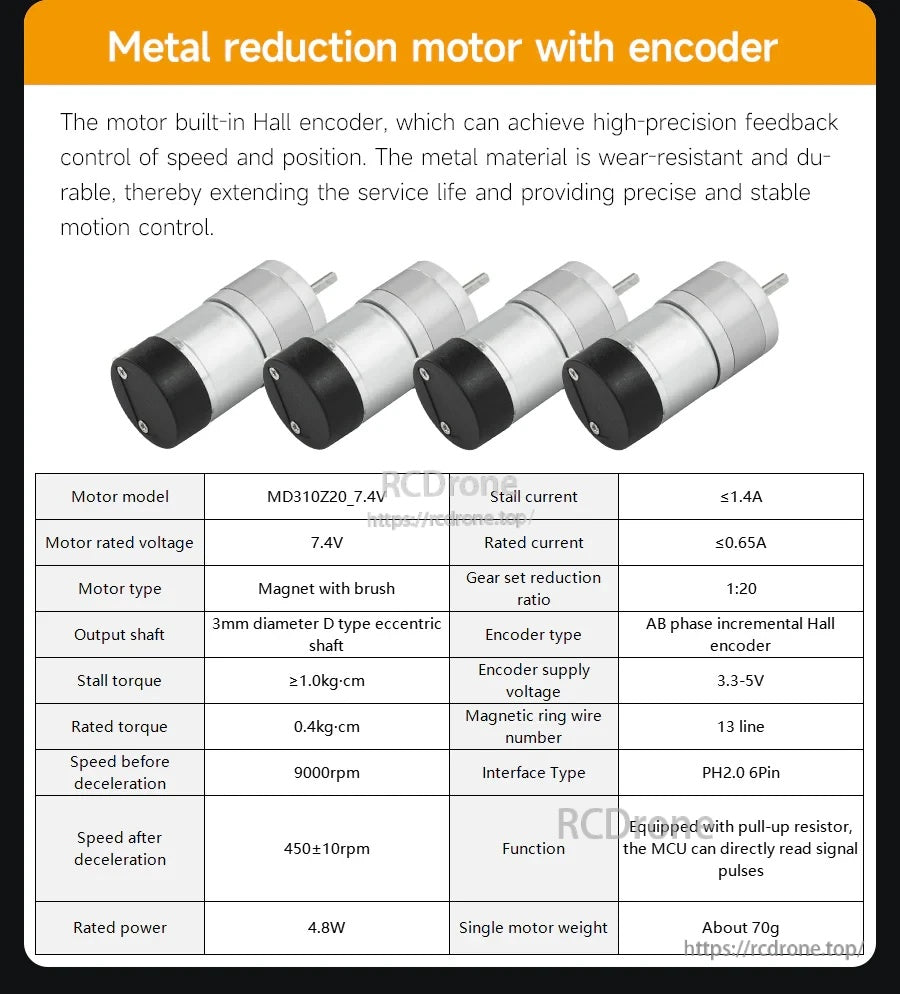
एन्कोडर मोटर्स स्थिर गति नियंत्रण प्रदान करते हैं, जो ओडोमेट्री और बंद-लूप ड्राइविंग प्रयोगों के लिए फीडबैक के साथ होते हैं।
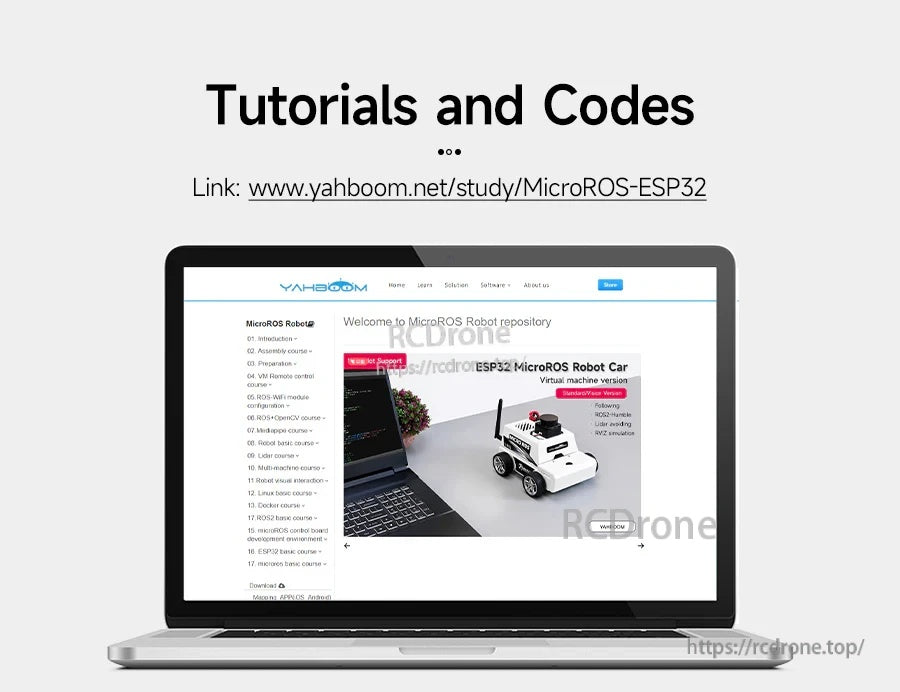
ऑनलाइन दस्तावेज़ीकरण और डाउनलोड स्थापना, कॉन्फ़िगरेशन, और ROS 2 परियोजना अभ्यास के लिए मार्गदर्शिका है।
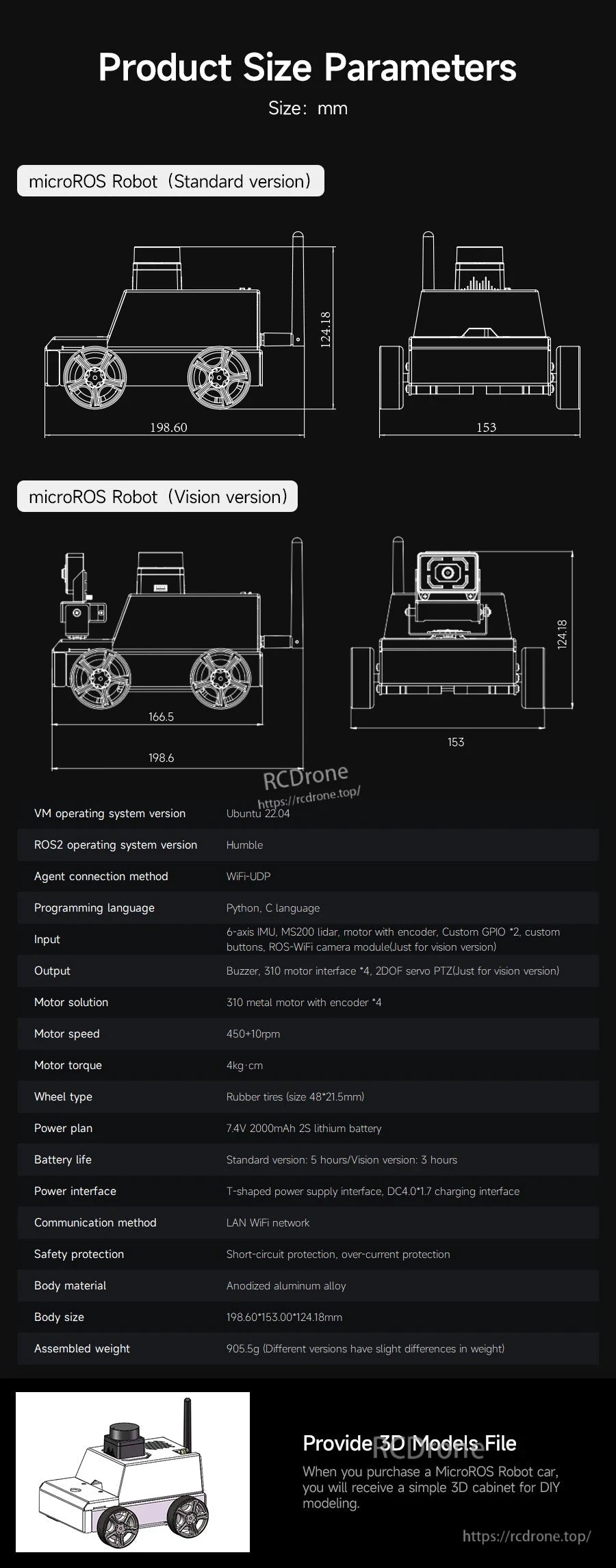
आयाम चित्र ऐड-ऑन और DIY भागों या कक्षा कार्यस्थलों के साथ एकीकरण की योजना बनाने में मदद करते हैं।
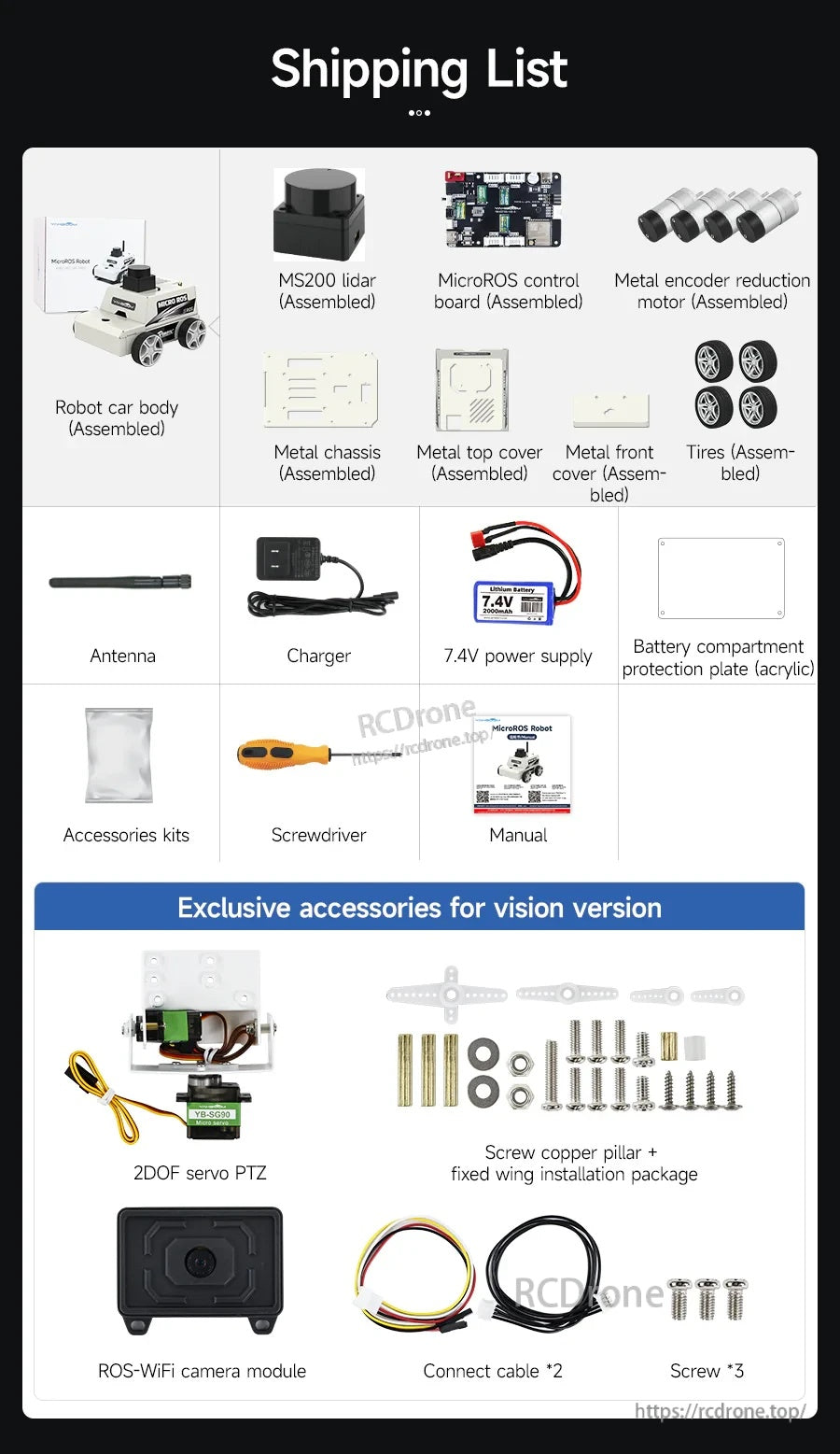
क्या शामिल है में असेंबल की गई चेसिस और कोर मॉड्यूल, साथ ही सेटअप के लिए वायरिंग, उपकरण, और दस्तावेज़ीकरण शामिल है।