


Axisflying SMURFS VTX 5.8G 1.6W Analog image transmission, long range VTX for FPV Freestyle RC Long Range Drone 5/7/10inch
Axisflying SMURFS VTX 5.8G 1.6W Analog image transmission, long range VTX for FPV Freestyle RC Long Range Drone 5/7/10inch
Axisflying
Couldn't load pickup availability


Specifications
| Model | SMURFS VTX |
|---|---|
| Frequency | 5.8G band, 5 frequency groups, 40 transmission frequencies |
| Power Rate | 25 / 100 / 250 / 800 / 1600 mW |
| Antenna Interface | IPEX generation 1 interface |
| Input Power | 7V ~ 36V |
| Adjustment Mode | Button operation, OSD control |
| Product Dimensions | 30 × 30 × 9 mm |
| Product Weight | 12.7 g |
| Mounting Holes | M2 |
| Mount Hole Distance | 20 × 20 mm |
| VTX Protocol | IRC Tramp |
⚠️ WARNING
Be sure to plug in the antenna before powering up, or you will burn this product!
Basic Settings
1. VTX Table Setup
-
Open the VTX settings.
-
Click “Load from File” to select and import the corresponding VTX table.
-
Save the configuration.
2. Port Interface Setup
-
Go to the Ports tab in Betaflight Configurator.
-
Enable Peripheral → VTX (IRC Tramp) for the selected UART port.
3. Video Transmission (VTX) Settings
-
Select frequency Band from the dropdown (A/B/E/F/R).
-
Select Channel (CH1–CH8).
-
Select Power Level: 25 / 100 / 250 / 800 / 1600 mW
-
You can define up to 5 power levels in the VTX table.
-
Configure Pit Mode and Low Power Disarm as needed.
User's Guide
Frequency Setting
-
Short press KEY_FR once:
Switches frequency incrementally between CH1–CH8 and saves it.
Frequency Band Setting
-
Long press KEY_FR (between 3–10 seconds):
Enters band setting mode, LED_FR flashes rapidly.-
Each short press after that: cycles band A → B → E → F → R
-
LED_FR blinks 1–5 times to indicate the current band
-
Press KEY_FR again or timeout (>10s) to save and exit.
-
Power Settings
-
Short press KEY_PW:
Switches power level from level 1 to level 5 (low → high) cyclically.-
LED_PW blinks 1–5 times to indicate the selected level.
-
System updates the level but does not save it persistently.
-
-
Double-click KEY_PW (<0.5s interval):
Instantly jumps to level 5 (max power), LED_PW stays on. -
At power-up, the system always defaults to level 1 to avoid damaging the amplifier module.
-
Long press KEY_PW (>3s):
Disables IRC (serial) communication until reboot. -
Pit Mode:
Set via Betaflight. LED_PW will blink frequently in Pit Mode.
Restore Factory Settings
-
Long press LED_FR key for >10s in any mode:
System restores and saves default factory settings.

Axisflying SMURFS VTX, 5.8G 1.6W, blue compact design for FPV systems.

SMURFS VTX: 5.8G, 40 frequencies, 25-1600mW power, IPEX antenna, 7V-36V input, button/OSD control, 30x30x9mm, 12.7g, M2 holes, IRC Tramp protocol. Warning: Plug in antenna before powering up. Basic settings included.
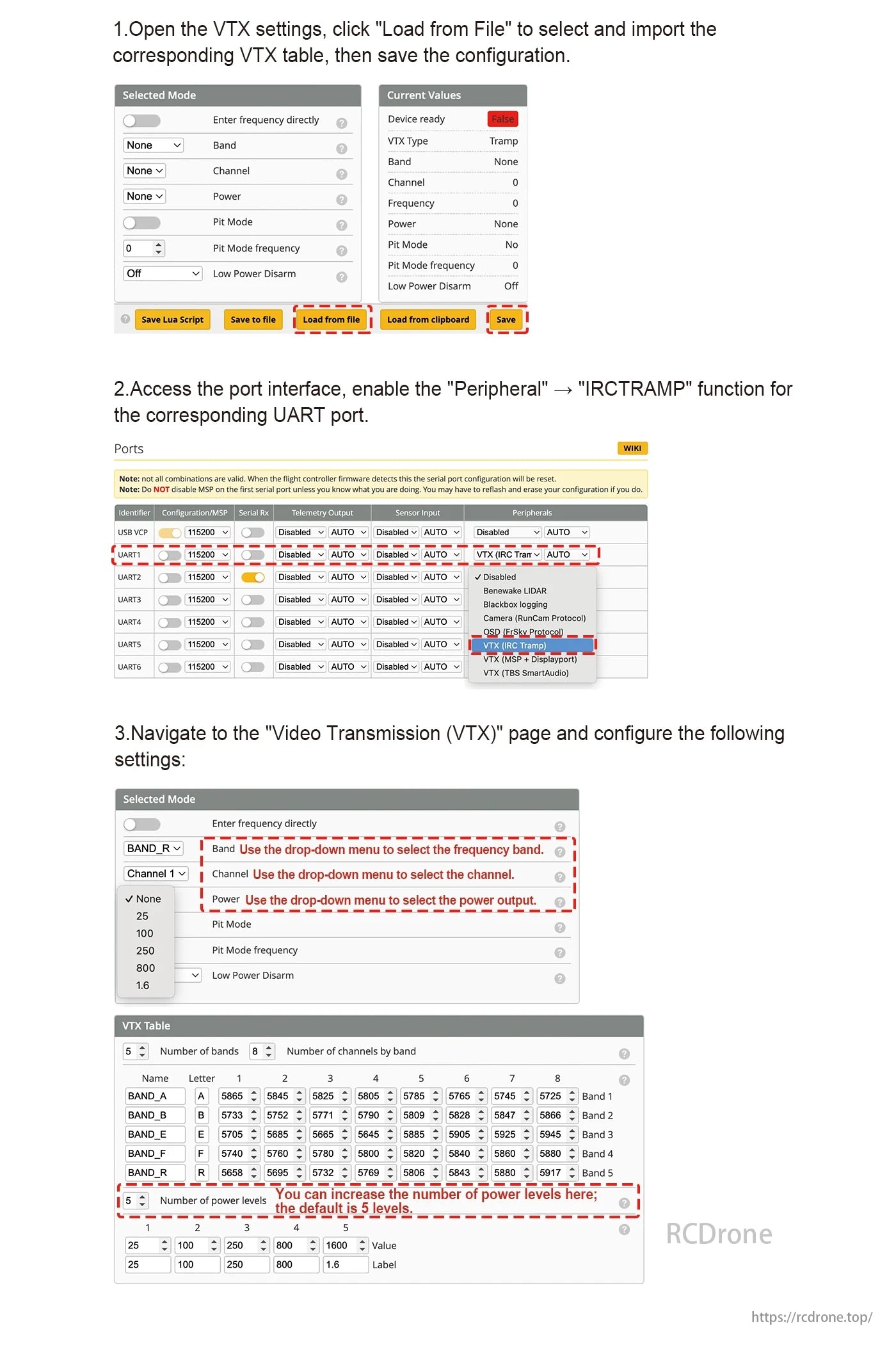
VTX settings: Load file, set UART to IRCTRAMP, choose frequency band, channel, and power. Adjust VTX table for bands and levels if needed. Save config.
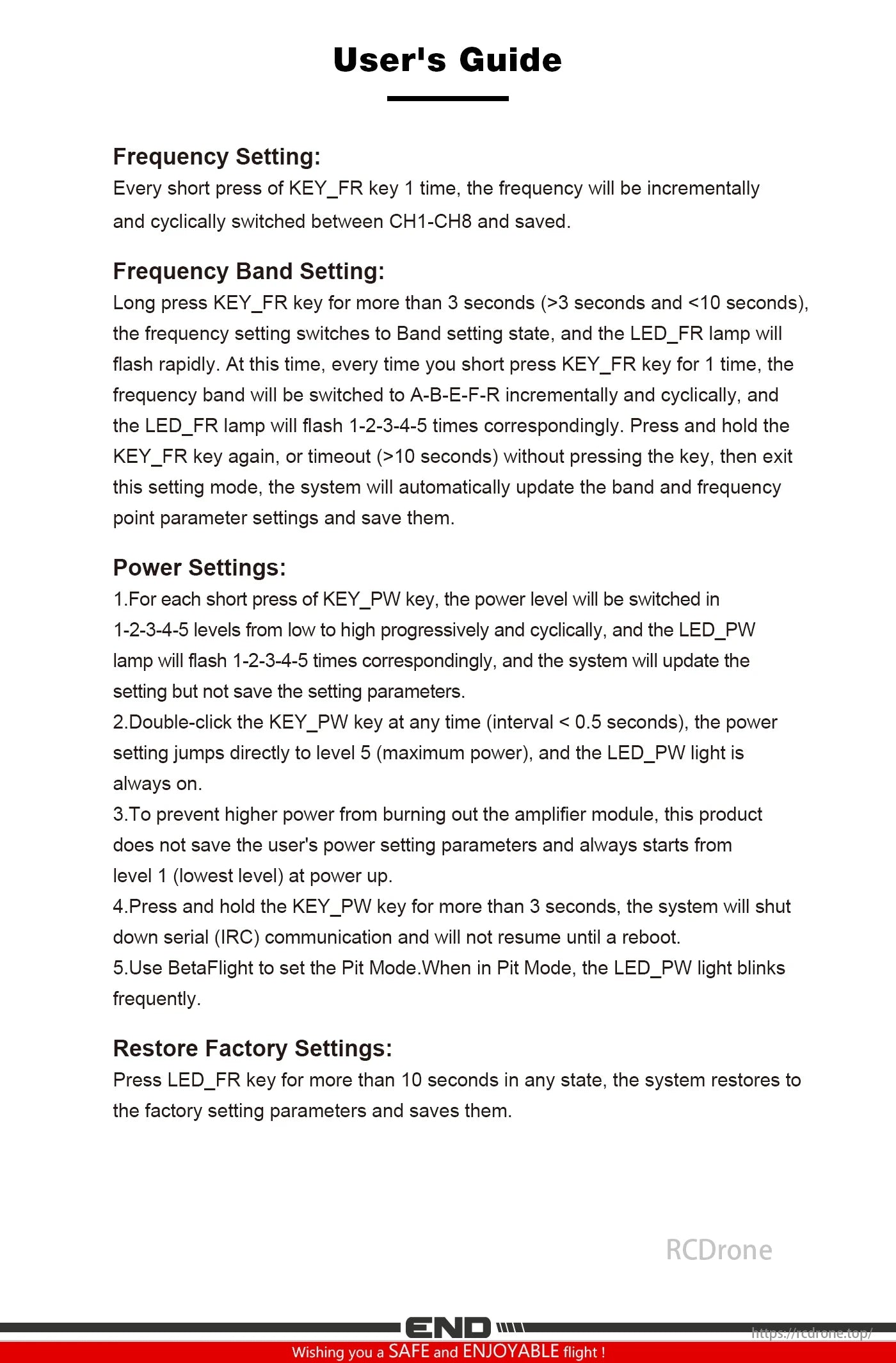
User guide for Axisflying SMURFS VTX: Adjust frequency, band, and power via KEY_FR and KEY_PW. Restore factory settings by pressing LED_FR for 10 seconds. Ensure safe operation with power level limits.