

Hobbywing S.BUS2 Telemetry Adapter for FUTABA Radio System, for Platinum V4/4.1/5 ESC
Hobbywing S.BUS2 Telemetry Adapter for FUTABA Radio System, for Platinum V4/4.1/5 ESC
Hobbywing
Regular price
$49.00 USD
Regular price
Sale price
$49.00 USD
Unit price
per
Taxes included.
Shipping calculated at checkout.
Couldn't load pickup availability
Overview
This telemetry adapter (Hobbywing S.BUS2 Telemetry Adapter) is suitable for Platinum V4/4.1/5 series or later with data backhaul function. When the electronic governor is connected to a Futaba receiver that supports the S.BUS2 protocol, the ESC can transmit telemetry data to the Futaba radio system for on-screen display.
Key Features
- Designed for use with Futaba receivers supporting the S.BUS2 protocol.
- Supports ESC telemetry transmission to a Futaba radio system when used with compatible Platinum series ESCs with data backhaul function.
- Wiring includes connections for ESC port, S.BUS2 channel identification, and throttle signal line (per wiring diagram).
Specifications
| Input voltage | 5-9V |
| Port note | The "-P" port does not provide a power input. |
Customer service: [email protected]
Wiring & Setup Notes (from images)
Wiring diagram
- Use a cable to connect to the ESC port (usually identified as "- + P") and the adapter "-P" side.
- Connect the adapter "-S.BUS2" to the Futaba receiver to identify the channel of "S.BUS2".
- Connect the ESC throttle signal line to the Futaba receiver throttle channel.
Parameter setting method (with LCD Program Box)
- According to the wiring diagram, connect the adapter and LCD program box (adapter "-P" side connection LCD program box "ESC" side adapter). Connect the "-S.BUS2" cable using a Y-wire to the program box, and set the power supply at the end of the box with the battery (battery recommended: 2S battery).
- Press the "OK" key upon connecting the program box. After the connection is successful, the current firmware version number will be displayed.
- After adjusting parameters on the interface, press the "ITEM" key to browse the parameter item; press the "VALUE" key to change the parameter item's set value.
- After the setting value has been changed, press the "OK" key to save the setting.
- Repeat the third and fourth steps to modify settings of other parameter items.
- After parameter settings are completed, unplug and disconnect the adapter from the battery, then power up again to see if the parameters are current.
Manuals
User Manual (download referenced in the provided product content; link not provided).
Details
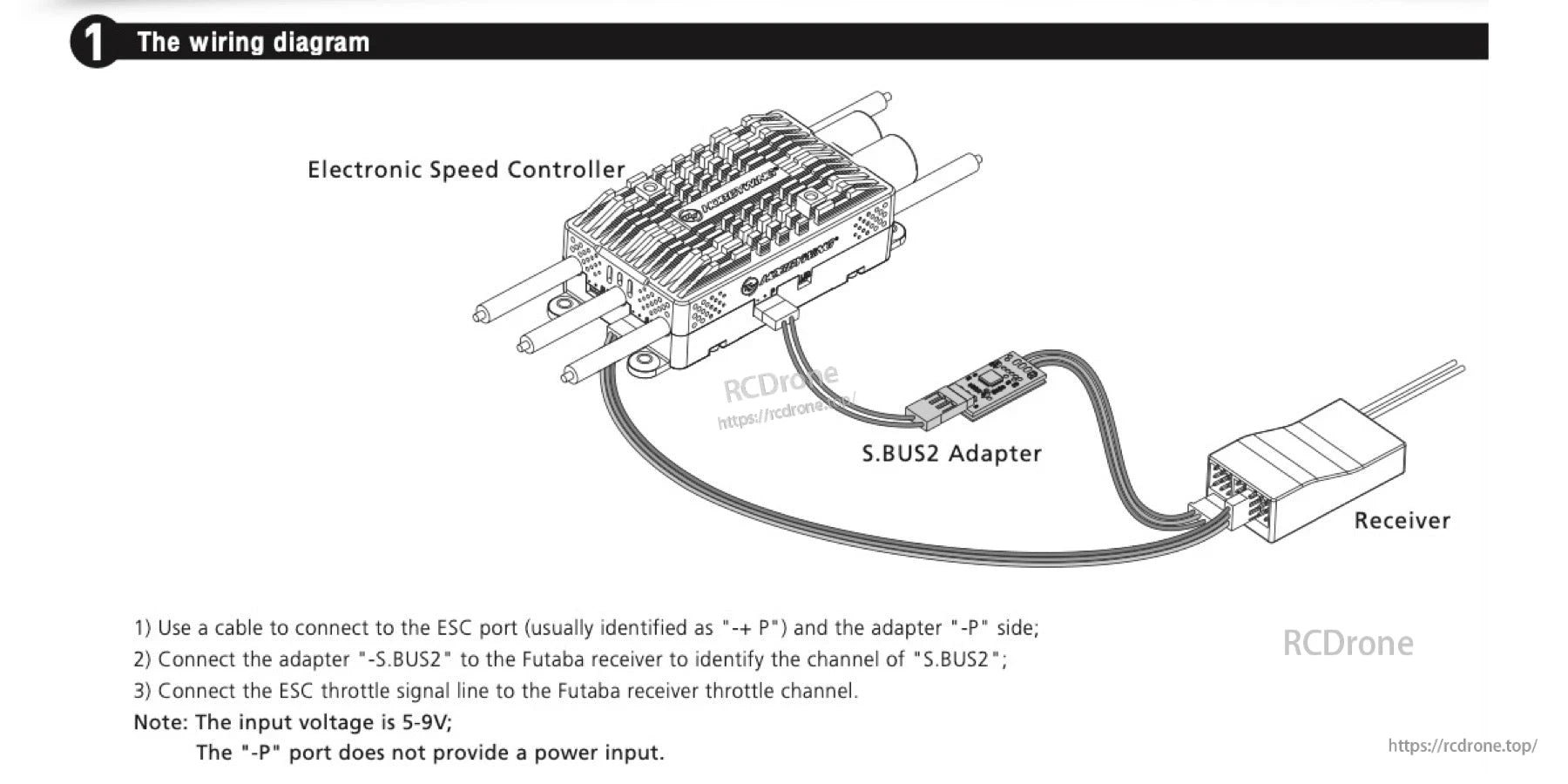
The S.BUS2 adapter links the electronic speed controller to the receiver for telemetry wiring, with a 5–9V input noted in the diagram.

The S.BUS2 adapter connects between the LCD Program Box and a battery for parameter setup and adjustments.
Related Collections

