


Matek R24-TD ExpressLRS/ELRS 2.4GHz True Diversity Receiver (CRSF, ESP32-PICO-D4, SX1281)
Matek R24-TD ExpressLRS/ELRS 2.4GHz True Diversity Receiver (CRSF, ESP32-PICO-D4, SX1281)
MATEKSYS
Couldn't load pickup availability


Overview
The Matek R24-TD is an ExpressLRS/ELRS 2.4GHz true diversity receiver for long-range FPV, drones, and RC aircraft. It uses an ESP32-PICO-D4 with an SX1281 RF chipset and supports the CRSF receiver protocol for low-latency control and stable signal reception.
Key Features
- ExpressLRS 2.4GHz true diversity receiver design
- CRSF receiver protocol support
- Flashing supported via WiFi or UART
- Custom binding phrase configurable via WebUI
- RGB LED status indication
- IPEX MHF-1 antenna connector
- Solder pads labeled: G, V, TX, RX
Specifications
| Model | ELRS-R24-TD (R24-TD) |
| MCU / RF | ESP32-PICO-D4, SX1281, ExpressLRS Firmware |
| PA/LNA | AT2401C |
| RF Frequency | 2.4GHz ISM |
| Telemetry power | 20dbm (100mW) |
| Diversity | True Diversity |
| Receiver protocol | CRSF |
| Antenna connector | IPEX MHF-1 |
| Power supply | 4-13V DC @ "V" Pad |
| Power dissipation | 100mA~170mA@5V IN |
| PCB size | 28mm x 16mm |
| Weight | 4g w/ antenna |
| Preloaded firmware | ExpressLRS 3.3.2 |
What's Included
- 1x ELRS-R24-TD
- 2x IPEX MHF1 Antennas (15cm)
RGB LED Status
- [Rainbow fade effect], Starting Up
- [Green heartbeat], Web update mode enabled
- [Slow blink 500ms on/off], Waiting for connection from transmitter
- [Red flashing 100ms on/off], Radio chip not detected
- [Orange Double blink then pause], Binding mode enabled
- [Orange Triple blink then pause], Connected to transmitter but mismatched model-match configuration
- [Solid single color Connected to a transmitter], color indicates packet rate
- In Boot mode, RGB LED does not light up.
Firmware
- ExpressLRS wiki: https://www.expresslrs.org/
- Receiver Target: Generic ESP32 True Diversity PA 2.4Ghz RX / or RadioMaster RP4-TD / or HappyModel EP Dual
- Any variants based on target Generic ESP32 True Diversity PA 2.4Ghz RX can be flashed.
- Receiver has ExpressLRS 3.3.2 preloaded with binding phrase "123456". The receiver will never enter binding mode if using the traditional binding procedure.
- Reflash with a binding phrase or connect to PC/phone via WiFi and set the binding phrase in WebUI.
Flashing via WiFi
- Power on receiver. RGB LED Rainbow fade effect at first, then Slow blink 500ms on/off. After 20s, Green blink indicates it is on WiFi Hotspot Mode.
- WiFi SSID: "ExpressLRS RX"
- Password: "expresslrs"
- More detailed steps: https://www.expresslrs.org/software/updating/wifi-updating/?h=wifi
Flashing via UART
- Wire the receiver into the USB-TTL adapter, with TX on receiver connected to the RX on the USB-TTL, and RX on receiver connected to the TX of the USB-TTL. Wire 5V and GND of the USB-TTL to 5V and GND of the receiver.
- Press the boot button while powering on the receiver, then release. The RGB LED will not turn on.
- In Configurator, select the target Generic ESP32 True Diversity PA 2.4Ghz RX, or RadioMaster RP4-TD, or HappyModel EP Dual, and select UART for Flashing Method. Set your bind phrase and Firmware Options, check erase before flash and Force Flash.
- Web-flasher: https://expresslrs.github.io/web-flasher/
Tips
- Full Resolution Switch Configuration Modes: https://www.expresslrs.org/software/switch-config/?h=#full-resolution-switch-configuration-modes
- Powering receiver with reverse voltage will damage the regulator chip. Double check the power wires connected to the receiver.
Customer service: [email protected] (or visit https://rcdrone.top/).
Details

Matek’s ELRS R24-TD 2.4GHz true diversity receiver uses a compact 28x16mm PCB with G/V/TX/RX solder pads and dual IPEX MHF1 antenna connectors for tidy installs.
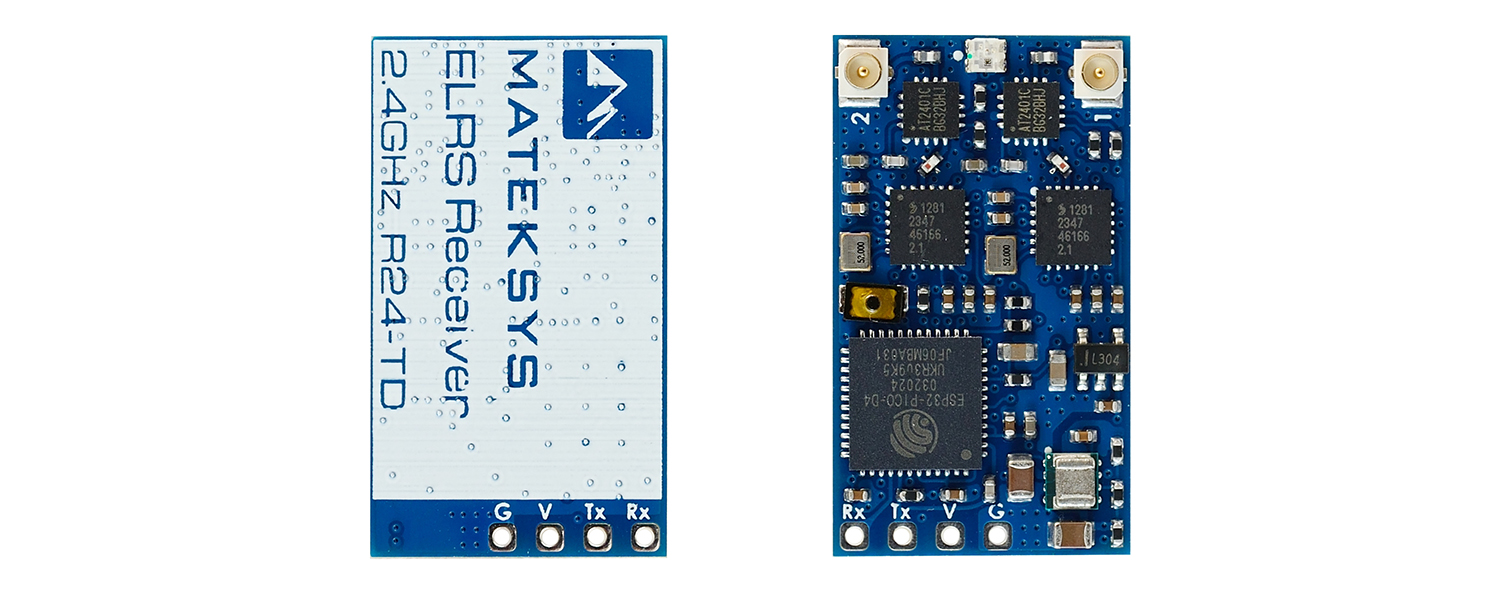
Matek R24-TD ExpressLRS receiver uses dual U.FL antenna connectors and clearly labeled G, V, TX, and RX solder pads for straightforward wiring.

The Matek R24-TD ELRS receiver uses two antenna leads for true diversity placement on compact RC builds.