


Yahboom MicroROS স্বয়ং-সন্তুলিত রোবট কার ৪কেজি লোড (স্ট্যান্ডার্ড/এআই ভিশন) ROS2 Humble TOF LiDAR SLAM
Yahboom MicroROS স্বয়ং-সন্তুলিত রোবট কার ৪কেজি লোড (স্ট্যান্ডার্ড/এআই ভিশন) ROS2 Humble TOF LiDAR SLAM
Yahboom
পিকআপের উপলভ্যতা লোড করা যায়নি


ওভারভিউ
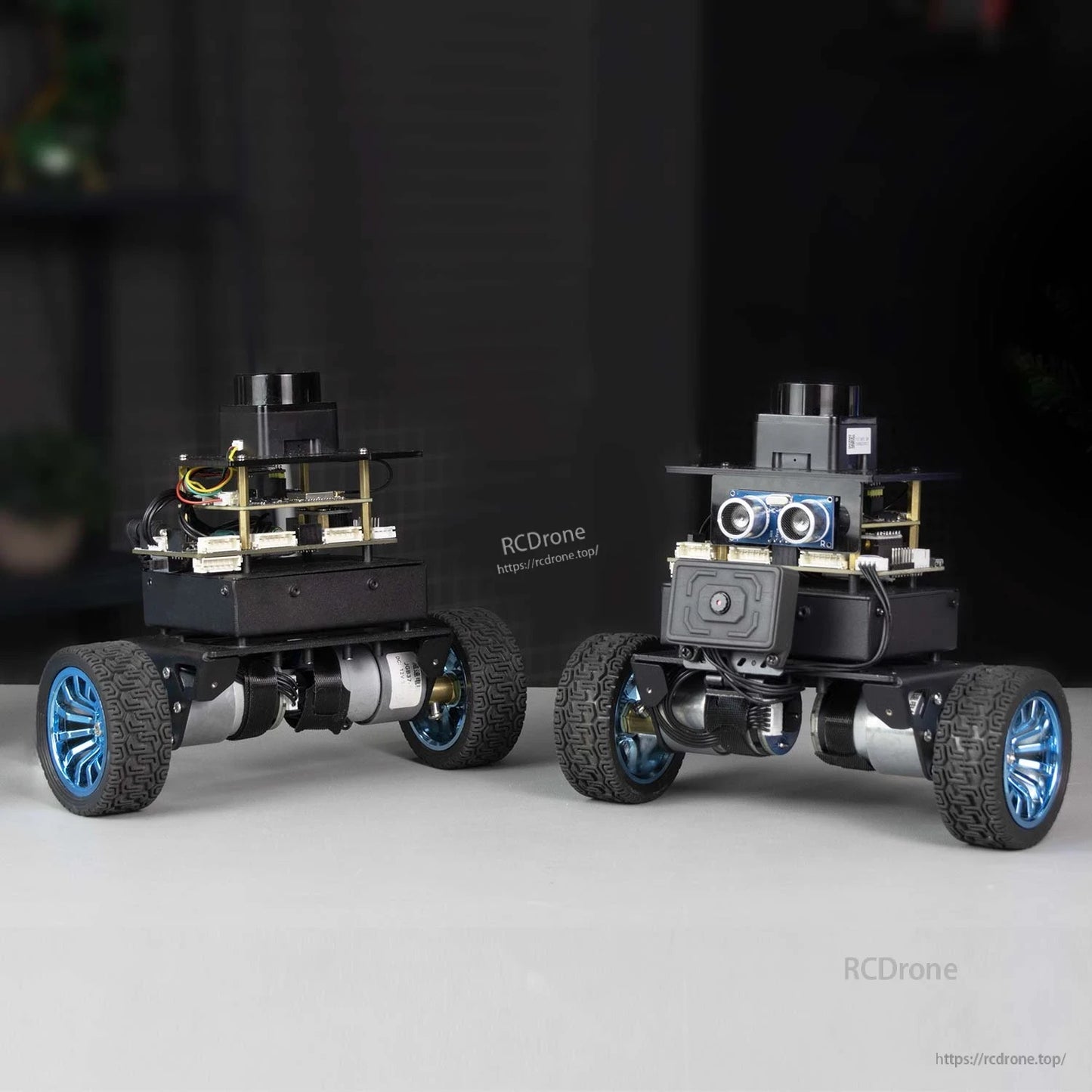
Yahboom MicroROS সেল্ফ-ব্যালান্সিং রোবট কার হল একটি দুই-চাকা সেল্ফ-ব্যালান্সিং রোবট কার প্ল্যাটফর্ম যা ROS2 (Humble) শেখা এবং উন্নয়নের জন্য ডিজাইন করা হয়েছে। এটি STM32 + ESP32 ডুয়াল প্রসেসর, একটি ধাতব চেসিস, 520 এনকোডার ডিসি রিডাকশন মোটর, একটি 6-অক্ষের IMU অ্যাটিটিউড সেন্সর, আল্ট্রাসনিক মডিউল, TOF লেজার LiDAR, এবং একটি OLED ডিসপ্লে সংহত করে। MicroROS ওয়্যারলেস যোগাযোগ ব্যবহার করে, সেন্সর ডেটা (যেমন LiDAR, ওডোমিটার, 6-অক্ষের সেন্সর, এবং ঐচ্ছিক ক্যামেরা) একটি পিসি ভার্চুয়াল মেশিন সিস্টেমে প্রেরণ করা যেতে পারে জটিল গণনা কাজ সম্পন্ন করতে এবং ম্যাপিং এবং নেভিগেশনের জন্য সিদ্ধান্ত তৈরি করতে।
মূল বৈশিষ্ট্যসমূহ
- MicroROS ওয়্যারলেস যোগাযোগ + ভার্চুয়াল মেশিন মাস্টার কন্ট্রোল রিয়েল-টাইম সেন্সর ডেটা ট্রান্সমিশন এবং পিসি ভার্চুয়াল মেশিনে গণনার জন্য
- ROS2 Humble সমর্থন, RViz সিমুলেশন সিস্টেমের অবস্থা এবং SLAM প্রক্রিয়াগুলি ভিজুয়ালাইজ করার জন্য
- SLAM ম্যাপিং & নেভিগেশন সমর্থন (gmapping এবং cartographer অ্যালগরিদম)
- LiDAR ফাংশনসমূহ: ওয়াল ফলোয়িং, গার্ড (নিকটতম লক্ষ্যবস্তু মুখোমুখি), ফলো (নিকটতম লক্ষ্যবস্তু ট্র্যাক করে), প্যাট্রোল (রুট স্ক্যান করে এবং বাধার সম্মুখীন হলে থামে), বাধা এড়ানো
- আল্ট্রাসনিক বাধা এড়ানো/ফলোয়িং মোড (পরিবর্তনযোগ্য)
- OLED ডেটা ডিসপ্লে (বর্তমান মোড এবং রোবট গাড়ির ভোল্টেজ প্রদর্শন সমর্থন করে)
- ৪ কেজি লোড ব্যালেন্স সক্ষমতা; ৩-স্তর বিশিষ্ট কাঠামো ডিজাইন, যার উপরের প্ল্যাটফর্ম আইটেম বহন/DIY সম্প্রসারণের জন্য
- আরোহন: প্রায় ৩০° ঢাল সমর্থন করে
- মাল্টি-মেশিন সিঙ্ক্রোনাস নেভিগেশন/নিয়ন্ত্রণ (একই মানচিত্রে মাল্টি-রোবট নেভিগেশন; মাল্টি-মেশিন হ্যান্ডেল নিয়ন্ত্রণ এবং কীবোর্ড নিয়ন্ত্রণ)
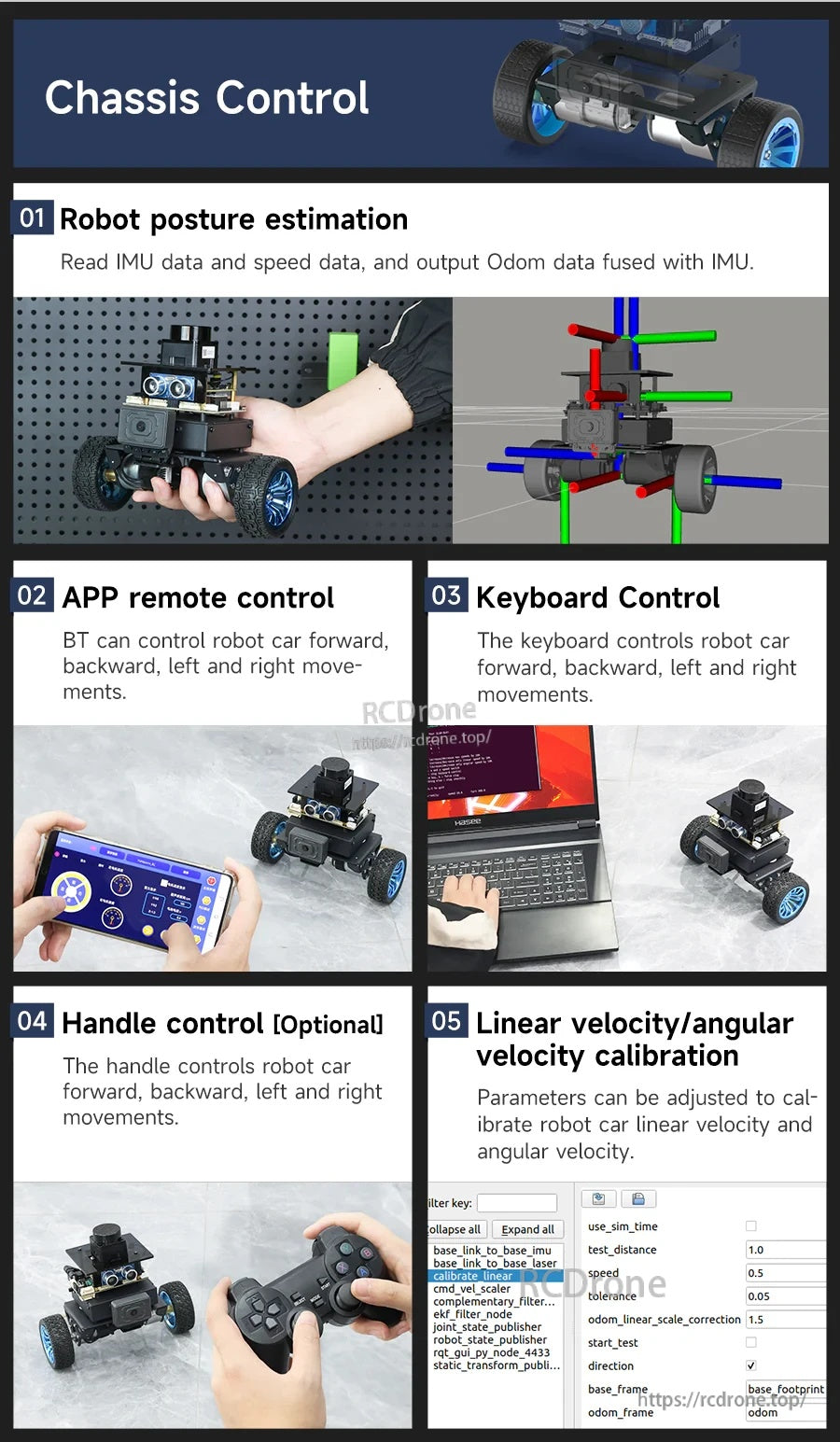
- অ্যাপ নিয়ন্ত্রণ: ম্যাপিং নেভিগেশন অ্যাপ (iOS/Android) এবং ব্লুটুথ রিমোট কন্ট্রোল অ্যাপ (শুধুমাত্র Android)
পণ্য নির্বাচন, সেটআপ সহায়তা এবং বিক্রয়োত্তর সেবার জন্য যোগাযোগ করুন https://rcdrone.top/ অথবা ইমেইল [email protected].
স্ট্যান্ডার্ড বনাম এআই ভিশন ভার্সন
- স্ট্যান্ডার্ড ভার্সন: এআই ভিজ্যুয়াল ইন্টারঅ্যাকশন ফাংশন সমর্থিত নয়।
- এআই ভিশন ভার্সন: একটি ROS-WiFi ক্যামেরা মডিউল যোগ করে এবং এআই ভিশন স্বীকৃতি/ইন্টারঅ্যাকশন সমর্থন করে। এআই ভিশন ভার্সন ম্যাপিং নেভিগেশন অ্যাপে ভিডিও দেখার সমর্থন করে।
এআই ভিশন ফাংশন (শুধুমাত্র এআই ভিশন সংস্করণ)
- কিউআর কোড মোশন কন্ট্রোল (কিউআর কোডের বিষয়বস্তু চিনতে এবং সামনের/পিছনের নির্দেশাবলী সম্পাদন করতে)
- পাম ফলোয়িং
- গাড়ির গতির অঙ্গভঙ্গি নিয়ন্ত্রণ
- মুখ ট্র্যাকিং
- মানব অঙ্গভঙ্গি ট্র্যাকিং
- ওপেনসিভি ইমেজ প্রসেসিং
- মিডিয়াপাইপ মেশিন লার্নিং
বিশেষ উল্লেখ
| মডেল | মাইক্রোআরওএস স্বয়ং-সামঞ্জস্যপূর্ণ রোবট গাড়ি (স্ট্যান্ডার্ড সংস্করণ / এআই ভিশন সংস্করণ) |
| প্রধান প্রসেসর | এসটিএম৩২ + ইএসপি৩২ ডুয়াল প্রসেসর |
| প্রসেসর (বিস্তারিত) | এসটিএম৩২এফ১০৩আরসিটি৬; ইএসপি৩২-এস৩-ডব্লিউআরওওএম-১ইউ-এন৪আর২ |
| হোস্ট কম্পিউটার / আরওএস মাস্টার কন্ট্রোল | পিসি ভার্চুয়াল মেশিন |
| ওয়্যারলেস মোড | WiFi-UDP মোড (ভার্চুয়াল মেশিন/কম্পিউটারের WiFi-UDP প্রক্সিতে সংযুক্ত হয়); পেশাদার মোড (STA) বহু-রোবট নিয়ন্ত্রণের জন্য উপযুক্ত; ডিভাইসগুলি একই নেটওয়ার্ক সেগমেন্টের মধ্যে থাকা উচিত |
| LiDAR | TOF LiDAR স্ট্যান্ডার্ড হিসাবে; TOF লেজার LiDAR (SLAM) |
| স্ট্যান্ডার্ড সেন্সর | OLED; আল্ট্রাসনিক; TOF লেজার LiDAR (SLAM) |
| IMU | 6-অক্ষ IMU মনোভাব সেন্সর |
| মোটর | 520 এনকোডার ডিসি রিডাকশন মোটর |
| এনকোডার | AB ফেজ স্পিড এনকোডার |
| নিয়ন্ত্রণ অ্যালগরিদম | PID / LQR (PID এবং LQR নিয়ন্ত্রণ সমর্থন করে) |
| ব্যাটারি | 2200mAh ব্যাটারি প্যাক |
| লোড | 4KG লোড ব্যালেন্স |
| আরোহন ক্ষমতা | প্রায় ৩০° ঢাল |
| রিমোট কন্ট্রোল | বিটি রিমোট কন্ট্রোল অ্যাপ; ম্যাপিং নেভিগেশন অ্যাপ; কীবোর্ড কন্ট্রোল; হ্যান্ডেল কন্ট্রোল (ঐচ্ছিক) |
| মোবাইল অ্যাপস | ম্যাপ নেভিগেশন অ্যাপ iOS/Android সমর্থন করে; ব্লুটুথ রিমোট কন্ট্রোল অ্যাপ শুধুমাত্র Android সমর্থন করে |
| ক্যামেরা (ভিশন ভার্সন) | ROS-WiFi ক্যামেরা মডিউল |
| RViz | RViz সিমুলেশন সমর্থন |
| অনবোর্ড ডিসপ্লে | OLED ডাটা ডিসপ্লে (মোড এবং ভোল্টেজ) |
| প্রোটেকশন / সতর্কতা | ব্যাটারি প্রোটেকশন বক্স সহ; নিম্ন ভোল্টেজ সতর্কতা ফাংশন |
| OS / প্ল্যাটফর্ম নোট | ম্যাক সিস্টেম সমর্থন করে না |
| বিটি অ্যাপ প্যারামিটার সমন্বয় | সমর্থন করে না |
অ্যাপ্লিকেশনসমূহ
- ROS2 Humble শেখা এবং শ্রেণীকক্ষ শিক্ষাদান
- SLAM ম্যাপিং এবং নেভিগেশন পরীক্ষা (gmapping/cartographer)
- মাল্টি-রোবট সমন্বয় ডেমো (মাল্টি-মেশিন সিঙ্ক্রোনাস নেভিগেশন/নিয়ন্ত্রণ)
- এআই ভিশন ইন্টারঅ্যাকশন প্রকল্প (এআই ভিশন ভার্সন উইথ ROS-WiFi ক্যামেরা মডিউল)
টিউটোরিয়াল
টিউটোরিয়াল লিঙ্ক: http://www.yahboom.net/study/SBR-microROS
বিস্তারিত
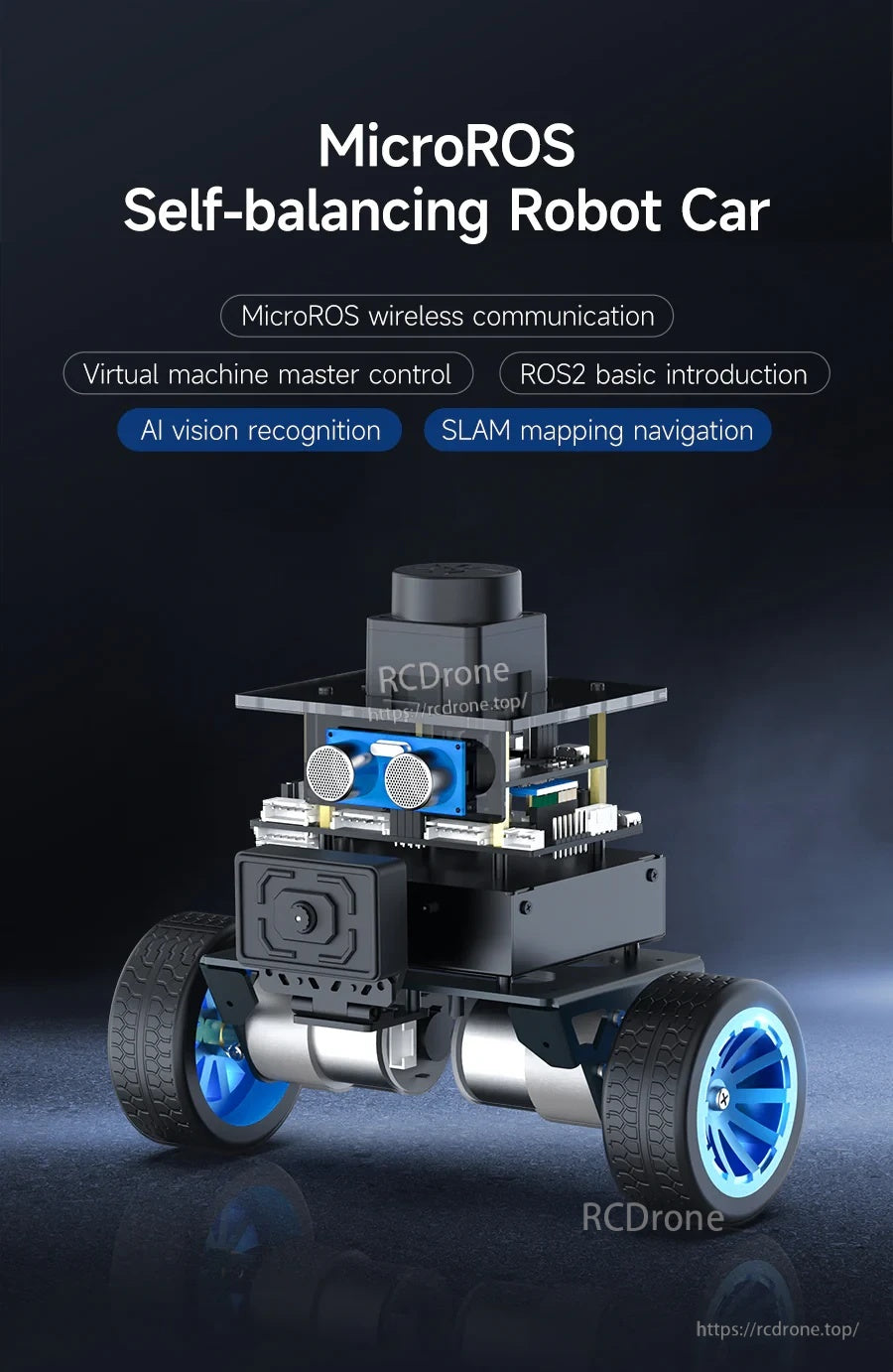
মাইক্রোআরওএস ওয়্যারলেস যোগাযোগ LiDAR/IMU/odometry ডেটা একটি ROS2 Humble পিসি (ভার্চুয়াল মেশিন) এ ম্যাপিং এবং নেভিগেশনের জন্য স্ট্রিম করে।
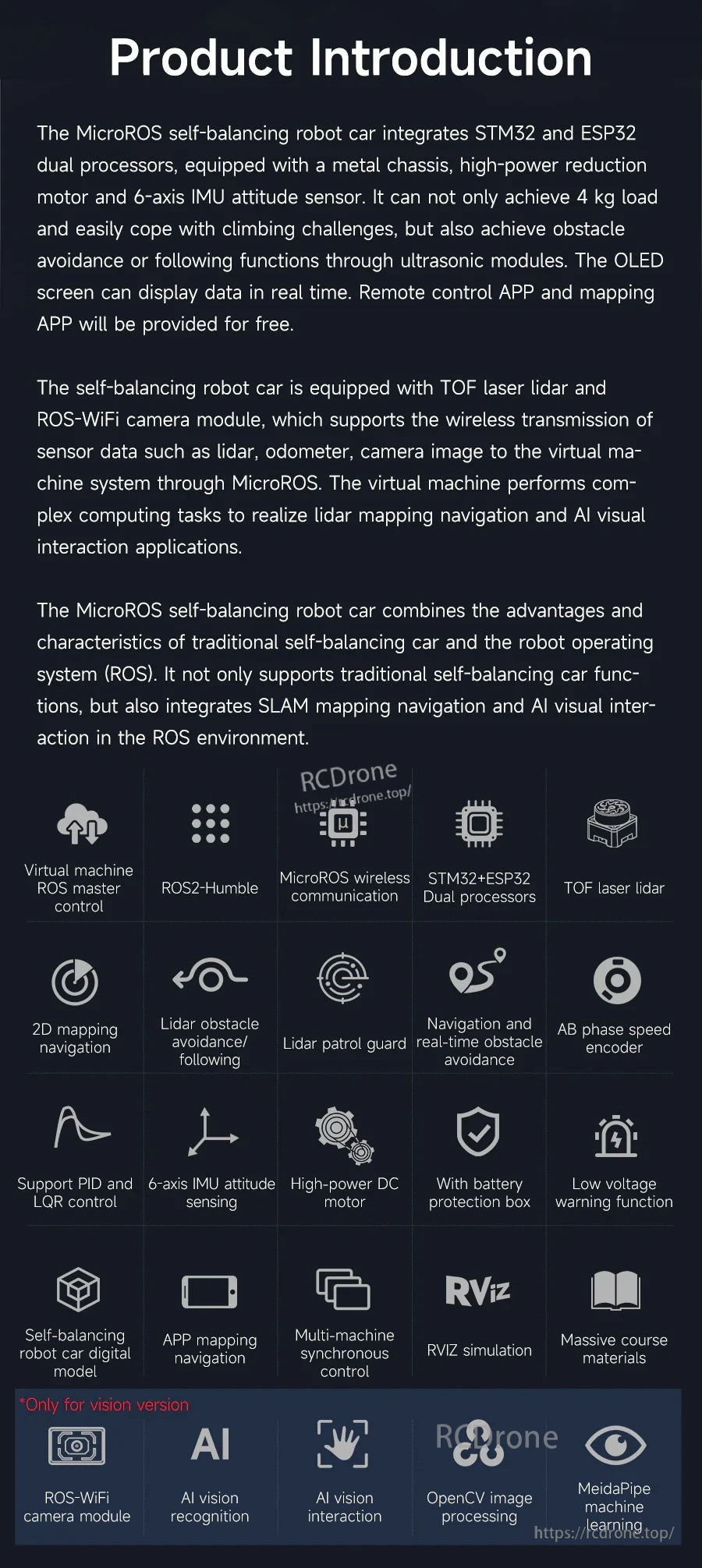
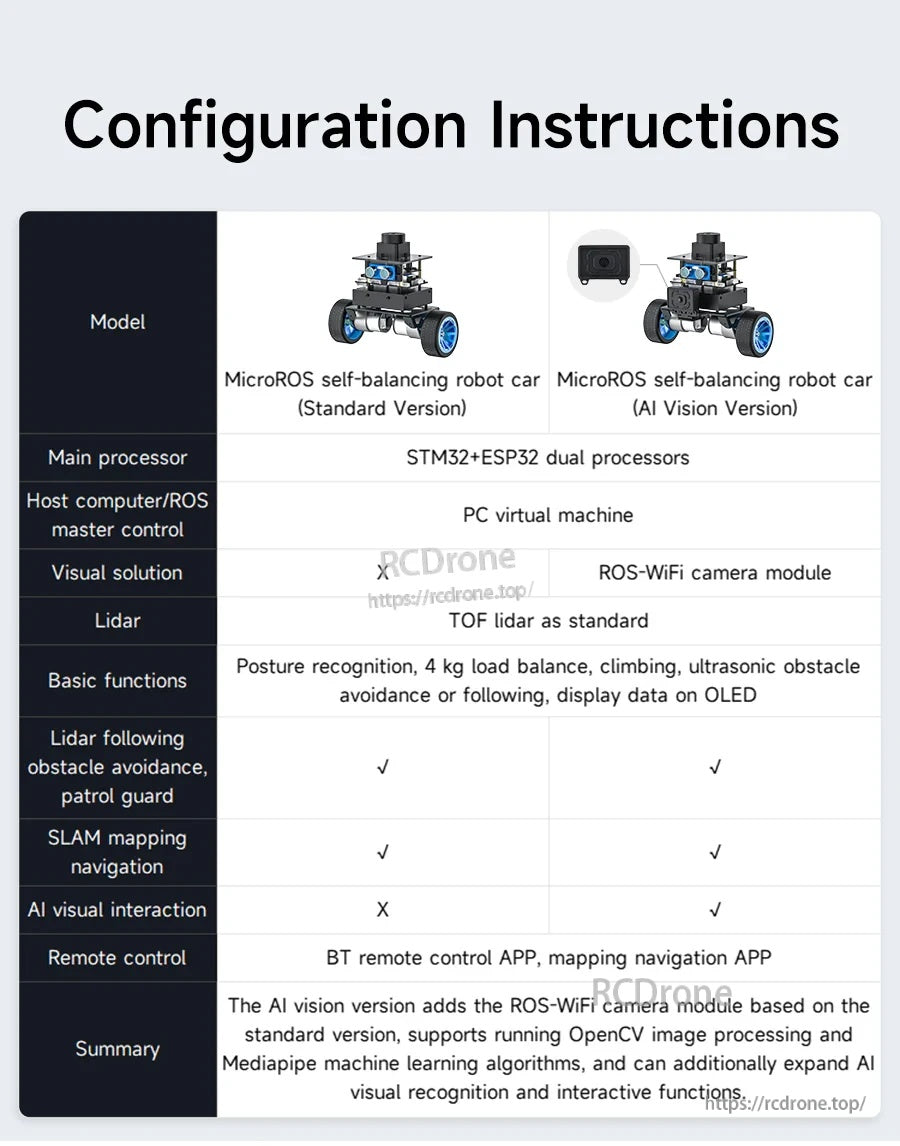
কোর MicroROS + SLAM শেখার জন্য স্ট্যান্ডার্ড কিট নির্বাচন করুন, অথবা ROS-WiFi ক্যামেরা এবং ভিশন ইন্টারঅ্যাকশন ফিচার যোগ করার জন্য AI ভিশন সংস্করণটি বেছে নিন।
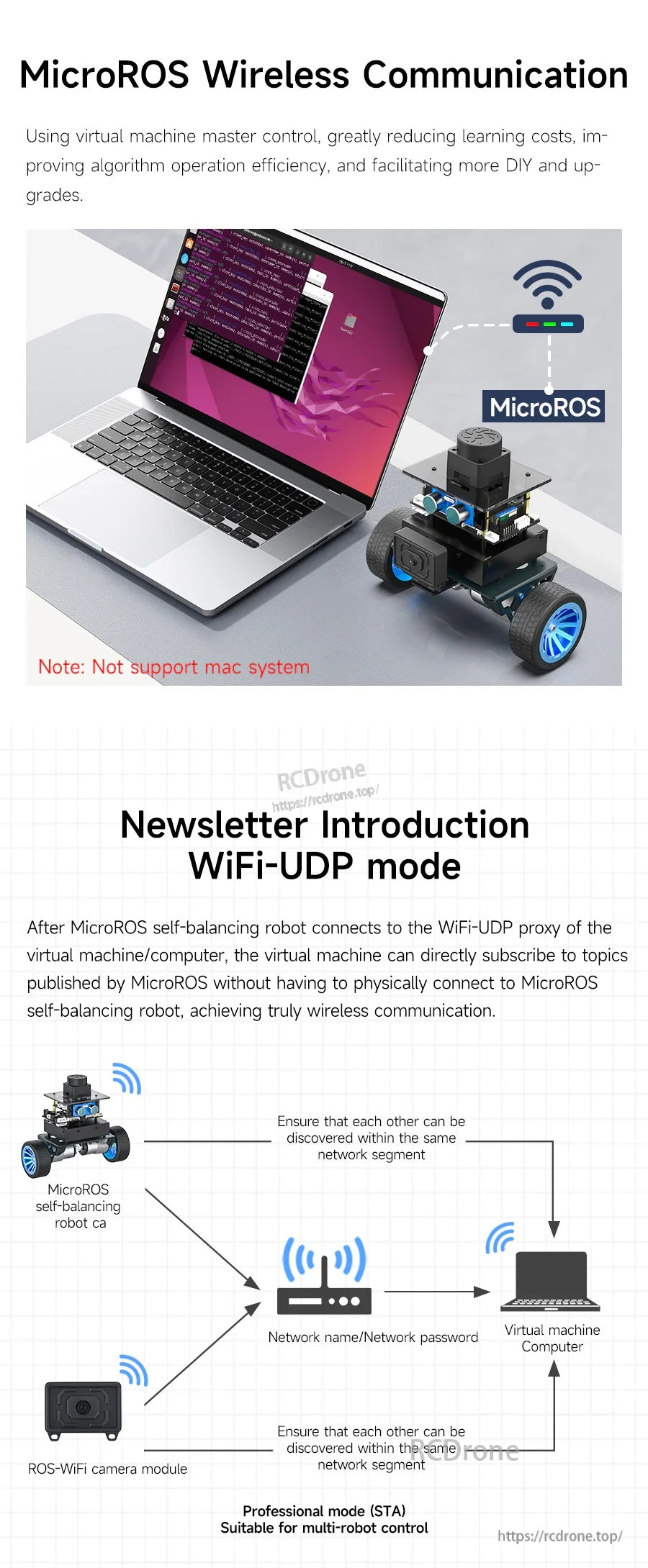
একটি Wi‑Fi UDP ব্রিজ রোবটকে ROS2 ভার্চুয়াল-মেশিন মাস্টারের সাথে সংযুক্ত করে, যা অনবোর্ড কম্পিউটকে হালকা রাখতে সহায়তা করে।
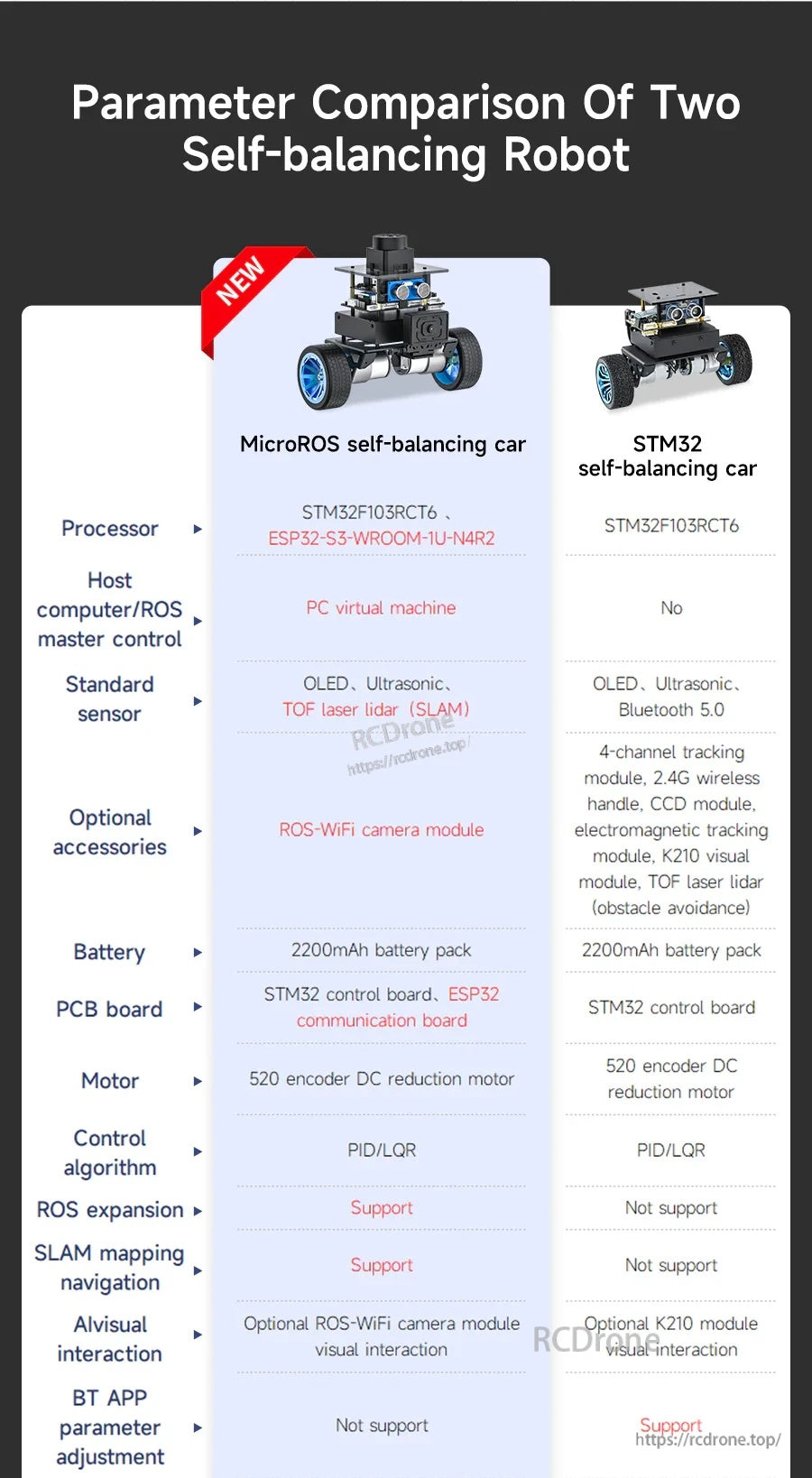
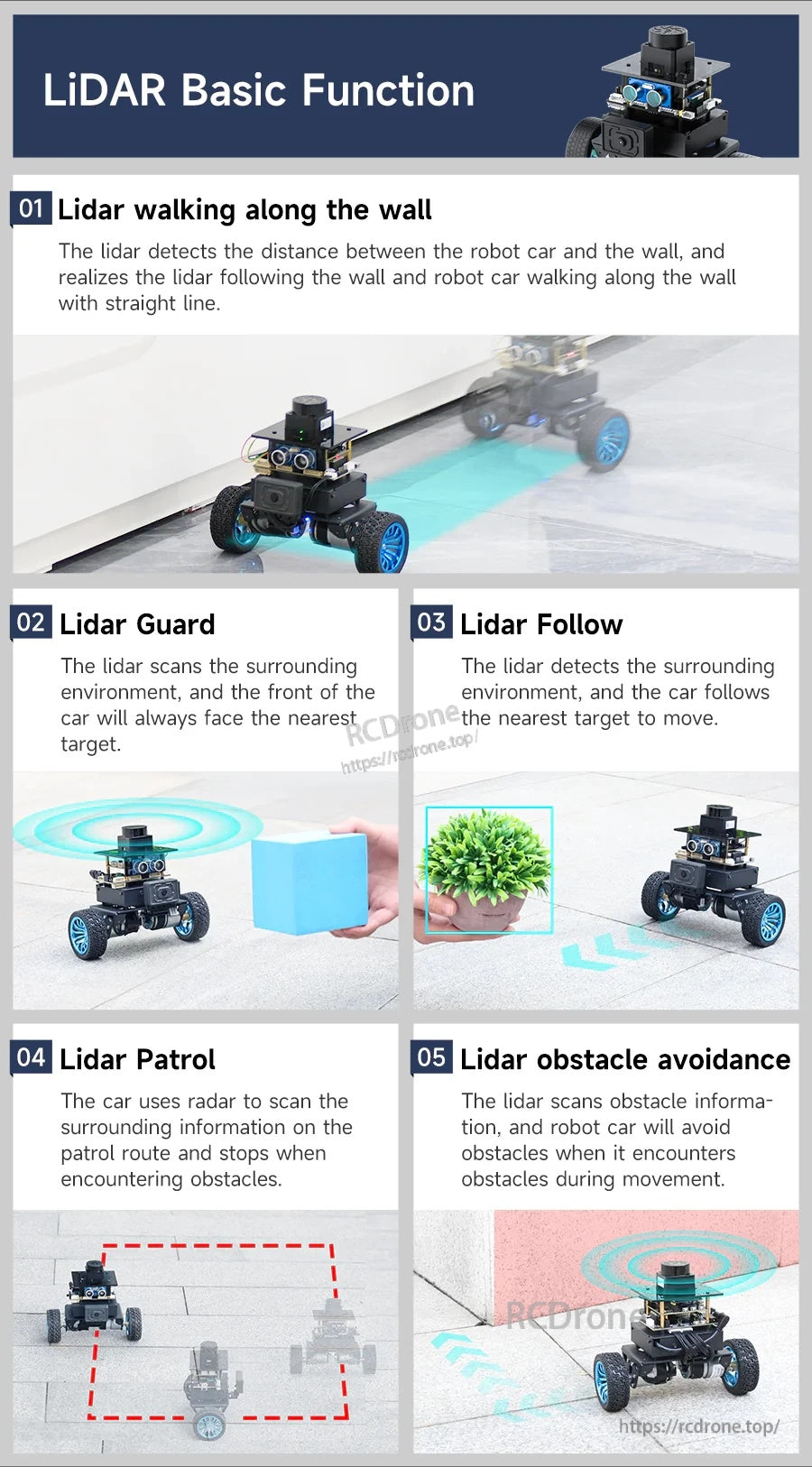
বিল্ট-ইন LiDAR আচরণগুলির মধ্যে রয়েছে দেয়াল অনুসরণ, গার্ড/ফলো মোড, প্যাট্রোল স্ক্যানিং এবং ইনডোর ডেমোর জন্য বাধা এড়ানো।
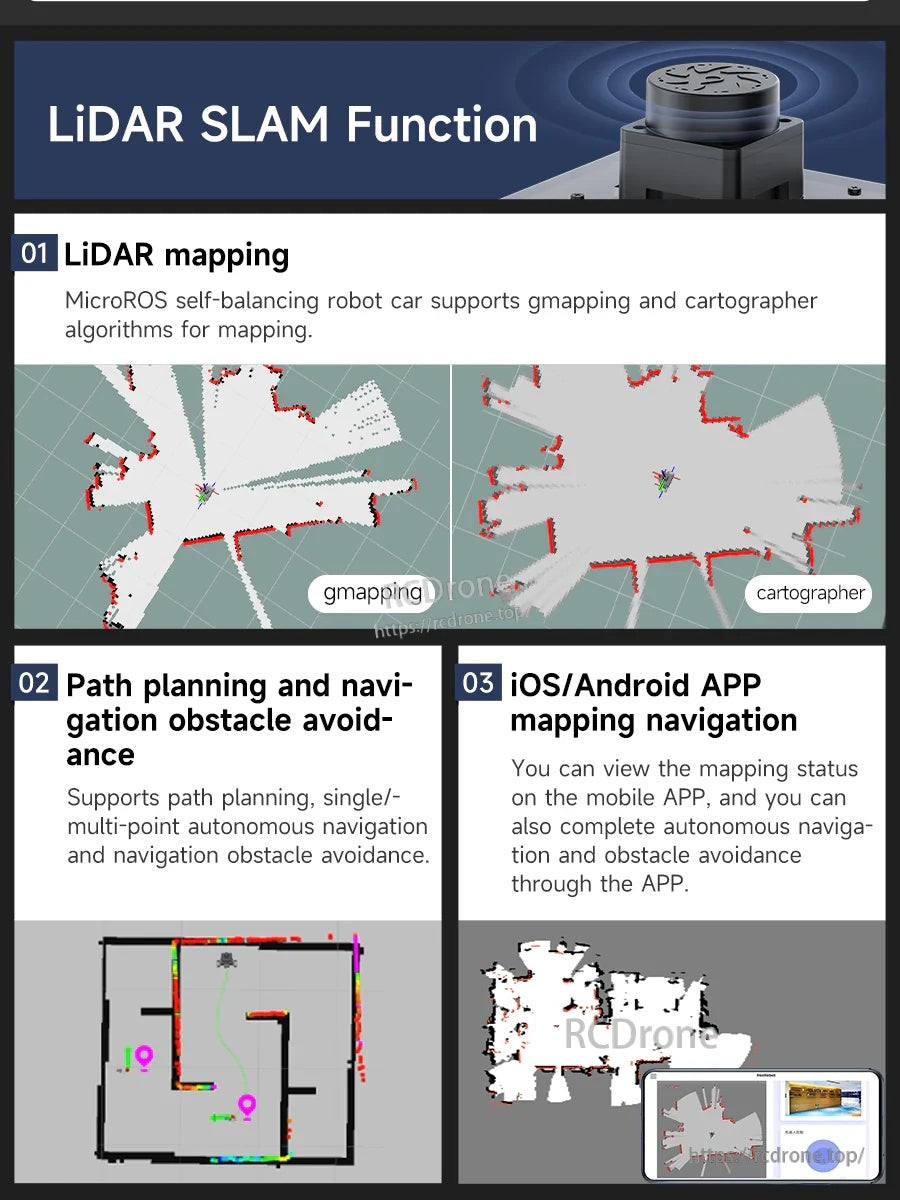
ROS2 SLAM ওয়ার্কফ্লোগুলি gmapping এবং কার্টোগ্রাফারকে সমর্থন করে, প্লাস বাধা এড়ানো এবং অ্যাপ-ভিত্তিক ম্যাপিং নেভিগেশনের সাথে পথ পরিকল্পনা করে।
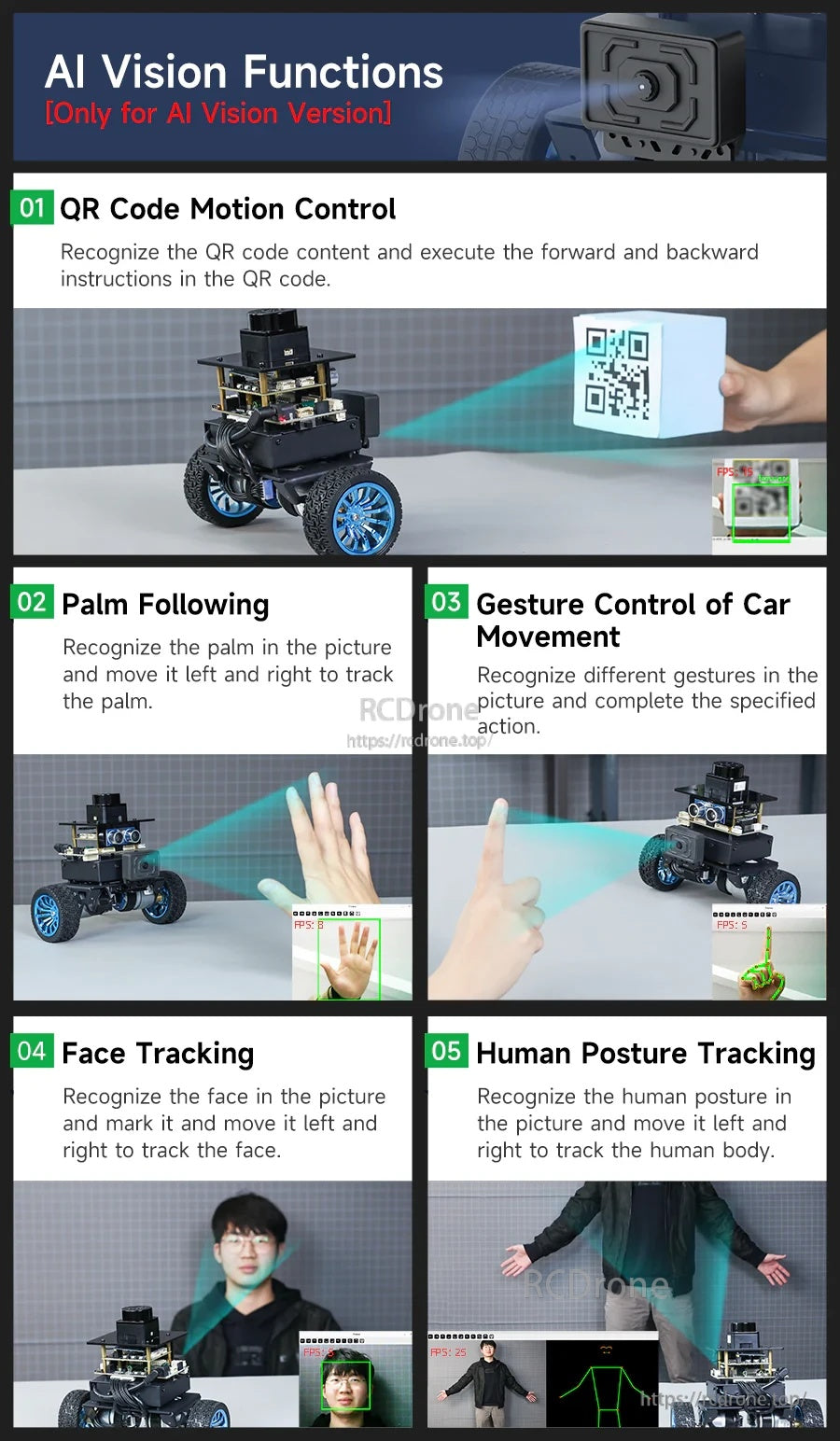
AI ভিশন কিট ক্যামেরা-ভিত্তিক ইন্টারঅ্যাকশন যেমন QR কোড কমান্ড, অঙ্গভঙ্গি, পাম ফলো করা এবং ভঙ্গি ট্র্যাকিং যোগ করে।
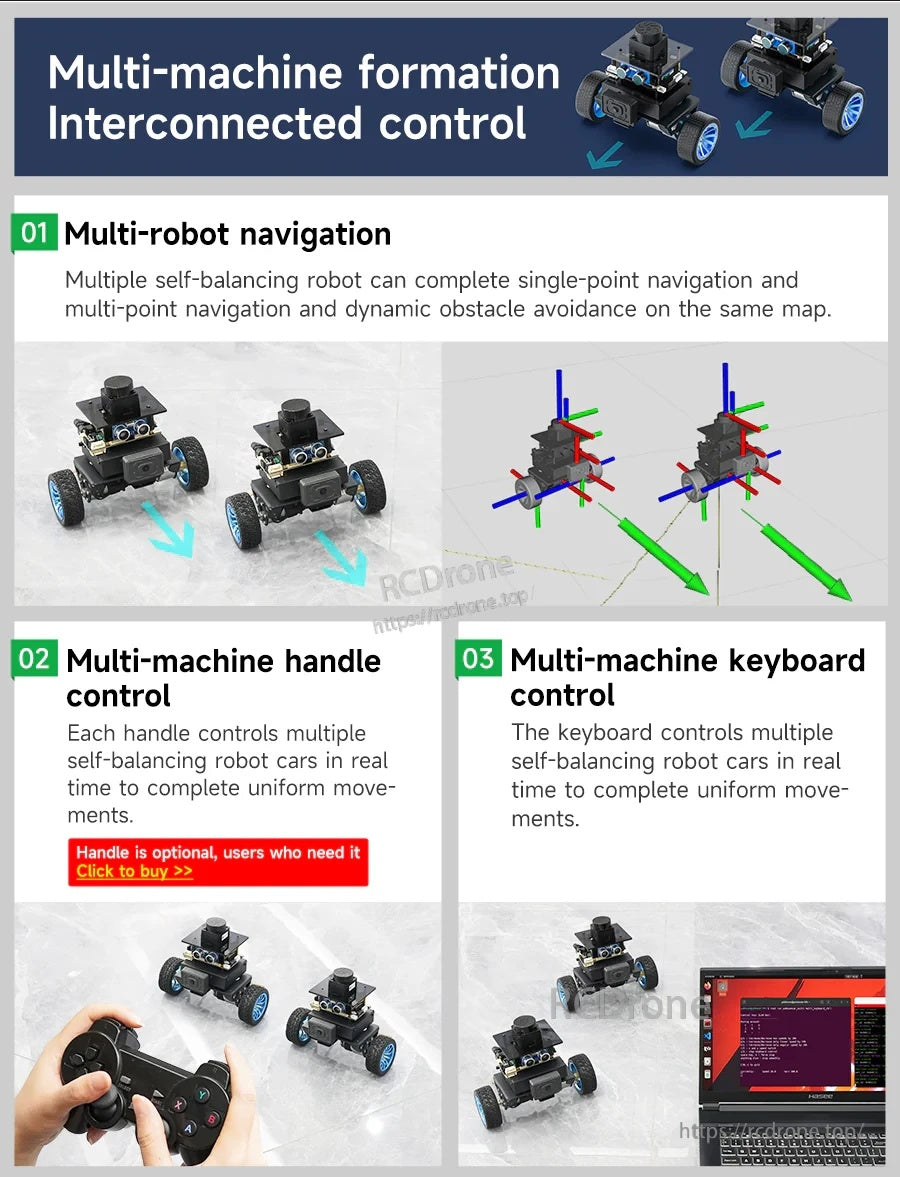
একই মানচিত্রে একাধিক রোবট চালান এবং কীবোর্ড নিয়ন্ত্রণ বা ঐচ্ছিক গেমপ্যাড হ্যান্ডেল ব্যবহার করে আন্দোলন সমন্বয় করুন।
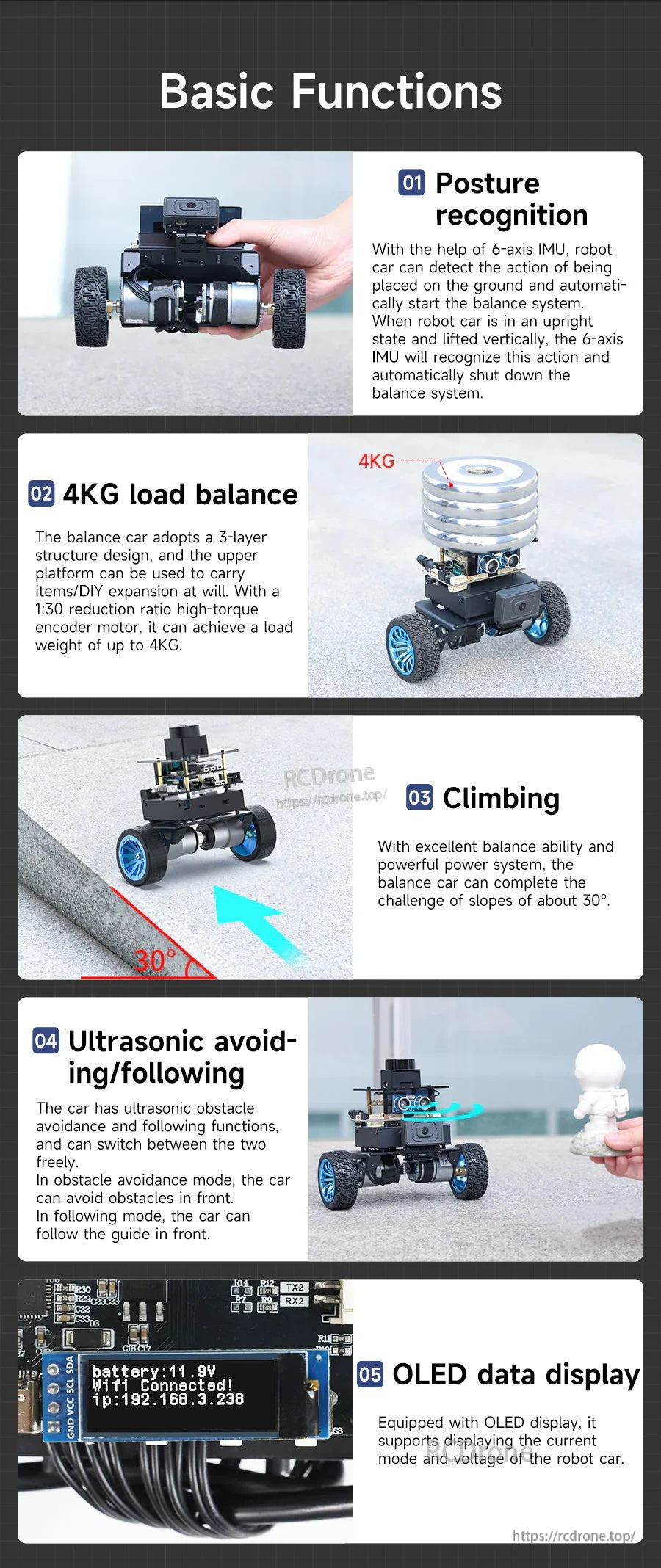
একটি ৩-স্তরের ধাতব কাঠামো ৪ কেজি পর্যন্ত পে-লোড সমর্থন করে, আল্ট্রাসনিক মোড এবং স্ট্যাটাস ও ভোল্টেজের জন্য একটি OLED রিডআউট সহ।
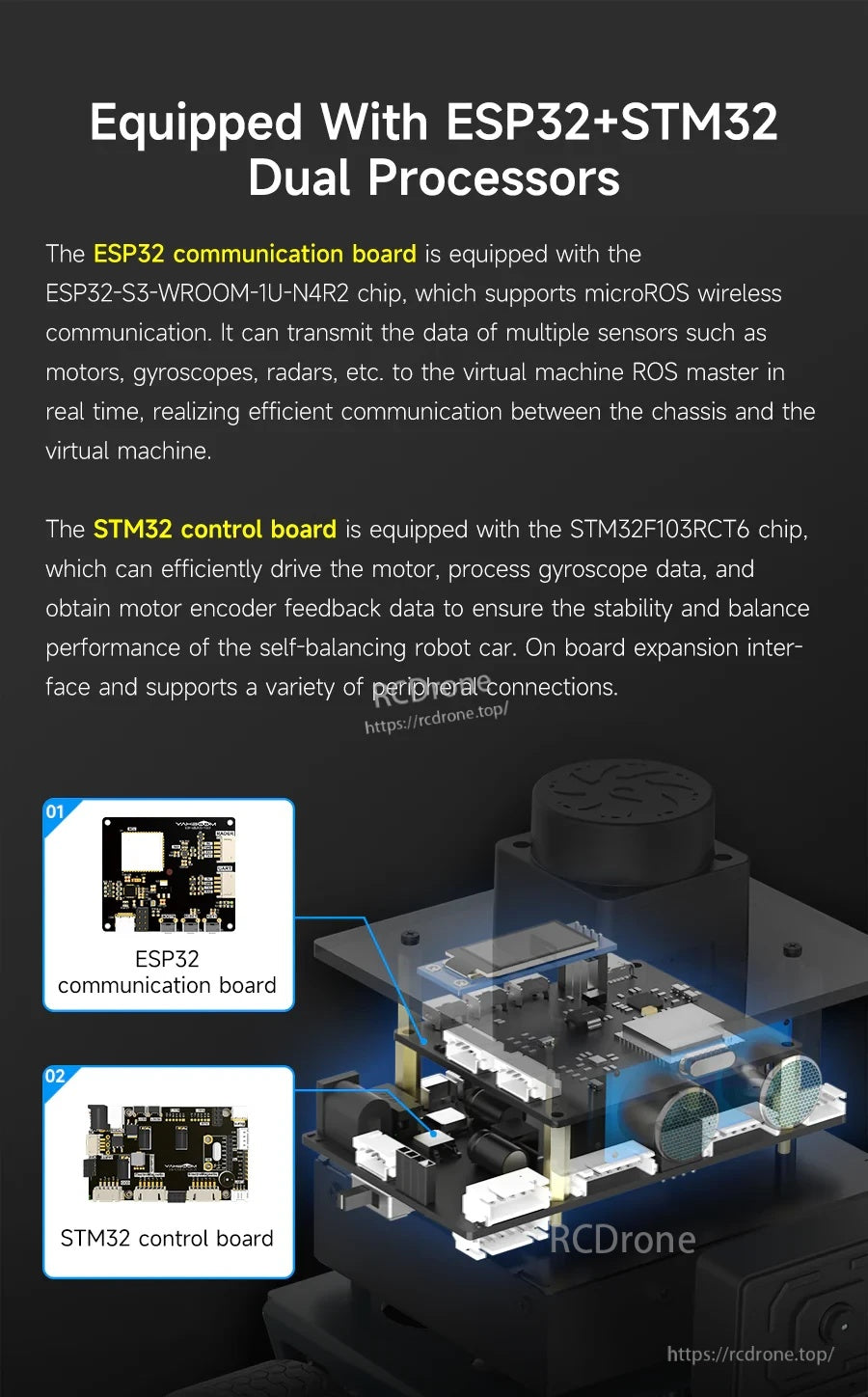
STM32 রিয়েল-টাইম মোটর নিয়ন্ত্রণ পরিচালনা করে, যখন ESP32 MicroROS ওয়্যারলেস যোগাযোগ ROS2 মাস্টারের সাথে পরিচালনা করে।
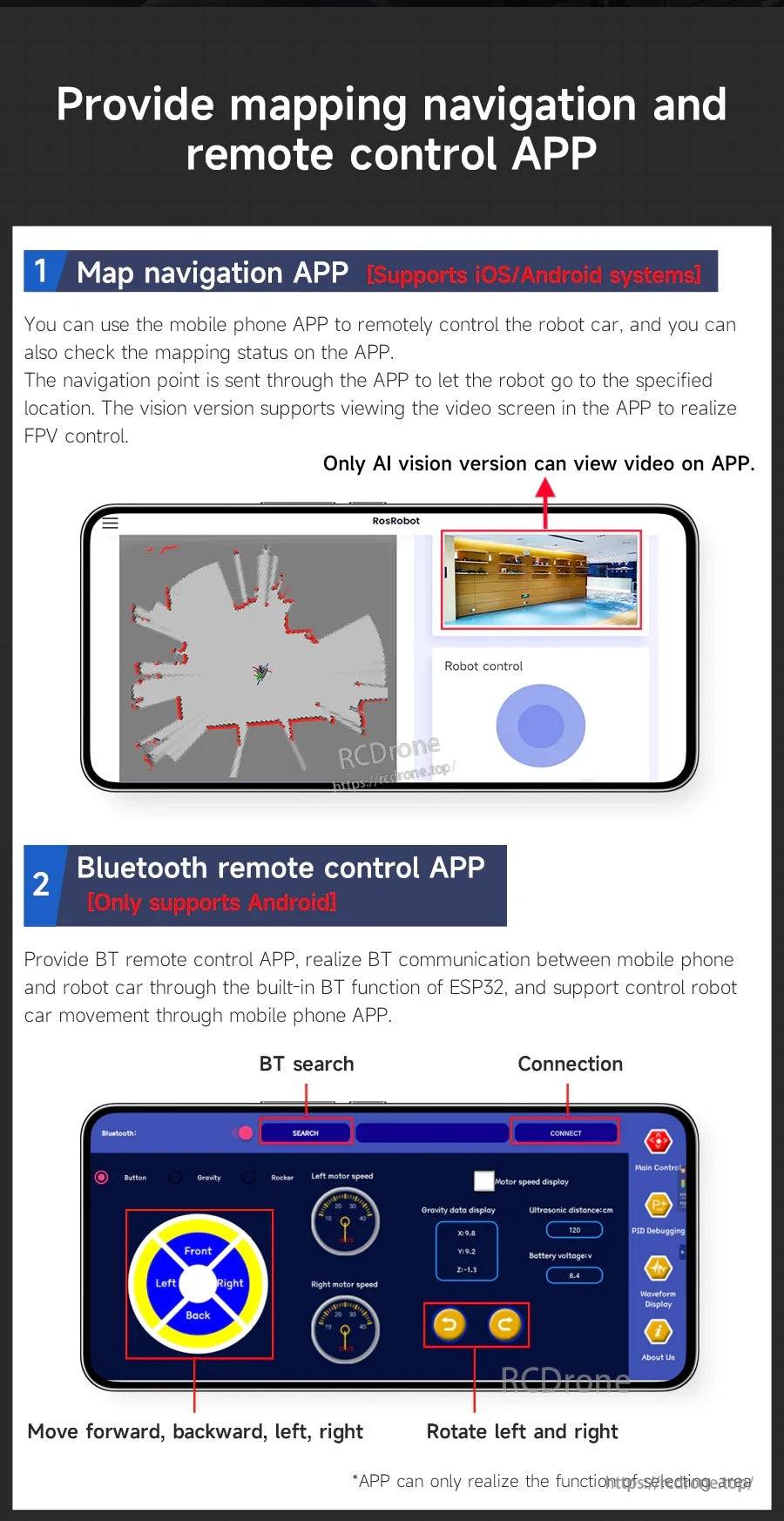
SLAM ওয়ার্কফ্লো জন্য ম্যাপিং/নেভিগেশন অ্যাপ ব্যবহার করুন, অথবা দ্রুত ড্রাইভিং পরীক্ষার জন্য ব্লুটুথ রিমোট কন্ট্রোলে স্যুইচ করুন।
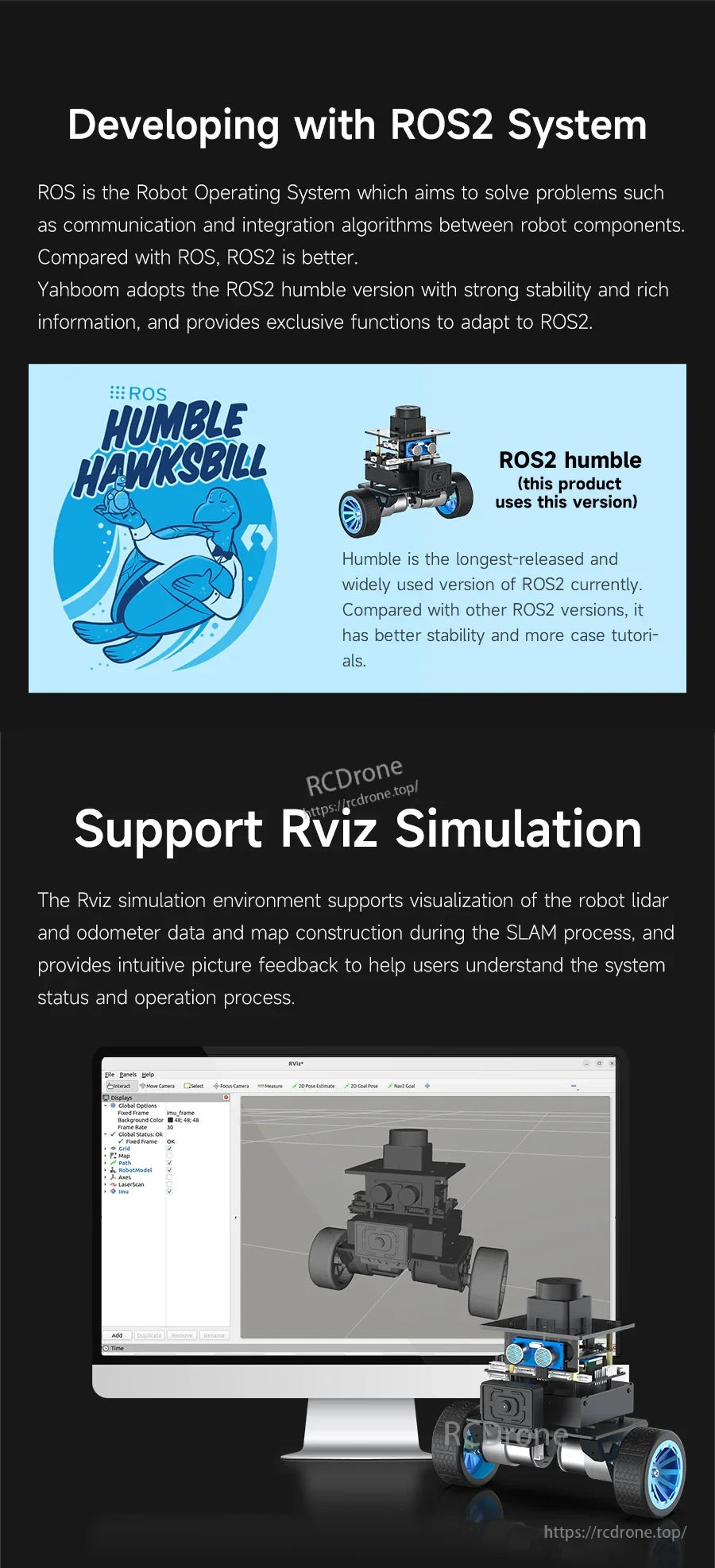
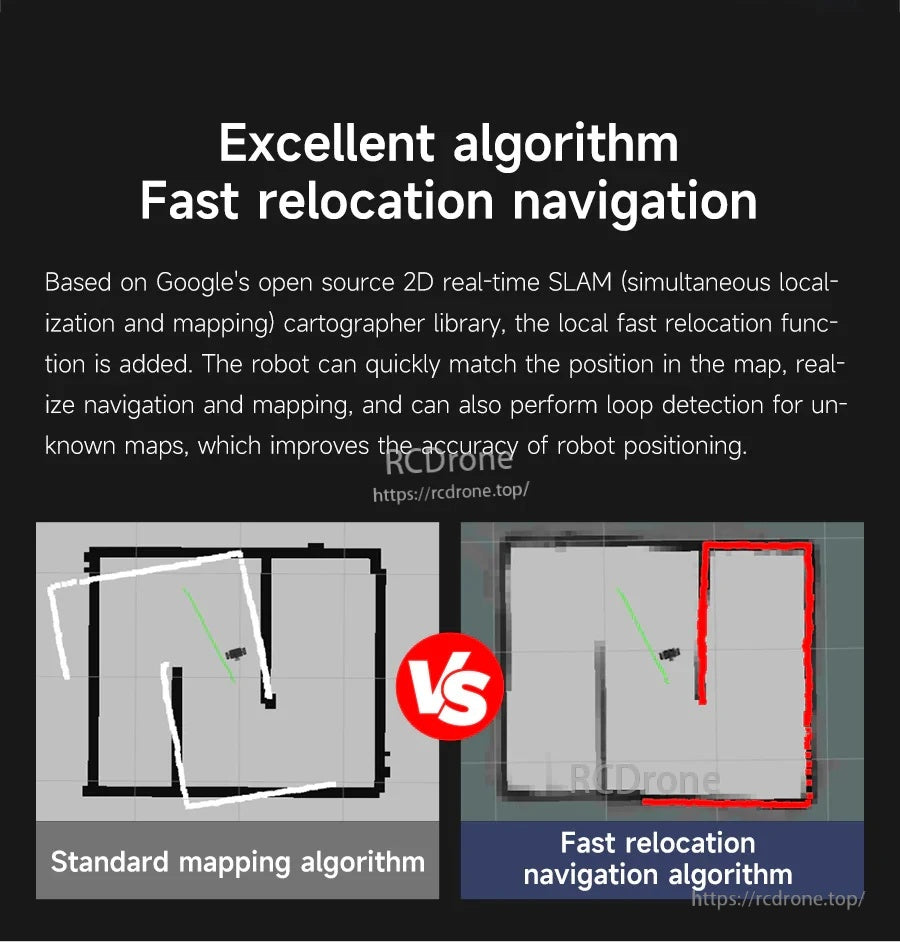
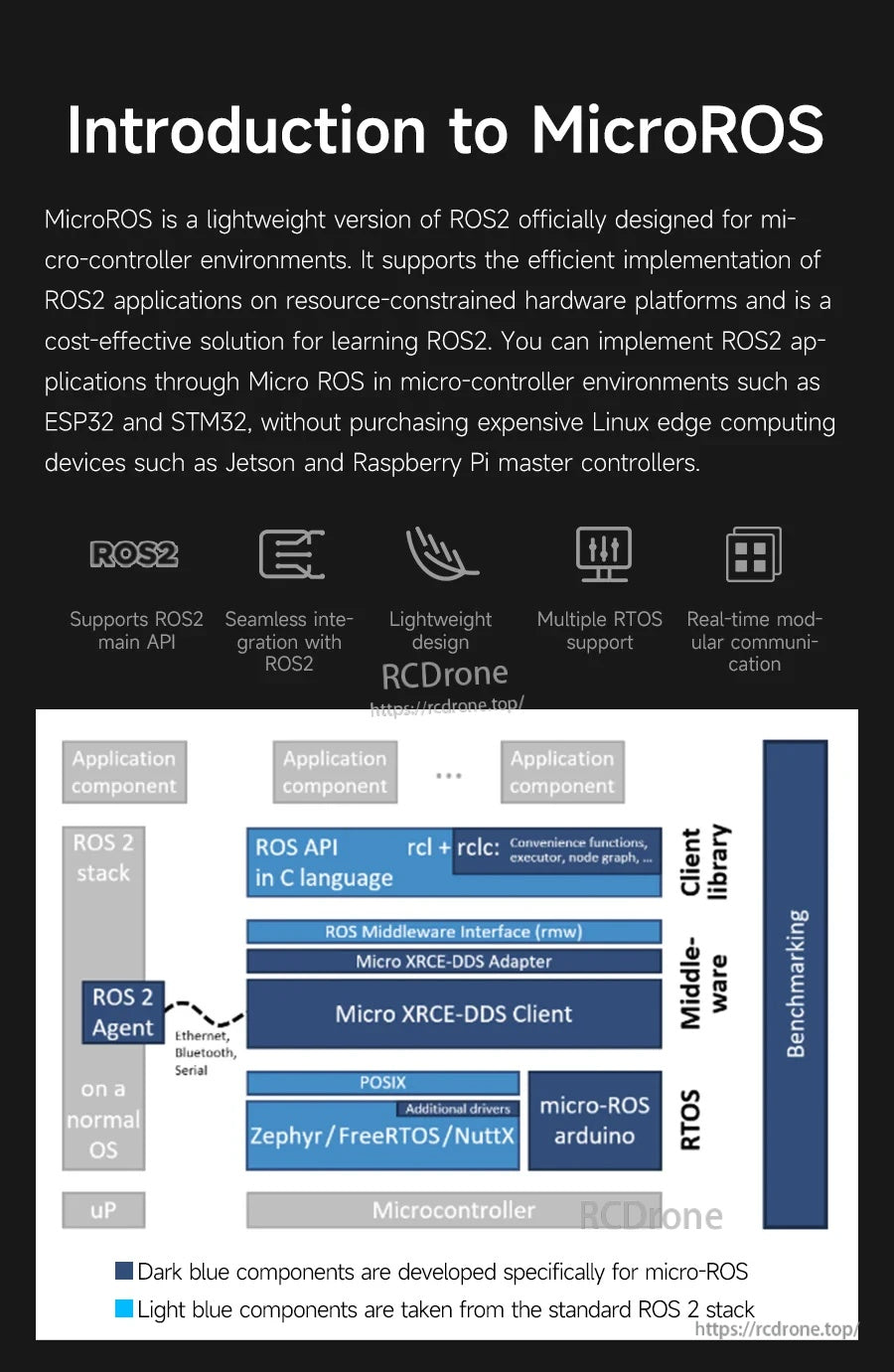
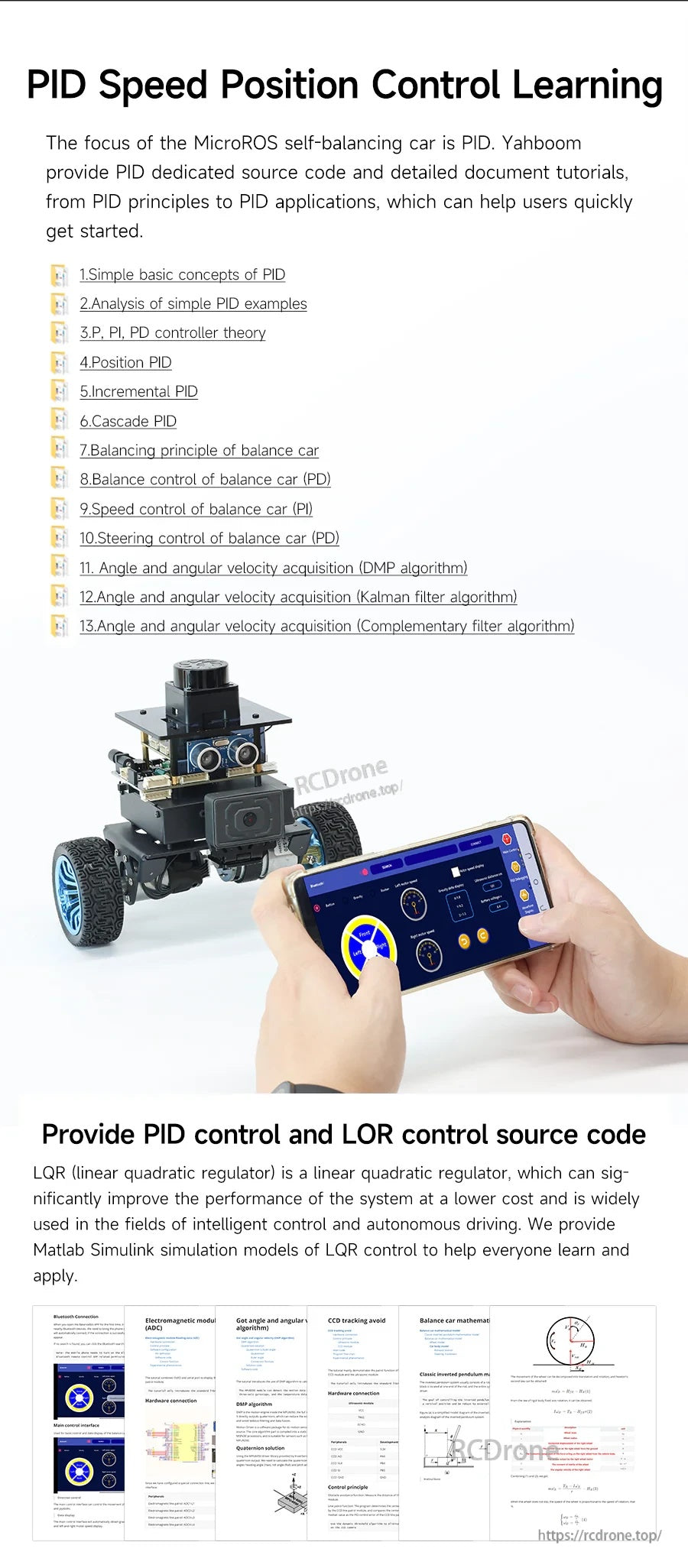
শিক্ষা উপকরণগুলি PID গতি/অবস্থান নিয়ন্ত্রণের উপর ফোকাস করে, উদাহরণ কোড এবং দ্রুত ব্রিং-আপের জন্য অ্যাপ-ভিত্তিক টিউনিং সহ।
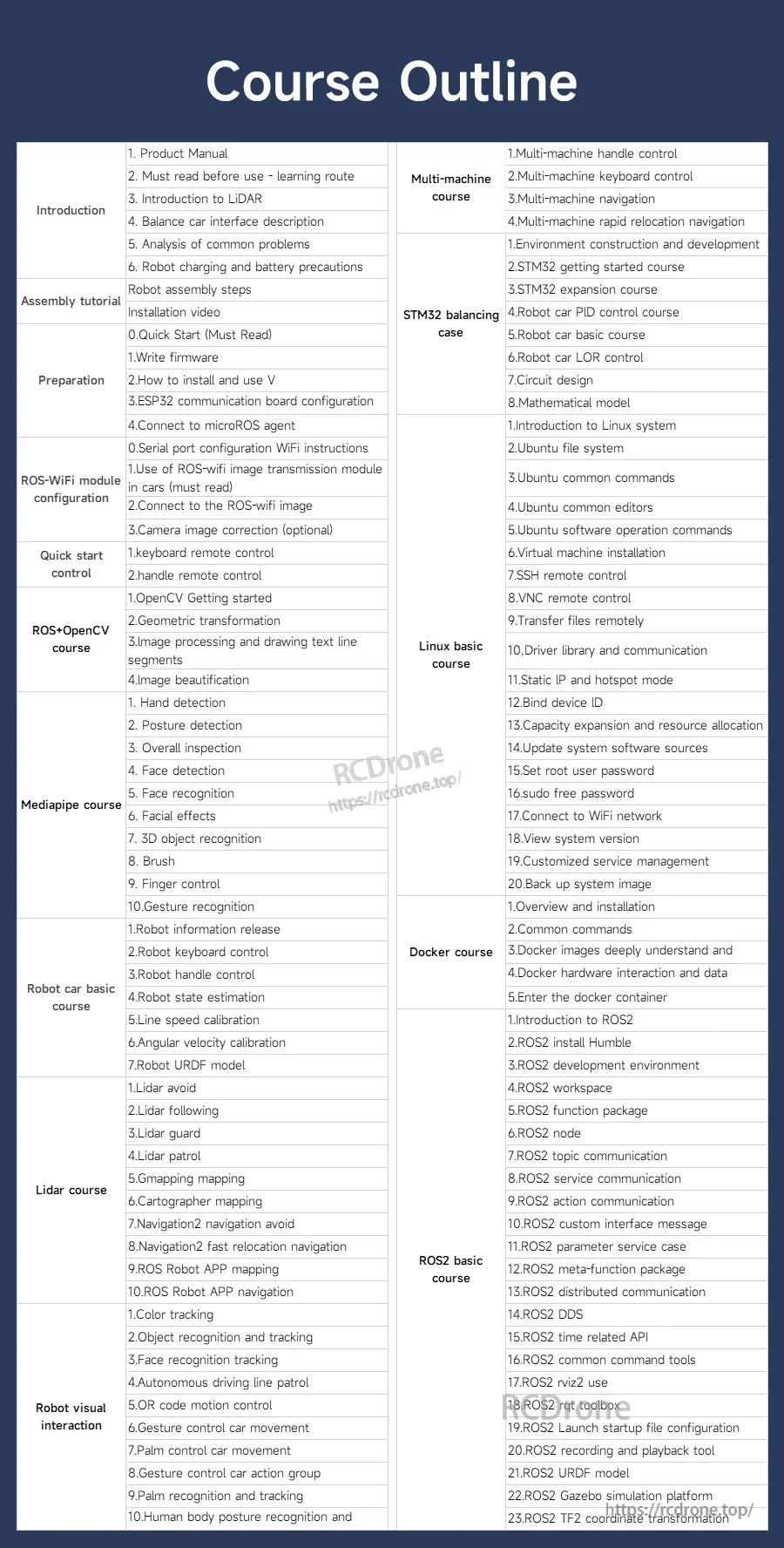
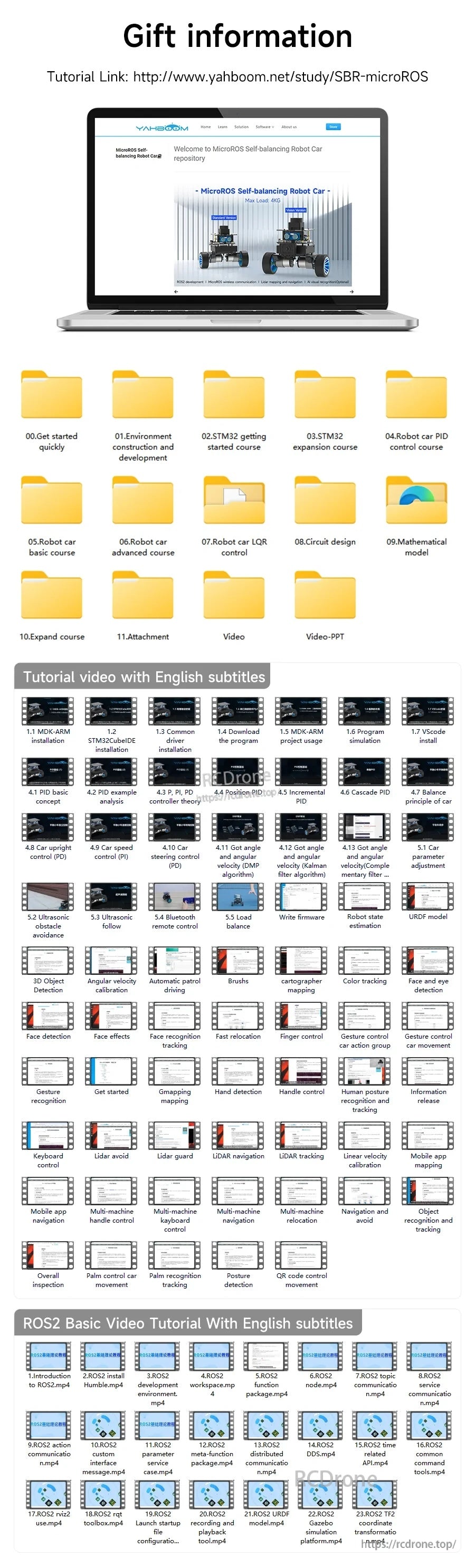
Yahboom একটি স্টাডি লিঙ্ক এবং শুরু করতে সহায়তা করার জন্য নথির সংগঠিত ফোল্ডার এবং ইংরেজি সাবটাইটেল সহ টিউটোরিয়াল ভিডিও অন্তর্ভুক্ত করে।
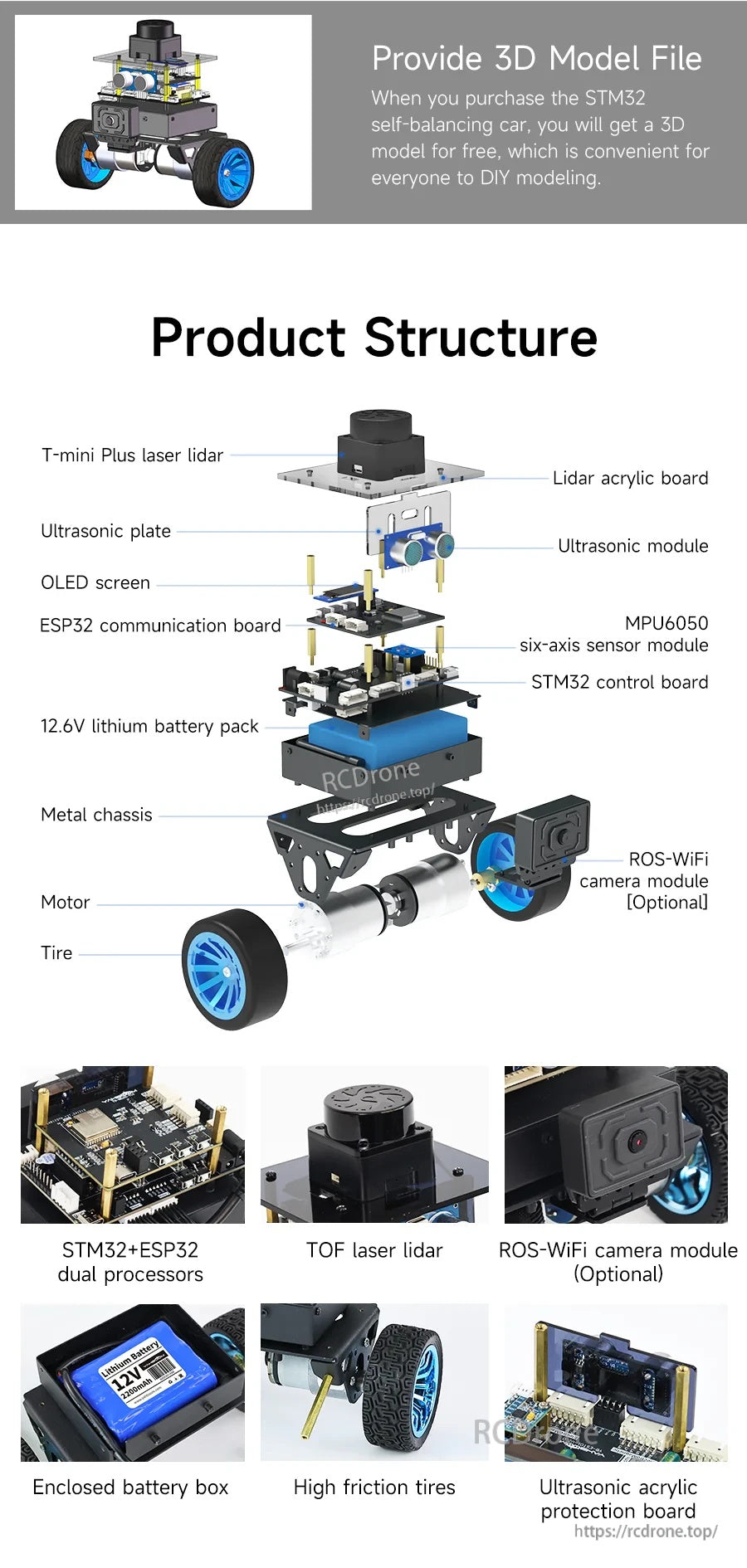
MicroROS স্বয়ং-সামঞ্জস্যকারী রোবট একটি স্তরযুক্ত চ্যাসিস ব্যবহার করে TOF লেজার লিডার, আল্ট্রাসনিক সেন্সিং, একটি OLED স্ক্রীন, এবং পৃথক নিয়ন্ত্রণ/যোগাযোগ বোর্ড সহ, একটি ঐচ্ছিক ROS WiFi ক্যামেরা মডিউল সহ।
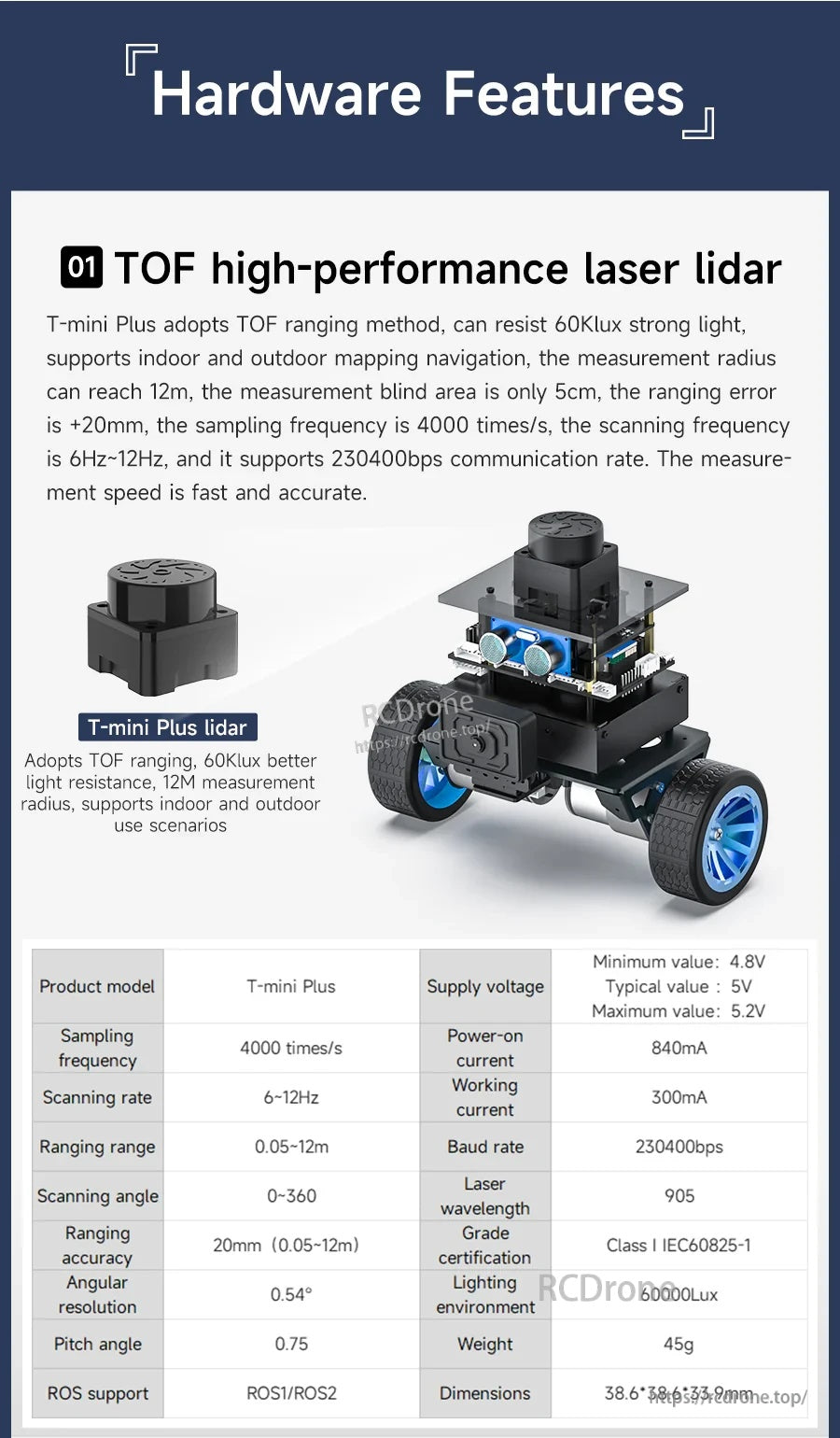
TOF লেজার লাইডার মডিউলটি নেভিগেশন এবং ম্যাপিং কাজের জন্য ১২ মিটার পর্যন্ত রেঞ্জিং এবং ৫ সেমি ব্লাইন্ড এরিয়া সহ ৩৬০° স্ক্যানিং প্রদান করে।
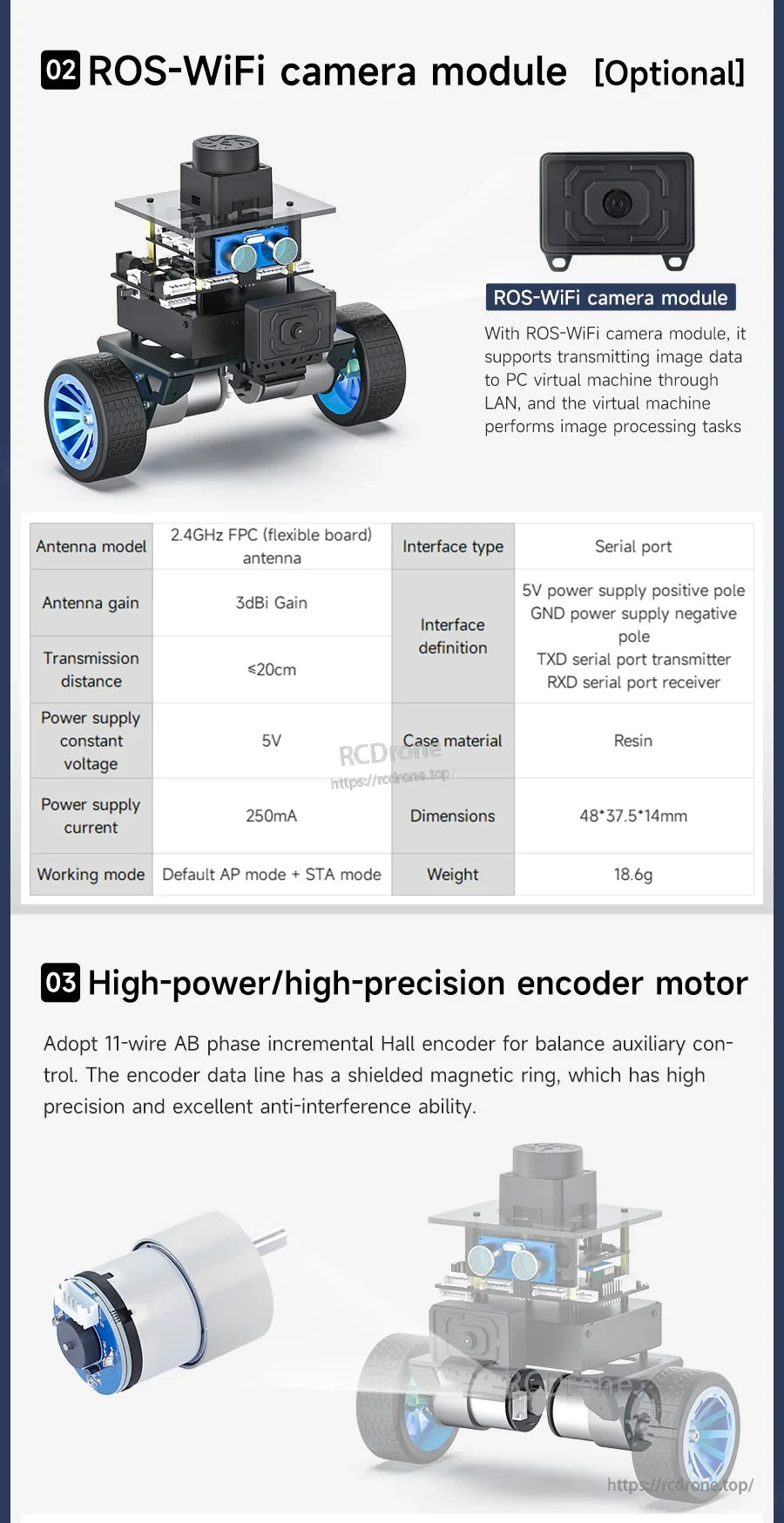
মাইক্রোআরওএস সেলফ-ব্যালেন্সিং রোবটটি ইমেজ ক্যাপচার এবং ভিডিও স্ট্রিমিংয়ের জন্য ৫ ভোল্ট পাওয়ার এবং সিরিয়াল পোর্ট সংযোগ সহ একটি ঐচ্ছিক ROS‑WiFi ক্যামেরা মডিউল সমর্থন করে।
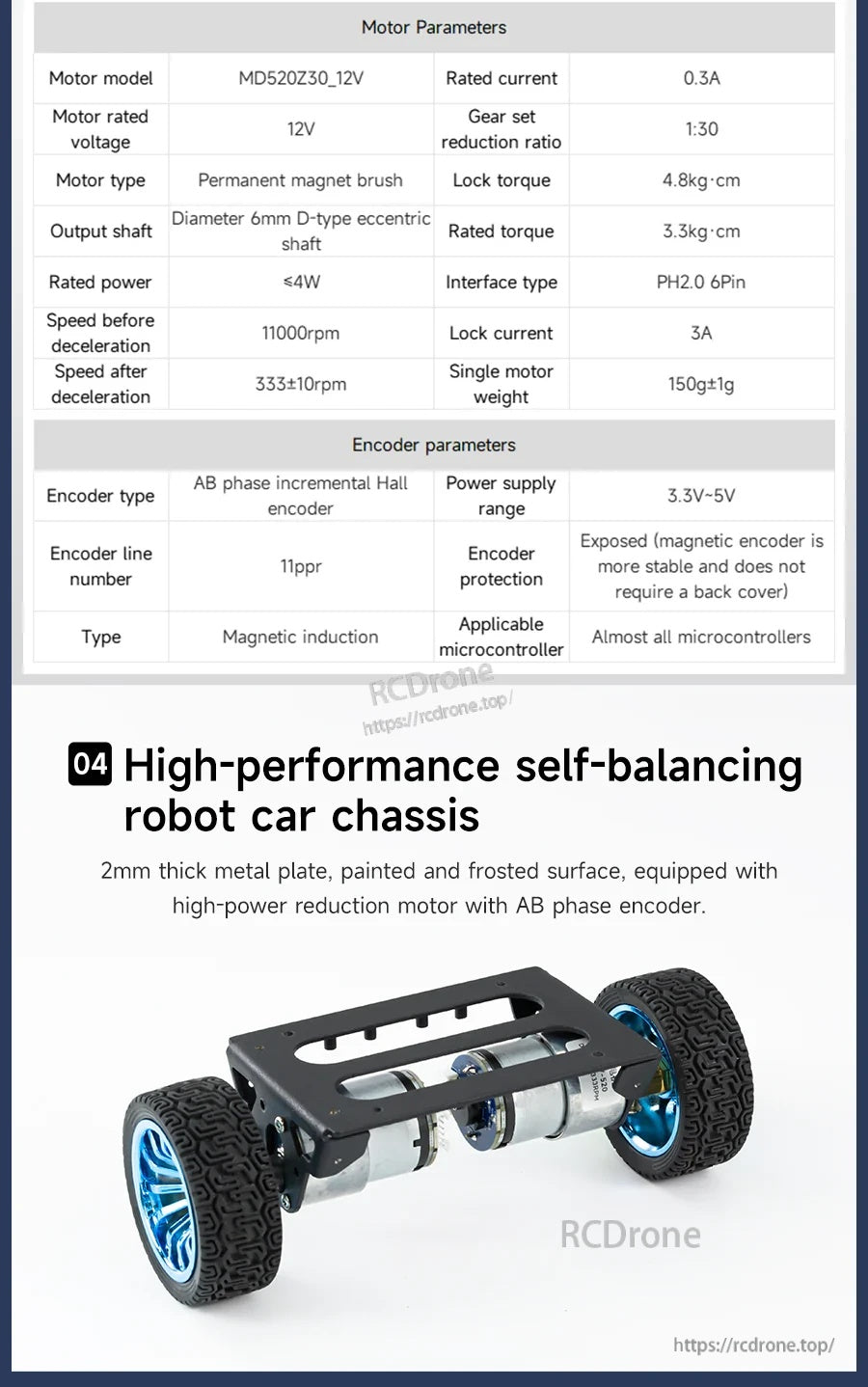
ইয়াহবুম মাইক্রোআরওএস সেলফ-ব্যালেন্সিং রোবট চ্যাসিসটি ফিডব্যাক নিয়ন্ত্রণের জন্য একটি ১২ ভোল্ট গিয়ার্ড মোটর (১:৩০) এবং একটি এবি ফেজ ইনক্রিমেন্টাল হল এনকোডার (৩.৩–৫ ভোল্ট) ব্যবহার করে।
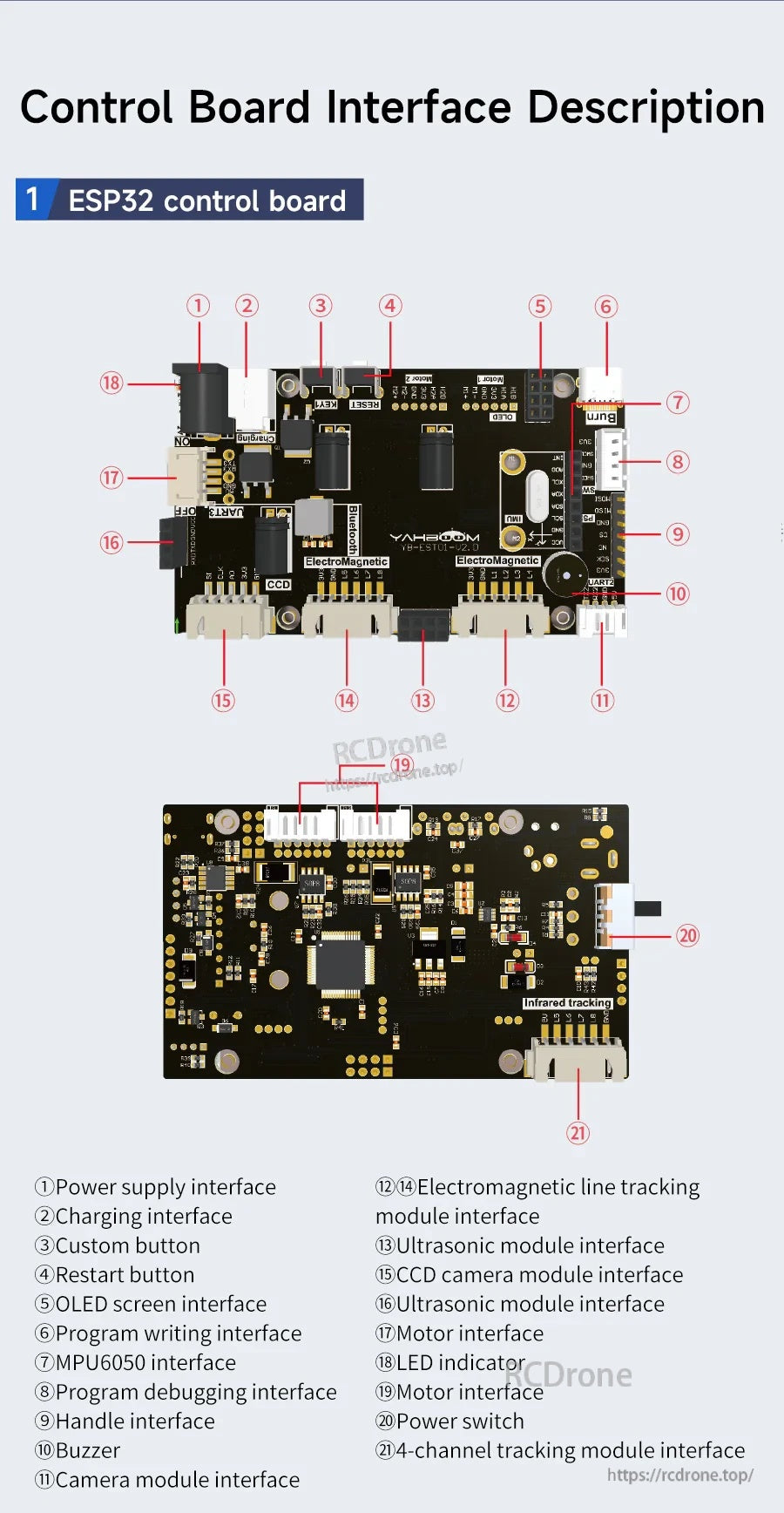
ইয়াহবুম মাইক্রোআরওএস সেলফ-ব্যালেন্সিং রোবটটি স্পষ্টভাবে লেবেলযুক্ত মোটর এবং অ্যাড-অন মডিউল যেমন OLED, মাইক্রোএসডি, ক্যামেরা এবং আল্ট্রাসনিক সেন্সরের জন্য সংযোগকারী সহ একটি ESP32 কন্ট্রোল বোর্ড ব্যবহার করে।
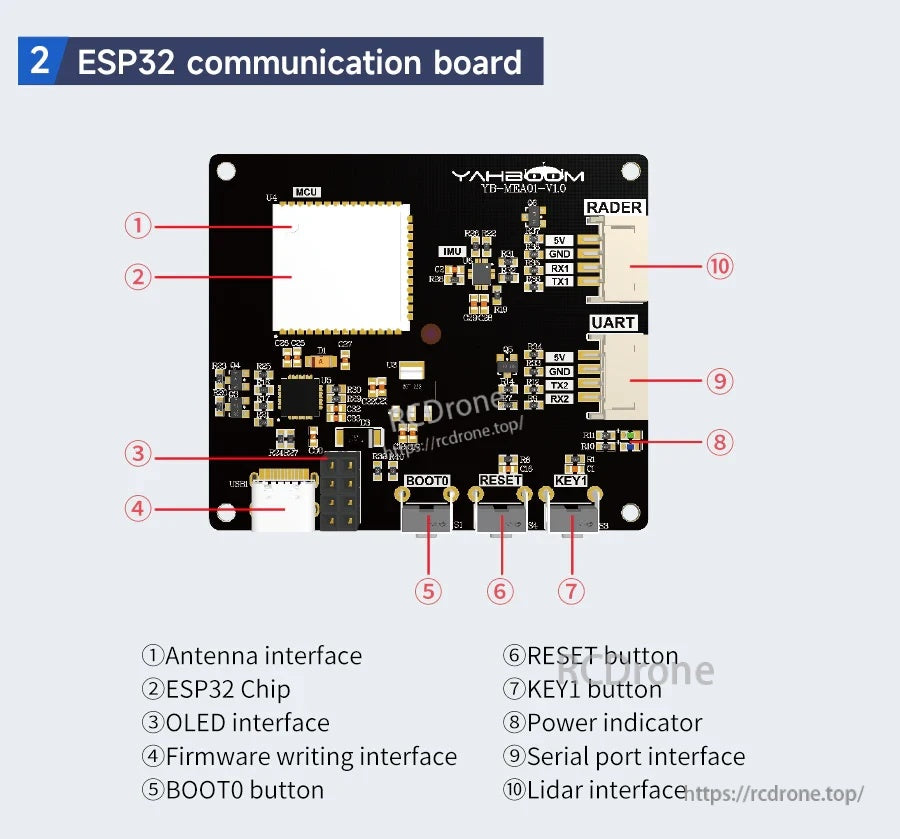
ইয়াহবুম ESP32 যোগাযোগ বোর্ডে অ্যান্টেনা, OLED, UART/সিরিয়াল এবং LiDAR এর জন্য লেবেলযুক্ত সংযোগকারী, প্লাস সেটআপের জন্য BOOT এবং RESET বোতাম অন্তর্ভুক্ত রয়েছে।
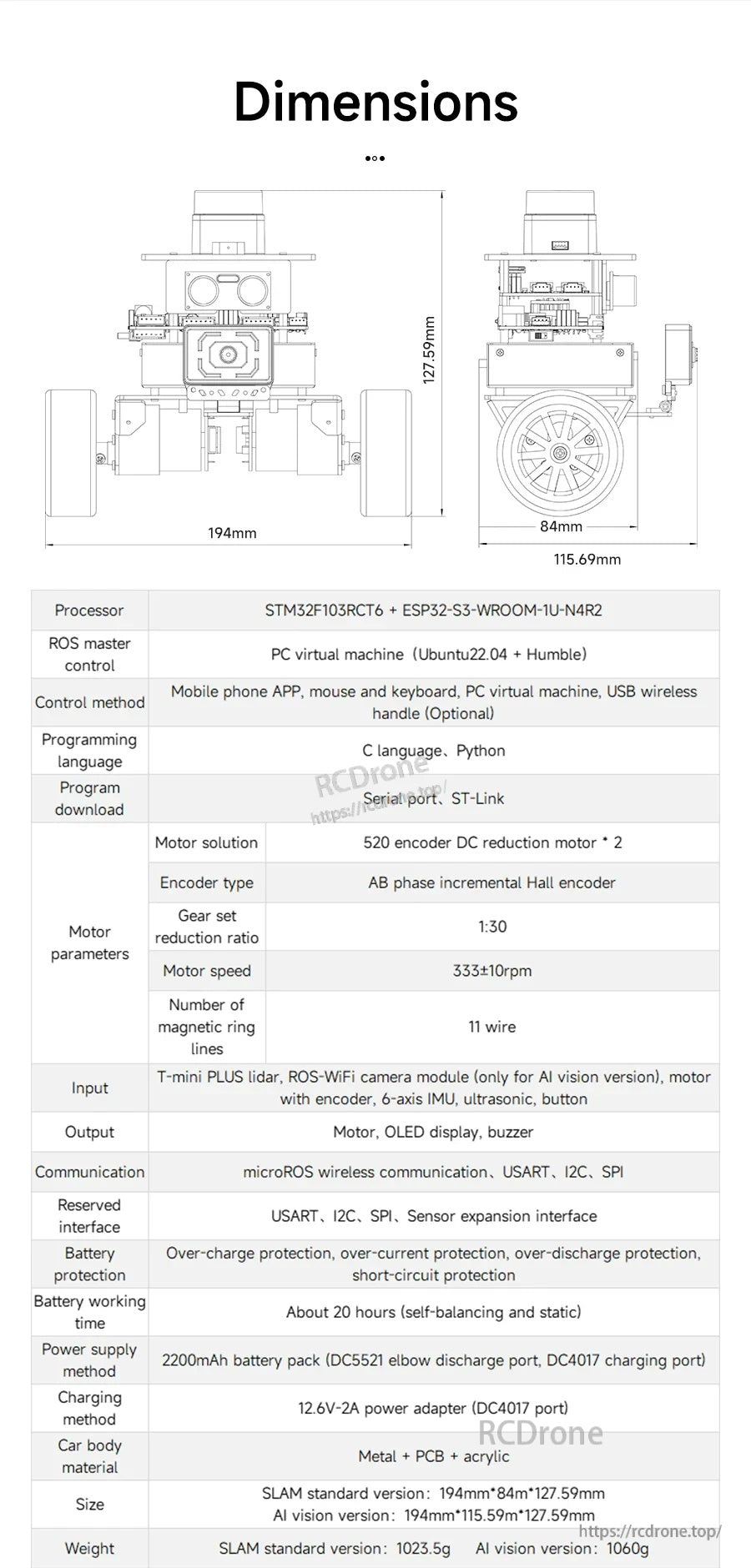
Yahboom-এর মাইক্রোআরওএস স্বয়ং-সামঞ্জস্যকারী রোবটের মধ্যে একটি বিস্তারিত মাত্রা বিন্যাস (১৯৪ মিমি প্রশস্ত, ১৯৭ মিমি উঁচু) অন্তর্ভুক্ত রয়েছে যা মাউন্টিং এবং কর্মক্ষেত্রের ফিট পরিকল্পনা করতে সহায়তা করে।
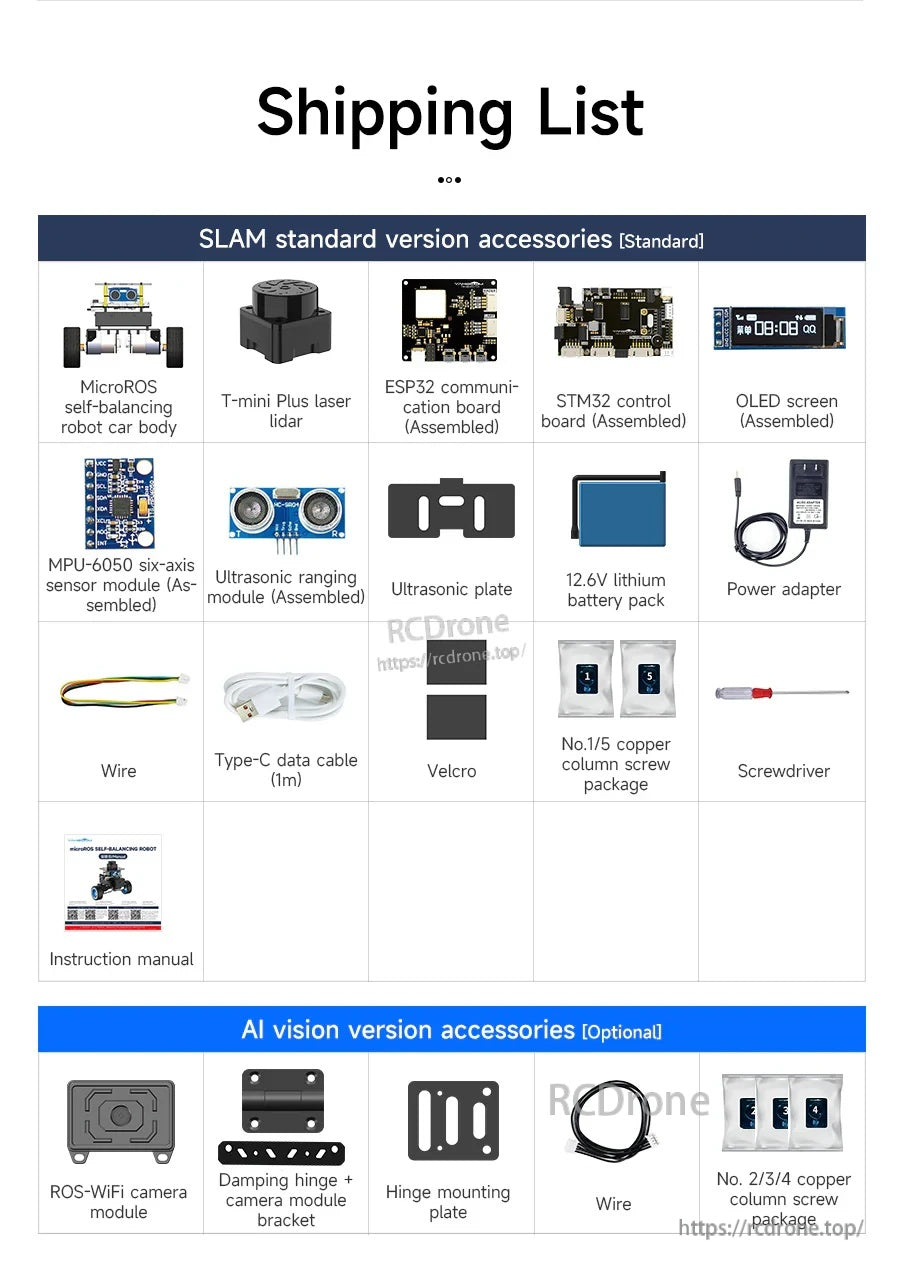
মাইক্রোআরওএস স্বয়ং-সামঞ্জস্যকারী রোবট কিটের মধ্যে রয়েছে গাড়ির শরীর, মিনি প্লাস লেজার লাইডার, ESP32 এবং STM32 বোর্ড, একটি OLED স্ক্রিন, একটি ১২.৬V ব্যাটারি প্যাক, এবং মৌলিক তারের আনুষাঙ্গিক।