Pulsante di aggiornamento fai-da-te per radio TX16S MKII
Pulsante di aggiornamento fai-da-te per radio TX16S MKII
RadioMaster
Prezzo di listino
$10.59 USD
Prezzo di listino
Prezzo scontato
$10.59 USD
Prezzo unitario
per
Imposte incluse.
Spese di spedizione calcolate al check-out.
Impossibile caricare la disponibilità di ritiro


Panoramica
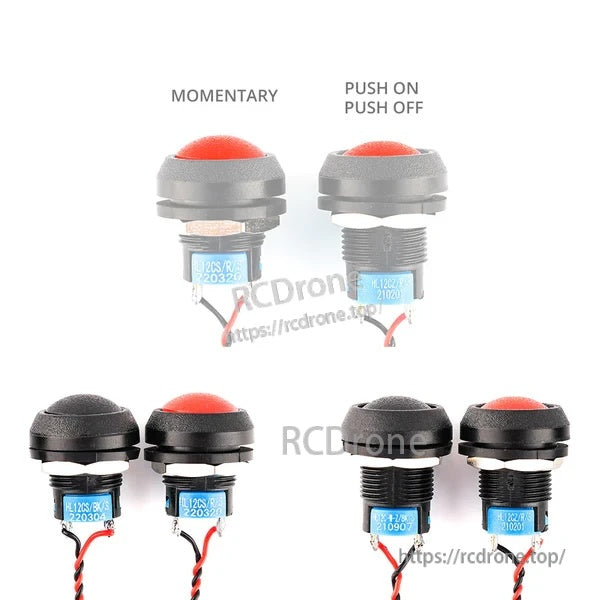
Questo pulsante di aggiornamento fai-da-te per il radiocomando TX16S MKII aggiunge un'opzione di pulsante/interruttore fisico extra al trasmettitore. Sono disponibili due tipi di pulsanti: Momentaneo e Premi su / Premi giù (bloccante), con opzioni di colore Nero o Rosso.
Caratteristiche principali
- Due comportamenti del pulsante selezionabili: Momentaneo o Accensione / Spegnimento (bloccaggio)
- Opzioni di colore: Nero o Rosso
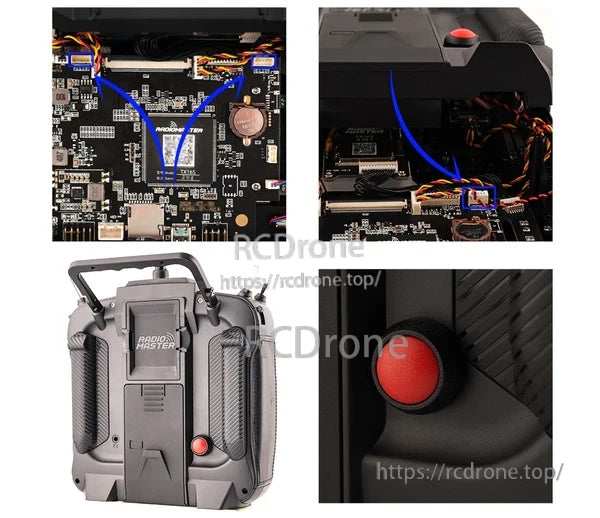
- Progettato per installazione fai-da-te all'interno di una radio TX16S MKII
- È supportata la schermata di mappatura/configurazione del firmware (il menu "Hardware" della radio mostra opzioni di interruttore come 2POS/3POS/Toggle, a seconda della configurazione del firmware)
Specifiche
| Prodotto | Pulsante di aggiornamento fai-da-te (Interruttore/Pulsante radio) |
| Radio compatibile | TX16S MKII |
| Opzioni di tipo | Accensione & Spegnimento; Momentaneo |
| Opzioni di colore | Nero; Rosso |
Installazione
- L'installazione fai-da-te richiede l'apertura della radio e il collegamento del pulsante all'interfaccia interna.
- Dopo l'installazione, configurare l'entrata dello switch correlato nel menu "Hardware"/impostazioni switch del sistema della radio secondo necessità.
Per assistenza all'installazione o domande di compatibilità prima di ordinare, contattare il supporto a https://rcdrone.top/ o [email protected].
Cosa è incluso
- 1 × Pulsante di aggiornamento fai-da-te
Dettagli