


Yahboom STM32 自平衡機器人車套件,4KG 載重,STM32F103RCT6,六軸 IMU,OLED,藍牙 5.0
Yahboom STM32 自平衡機器人車套件,4KG 載重,STM32F103RCT6,六軸 IMU,OLED,藍牙 5.0
Yahboom
無法載入取貨服務供應情況


概述
STM32自平衡機器人車是一個基於STM32微控制器的機器人車學習和實驗平台,用於機器人和控制系統的探索。它集成了STM32F103RCT6主控、6軸IMU姿態傳感器(加速度計+陀螺儀)、高功率減速電機和金屬底盤,通過PID控制實現實時傾斜感測和平衡穩定。該平台支持最大負載4KG,並提供OLED顯示屏和移動APP進行調試和控制(僅支持Android,不支持iOS)。支持多種擴展樣式,可與各種傳感器組合。
主要特點
- 配備 STM32F103RCT6 晶片
- AB 相位速度編碼器
- 高功率直流馬達
- 帶電池保護盒
- 在 APP 上調整參數
- PID 和 LQR 控制
- 六軸 IMU 姿態感測
- 低電壓警告
- 平衡車數學模型
- 超聲波避障/跟隨功能(通過超聲波模組)
- OLED 數據顯示(支持顯示當前模式和電壓)
- 姿態識別(六軸 IMU 可在放置於地面時啟動平衡;在垂直抬起時可關閉平衡)
- 爬坡能力:約 30° 的坡度
可選擴展功能(取決於套件/模組)
- 激光雷達沿牆行走(可選)
- 激光雷達避障/跟隨(可選)
- 激光雷達守衛(可選)
- K210 二維碼控制(可選)
- K210 顏色線巡邏(可選)
- K210 顏色跟隨(可選)
- K210 自學(可選)
- K210 數字識別(可選)
規格
主控制器 (MCU)
| 型號 | STM32F103RCT6 |
| 核心 | Cortex M3 R1P1 |
| 內部閃存 | 256KB |
| SRAM | 48KB |
| GPIO 數量 | 51 |
| 計時器 | 8 |
| 引腳封裝 | LQFP64 |
| 接口資源 | 2 x SPI, 3 x USART, 2 x I2C, 2 x I2S, 1 x CAN, 51 x I/O, 2 x DAC |
| 電壓範圍 | 外部電壓: 2.0~3.6V; 核心電壓: 1.8V |
| 編譯工具 | KEIL MDK, STM32CubeMX |
STM32F103RCT6 被描述為高性能的32位MCU,擁有高達256KB的Flash和48KB的SRAM,提供51個可編程輸入/輸出引腳,適用於複雜應用,如機器人控制系統和自平衡機器人車控制系統。
底盤
| 金屬板厚度 | 2mm |
| 表面 | 噴漆和磨砂表面 |
| 驅動 | 高功率減速電機,帶AB相編碼器 |
電機參數
| 電機型號 | MD520Z30_12V |
| 電機額定電壓 | 12V |
| 電機類型 | 永磁刷式 |
| 輸出軸 | 直徑6mm的D型偏心軸 |
| 額定功率 | <=4W |
| 額定電流 | 0.3A |
| 齒輪組減速比 | 1:30 |
| 減速前速度 | 11000rpm |
| 減速後速度 | 333±10rpm |
| 堵轉扭矩 | 4.8kg·cm |
| 額定扭矩 | 3.3kg·cm |
| 堵轉電流 | 3A |
| 介面類型 | PH2.0 6Pin |
| 單個馬達重量 | 150g±1g |
| 功能 | 內建上拉整形,微控制器可以直接讀取信號脈衝 |
編碼器參數
| 編碼器類型 | AB相增量霍爾編碼器 |
| 編碼器線數 | 11ppr |
| 類型 | 磁感應 |
| 電源供應範圍 | 3.3V~5V |
| 編碼器保護 | 外露(磁性編碼器更穩定,不需要後蓋) |
| 適用MCU | 幾乎所有微控制器 |
負載能力
| 最大負載 | 4KG |
控制&姿態算法(如提供)
- 控制算法:PID/LQR
- 姿態算法:卡爾曼濾波器/互補濾波器/DMP
編碼器電機接線(PH2.0 6Pin)
| 1 | 電機電源線 + |
| 2 | 電機電源線 - |
| 3 | 傳感器信號-負 |
| 4 | 傳感器信號-正 3.3V |
| 5 | 感測器信號線-B相 |
| 6 | 感測器信號線-A相 |
APP控制(僅限Android)
APP控制程序在出貨前已經寫入。它包含多達20種功能和玩法。無需下載程序;可以立即使用。輕輕轉動輪子以切換機器人車到不同的功能模式。
主控界面(標籤)
- 藍牙開關
- 重力顯示
- 馬達速度顯示
- 超聲波距離顯示
- 主控界面按鈕
- 電池電壓顯示
- 向右旋轉
- 向左旋轉
- 左右馬達速度顯示
- 三種控制方式:按鈕、重力、搖桿
- 按鈕控制:按上、下、左、右啟動,鬆開停止。
- 重力感應器:根據手機的姿態控制機器人車向前、向後、向左和向右移動。
- 搖桿控制:推動中間的圓圈至不同方向以控制機器人車的移動。
PID調試介面(標籤)
- 平衡迴路參數D
- 平衡迴路參數P
- 速度迴路參數I
- 速度迴路參數P
- 轉向迴路參數D
- 轉向迴路參數P
- PID調試介面按鈕
- 恢復默認
- 更新轉向迴路PID
- 更新速度迴路PID
- 更新平衡迴路PID
- 查詢PID
PID調試功能可以更新車輛的PID數據並顯示在APP介面上,還可以一鍵調整PID參數並恢復默認參數。
波形顯示介面
支持多通道波形的同時顯示。波形細節可以放大和縮小,並且可以在手機上觀察機器車的運動狀態。
功能模式列表(如提供)
| 序列號 | 功能模式 | 描述 |
|---|---|---|
| 1 | 標準模式 | 標準模式:APP 控制 |
| 2 | UT 跟隨 | 超聲波跟隨模式 |
| 3 | UT 避障 | 超聲波避障模式 |
| 4 | 負載移動 | 負載模式:APP 控制 |
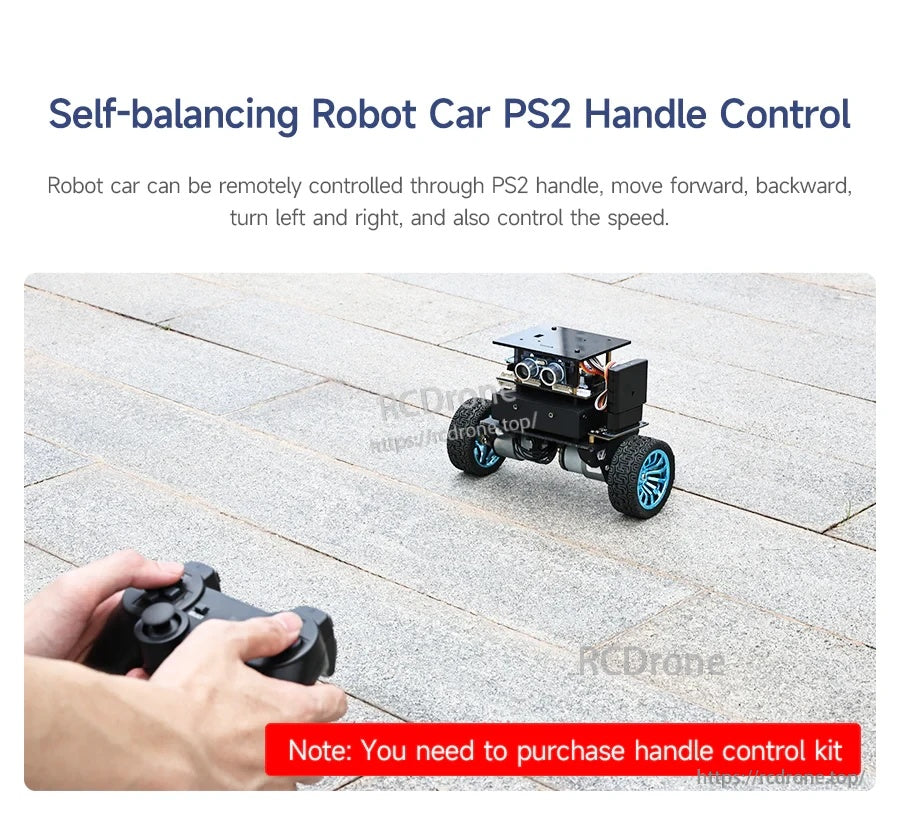
| 5 | 手柄控制 | PS2 無線手柄控制模式 |
| 6 | 紅外線跟蹤 | 四通道紅外線循跡模式 |
| 7 | 高級紅外線跟蹤 | 高級四通道紅外線循跡模式 |
| 8 | K210 QR 識別 | K210 QR 碼識別模式 |
| 9 | K210 路徑追蹤 | K210 路徑追蹤模式 |
| 10 | K210 跟隨 | K210 跟隨模式 |
| 11 | K210 自學 | K210 自學模式 |
| 12 | K210 數字識別 | K210 數字識別模式 |
| 13 | LiDAR 避障 | LiDAR 障礙物避讓模式 |
| 14 | LiDAR 跟隨 | LiDAR 跟隨模式 |
| 15 | LiDAR 守衛 | LiDAR 守衛模式 |
| 16 | LiDAR 巡邏 | LiDAR 巡邏模式 |
| 17 | LiDAR 直線1 | LiDAR 直線-1 模式 |
| 18 | LiDAR 直線2 | LiDAR 直線-2 模式 |
包含內容
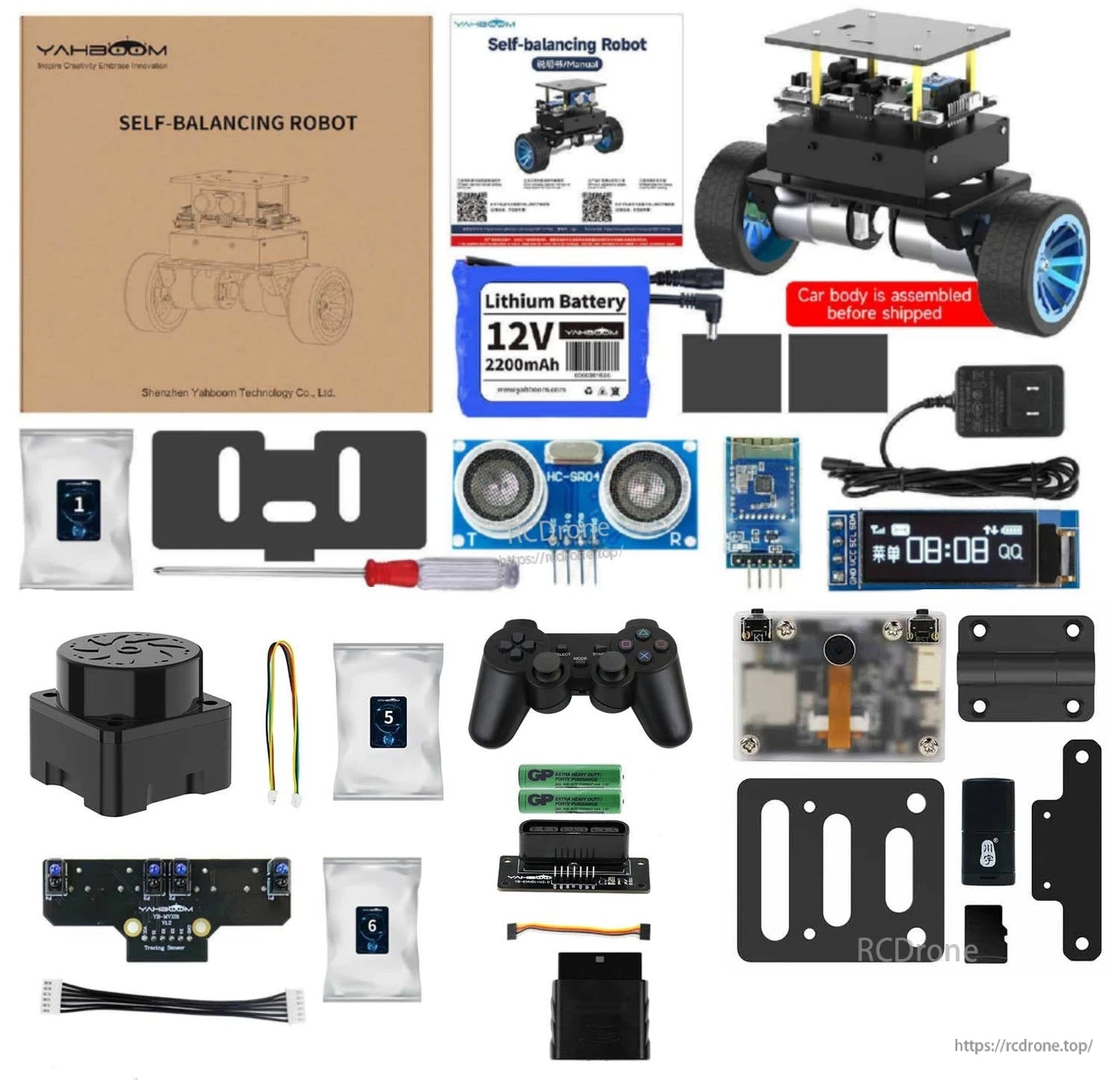
提供各種套件。 以下套件內容如所述提供。
標準套件
- STM32自平衡機器人車
- 超聲波模組
- OLED顯示屏
- BT 5.0模組
標準套件功能描述:PID參數調整、姿態識別、負載平衡、爬坡、手機APP遠程控制、超聲波避障和跟隨功能。
循線套件
- 標準套件
- 4通道循跡模組
- 線材+螺絲包
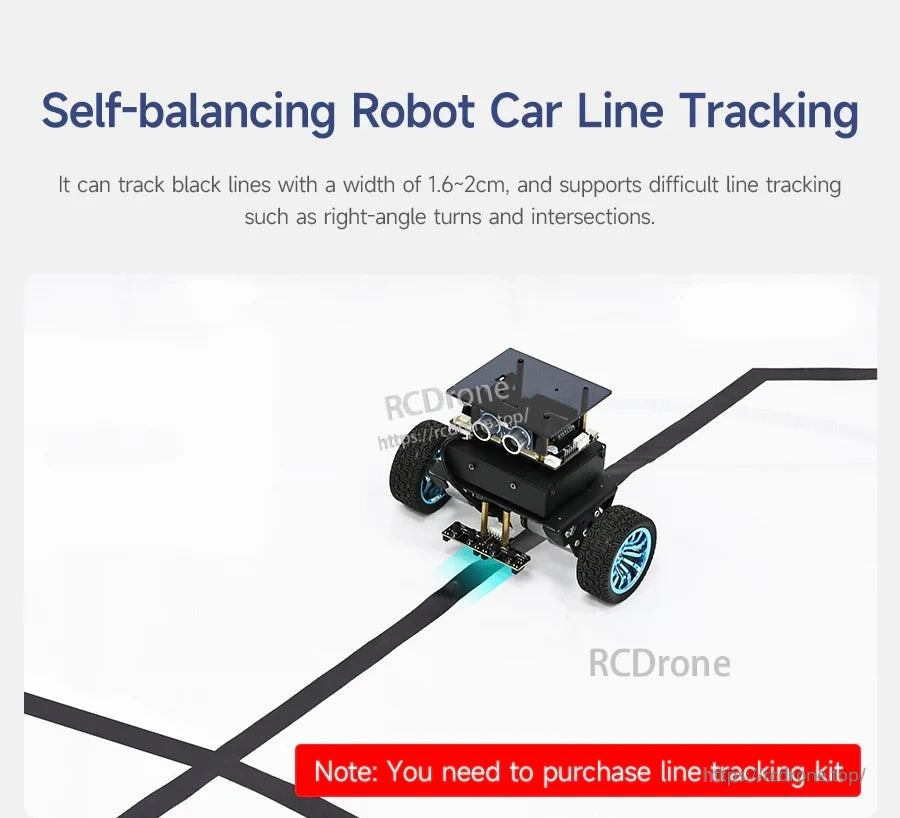
循線套件注意事項:適用於1.6~2CM寬的黑線循跡,並支持高難度循跡如直角轉彎和交叉路口。
手柄控制套件
- 標準套件
- PS2 手柄
- AAA 電池
- PS2 轉接板
- PS2 手柄接收器
- 線材 + 螺絲包
手柄控制套件說明:可實現 2.4G 無線手柄遙控。
K210 視覺套件
- 標準套件
- K210 視覺模組
- 鉸鏈安裝板
- 阻尼鉸鏈板
- K210 轉接器
- 螺絲包
- TF 卡
- 讀卡器
K210 視覺套件說明:可實現視覺識別和互動功能,如視覺跟隨、視覺線路追蹤、QR 碼控制等功能。
Lidar 套件
- 標準套件
- T-MINI PLUS 激光雷達
- 線材 + 螺絲包裝
Lidar 套件說明:基於激光雷達測距功能,可以實現激光雷達防護、避障、跟隨、巡邏等玩法。
如需幫助選擇合適的套件和配件,請聯繫[email protected] or訪問https://rcdrone.top/.
應用
- 機器人教育和課堂演示
- 控制算法學習(PID / LQR)和參數調試
- 傳感器擴展實驗(超聲波、紅外線循跡、2.4G 無線手柄, K210 視覺模組, 激光雷達)
手冊
教程鏈接
代碼分析視頻教程,附英文字幕(如列表所示)
-
環境構建和開發
- 1.1 MDK-ARM installation.mp4
- 1.2 STM32CubeIDE installation.mp4
- 1.3 通用驅動installation.mp4
- 1.4 下載program.mp4
- 1.5 MDK-ARM 項目usage.mp4
- 1.6 程序simulation.mp4
- 1.7 VSCode install.mp4
-
STM32 擴展課程
- 3.1 電池電壓檢測 (ADC).mp4
- 3.2 超聲波模組-測距 (TIM).mp4
- 3.3 馬達驅動+編碼器 (TIM).mp4
- 3.4 OLED 數據顯示(I2C).mp4
- 3.5 MPU6050-數據讀取 (I2C).mp4
- 3.6 藍牙模組-數據讀取 (USART).mp4
- 3.7 2.4G 手柄-控制模組讀取 (SPI).mp4
- 3.8 跟踪模組-讀取狀態 (GPIO).mp4
- 3.9 CCD 模組-數據讀取 (ADC).mp4
- 3.10 電磁模組-數據讀取 (ADC).mp4
- 3.11 K210 模組-串行通信 (USART).mp4
- 3.12 Tmini-Plus 激光雷達-數據讀取 (USART).mp4
-
機器人車 PID 控制課程
- 4.1 PID 基礎 concept.mp4
- 4.2 PID 範例 analysis.mp4
- 4.3 P, PI, PD 控制器 theory.mp4
- 4.4 位置 PID.mp4
- 4.5 增量 PID.mp4
- 4.6 級聯 PID.mp4
- 4.7 平衡原理 car.mp4
- 4.8 車輛直立控制 (PD).mp4
- 4.9 車速控制 (PI).mp4
- 4.10 車輛轉向控制 (PD).mp4
- 4.11 獲取角度和角速度 (DMP 演算法).mp4
- 4.12 獲取角度和角速度 (卡爾曼濾波演算法).mp4
- 4.13 獲取角度和角速度 (互補濾波 ...)
-
機器人車基礎課程
- 5.1 車輛參數 adjustment.mp4
- 5.2 超聲波障礙 avoidance.mp4
- 5.3 超聲波 follow.mp4
- 5.4 藍牙遙控 control.mp4
- 5.5 負載 balance.mp4
-
機器人車進階課程
- 6.1 4通道 tracking.mp4
- 6.2 4通道追蹤 avoid.mp4
- 6.3 2.4G 手柄 control.mp4
- 6.4 CCD tracking.mp4
- 6.5 CCD 追蹤 avoid.mp4
- 6.6 電磁 tracking.mp4
- 6.7 K210-QR 碼 recognition.mp4
- 6.8 K210-色線 tracking.mp4
- 6.9 K210-色彩 follow.mp4
- 6.10 K210-自我 learning.mp4
- 6.11 K210-數字 recognition.mp4
- 6.12 激光雷達 avoid.mp4
- 6.13 激光雷達 guard.mp4
- 6.14 激光雷達 follow.mp4
- 6.15 激光雷達 patrol.mp4
- 6.16 激光雷達牆跟踪-直線 line.mp4
- 6.17 激光雷達牆跟踪-多重 walls.mp4
- 6.18 DIY 自動駕駛 car.mp4
詳情
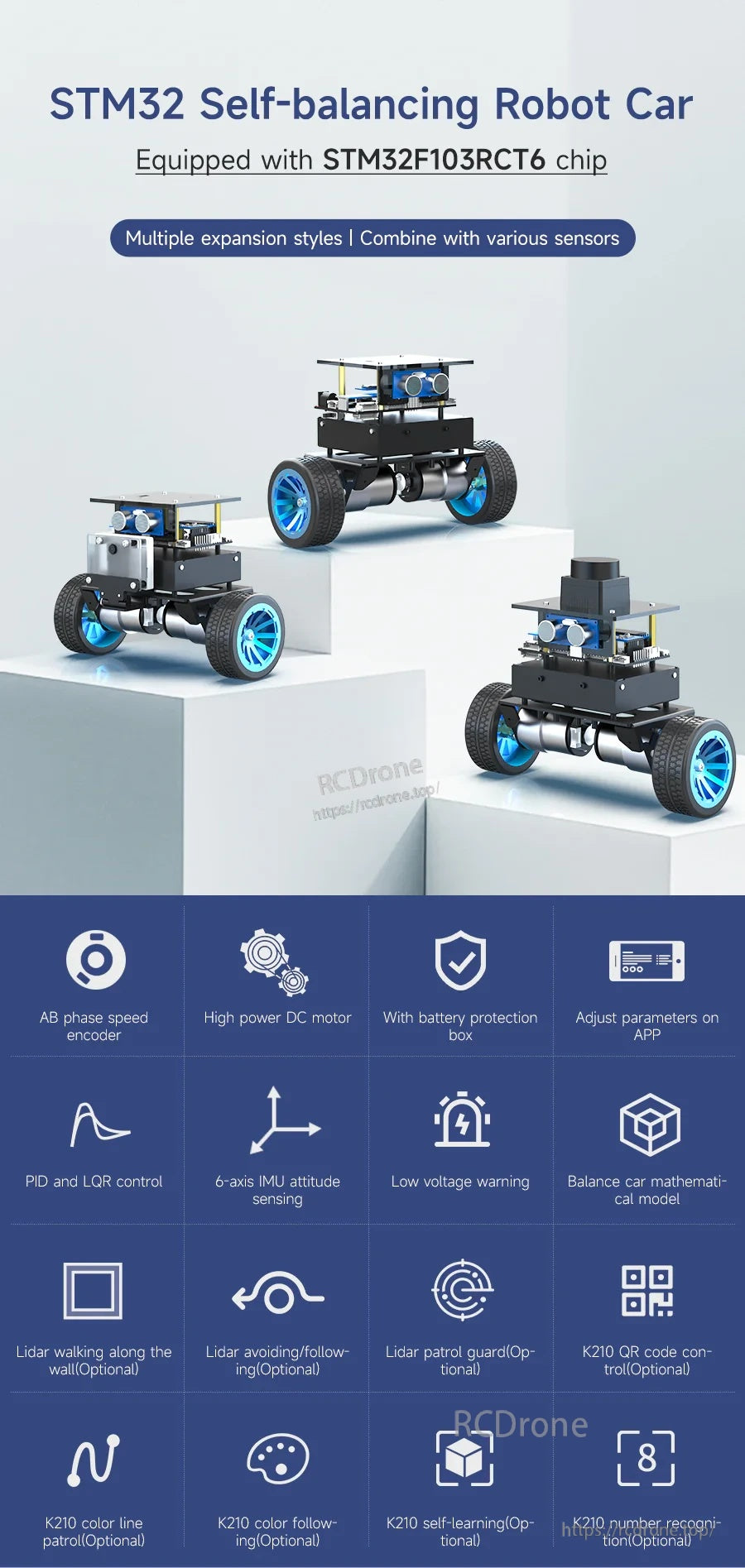
一個基於STM32的緊湊型自平衡機器人平台,專為控制系統學習、調整和傳感器擴展而設計。
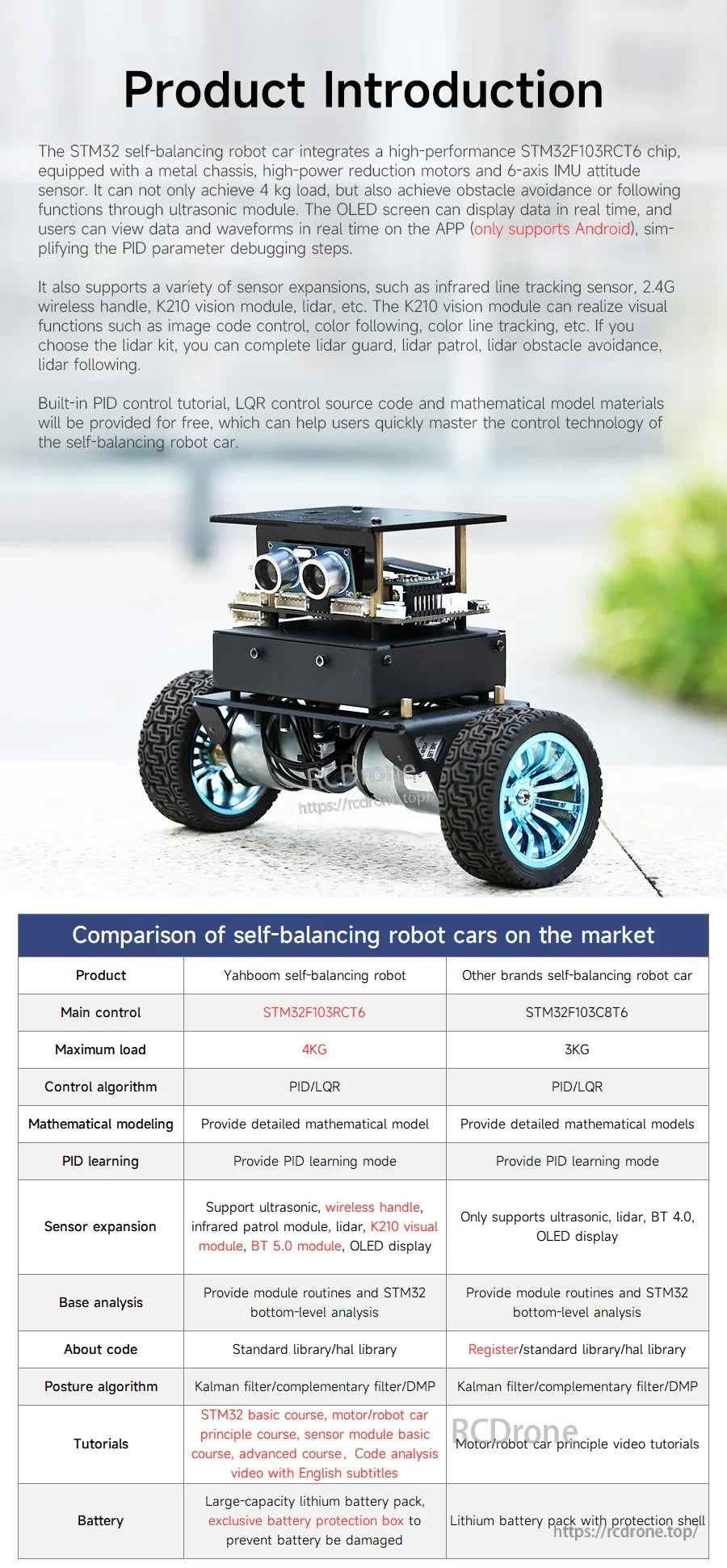
平台的控制硬件、傳感器和核心平衡功能概述,以及市場比較以便快速選擇。
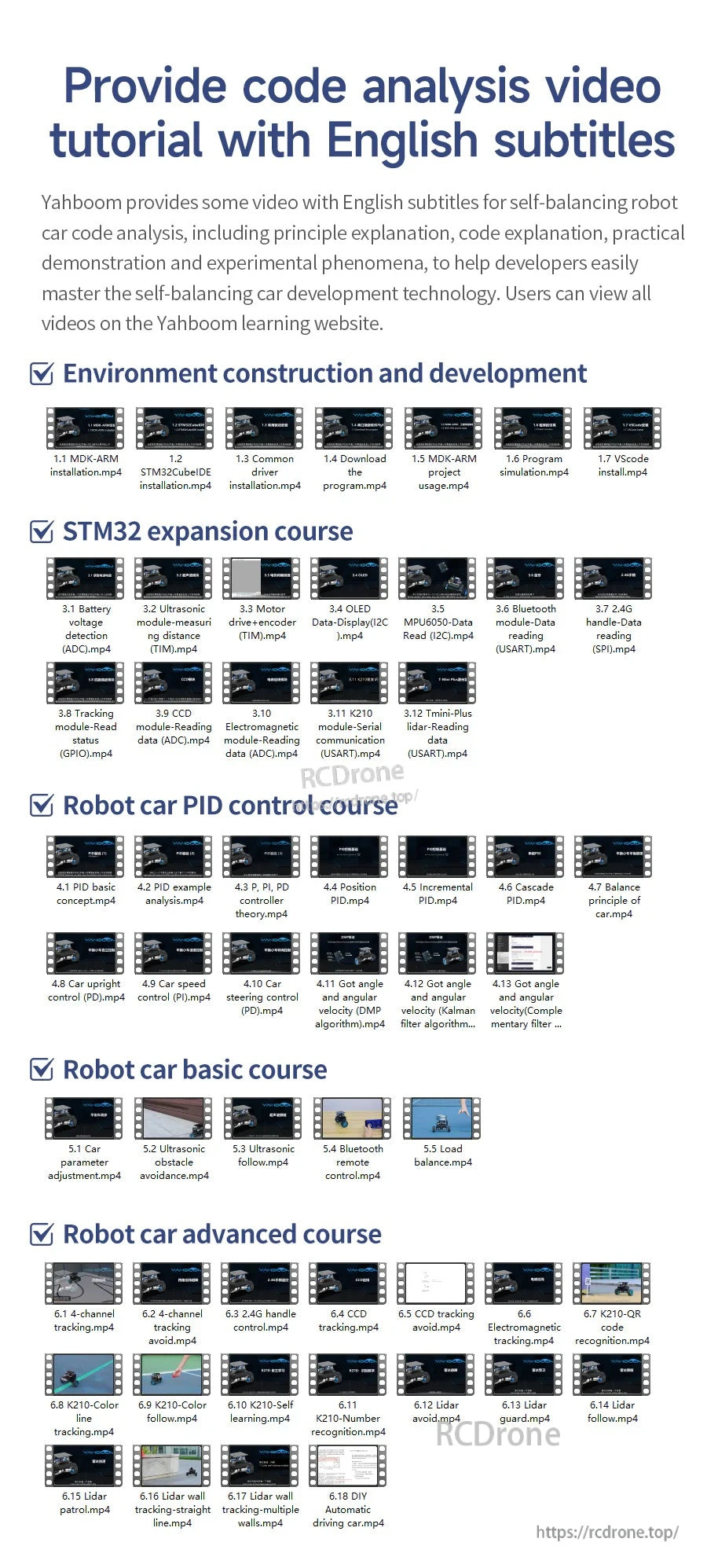
逐步學習資源涵蓋環境設置、擴展課程、PID調整和進階機器人課程。
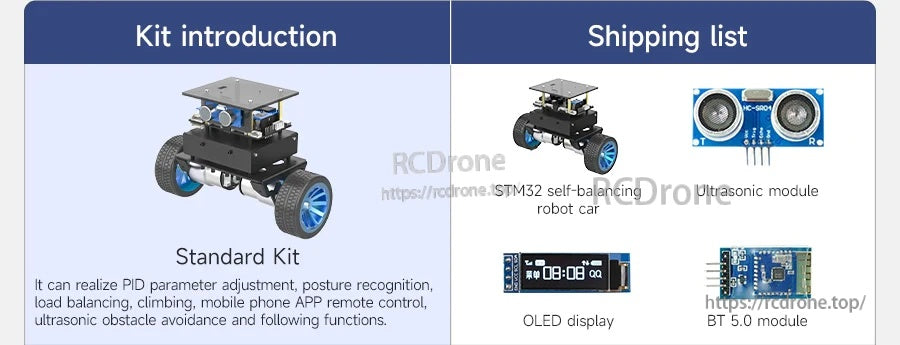
選擇標準套件以獲得核心平衡加上超聲波功能和設備狀態顯示。
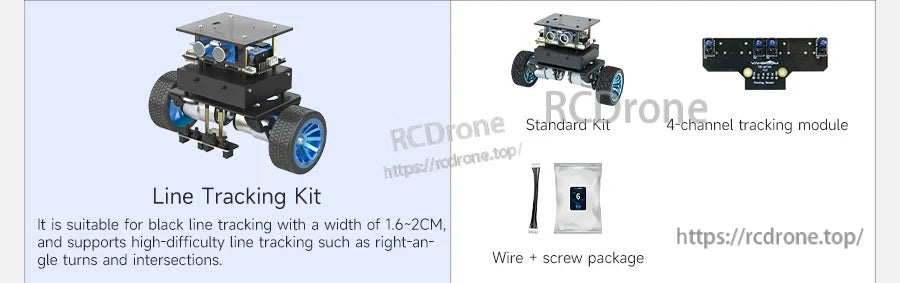
添加線路跟踪套件以跟隨黑色膠帶路線並處理直角轉彎和交叉路口。
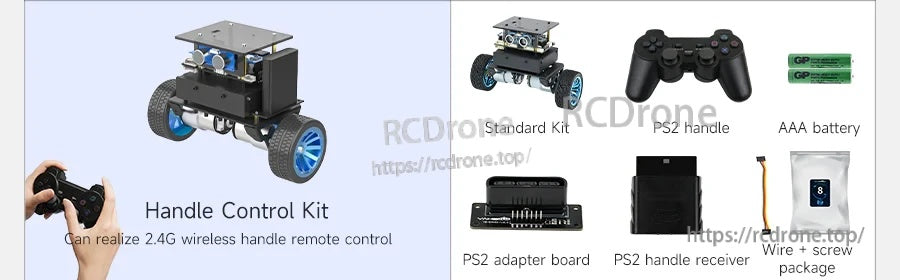
手柄控制套件支持無線PS2風格的遠程駕駛和速度控制。
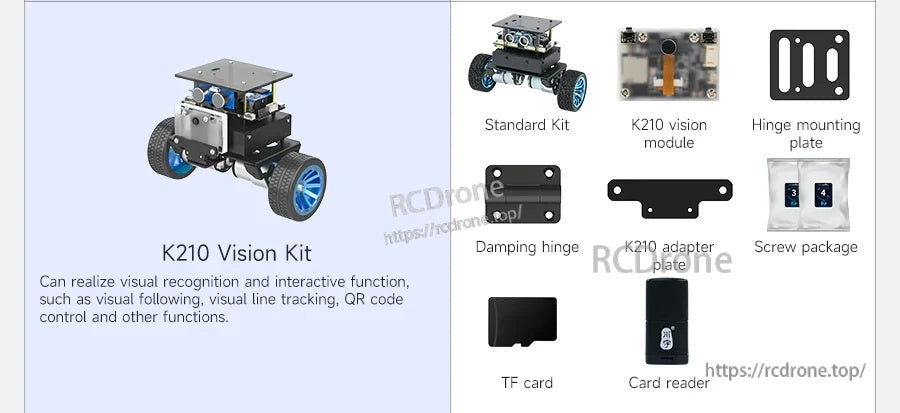
K210視覺套件開啟AI風格的互動,如QR控制、顏色跟踪和視覺跟隨。
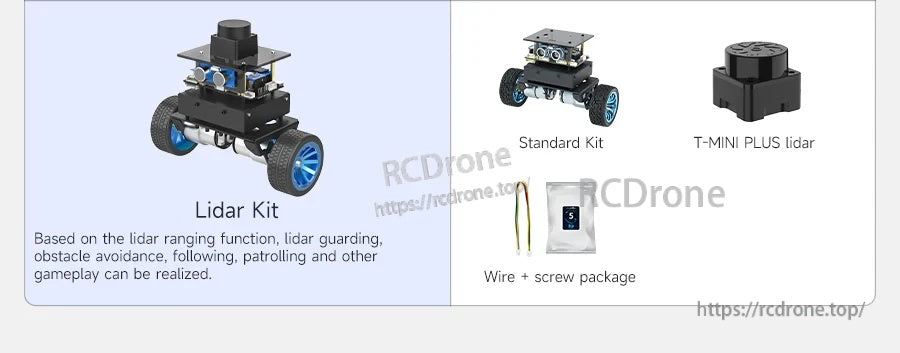
升級到激光雷達以獲得先進的導航行為,如跟隨、避障和守護模式。
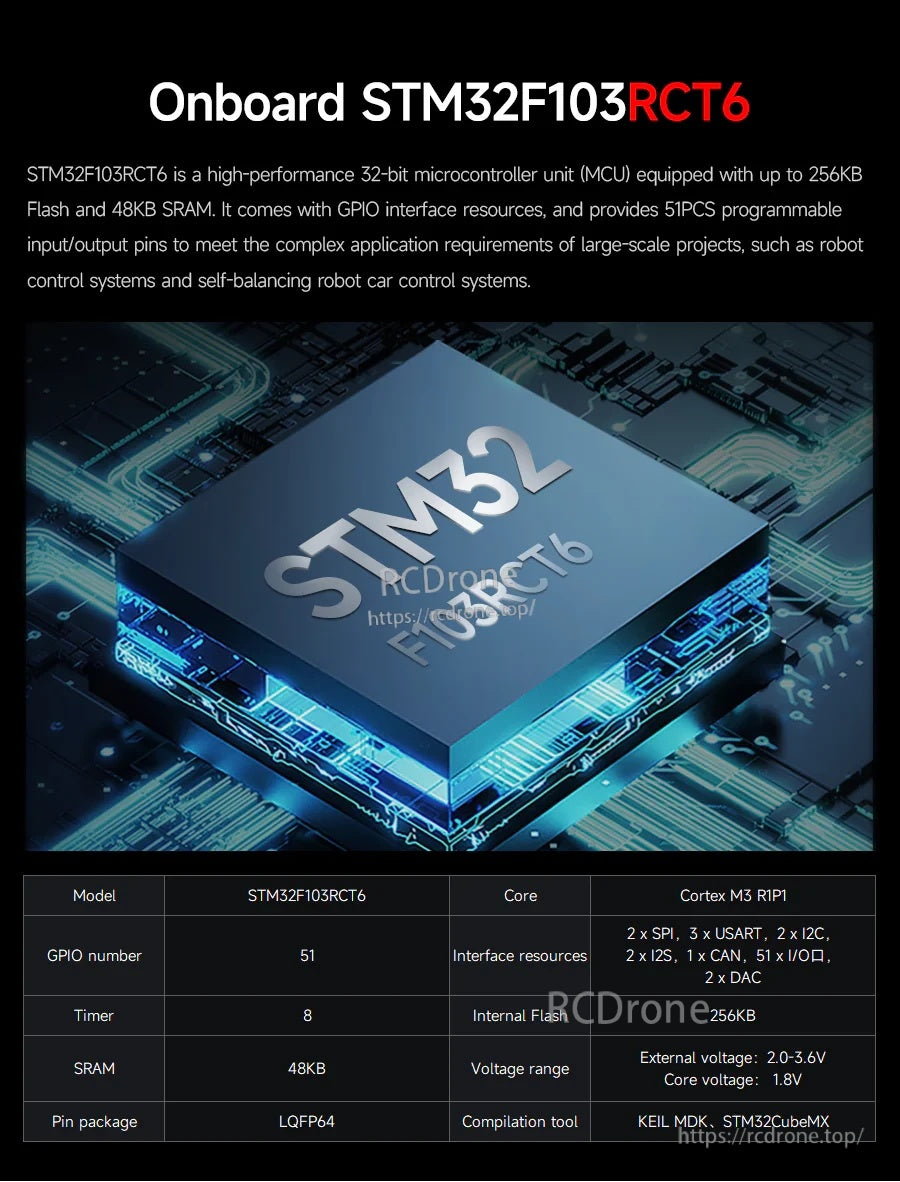
基於STM32F103RCT6 MCU構建,以支持實時平衡控制和豐富的外圍擴展。
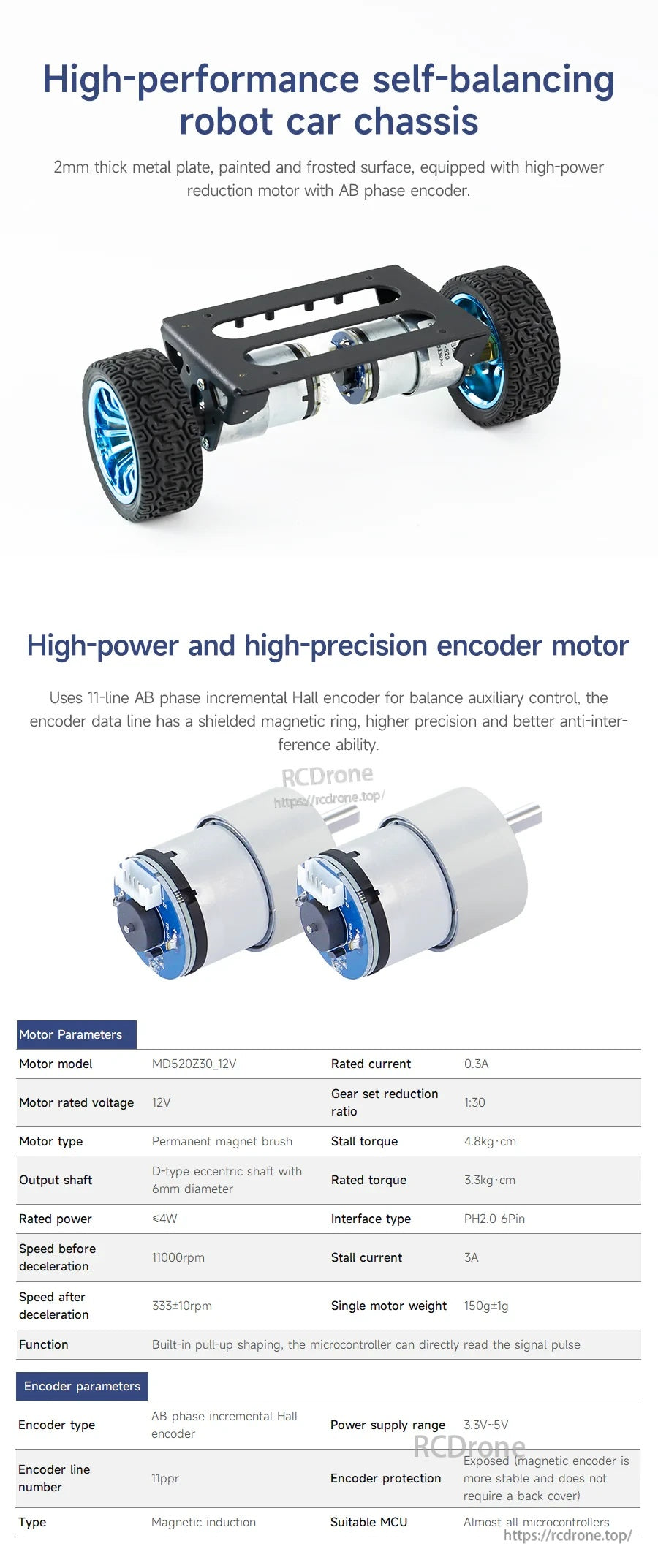
堅固的金屬底盤和編碼器電機提供穩定的反饋,用於平衡控制和速度測量。

電機結構細節和接線指導有助於組裝、故障排除和控制實驗。
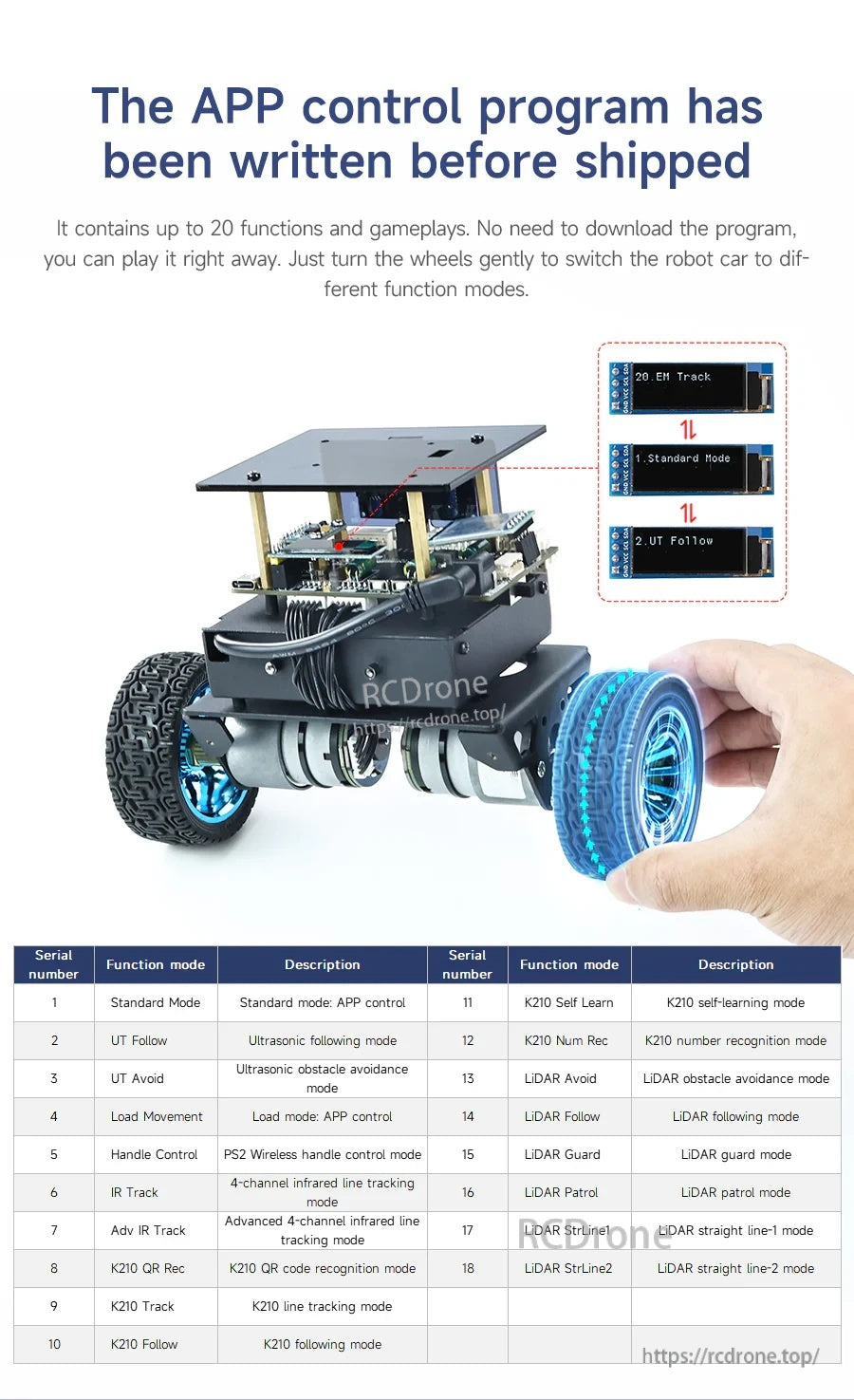
Android 應用程式支持參數調整和在多個運動和傳感器模式之間切換。
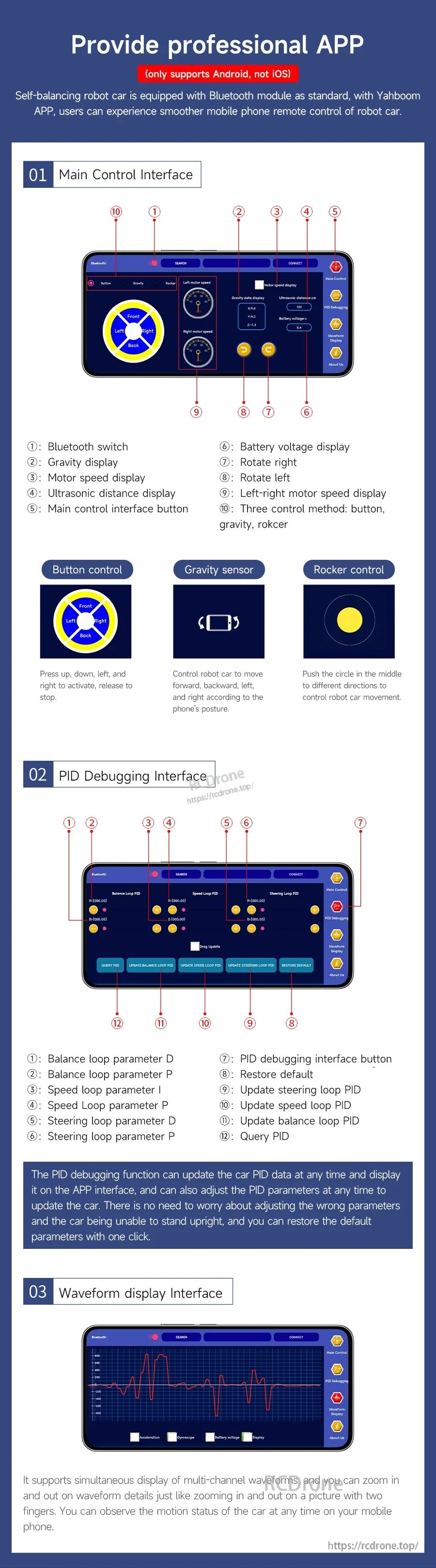
控制、PID 調整和波形可視化被組織到專用的應用程式屏幕中,以加快調試速度。

核心功能包括姿態識別、最高 4 公斤負載能力、攀爬能力、超聲波避障和 OLED 顯示。
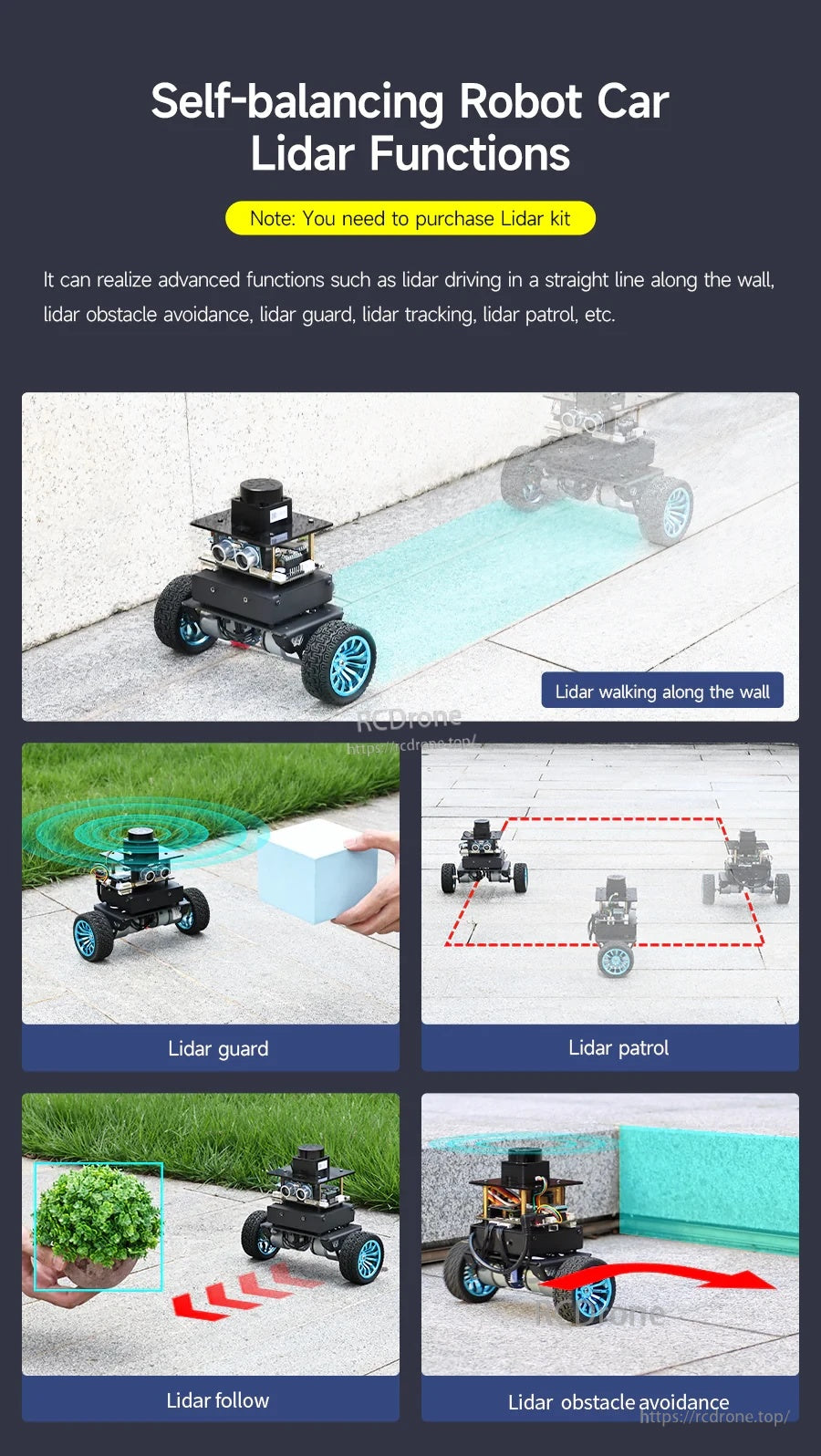
Yahboom STM32 自平衡機器人車支持基於 LiDAR 的循牆、避障、巡邏、守衛和跟隨行為。
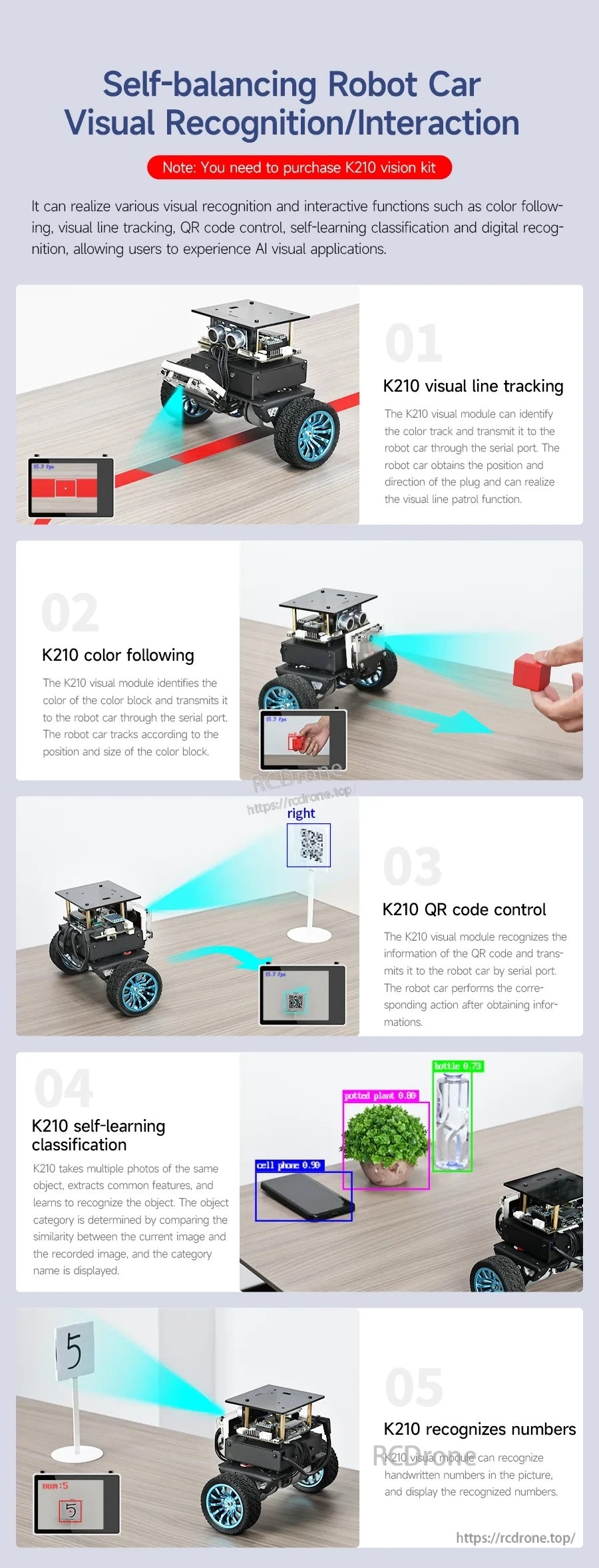
Yahboom STM32 自平衡機器人車支持線路跟踪、顏色跟隨、QR 碼控制和視覺識別任務,用於互動項目。
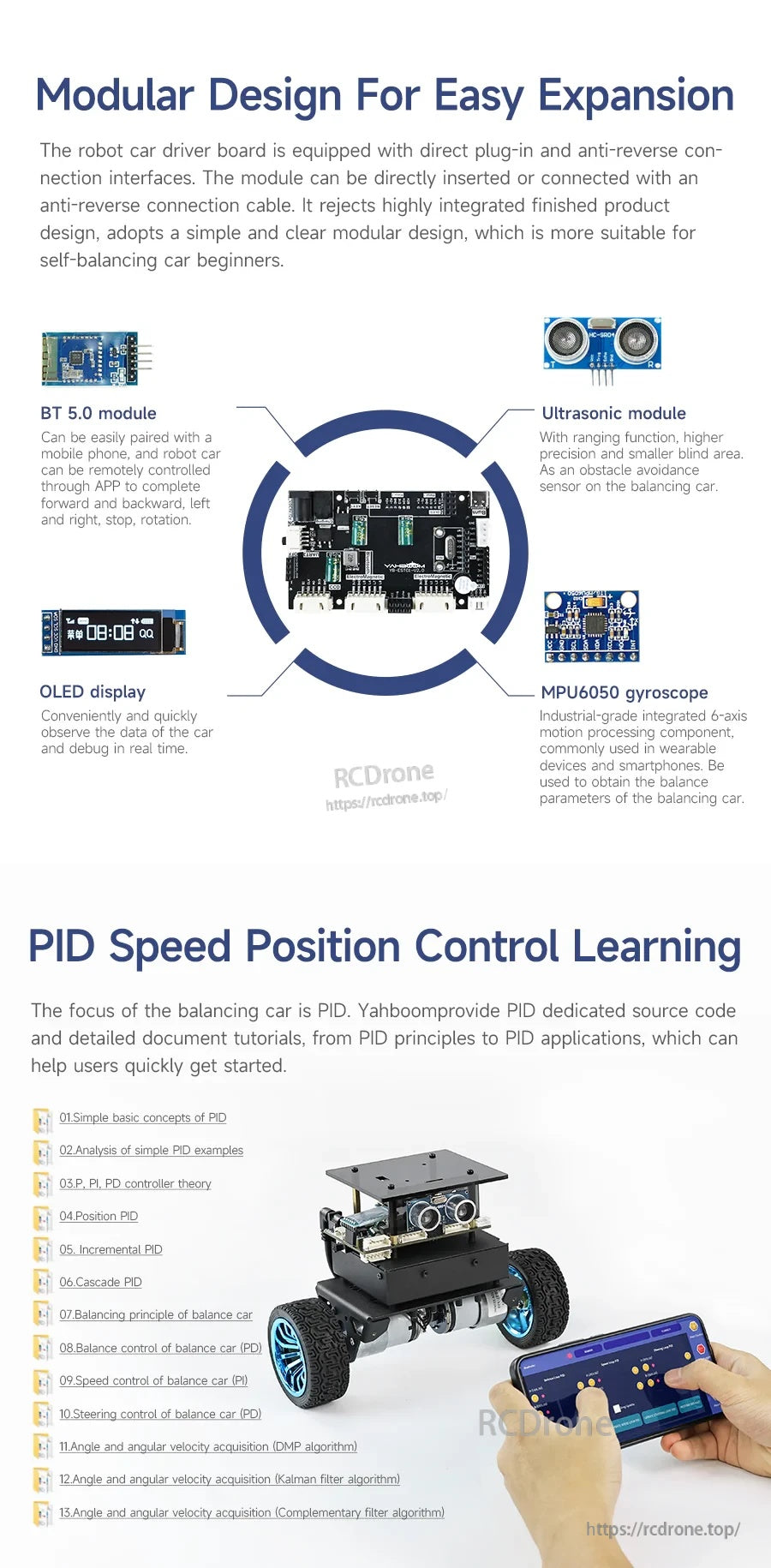
Yahboom STM32 自平衡機器人使用模組化控制板,配備藍牙、超聲波感應、OLED 顯示屏和 MPU6050 陀螺儀模塊,用於調整和 PID 學習。
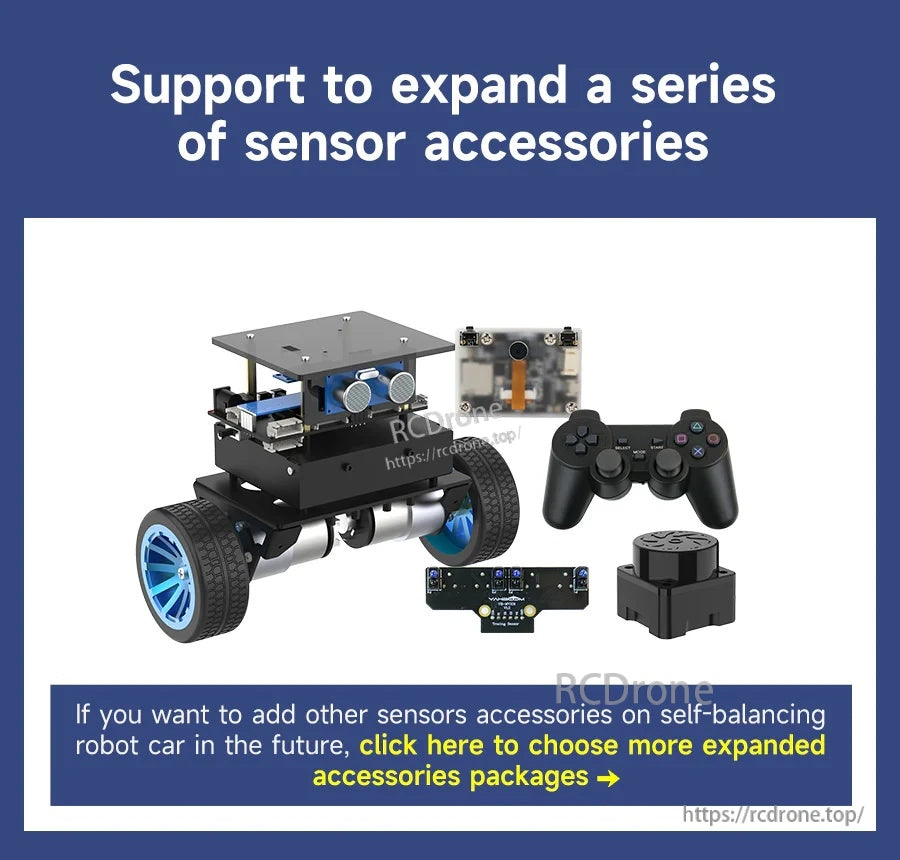
Yahboom STM32 自平衡機器人套件支持附加傳感器配件,並包括兩輪底盤、攝像頭模塊和遊戲手柄式控制器。
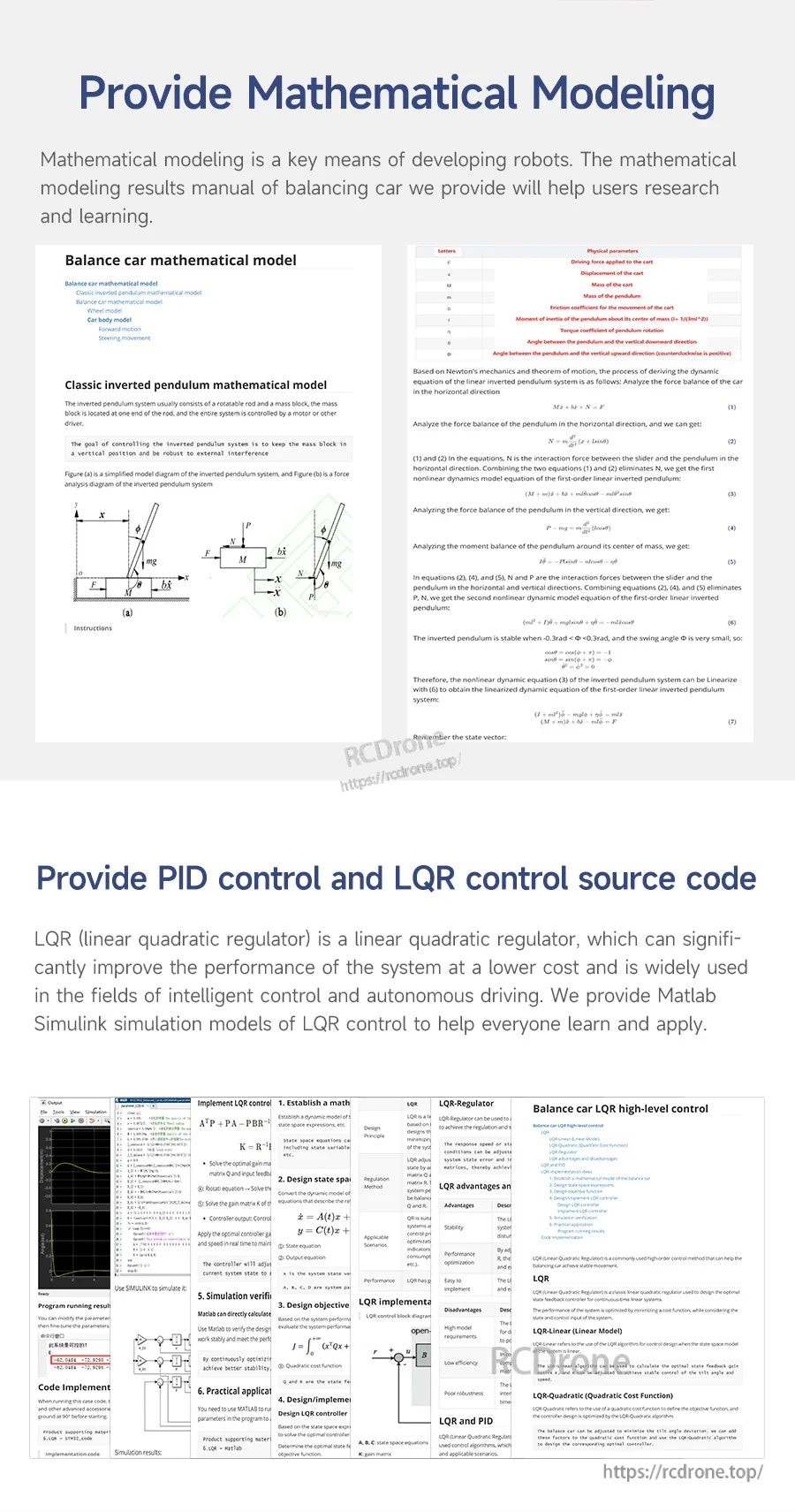
數學建模筆記和 PID/LQR 控制源代碼支持 STM32 自平衡機器人的調整和控制開發。
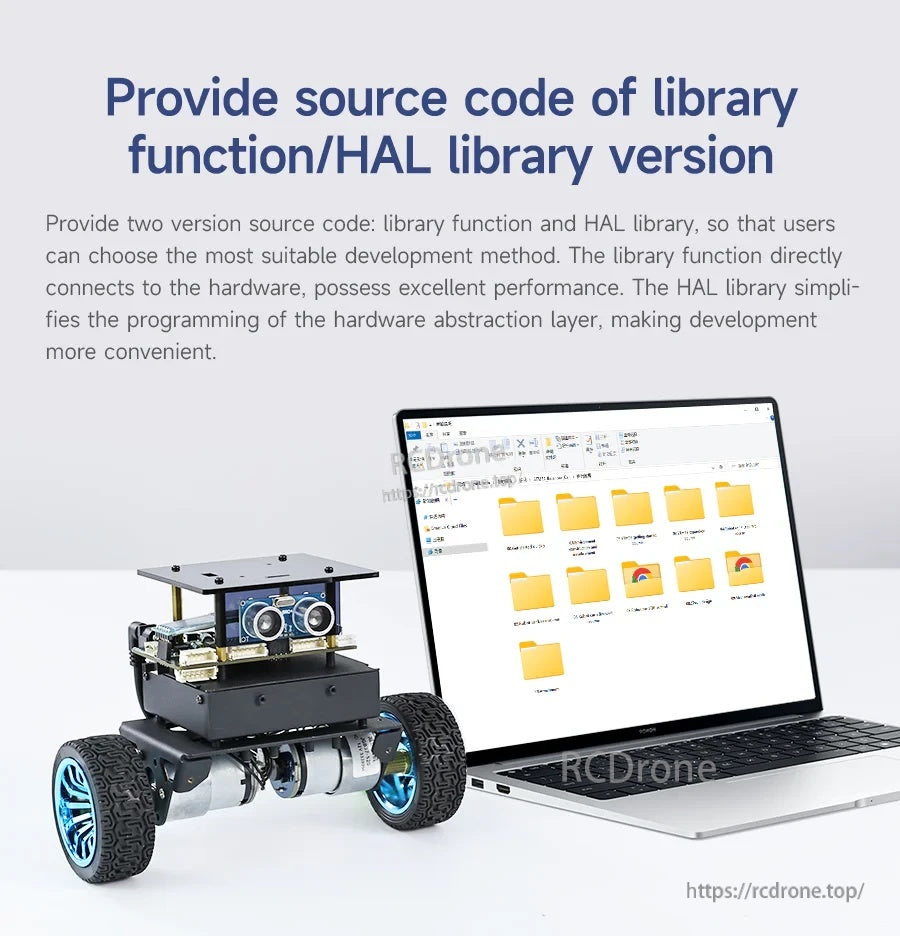
Yahboom STM32 自平衡機器人配有可下載的源代碼文件夾,包括庫函數和 HAL 版本以供開發。

Yahboom STM32 自平衡機器人包括詳細的功能開發手冊和 BSP 驅動數據庫文檔,以支持編碼和設置。
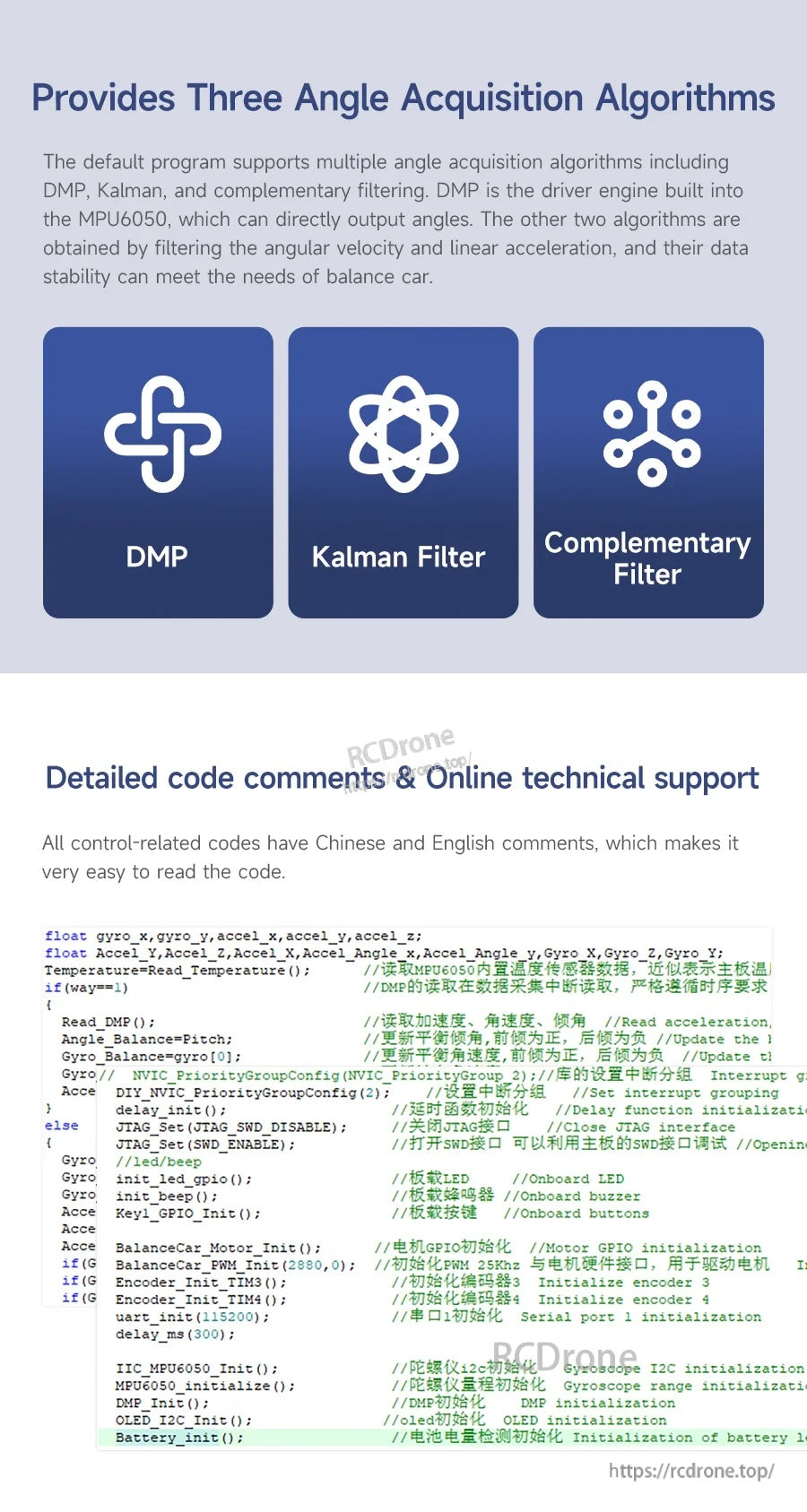
Yahboom STM32 自平衡機器人代碼支持 DMP、卡爾曼濾波器和互補濾波器選項,用於角度獲取和調整。
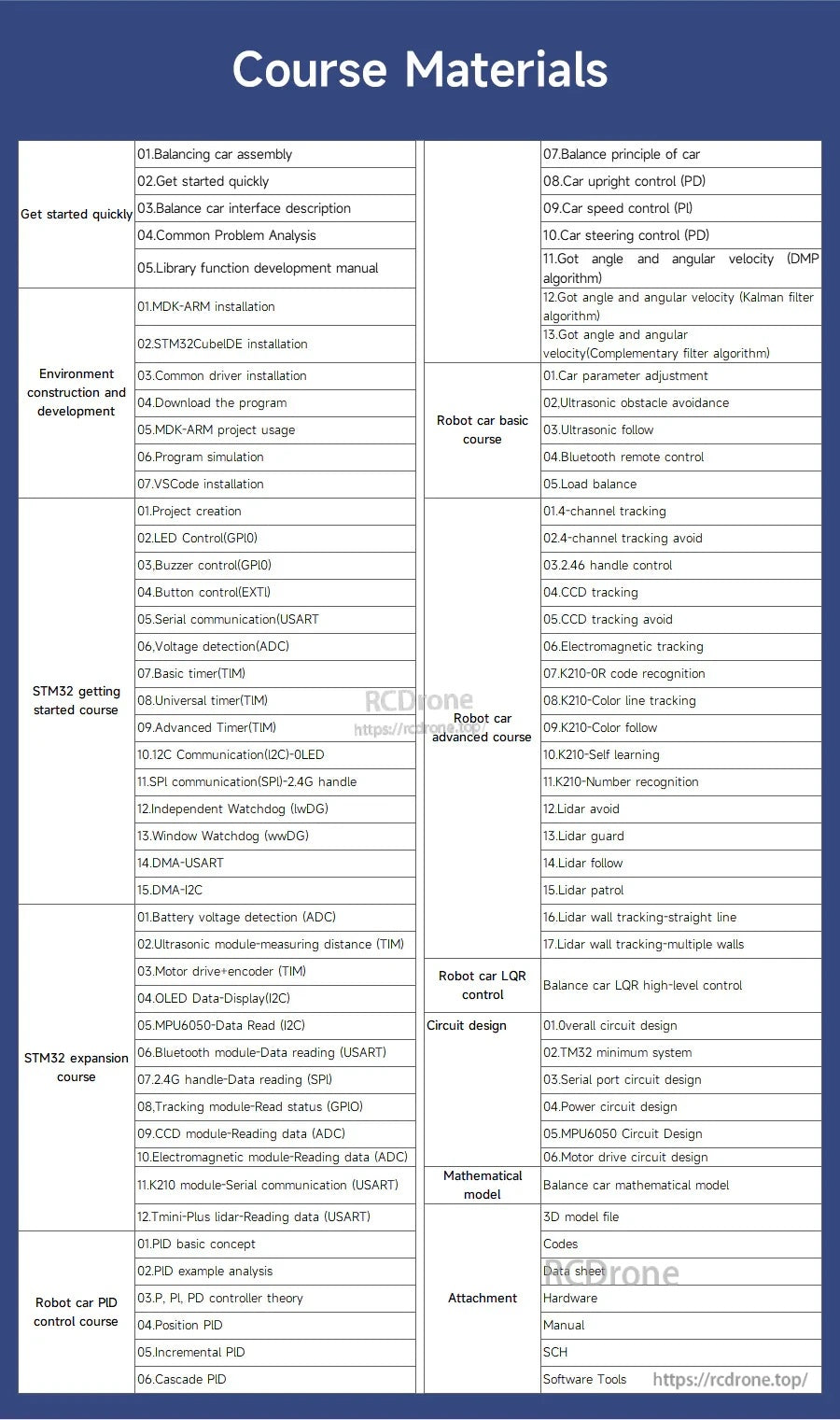
Yahboom STM32 自平衡機器人課程材料概述了組裝、STM32CubeIDE 編程和 PID 調整的逐步課程。

Yahboom STM32 自平衡機器人文檔包括組織良好的教程文件夾和視頻課程,以指導設置和編程。
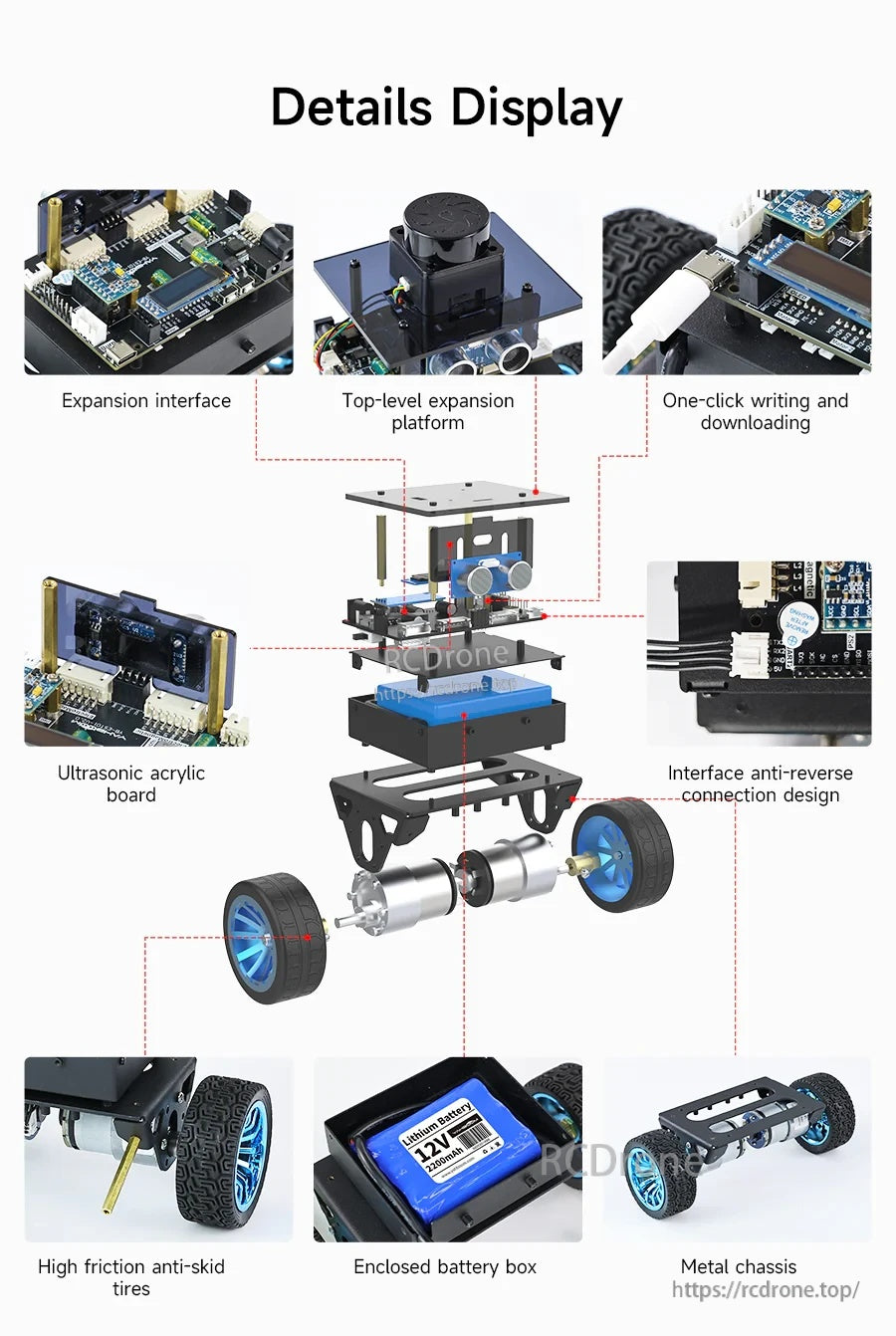
STM32 自平衡機器人使用金屬底盤,配有封閉的電池盒、防滑輪以及模塊化擴展和傳感器板,便於組裝。
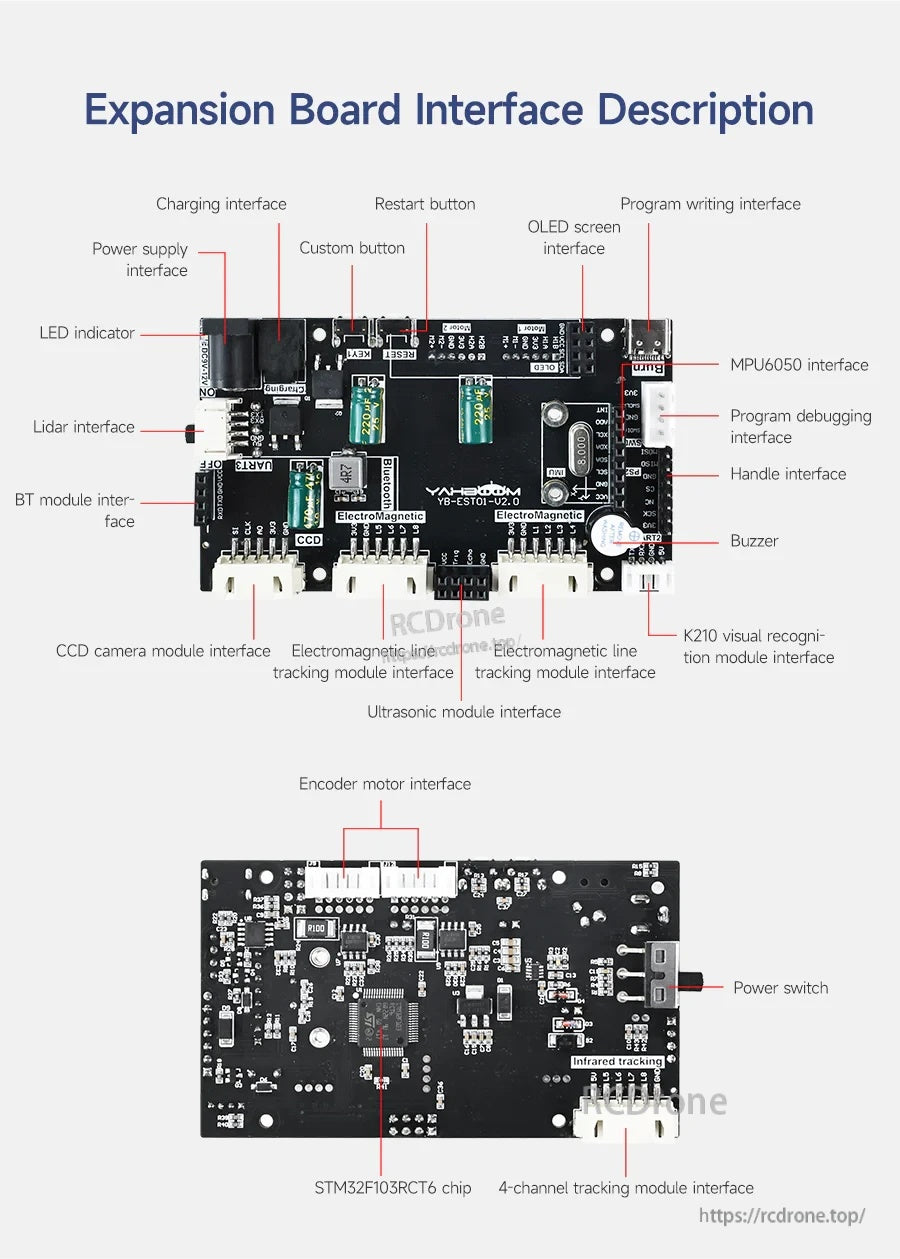
STM32 機器人擴展板使用清晰標記的連接器,用於電源、電機、傳感器(MPU6050、超聲波、激光雷達)和編程,以簡化佈線和設置。
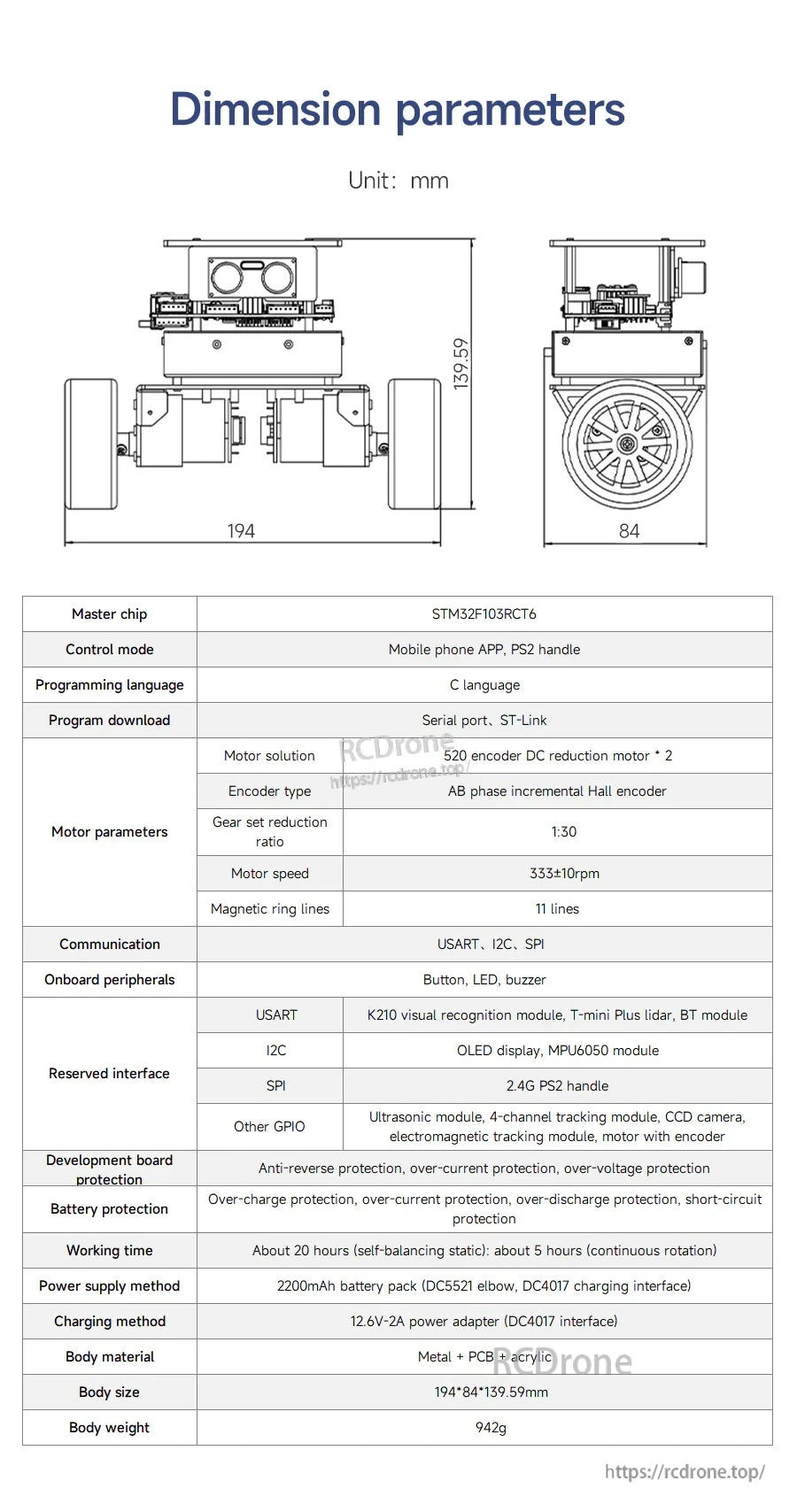
Yahboom STM32 自平衡機器人使用 STM32F103C8T6 控制器並列出 7。4V 2200mAh 電池以及關鍵尺寸以便於安裝規劃。
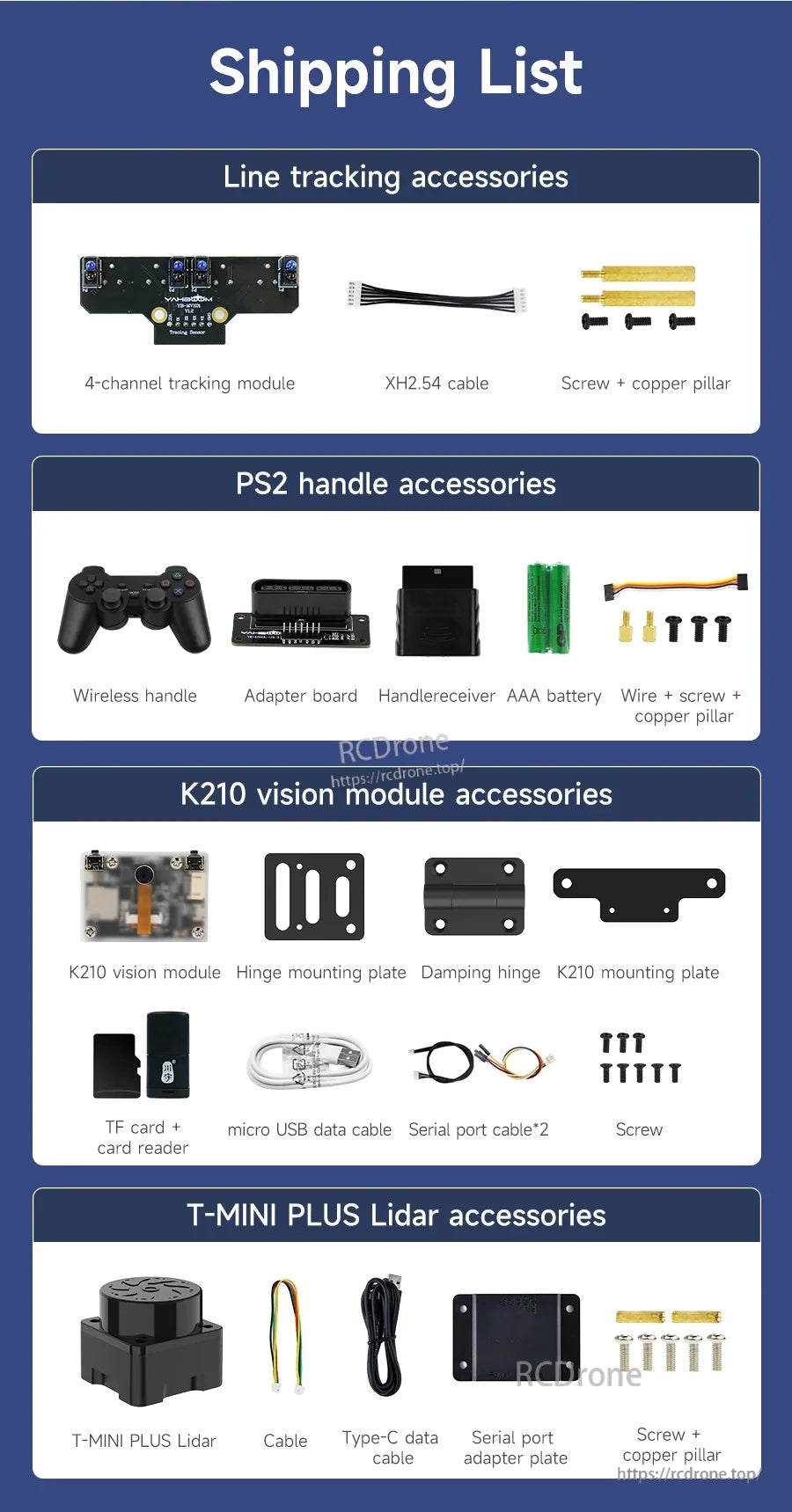
Yahboom STM32 自平衡機器人套件包括循跡配件、PS2 無線手柄套件、K210 視覺模組零件和 T-MINI PLUS LiDAR 配件以供擴展。