مجموعة تطوير NVIDIA Jetson Nano 4GB B01 للذكاء الاصطناعي الطرفي/ROS - معالج A57 بسرعة 1.43GHz، وحدة معالجة رسومات Maxwell بـ128 نواة
مجموعة تطوير NVIDIA Jetson Nano 4GB B01 للذكاء الاصطناعي الطرفي/ROS - معالج A57 بسرعة 1.43GHz، وحدة معالجة رسومات Maxwell بـ128 نواة
Yahboom
سعر عادي
$491.80 USD
سعر عادي
سعر البيع
$491.80 USD
سعر الوحدة
per
Taxes included.
الشحن محسوب عند السداد.
تعذر تحميل توفر الالتقاط


نظرة عامة
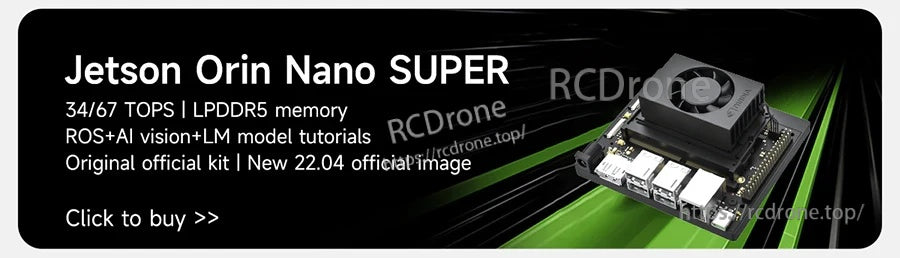
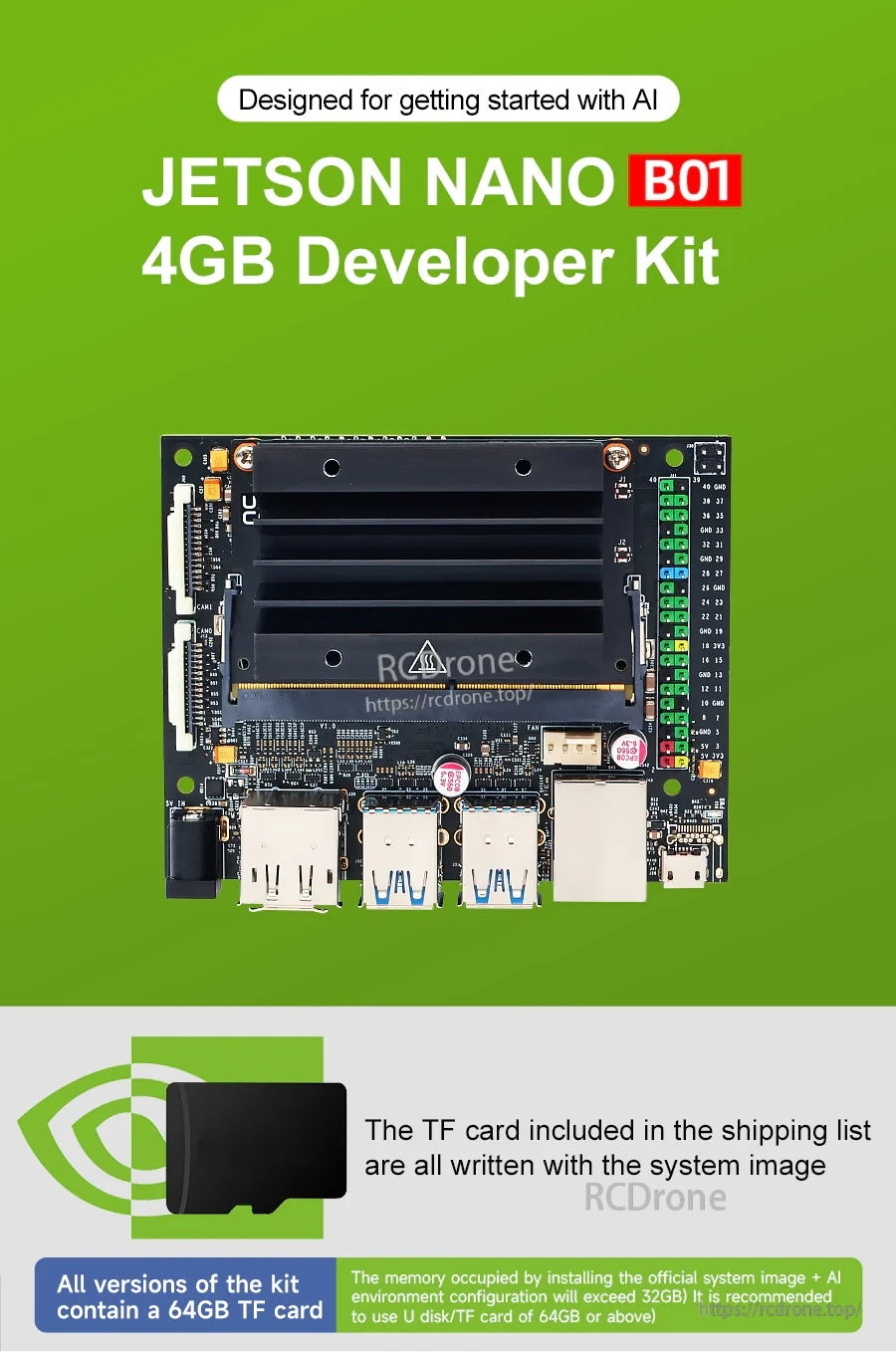
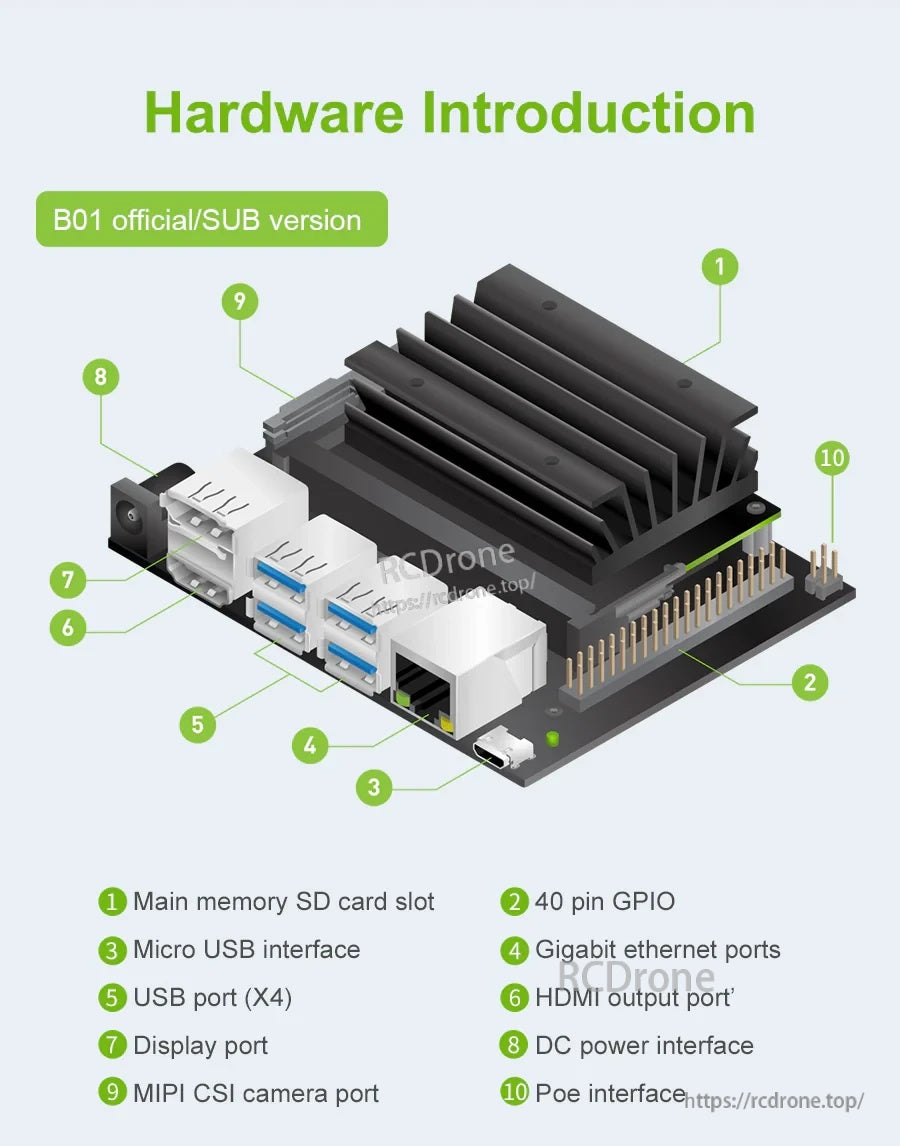
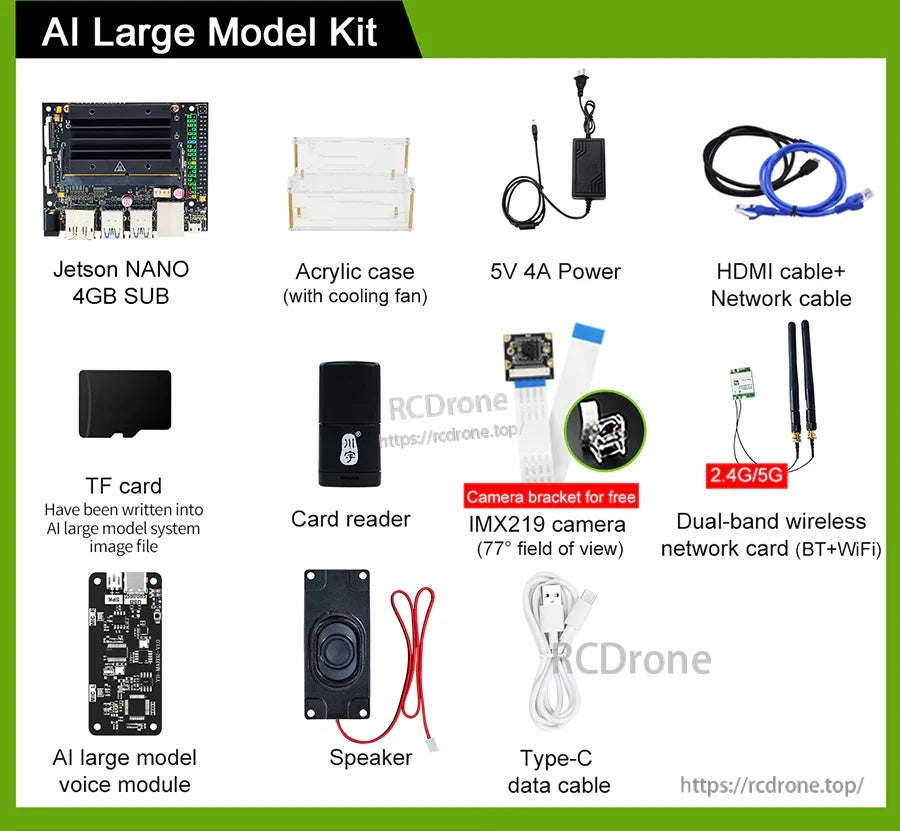
مجموعة تطوير Jetson NANO 4GB B01 AI Large Model Developer Kit هي مجموعة تطوير مدمجة (منصة لوحة تطوير) مصممة للبدء في الذكاء الاصطناعي. يمكنها تشغيل شبكات عصبية متعددة بالتوازي لتطبيقات مثل تصنيف الصور، واكتشاف الأجسام، والتجزئة، ومعالجة الكلام، ويمكن تشغيلها بقدرة تصل إلى 5 واط فقط.
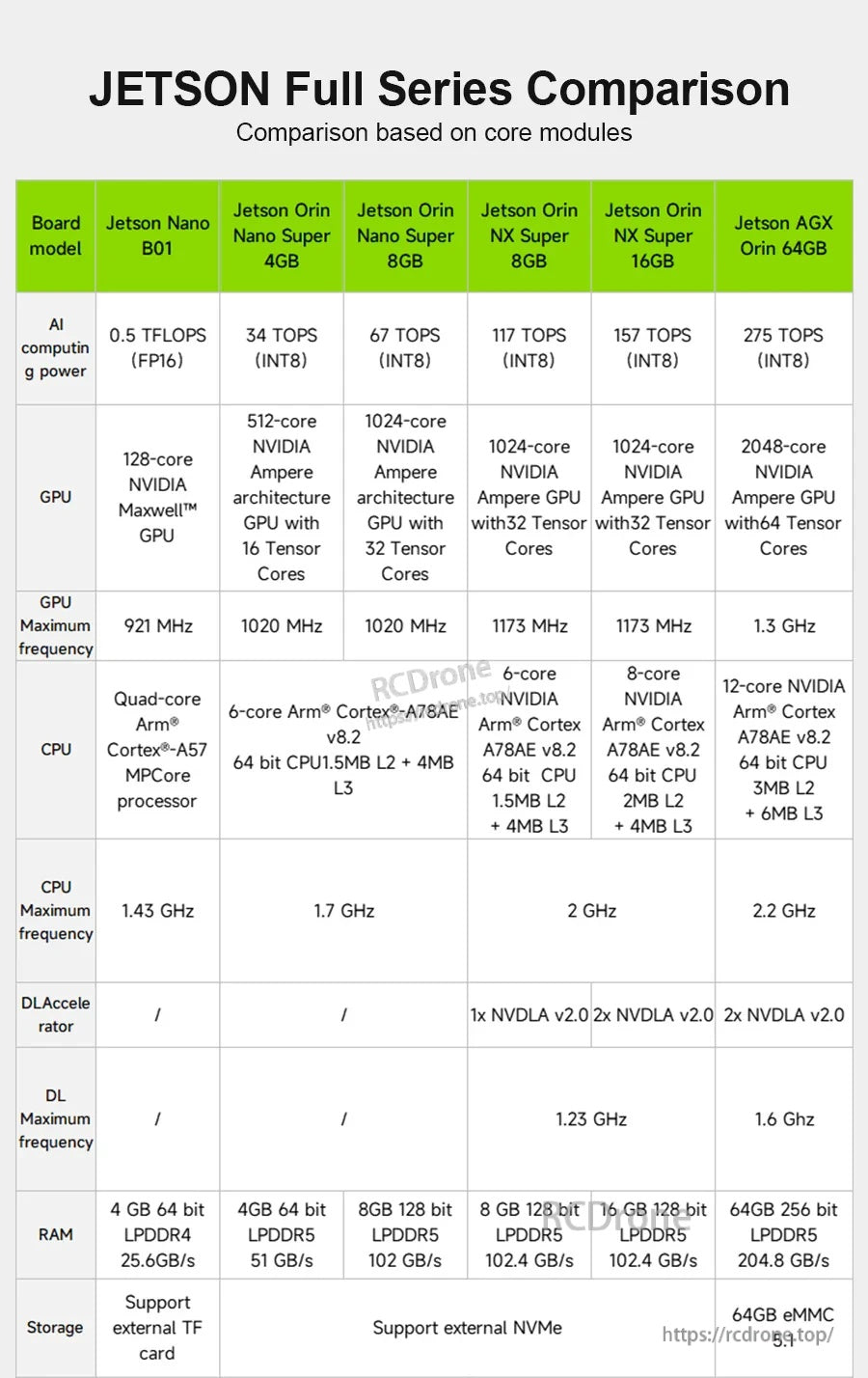
تستخدم منصة Jetson Nano هذه معالج ARM Cortex-A57 رباعي النواة ووحدة معالجة رسومات Maxwell بـ 128 نواة مع ذاكرة LPDDR بسعة 4 جيجابايت، وتدعم أطر عمل وخوارزميات الذكاء الاصطناعي الشهيرة مثل TensorFlow، وPyTorch، وCaffe/Caffe2، وKeras، وMXNet.
الميزات الرئيسية
- المعالج: رباعي النواة ARM A57 @ 1.43 جيجاهرتز
- وحدة معالجة الرسومات: 128 نواة Maxwell
- قوة الحوسبة للذكاء الاصطناعي: 473 GFLOPS (كما ورد أيضًا 472 GFLOP في النص المقدم)
- تشغيل منخفض الطاقة: يصل إلى 5 واط (كما يظهر أيضًا 5 واط–10 واط في المواد المقارنة المقدمة)
- ترميز الفيديو: 4K @ 30; 4x 1080p @ 30; 9x 720p @ 30 (H.264/H.265)
- فك تشفير الفيديو: 4K @ 60; 2x 4K @ 30; 8x 1080p @ 30; 18x 720p @ 30 (H.264/H.265)
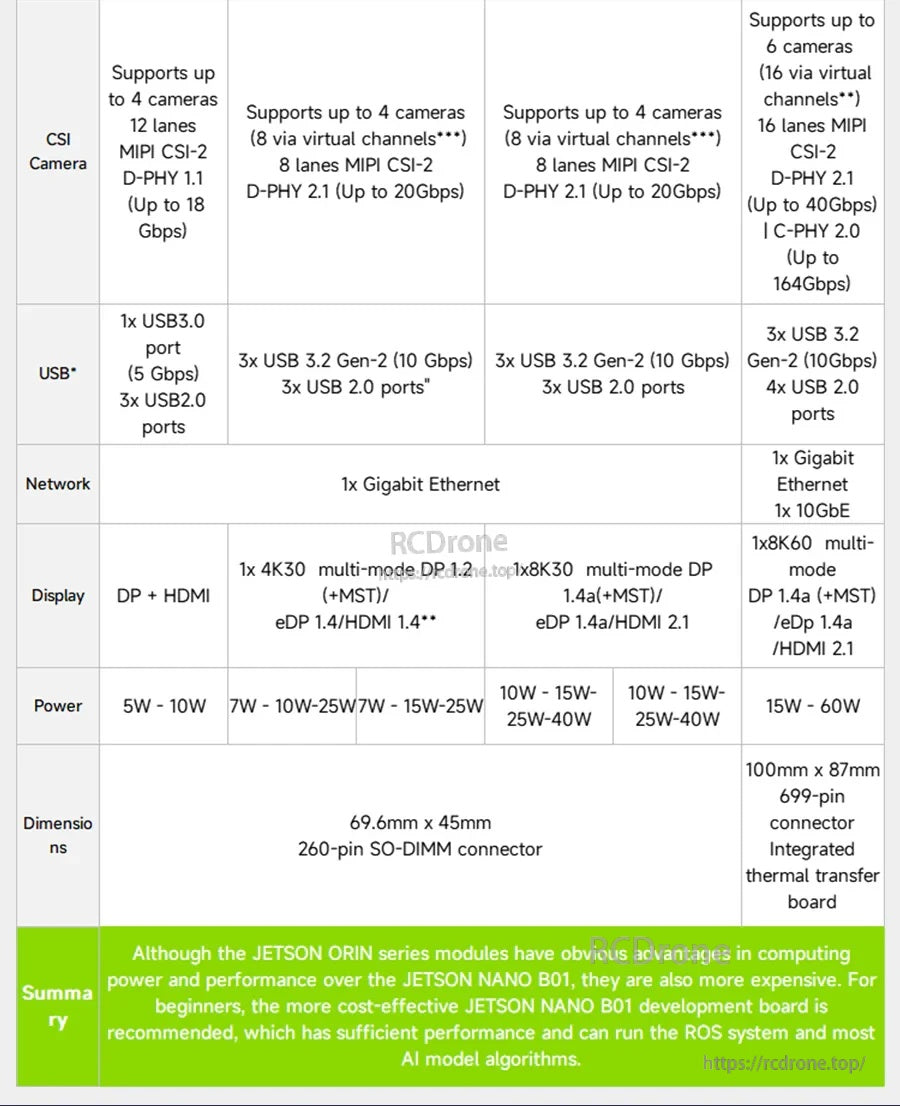
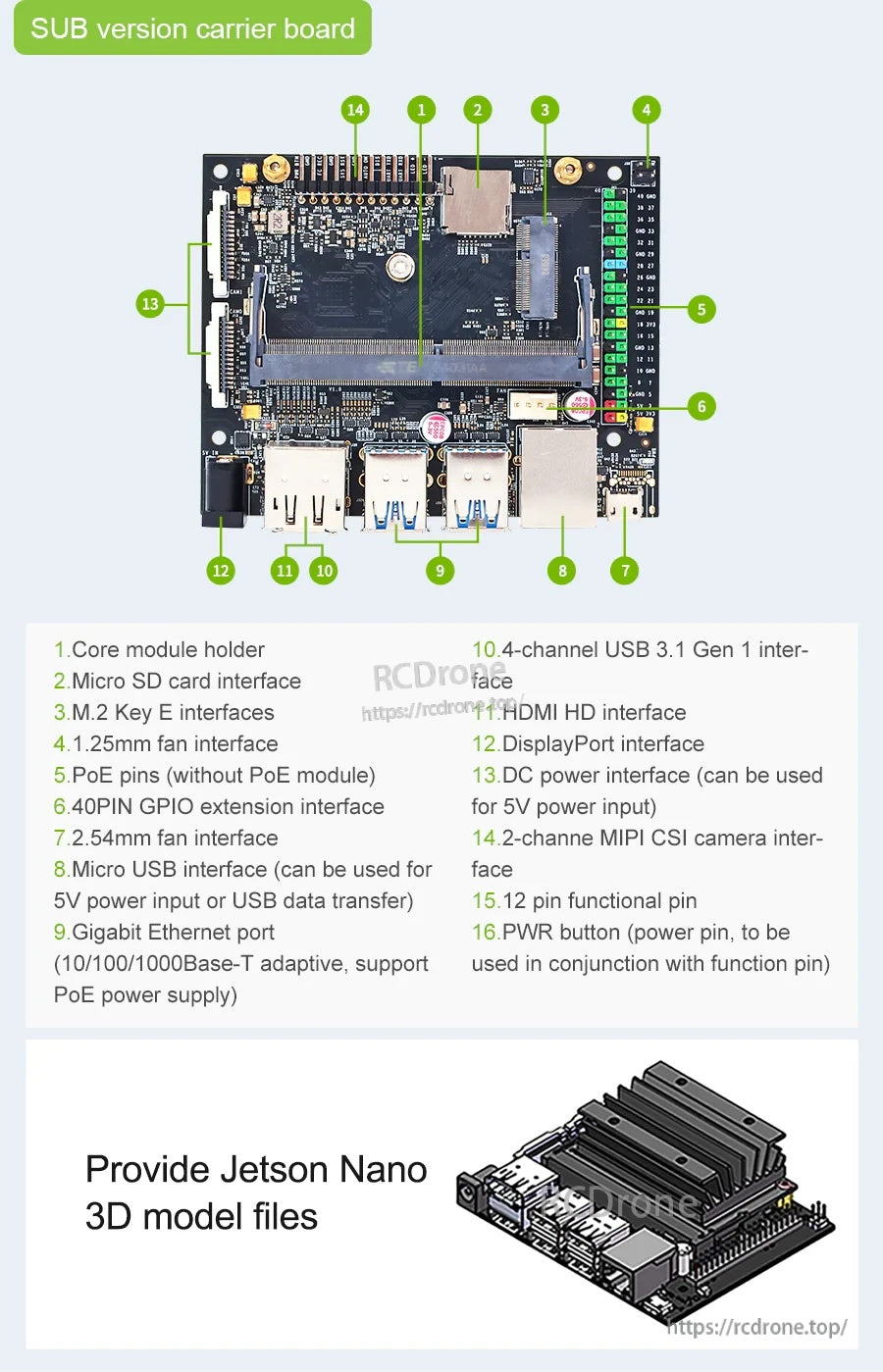
- واجهة الكاميرا: MIPI CSI-2 DPHY channel *2
- العرض: HDMI و DP
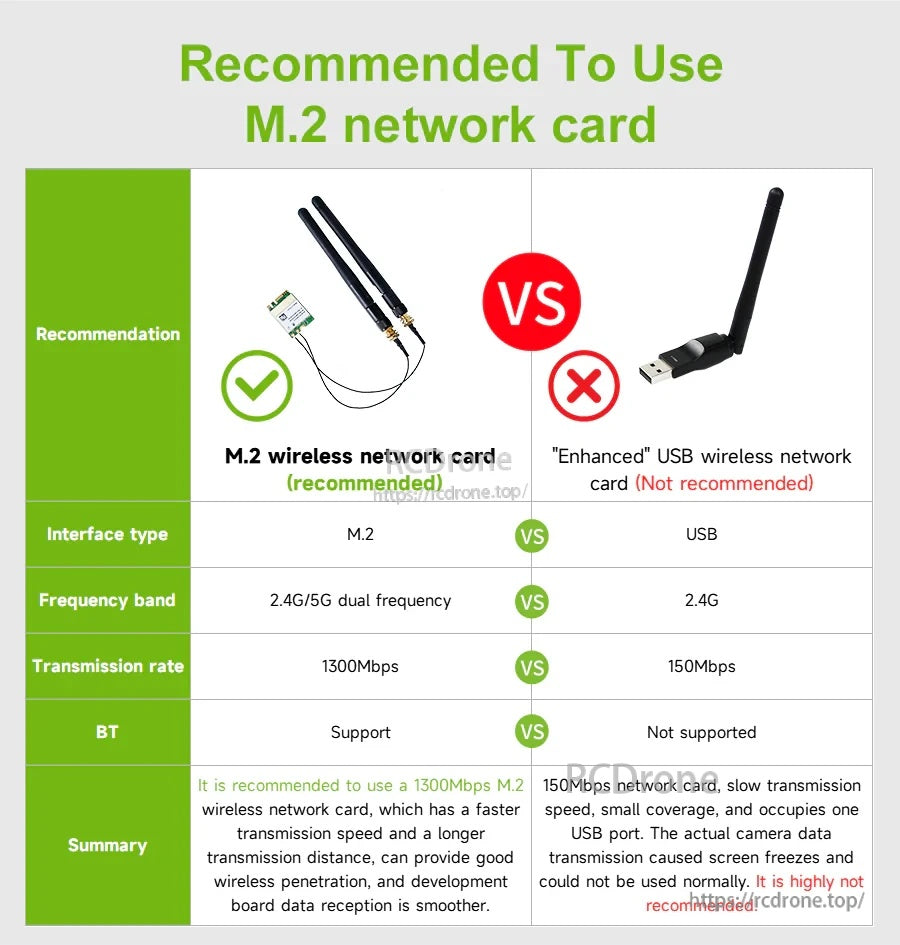
- الشبكات / التوسعة: إيثرنت جيجابت؛ M.2 Key E؛ يدعم بطاقة الشبكة عالية السرعة ثنائية النطاق M.2؛ يدعم بطاقة الشبكة عالية السرعة USB
- USB: 4x USB 3.0; USB 2.0 Micro-B
- مدخلات/مخرجات أخرى مدرجة: GPIO, I2C, I2S, SPI, UART
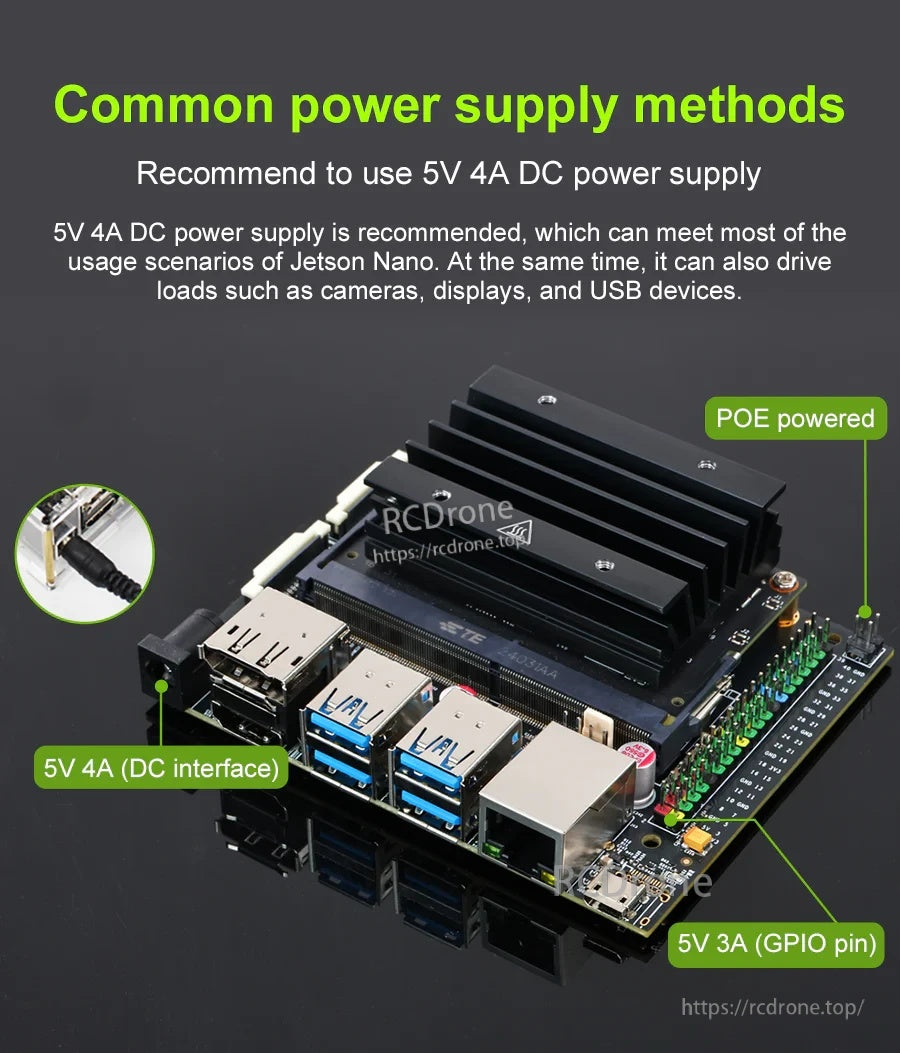
- مصادر الطاقة المذكورة: micro USB، طاقة DC، و PoE (كما هو مذكور في النص المقدم)
المواصفات
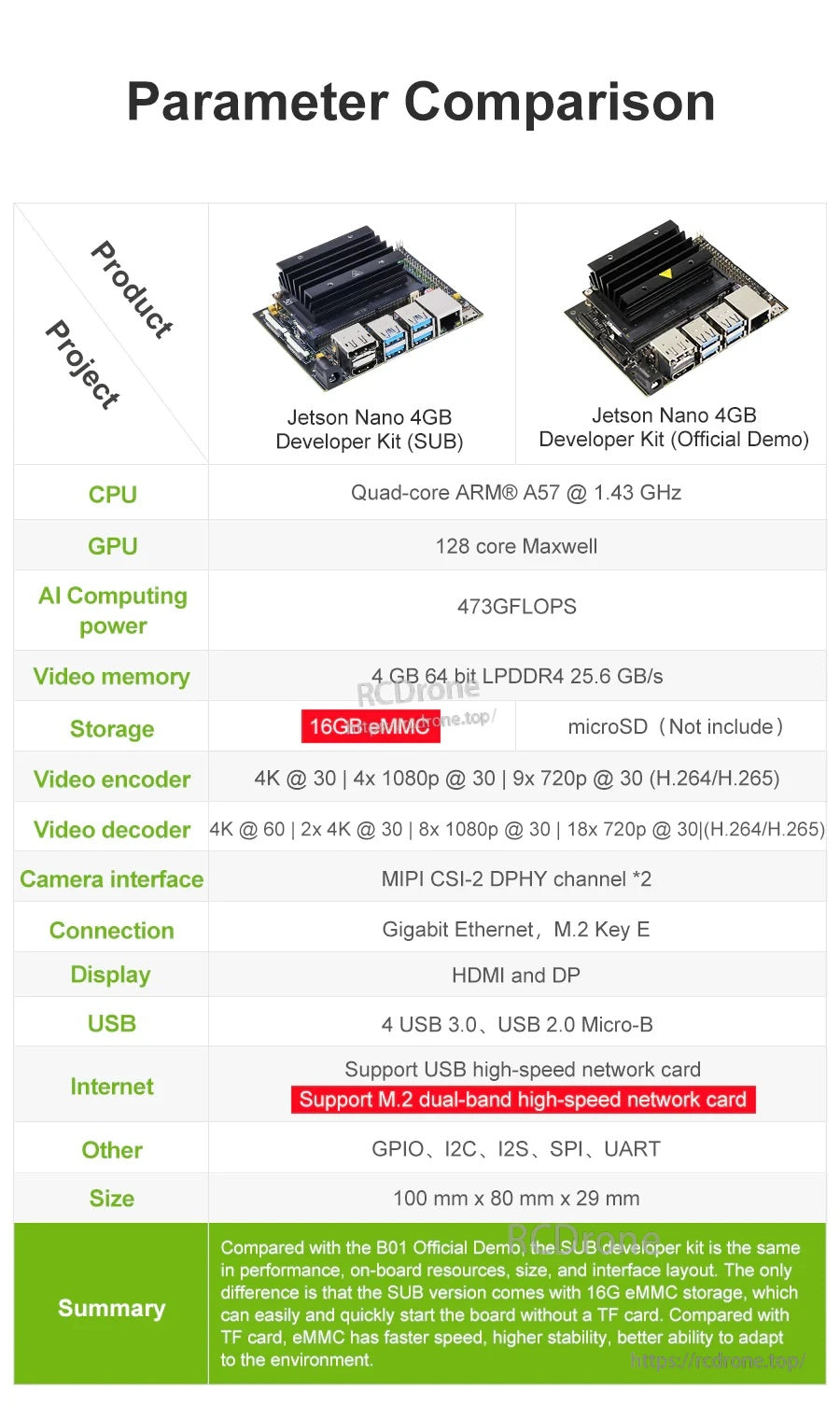
| وحدة المعالجة المركزية | رباعي النواة ARM A57 @ 1.43 GHz |
| وحدة معالجة الرسوميات | 128 نواة Maxwell |
| قوة الحوسبة الذكية | 473 GFLOPS |
| الذاكرة | 4 جيجابايت 64 بت LPDDR4 25.6 جيجابايت/ثانية |
| ترميز الفيديو | 4K @ 30 | 4x 1080p @ 30 | 9x 720p @ 30 (H.264/H.265) |
| فك ترميز الفيديو | 4K @ 60 | 2x 4K @ 30 | 8x 1080p @ 30 | 18x 720p @ 30 (H.264/H.265) |
| واجهة الكاميرا | MIPI CSI-2 DPHY channel *2 |
| الاتصال | جيجابت إيثرنت، M.2 Key E |
| العرض | HDMI و DP |
| USB | 4 USB 3.0، USB 2.0 Micro-B |
| الإنترنت (كما هو مذكور) | دعم بطاقة شبكة USB عالية السرعة؛ دعم M.بطاقة شبكة ثنائية النطاق عالية السرعة 2 |
| أخرى | GPIO, I2C, I2S, SPI, UART |
| الحجم | 100 مم × 80 مم × 29 مم |
ملاحظات التخزين (العرض الرسمي مقابل إصدار SUB)
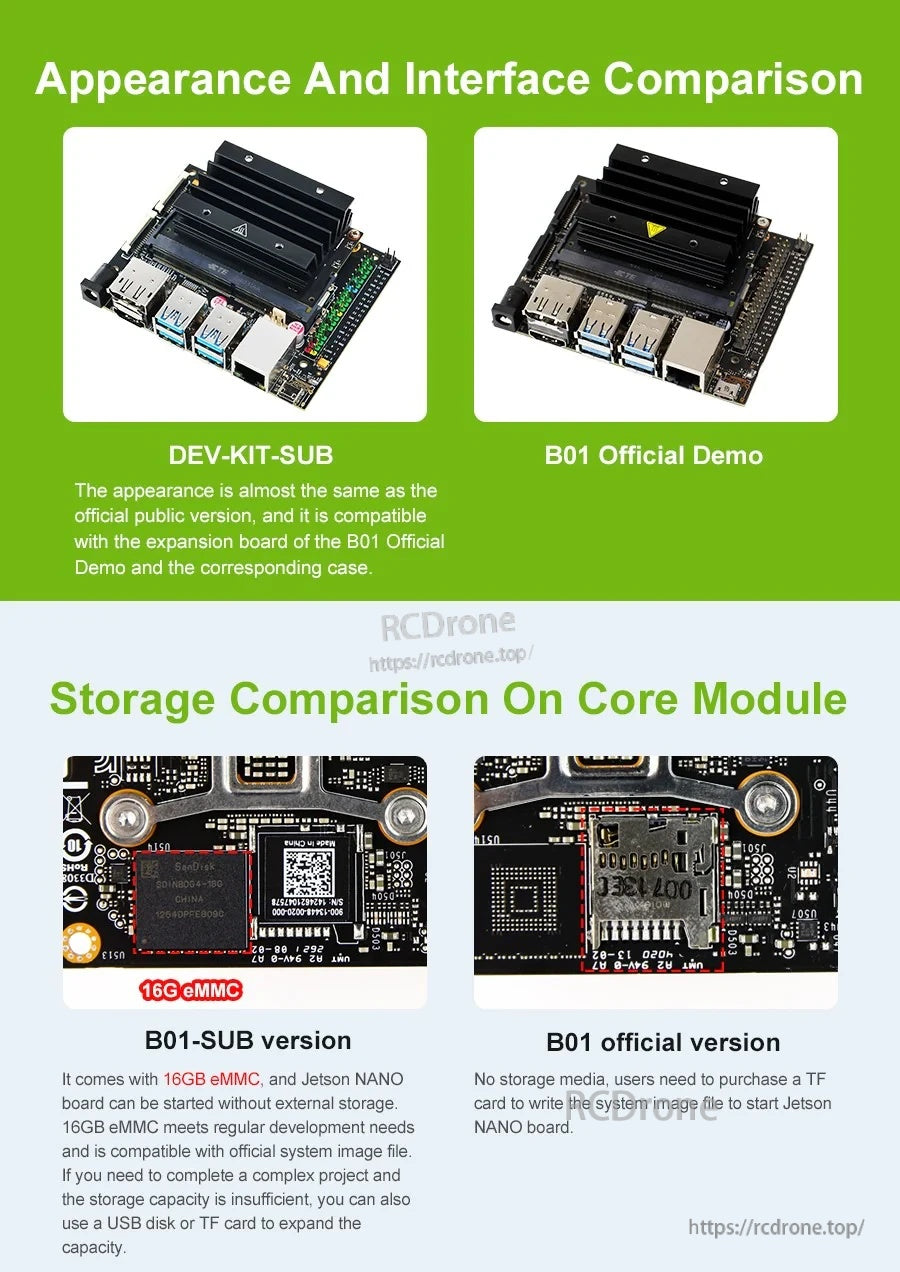
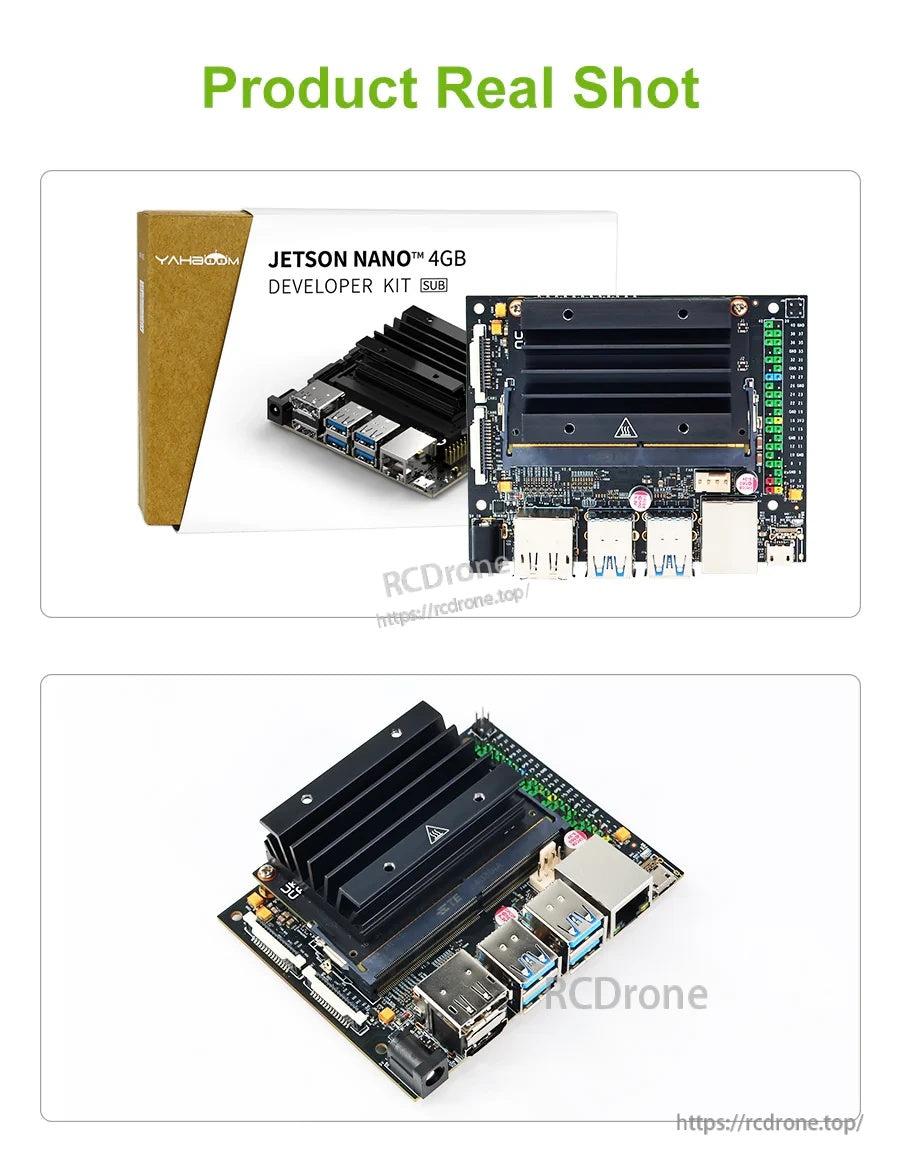
- تقدم المواد المقارنة قائمتين: Jetson Nano 4GB Developer Kit (SUB) و Jetson Nano 4GB Developer Kit (العرض الرسمي).
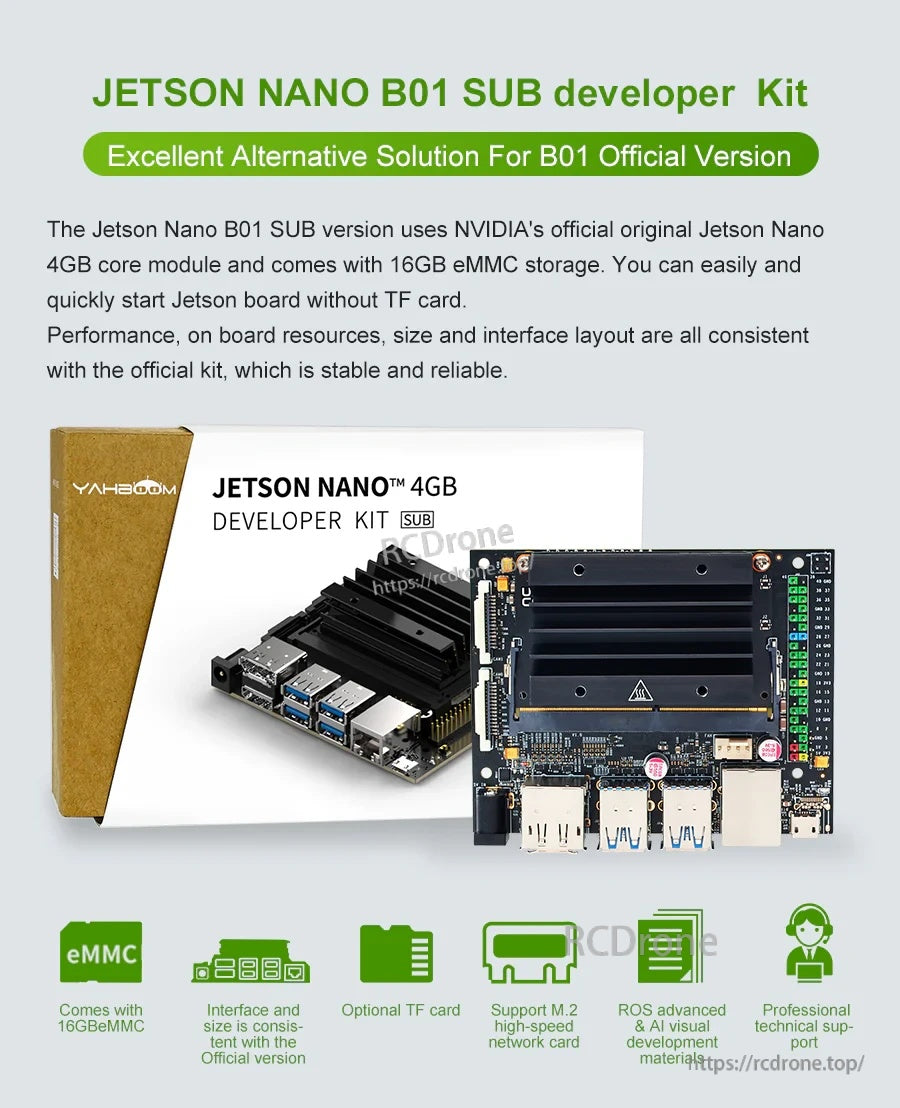
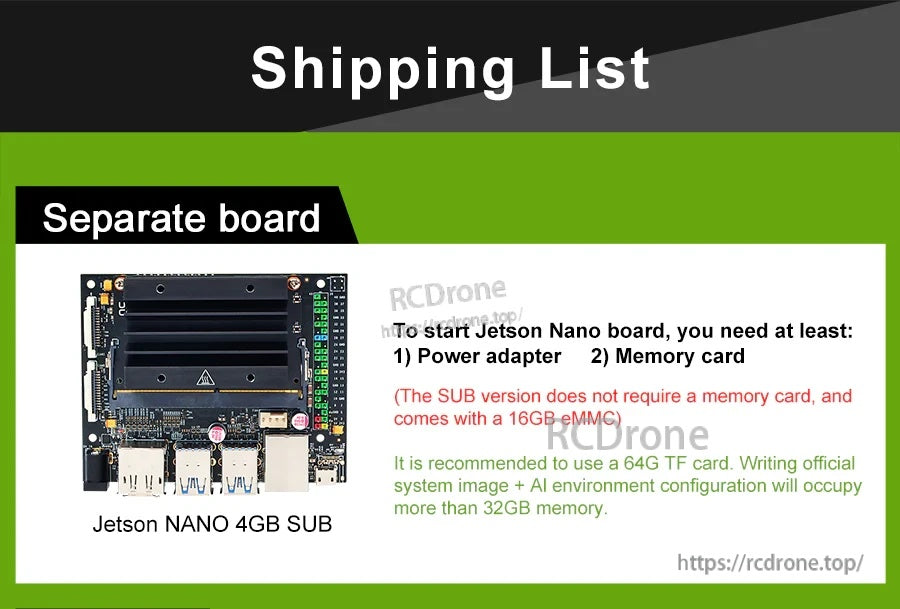
- تخزين SUB (المعروض): 16GB eMMC. تشير المواد إلى أن اللوحة يمكن تشغيلها بدون تخزين خارجي، وأن 16GB eMMC تلبي احتياجات التطوير العادية ومتوافقة مع ملف صورة النظام الرسمي.
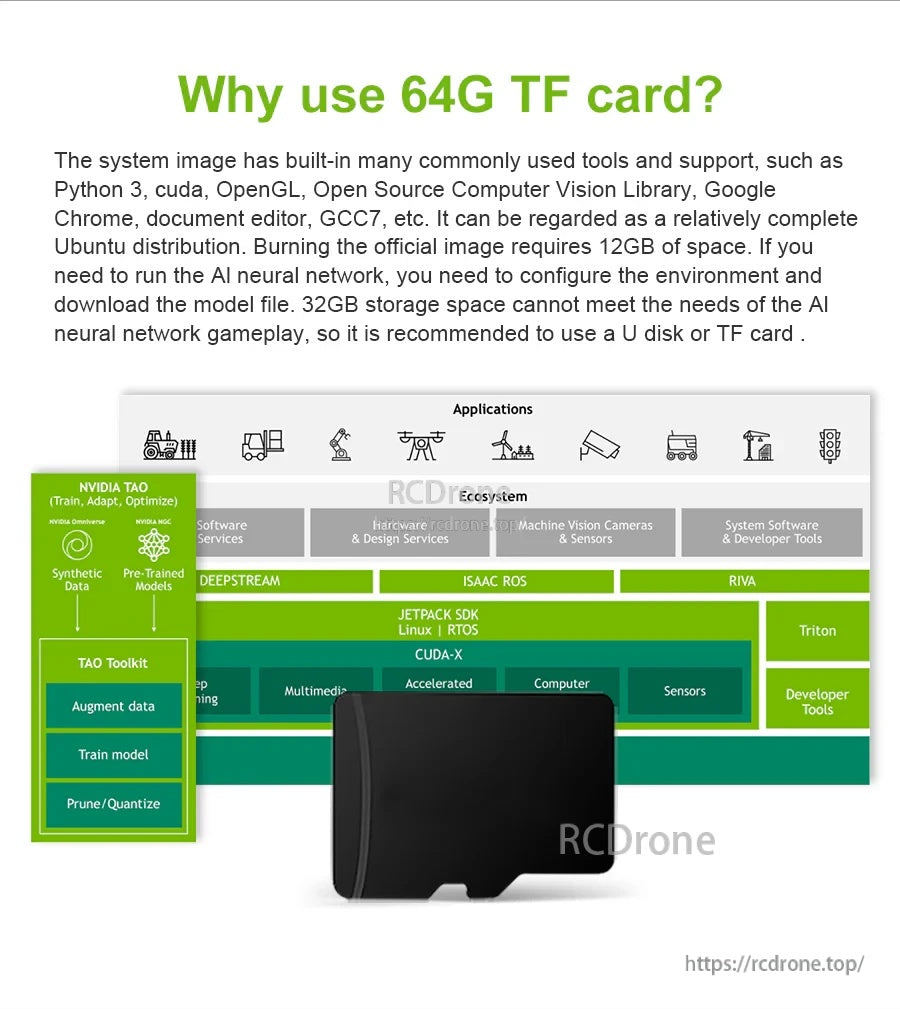
- تخزين العرض الرسمي (المعروض): microSD (غير متضمن). تشير المواد إلى أن المستخدمين بحاجة إلى شراء بطاقة TF (microSD) وكتابة ملف صورة النظام لبدء تشغيل اللوحة.
- إذا كانت سعة التخزين غير كافية للمشروع، يمكن توسيع السعة باستخدام قرص USB أو بطاقة TF.
ملاحظة بطاقة TF / صورة النظام
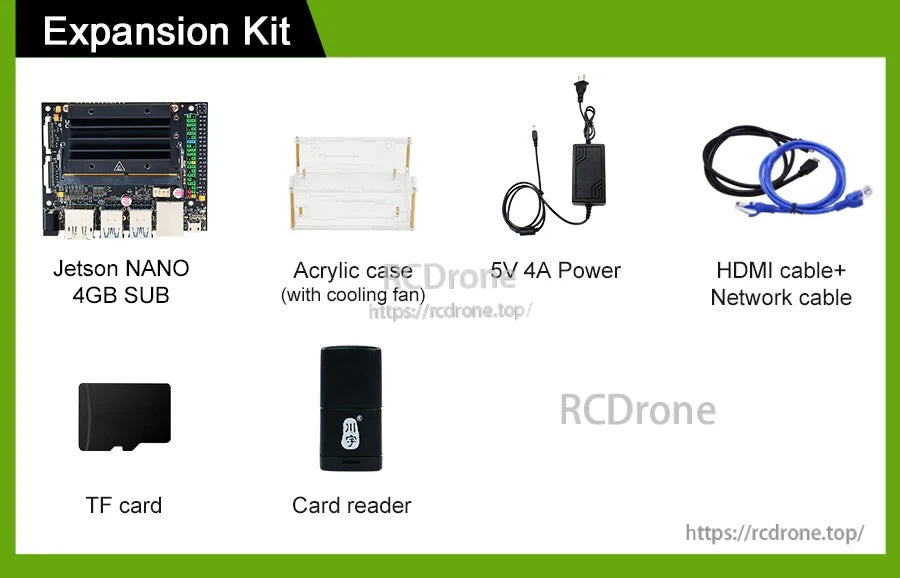
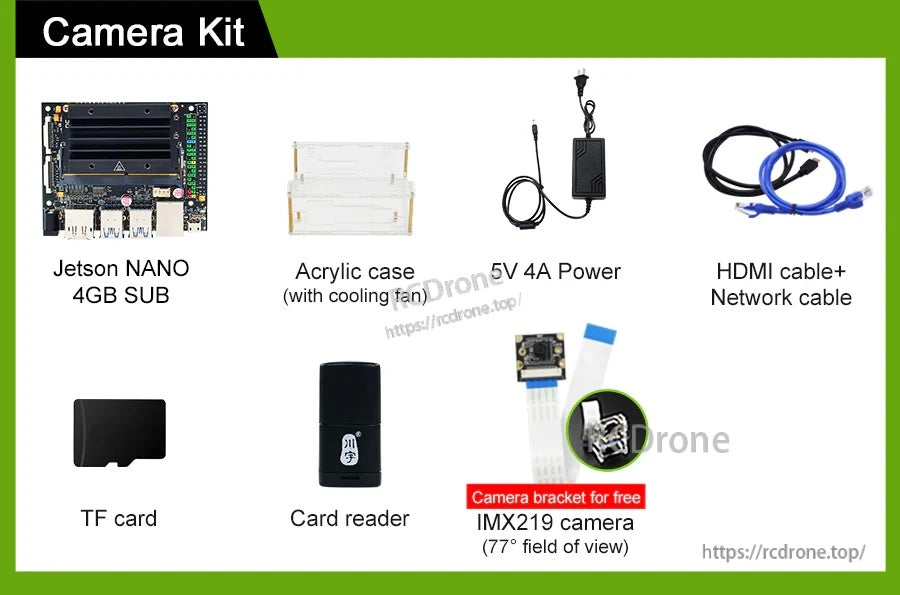
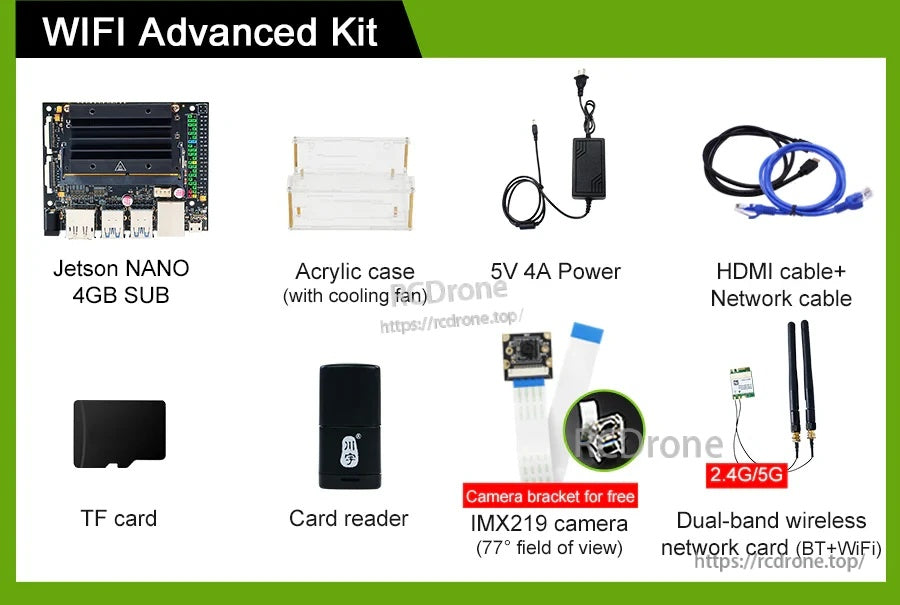
- تنص المواد المقدمة: "جميع بطاقات TF المدرجة في قائمة الشحن مكتوبة بصورة النظام."
- كما تنص المواد المقدمة: "جميع إصدارات المجموعة تحتوي على بطاقة TF بسعة 64 جيجابايت."
- تشير ملاحظة أخرى إلى أن تثبيت صورة النظام الرسمية + تكوين بيئة الذكاء الاصطناعي قد يتجاوز 32 جيجابايت، ويوصى باستخدام قرص U / بطاقة TF بسعة 64 جيجابايت أو أكثر.
فيديوهات تعليمية
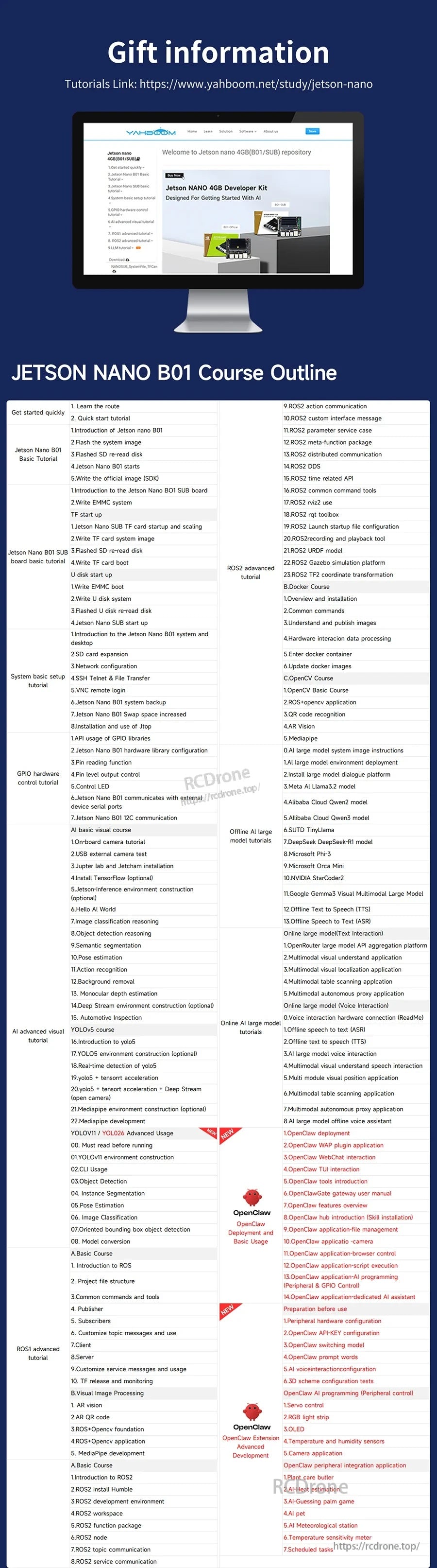
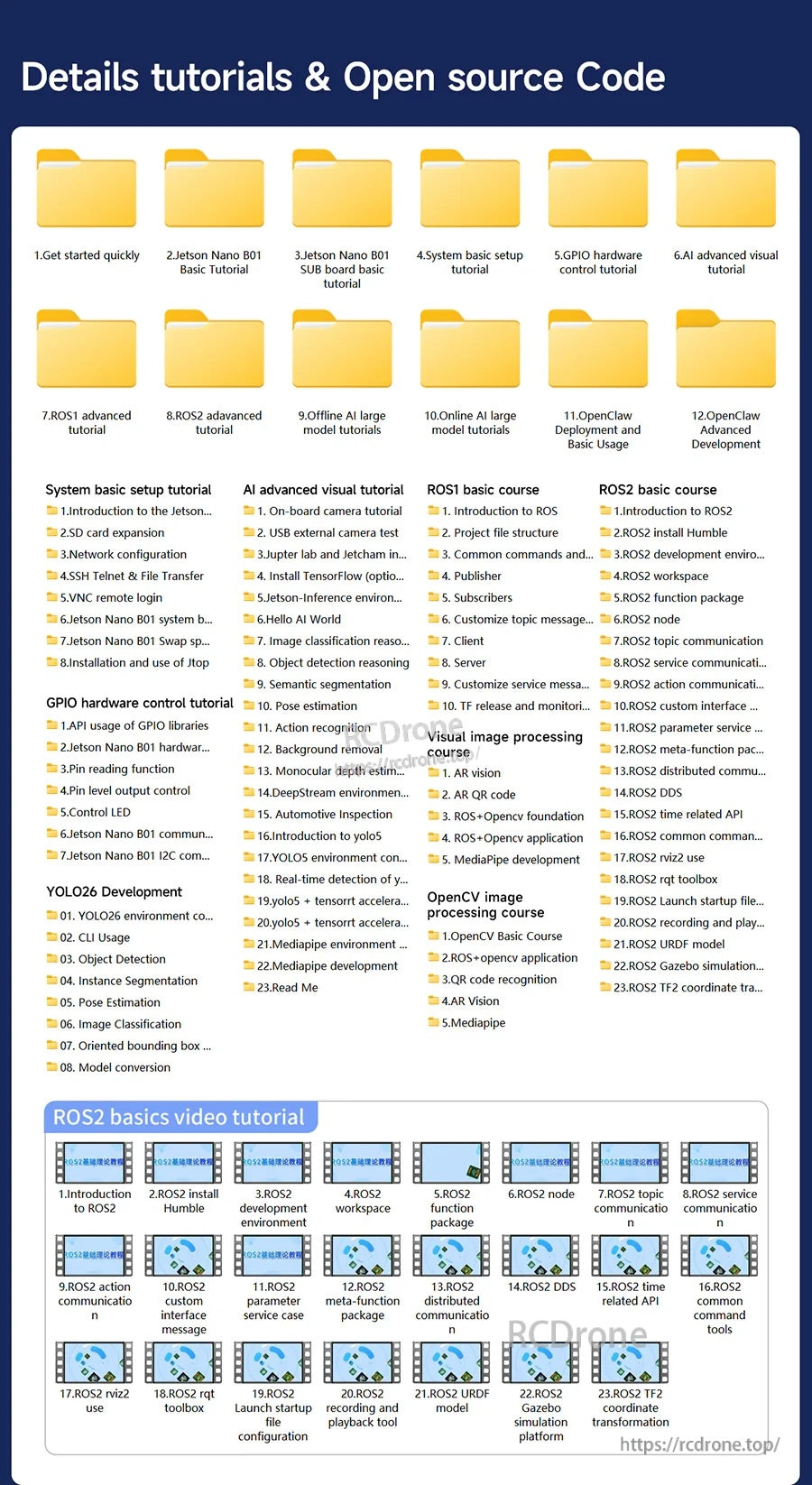
محتوى الدورة / البرنامج التعليمي (كما هو مقدم)
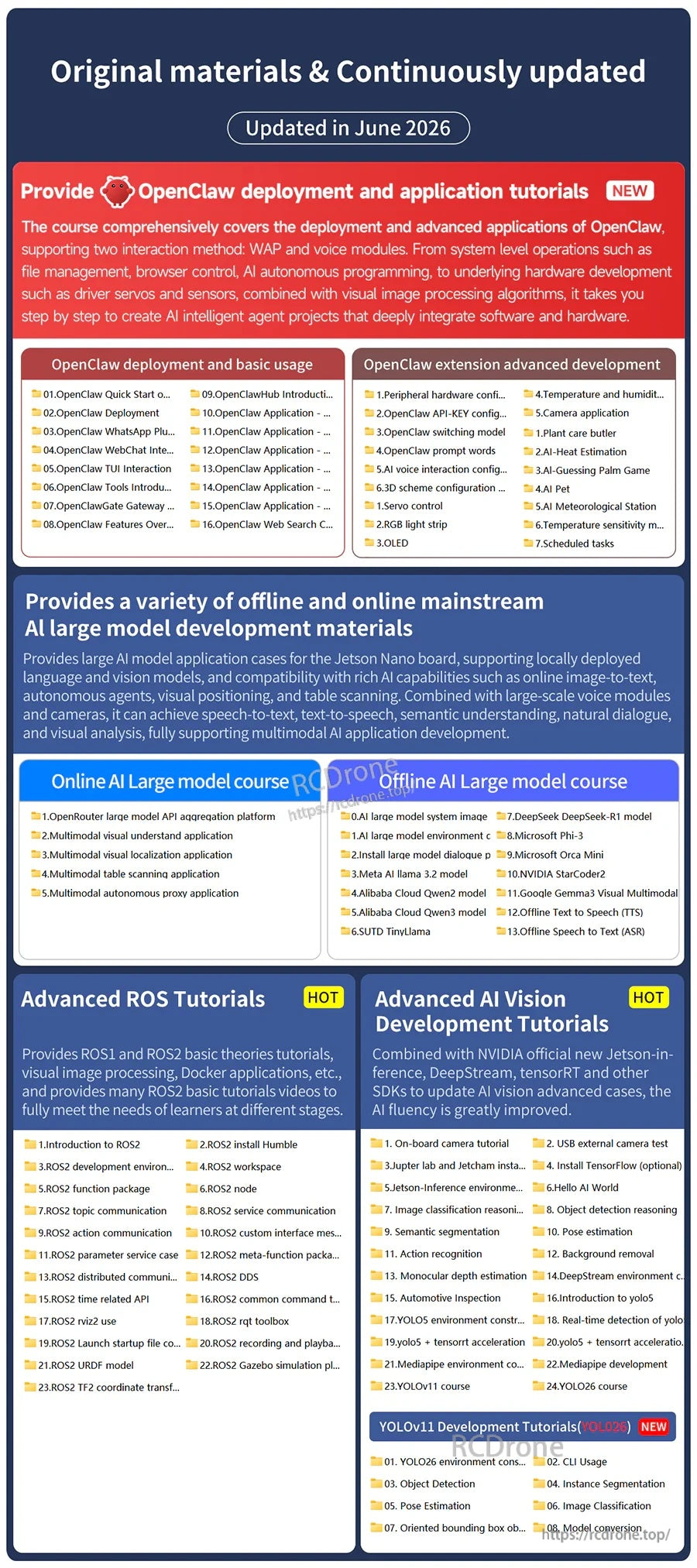
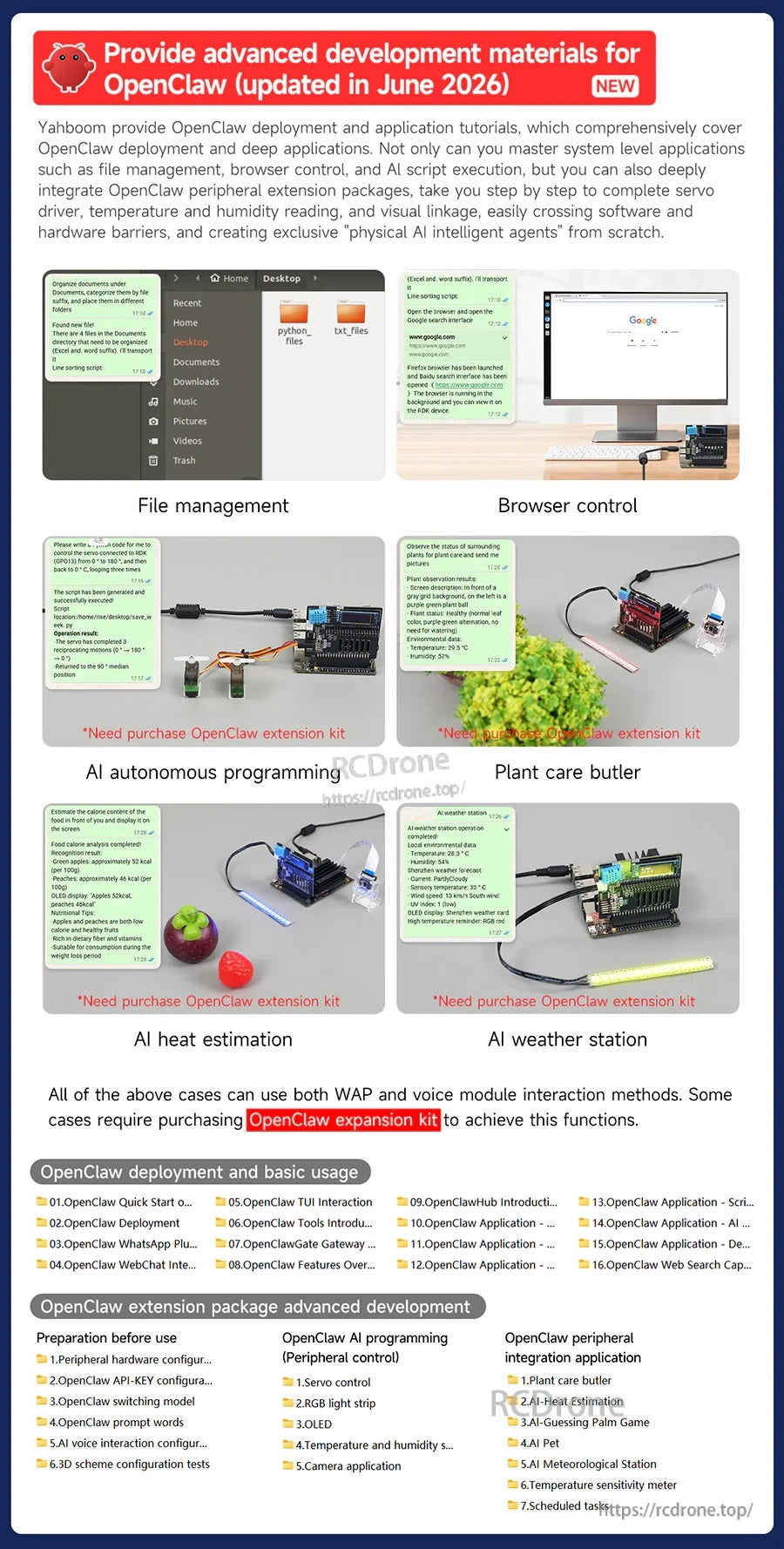
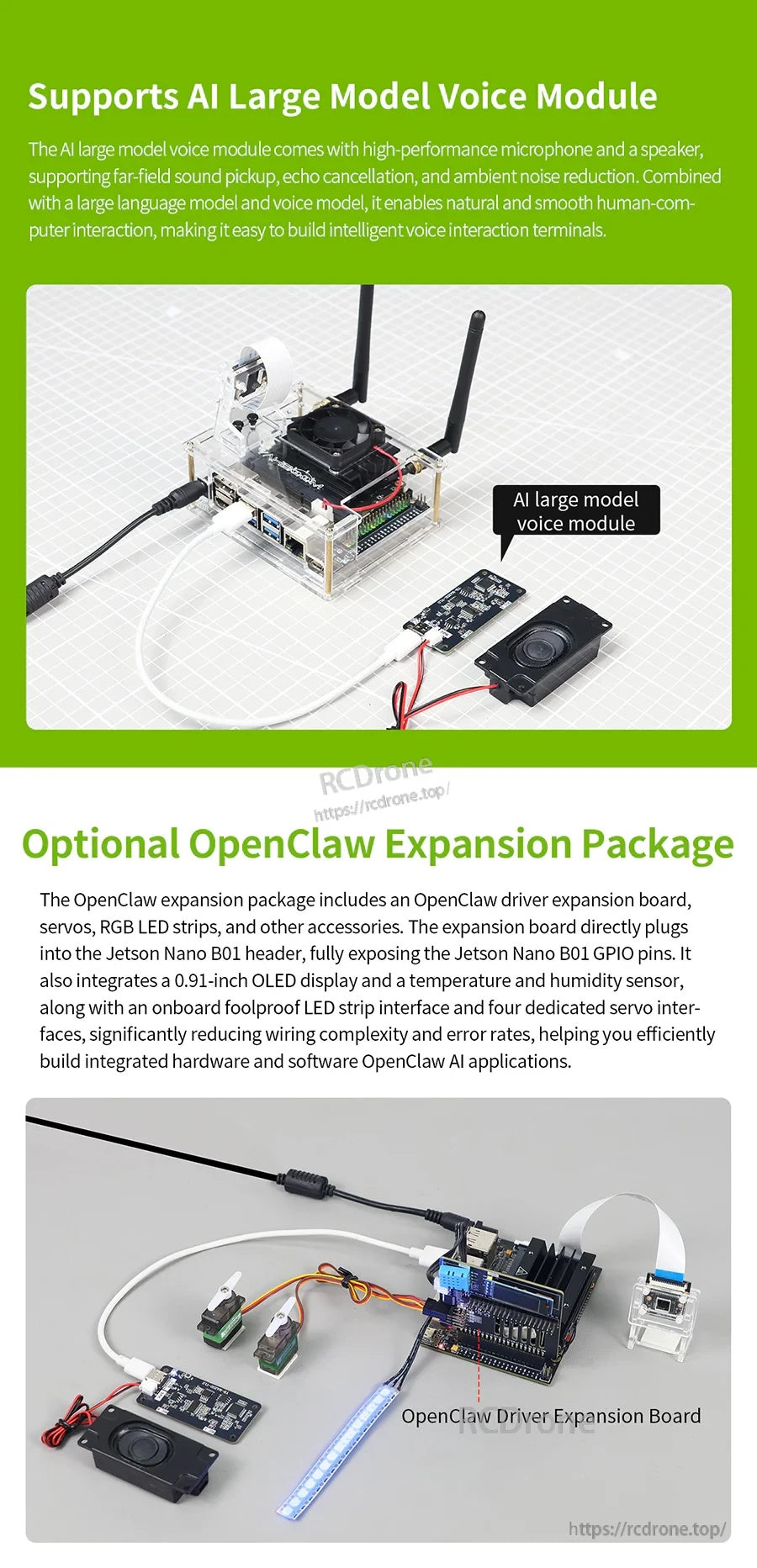
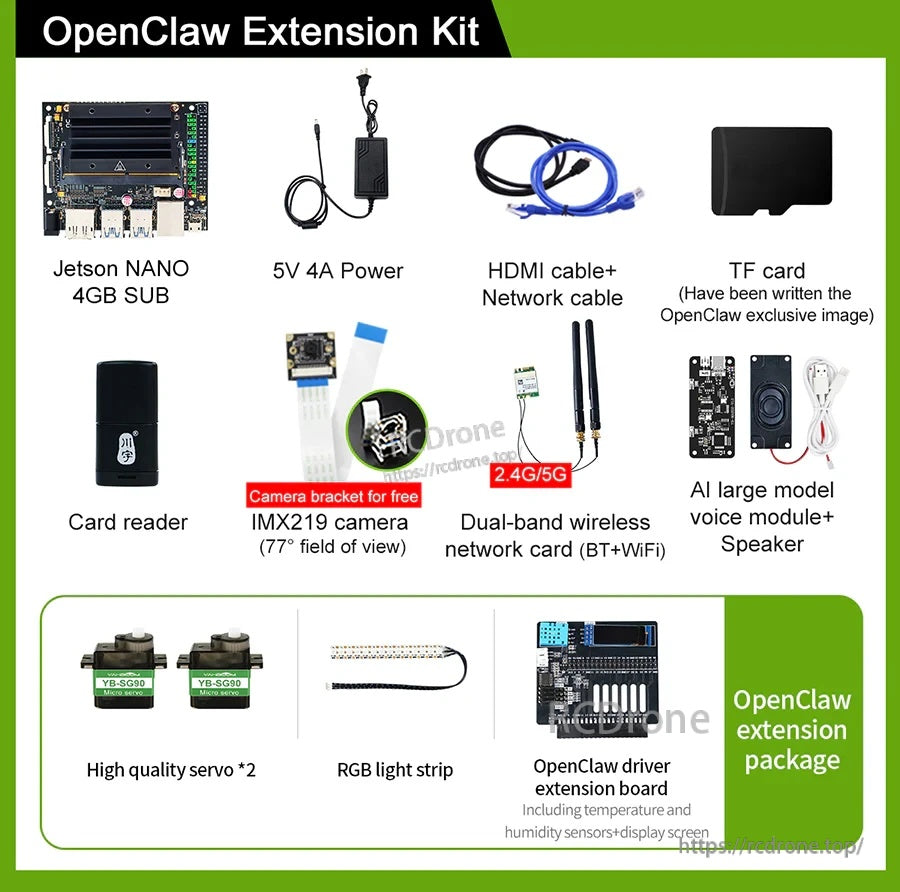
- تم التحديث في يونيو 2026: دروس نشر وتطبيق OpenClaw (جديد). يتم ذكر طريقتين للتفاعل: وحدات WAP والصوت.
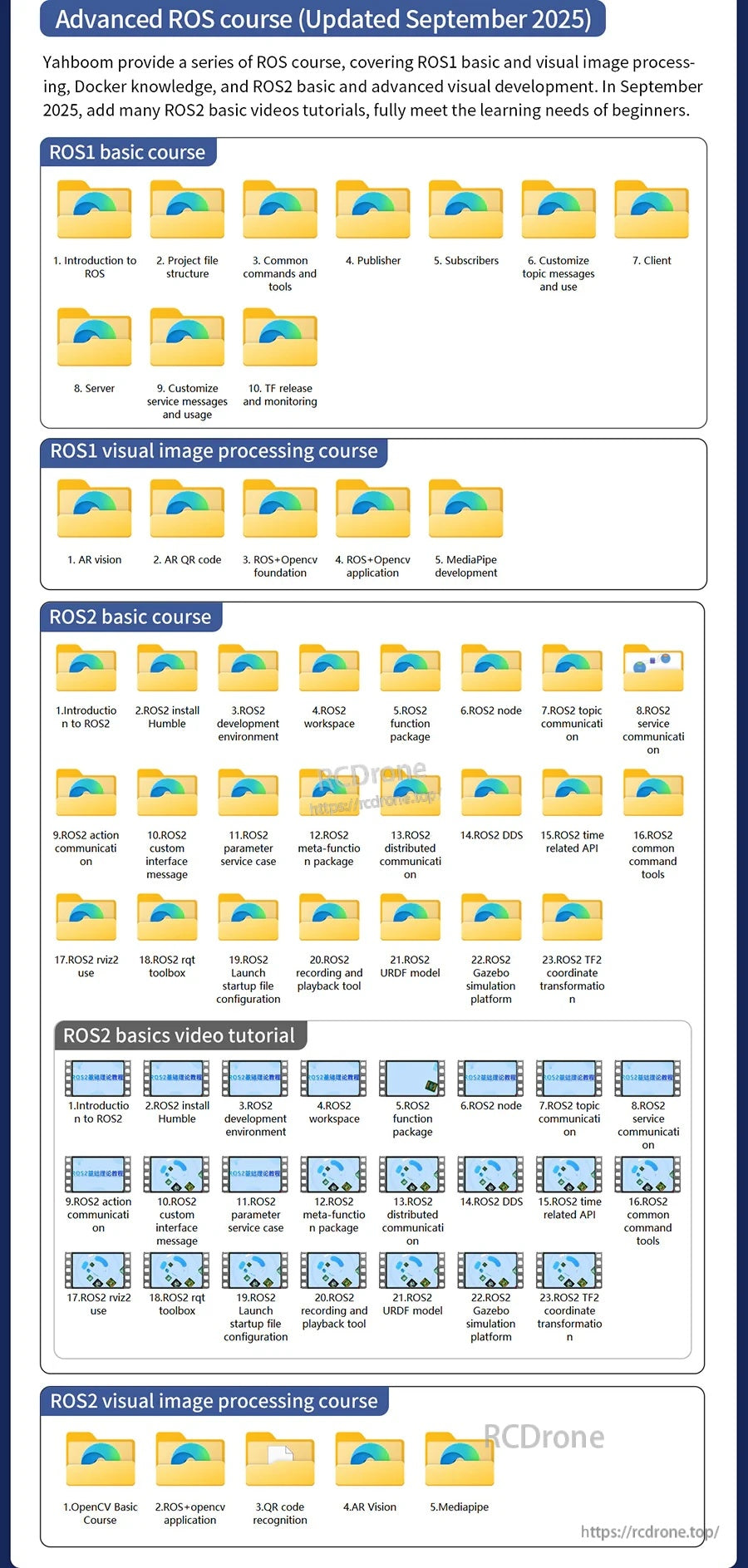
- دروس متقدمة في ROS (شائع): يتم عرض أساسيات ROS1 وROS2 ومواد التعلم ذات الصلة.
- دروس تطوير الرؤية الاصطناعية المتقدمة (شائع): تتضمن عناصر مثل درس الكاميرا المدمجة، اختبار الكاميرا الخارجية USB، بناء بيئة Jetson-Inference، بناء بيئة DeepStream، والمزيد (كما هو موضح في المخطط أدناه).
مخطط دورة Jetson Nano B01 (مقتطف)
- ابدأ بسرعة: 1. تعلم المسار؛ 2. درس البدء السريع
- درس Jetson Nano B01 الأساسي: 1. مقدمة في Jetson Nano B01؛ 2. فلاش صورة النظام؛ 3. إعادة قراءة القرص SD المومض؛ 4. يبدأ Jetson Nano B01؛ 5. كتابة الصورة الرسمية (SDK)
- درس Jetson Nano B01 SUB board الأساسي: 1. مقدمة في لوحة Jetson Nano B01 SUB؛ 2. كتابة صورة نظام EMMC
- بدء تشغيل TF: 1.بدء تشغيل بطاقة Jetson Nano SUB TF وتوسيعها; 2. كتابة صورة نظام بطاقة TF; 3. إعادة قراءة القرص SD المبرمج; 4. كتابة إقلاع بطاقة TF
- بدء تشغيل قرص U: 1. كتابة إقلاع EMMC; 2. كتابة نظام قرص U; 3. إعادة قراءة قرص U المبرمج; 4. بدء تشغيل Jetson Nano SUB
- دليل إعداد النظام الأساسي: 1. مقدمة لنظام Jetson Nano B01 وسطح المكتب; 2. توسيع بطاقة SD; 3. تكوين الشبكة; 4. نقل الملفات عبر SSH Telnet &; 5. تسجيل الدخول عن بعد عبر VNC; 6. نسخ احتياطي لنظام Jetson Nano B01; 7. زيادة مساحة التبديل لـ Jetson Nano B01; 8. تثبيت واستخدام Jtop
- دليل التحكم في الأجهزة GPIO: 1. استخدام API لمكتبات GPIO; 2. تكوين مكتبة الأجهزة لـ Jetson Nano B01; 3. وظيفة قراءة الدبوس; 4. التحكم في إخراج مستوى الدبوس; 5. التحكم في LED; 6. تواصل Jetson Nano B01 مع منافذ الأجهزة الخارجية التسلسلية; 7. اتصال Jetson Nano B01 عبر I2C
- دليل متقدم للرؤية الاصطناعية: 1.1. برنامج تعليمي للكاميرا المدمجة; 2. اختبار الكاميرا الخارجية USB; 3. تثبيت Jupyter lab و Jetcham; 4. تثبيت TensorFlow (اختياري); 5. بناء بيئة Jetson-Inference (اختياري); 6. مرحبًا بالعالم AI; 7. تفسير تصنيف الصور; 8. تفسير اكتشاف الأجسام; 9. التقسيم الدلالي; 10. تقدير الوضع; 11. التعرف على الحركة; 12. إزالة الخلفية; 13. تقدير العمق الأحادي; 14. بناء بيئة DeepStream (اختياري); 15. فحص السيارات; 16. مقدمة إلى yolo5; 17. بناء بيئة YOLO5 (اختياري); 18. الكشف في الوقت الحقيقي لـ yolo5; 19. تسريع yolo5 + tensorrt; 20. تسريع yolo5 + tensorrt + Deep Stream (فتح الكاميرا); 21. بناء بيئة Mediapipe (اختياري); 22. تطوير Mediapipe; 23. اقرأني
- الاستخدام المتقدم لـ YOLOv11 / YOLO26 (جديد): 00. يجب قراءته قبل التشغيل; 01. بناء بيئة YOLOv11; 02. استخدام CLI; 03. اكتشاف الأجسام; 04. تقسيم الكائنات; 05. تقدير الوضع; 06.تصنيف الصور; 07. اكتشاف الكائنات باستخدام الصندوق المحيط الموجه; 08. تحويل النموذج
- دورة أساسيات ROS1: 1. مقدمة في ROS; 2. هيكل ملف المشروع; 3. الأوامر والأدوات الشائعة; 4. الناشر; 5. المشتركين; 6. تخصيص رسائل الموضوع والاستخدام; 7. العميل; 8. الخادم; 9. تخصيص رسائل الخدمة والاستخدام; 10. إصدار ومراقبة TF
- دورة معالجة الصور المرئية في ROS1: 1. رؤية الواقع المعزز; 2. رمز الاستجابة السريعة للواقع المعزز; 3. أساسيات ROS+OpenCV; 4. تطبيق ROS+OpenCV; 5. تطوير MediaPipe
- دورة أساسيات ROS2: 1. مقدمة في ROS2; 2. تثبيت ROS2 Humble; 3. بيئة تطوير ROS2; 4. مساحة عمل ROS2; 5. حزمة وظائف ROS2; 6. عقدة ROS2; 7. اتصال موضوع ROS2; 8. اتصال خدمة ROS2; 9. اتصال عمل ROS2; 10. رسالة واجهة مخصصة لـ ROS2; 11. حالة خدمة المعلمات لـ ROS2; 12. حزمة الوظائف الفوقية لـ ROS2; 13. اتصال موزع لـ ROS2; 14. DDS لـ ROS2; 15. ROS2 واجهة برمجة التطبيقات المتعلقة بالوقت; 16. أدوات الأوامر الشائعة في ROS2; 17. استخدام ROS2 rviz2; 18. صندوق أدوات ROS2 rqt; 19. تكوين ملف بدء تشغيل ROS2 Launch; 20. أداة تسجيل وتشغيل ROS2; 21. نموذج ROS2 URDF; 22. منصة محاكاة ROS2 Gazebo; 23. تحويل الإحداثيات ROS2 TF2
- دورة Docker: 1. نظرة عامة وتثبيت; 2. الأوامر الشائعة; 3. فهم ونشر الصور; 4. معالجة بيانات التفاعل مع الأجهزة; 5. دخول حاوية docker; 6. تحديث صور docker
- دورة معالجة الصور OpenCV: 1. دورة OpenCV الأساسية; 2. تطبيق ROS+opencv; 3. التعرف على رمز QR; 4. الرؤية المعززة AR; 5. Mediapipe
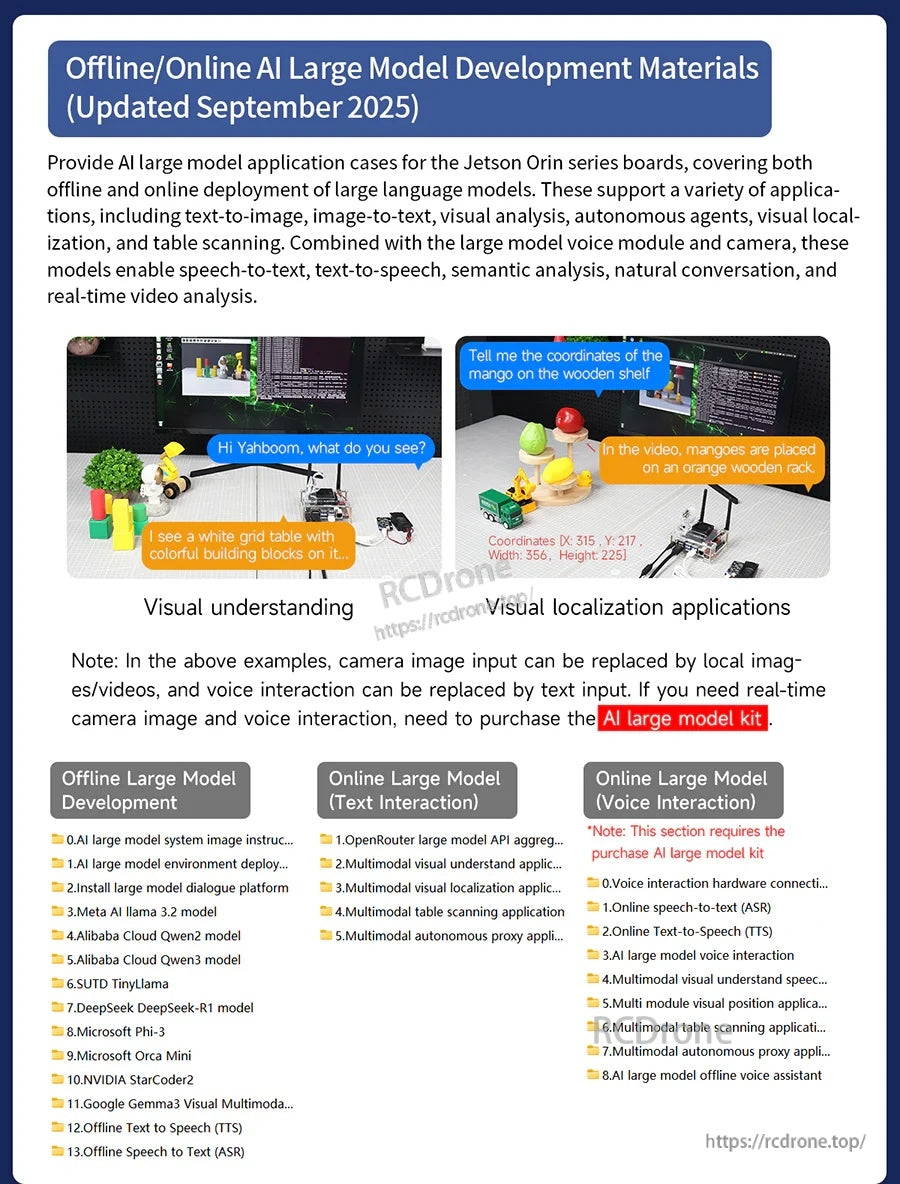
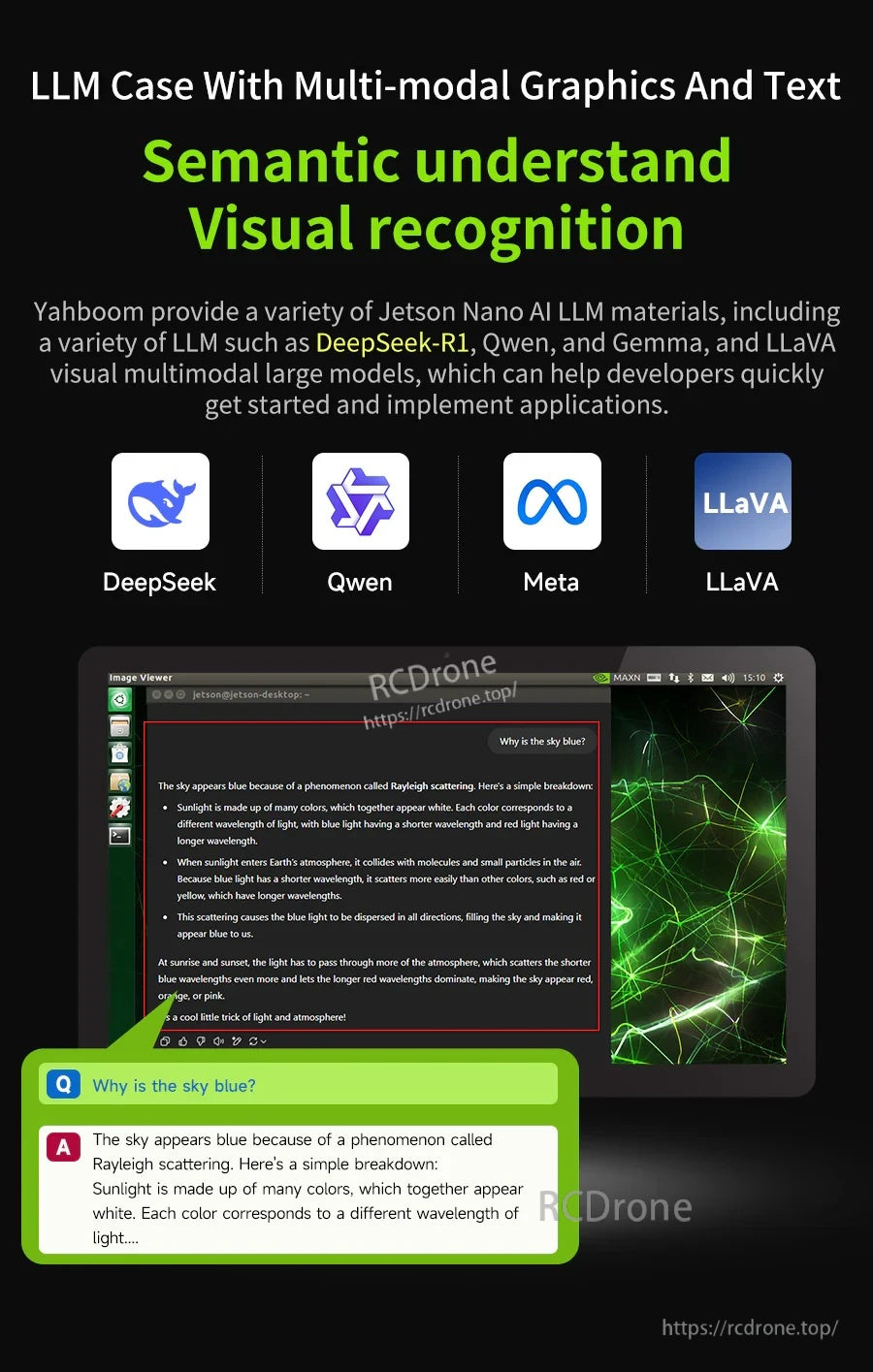
- دروس نماذج الذكاء الاصطناعي الكبيرة غير المتصلة: 0. تعليمات صورة نظام النموذج الكبير للذكاء الاصطناعي; 1. نشر بيئة النموذج الكبير للذكاء الاصطناعي; 2. تثبيت منصة حوار النموذج الكبير; 3. نموذج Meta AI Llama 3.2; 4. نموذج Alibaba Cloud Qwen2; 5. نموذج Alibaba Cloud Qwen3; 6. SUTD TinyLlama; 7. نموذج DeepSeek DeepSeek-R1; 8. Microsoft Phi-3; 9. Microsoft Orca Mini; 10. NVIDIA StarCoder2; 11. Google Gemma3 Visual Multimodal Large Model; 12. تحويل النص إلى كلام (TTS) دون اتصال بالإنترنت; 13. تحويل الكلام إلى نص (ASR) دون اتصال بالإنترنت
- دروس النماذج الكبيرة عبر الإنترنت: 1. منصة تجميع واجهة برمجة التطبيقات للنماذج الكبيرة OpenRouter; 2. تطبيق الفهم البصري متعدد الوسائط; 3. تطبيق تحديد المواقع البصري متعدد الوسائط; 4. تطبيق مسح الجداول متعدد الوسائط; 5. تطبيق الوكيل المستقل متعدد الوسائط
- النموذج الكبير عبر الإنترنت (التفاعل الصوتي): 0. اتصال الأجهزة للتفاعل الصوتي (ReadMe); 1. تحويل الكلام إلى نص (ASR) دون اتصال بالإنترنت; 2. تحويل النص إلى كلام (TTS) دون اتصال بالإنترنت; 3. التفاعل الصوتي مع النموذج الكبير للذكاء الاصطناعي; 4. التفاعل الصوتي للفهم البصري متعدد الوسائط; 5. تطبيق تحديد المواقع البصري متعدد الوسائط; 6. تطبيق مسح الجداول متعدد الوسائط; 7. تطبيق الوكيل المستقل متعدد الوسائط; 8. مساعد صوتي غير متصل بالإنترنت للنموذج الكبير للذكاء الاصطناعي
- نشر OpenClaw والاستخدام الأساسي: 1.نشر OpenClaw; 2. تطبيق OpenClaw WAP plugin; 3. تفاعل OpenClaw WebChat; 4. تفاعل OpenClaw TUI; 5. مقدمة أدوات OpenClaw; 6. دليل مستخدم بوابة OpenClaw Gate; 7. نظرة عامة على ميزات OpenClaw; 8. مقدمة مركز OpenClaw (تثبيت المهارات); 9. إدارة ملفات تطبيق OpenClaw; 10. كاميرا تطبيق OpenClaw; 12. تنفيذ سكريبت تطبيق OpenClaw; 13. برمجة تطبيق OpenClaw (التحكم في & GPIO المحيطي); 14. مساعد AI مخصص لتطبيق OpenClaw
- تحضير OpenClaw قبل الاستخدام: 1. تكوين الأجهزة المحيطية; 2. تكوين مفتاح API لـ OpenClaw; 3. نموذج تبديل OpenClaw; 4. كلمات تلميح OpenClaw; 5. تكوين التفاعل الصوتي AI; 6. اختبارات تكوين المخطط ثلاثي الأبعاد
- برمجة التحكم في الأجهزة المحيطية لـ OpenClaw: 1. التحكم في السيرفو; 2. شريط إضاءة RGB; 3. OLED
- تطوير متقدم لامتداد OpenClaw: 1.أجهزة استشعار درجة الحرارة والرطوبة؛ 2. تطبيق الكاميرا؛ 1. خادم رعاية النباتات؛ 2. تقدير الحرارة بالذكاء الاصطناعي؛ 3. لعبة التخمين بالذكاء الاصطناعي؛ 4. حيوان أليف بالذكاء الاصطناعي؛ 5. محطة أرصاد جوية بالذكاء الاصطناعي؛ 6. مقياس حساسية درجة الحرارة؛ 7. المهام المجدولة
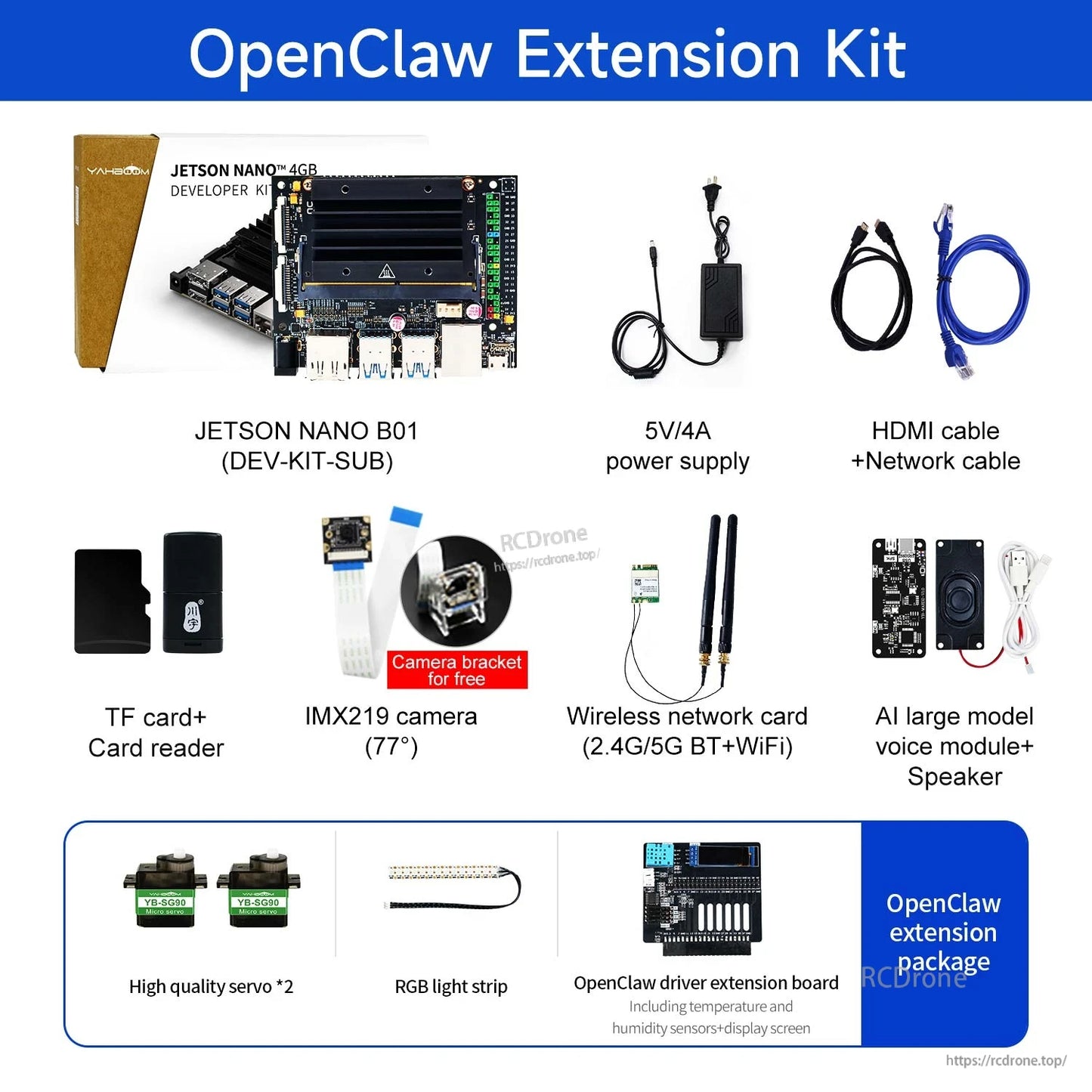
قائمة التعبئة (الملاحظات المعروضة)
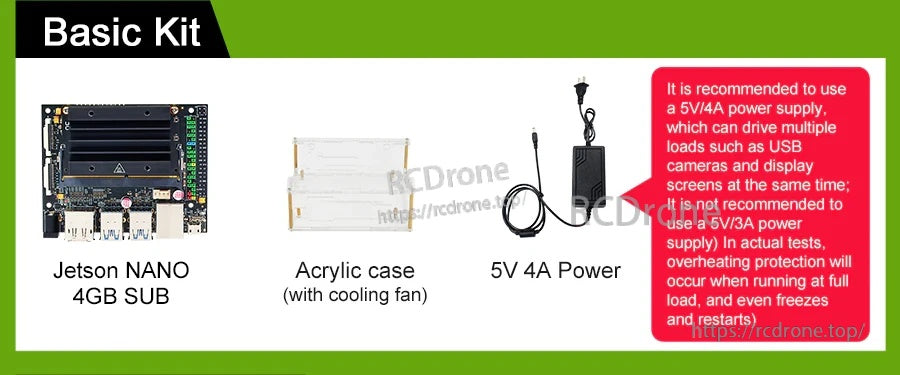
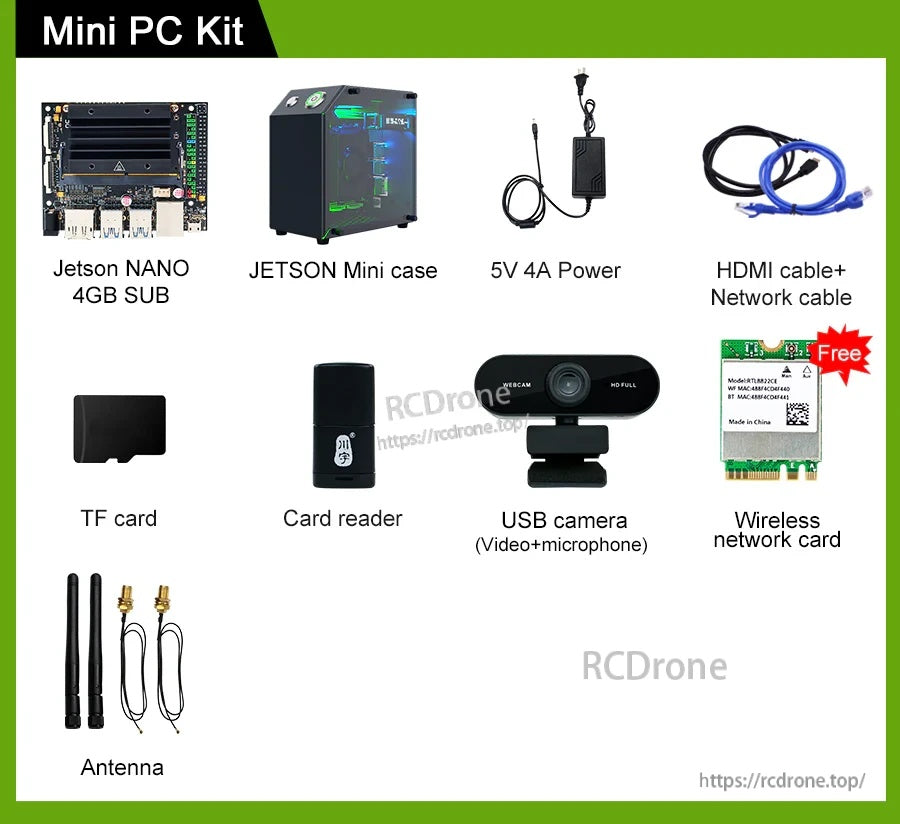
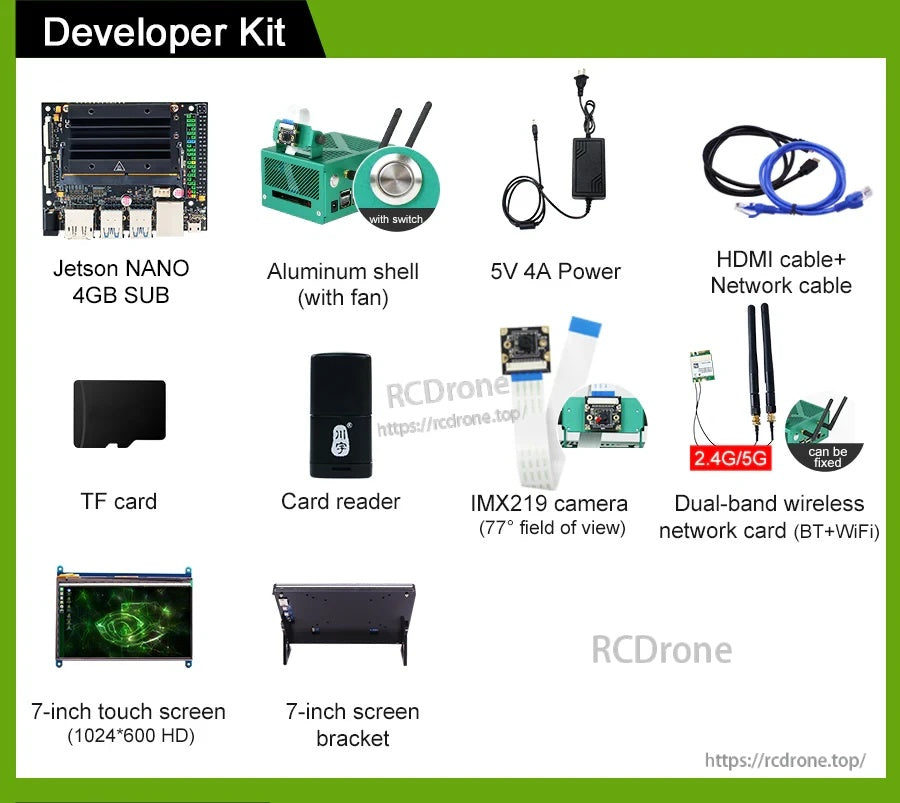
- تنص المواد المقدمة: يتطلب تشغيل اللوحة المنفصلة محول طاقة وبطاقة ذاكرة 64G.
التطبيقات
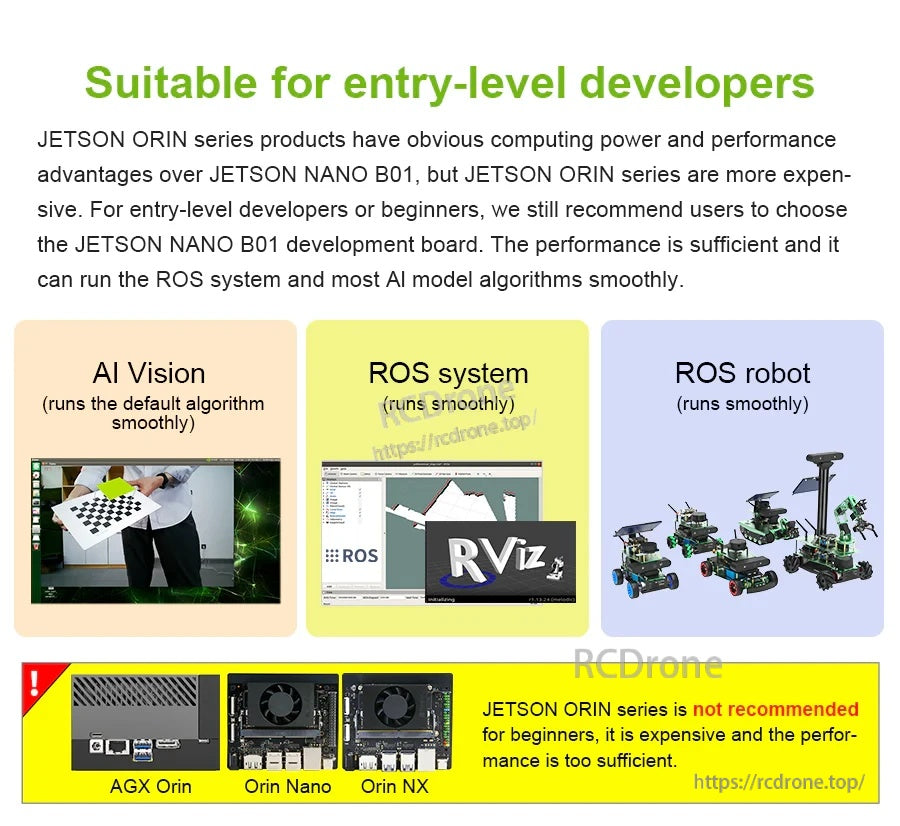
- النماذج الأولية للذكاء الاصطناعي الحافة: تصنيف الصور، كشف الأجسام، التقسيم، معالجة الكلام
- تعلم ROS وتطوير الروبوتات (نظام ROS / روبوت ROS معروضة كأهداف تعلم مدعومة في المواد المقدمة)
- مشاريع الرؤية الحاسوبية والمشاريع القائمة على الكاميرا عبر MIPI CSI-2 (قناتان) أو كاميرات USB (كما هو مشار إليه في مخطط الدورة)
لتأكيد الطلب (متغير التخزين، الملحقات المضمنة) أو أسئلة التكامل (M.2 Key E WiFi cards, cameras, power), contact [email protected] or visit https://rcdrone.top/ .
التفاصيل