


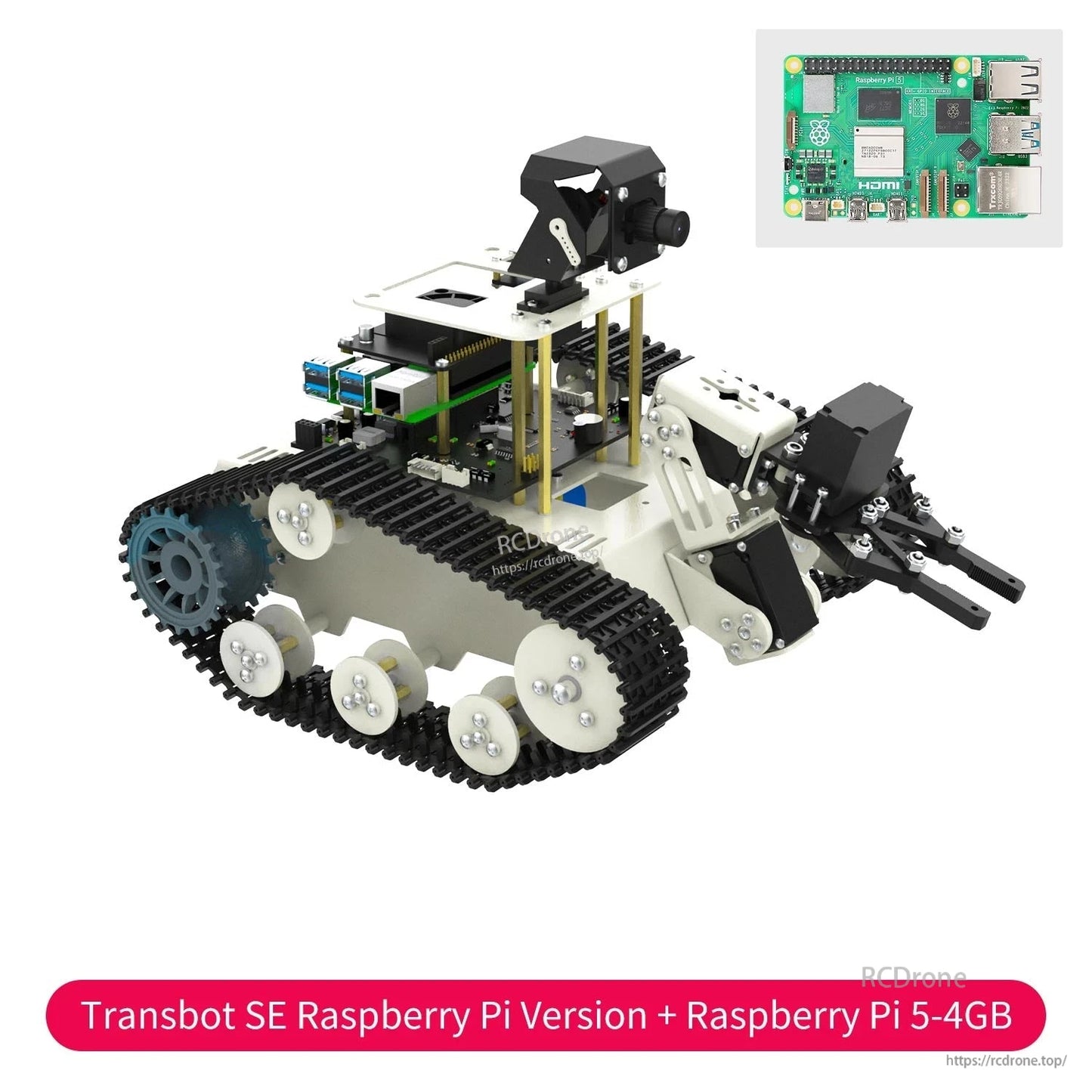
سيارة روبوت Yahboom Transbot SE ROS بذراع 3 درجات حرية وكاميرا PTZ بدقة 2 ميجابكسل، متوافقة مع Jetson Nano B01 / Raspberry Pi 5
سيارة روبوت Yahboom Transbot SE ROS بذراع 3 درجات حرية وكاميرا PTZ بدقة 2 ميجابكسل، متوافقة مع Jetson Nano B01 / Raspberry Pi 5
Yahboom
تعذر تحميل توفر الالتقاط


نظرة عامة
Transbot SE هو سيارة روبوت ROS (منصة زاحفة مجنزرة) مصممة لتطوير الرؤية الاصطناعية والروبوتات باستخدام Jetson Nano B01 أو Raspberry Pi 5. يستخدم هيكلًا من سبائك الألومنيوم بالكامل ويجمع بين ذراع روبوتية 3DOF بالإضافة إلى كاميرا 2DOF PTZ للتحكم القائم على الرؤية، والتتبع، ومحاكاة الذراع الروبوتية باستخدام MoveIt.
تحتاج إلى مساعدة في اختيار الإصدار (مع/بدون Jetson Nano أو Raspberry Pi) أو إعداد بيئة البرمجيات؟ اتصل بالدعم عبر https://rcdrone.top/ أو البريد الإلكتروني [email protected].
الميزات الرئيسية
- هيكل زاحف متعقب مع هيكل مسار تفاضلي للقيادة على الطرق الوعرة
- جسم من سبائك الألومنيوم بالكامل
- ذراع روبوتية ثلاثية الأبعاد (سيرفو ذكي للحافلة التسلسلية) للقبض/المناولة ومحاكاة سير العمل
- كاميرا PTZ ثنائية الأبعاد مع كاميرا 2 ميجابكسل (دوران أفقي/عمودي)
- محركات مشفرة 520
- حزمة رؤية AI مدمجة: معالجة الصور OpenCV، تعلم الآلة MediaPipe، التعرف على الكائنات YOLO، وإطار عمل التعلم العميق AI
- خيارات التحكم في الاتصال البيني المعروضة: تطبيق التحكم عن بعد، التحكم البرمجي عبر الويب Jupyter، نظام التحكم ROS، التحكم في الاتصال البيني عبر الأنظمة الأساسية، التحكم في تشكيل المركبات المتعددة
- البرمجة: يتم الإشارة إلى برمجة Python وبرمجة C++
وظائف التحكم & في الرؤية بالذكاء الاصطناعي (معروضة)
- معالجة الصور باستخدام OpenCV: كشف الأجسام (التعرف على فئات معينة من الأجسام)، رؤية الواقع المعزز (12 تأثيرًا معروضًا من خلال ورق الشطرنج)، رمز الاستجابة السريعة للواقع المعزز (إنشاء والتعرف على رموز الاستجابة السريعة للواقع المعزز)، التعرف على الوجوه (التدريب الذاتي والتعرف في الوقت الحقيقي من خلال جمع الصور الوجهية في الوقت الحقيقي)
- اللعب البصري بالذكاء الاصطناعي: تتبع الألوان، تتبع الأجسام (تتبع الكاميرا PTZ للأجسام في الوقت الحقيقي)، معالجة الذراع الروبوتية (معالجة قائمة على أوامر رمز الاستجابة السريعة)، الطيار الآلي (اختيار لون مخصص؛ يتبع مسار اللون المعترف به)
- التحكم في الذراع الروبوتية باستخدام MoveIt: خوارزمية الحركة الأمامية/العكسية، تخطيط المسار الكارتيزي، كشف الاصطدام، محاكاة MoveIt
- التحكم في التعرف على الإيماءات (MediaPipe): حركة الهيكل بالتحكم عن طريق راحة اليد، مجموعات عمل الذراع الروبوتية بالتحكم عن طريق الإيماءات، حركة الهيكل بالتحكم عن طريق الإيماءات، التحكم في وضعية الذراع (الذراع الروبوتية تحاكي وضعية الذراع وفتح/إغلاق راحة اليد)
- تطوير MediaPipe: التعرف على الإيماءات، التعرف على الوجوه، التعرف على الأجسام ثلاثية الأبعاد (الأمثلة المعروضة: "حذاء"، "كرسي"، "كوب"، "كاميرا"، إلخ.)
- أمثلة التعلم العميق المعروضة: التعرف على الأرقام المكتوبة بخط اليد باستخدام KNN؛ التعرف على الأجسام باستخدام YOLO (التعرف على الأجسام المخصصة عبر تدريب مجموعات بيانات مخصصة باستخدام خوارزمية YOLOv5)
المواصفات
| نوع الروبوت | سيارة روبوت زاحف متعقب بنظام ROS |
| اللوحات الرئيسية المتوافقة (مذكورة) | Jetson Nano B01; Raspberry Pi 5 |
| مادة الهيكل / الجسم | سبائك الألومنيوم (جسم من سبائك الألومنيوم بالكامل مذكور) |
| الذراع الروبوتية | ذراع روبوتية 3DOF (سيرفو ناقل ذكي تسلسلي) |
| الكاميرا & إمالة/تدوير | 2DOF كاميرا PTZ؛ كاميرا 2MP |
| محرك القيادة | محرك 520 مع مشفر (محركات مشفر 520 مذكورة) |
| البطارية (معروضة) | بطارية ليثيوم: 12V 4400mAh |
| شاحن (معروض) | 12.شاحن 6V 2A |
خيارات الإصدار (المعروضة)
- إصدار Jetson Nano: مع Jetson Nano 4GB (إصدار SUB) / بدون Jetson Nano
- إصدار Raspberry Pi: مع Raspberry Pi 5-4GB / بدون Raspberry Pi (يتطلب Raspberry Pi بذاكرة RAM 4GB أو أكثر)
التطبيقات
- تعلم ROS وتطوير التحكم في حركة الروبوت
- مشاريع الرؤية الحاسوبية (OpenCV)، التعرف على الإيماءات (MediaPipe)، والتعرف على الأشياء (YOLO)
- محاكاة الذراع الروبوتية وتجارب التخطيط باستخدام MoveIt (الحركيات، التخطيط الكارتيزي، اكتشاف التصادم)
- التحكم عن بعد وعروض التحكم البرمجي عبر الويب (التحكم عبر التطبيق، Jupyter، نظام التحكم ROS)
الدروس التعليمية & موارد التعلم
رابط الدروس التعليمية:http://www.yahboom.net/study/Transbot-SE
كتالوج الدورات (المعروضة)
- مقدمة عن Transbot SE: حول Transbot SE؛ احتياطات الاستخدام وسلامة البطارية؛ التجربة الأولى
- التجربة الأولى: تكوين شبكة WiFi؛ التحكم عبر التطبيق؛ التحكم عبر مقبض USB اللاسلكي؛ التحكم بالفيديو عبر المقبض
- دورة التحكم في الأجهزة: حول لوحة التوسعة وتحديث البرنامج الثابت؛ إغلاق عملية التشغيل الذاتي؛ تثبيت مكتبة Transbot SE؛ التحكم في الجرس والزر؛ التحكم في سيرفو PWM؛ التحكم في سيرفو الحافلة؛ التحكم في المحرك؛ التحكم في حركة الروبوت
- تكوين نظام التشغيل Linux: تثبيت واستخدام الجهاز الافتراضي؛ أساسيات Linux؛ التحكم عن بعد؛ تكوين الاتصال متعدد الأجهزة؛ IP الثابت ووضع النقطة الساخنة؛ مراقبة الصفحة في الوقت الحقيقي؛ برنامج تعليمي للتوسعة؛ كتابة صور النظام
- استخدام Docker: نظرة عامة على Docker وتثبيت Docker; الأوامر الشائعة لحاويات صور Docker; فهم عميق لصور Docker ونشر الصور; التفاعل مع الأجهزة ومعالجة البيانات باستخدام Docker; بدء حاوية Dobot
- دورة أساسيات ROS: مقدمة في ROS; هيكل ملفات المشروع; الأوامر والأدوات الشائعة; الناشر; المشتركين; تخصيص رسائل الموضوعات والاستخدام; العميل; الخادم; تخصيص رسائل الخدمة والاستخدام; إصدار ومراقبة TF
- دورات OpenCV: البدء مع Open Source CV; التحويل الهندسي في Open Source CV; معالجة الصور ورسم النصوص والقطاعات في Open Source CV; تحسين الصور في Open Source CV; رؤية AR; رمز QR في AR; أساسيات ROS+Opencv; تطبيقات ROS+Opencv; تطوير MediaPipe
- دورة روبوتات ROS: خوارزمية PID; الاتصال الأساسي; التحكم عبر لوحة المفاتيح; التحكم عبر المقابض; تقدير حالة الروبوت; معايرة البيانات
- دورة كاميرا بسيطة ROS: معايرة كاميرا HD؛ تتبع الألوان بكاميرا HD؛ تتبع الألوان بكاميرا HD (الشاسيه)؛ تتبع الأجسام بكاميرا HD؛ تتبع الأهداف KCF؛ تتبع الوجوه بكاميرا HD؛ حمل الذراع الروبوتية بكاميرا HD؛ الطيار الآلي بكاميرا HD
- دورة تحكم الذراع الروبوتية ROS: تكوين MoveIt؛ التحكم في الآلة الحقيقية باستخدام MoveIt؛ تحريك MoveIt بشكل عشوائي؛ تصميم الحركيات باستخدام MoveIt؛ مسار كارتيسي باستخدام MoveIt؛ تجنب باستخدام MoveIt؛ تصميم المشهد باستخدام MoveIt؛ تخطيط المسار باستخدام MoveIt
- تحكم متعدد الروبوتات ROS: تحكم متعدد الروبوتات؛ أداء طابور متعدد الروبوتات؛ رقص الذراع الروبوتية متعددة الروبوتات
- دورة التحكم في الذراع الروبوتية ROS باستخدام MoveIt: تكوين MoveIt; التحكم في الآلة الحقيقية باستخدام MoveIt; تحريك MoveIt بشكل عشوائي; تصميم الحركيات باستخدام MoveIt; مسار MoveIt الكارتيزي; تجنب MoveIt; تصميم المشهد باستخدام MoveIt; تخطيط المسار باستخدام MoveIt; التحكم في سيارة Mediapie باستخدام راحة اليد; التحكم في الذراع الروبوتية باستخدام الإيماءات Mediapipe; التحكم في السيارة باستخدام الإيماءات Mediapipe; التحكم في وضعية الذراع باستخدام Mediapipe
- دورات التعلم العميق: التعرف على الأرقام المكتوبة بخط اليد باستخدام KNN; الاستخدام الأساسي لـ TensorFlow; الاستخدام الأساسي لـ PyTorch (jetson); تدريب نموذج yolov5 (jetson); تسريع yolov5+tensorrt (jetson); yolov4-tiny
التفاصيل
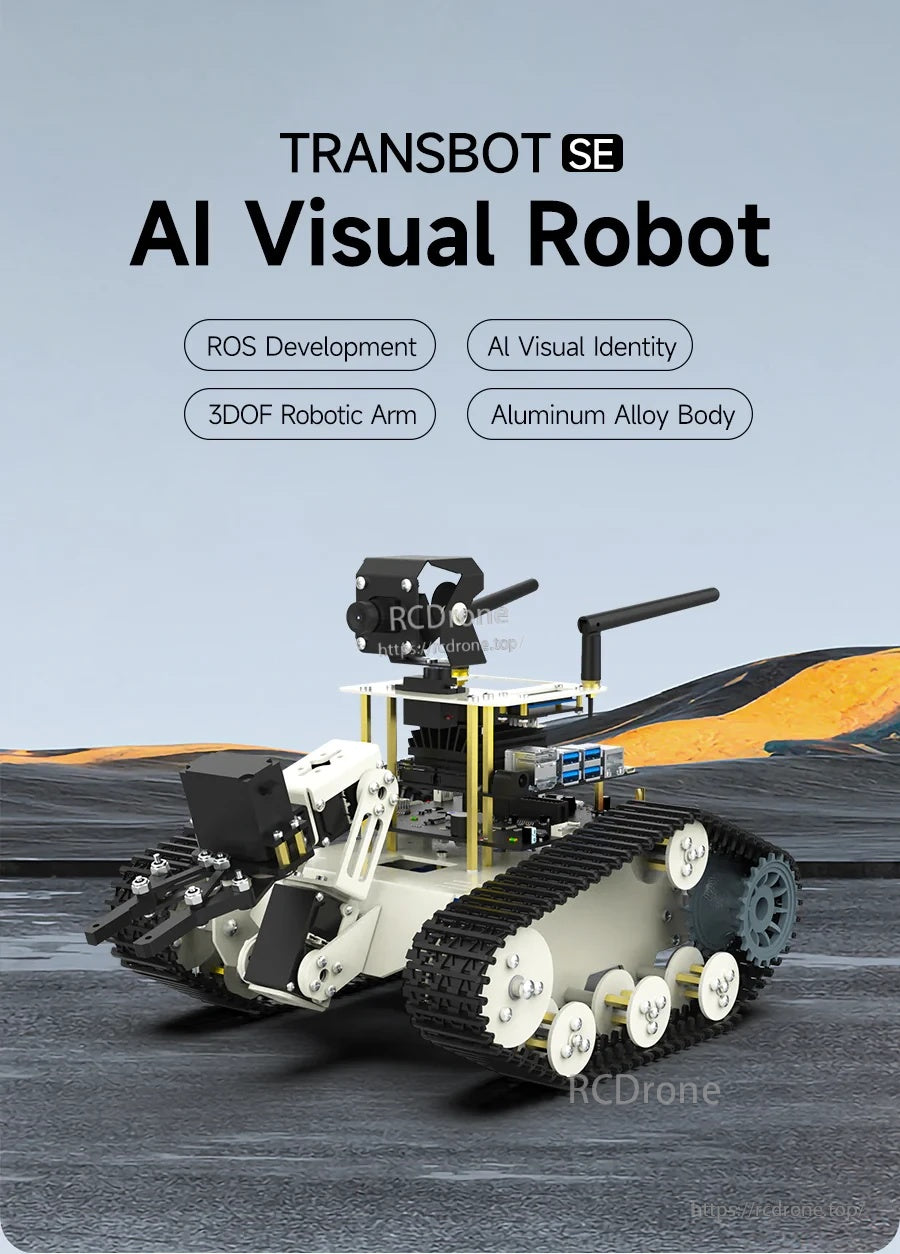
Transbot SE هو منصة روبوتية متعقبة بنظام ROS مصممة لمشاريع الرؤية الاصطناعية، تتميز بهيكل معدني بالكامل، وذراع 3DOF، وجيمبال كاميرا 2DOF.
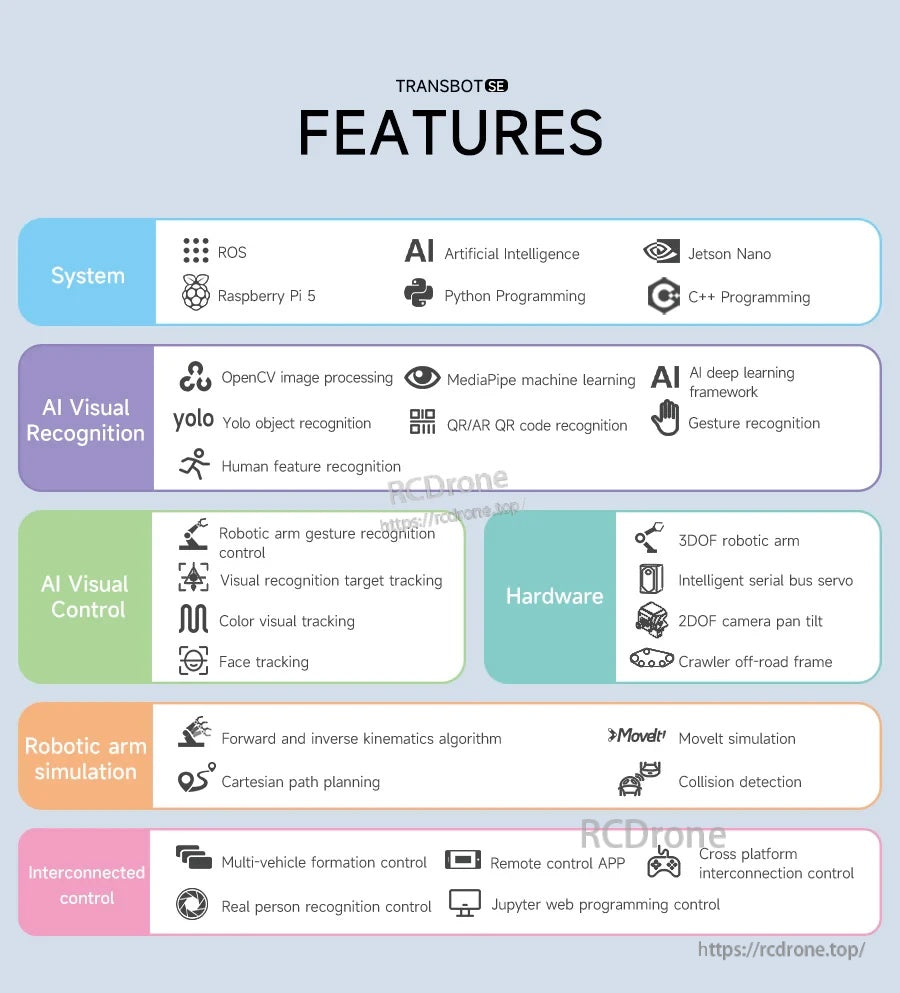
يدعم البرنامج الكامل OpenCV للرؤية، وMediaPipe للتحكم بالإيماءات، وYOLO للتعرف، ومحاكاة الذراع الروبوتية القائمة على MoveIt.
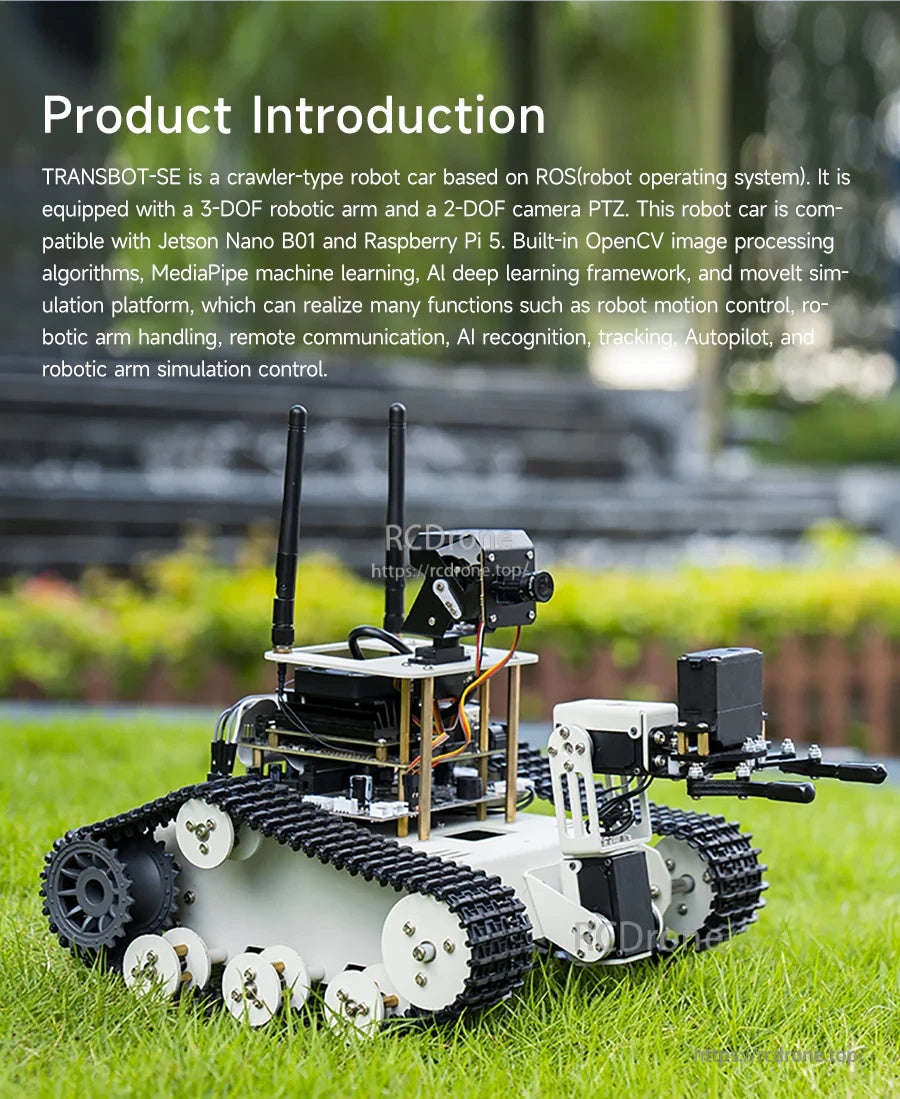
تم تصميم هيكل الزاحف المتعقب والدفع التفاضلي للحركة المستقرة على الأسطح الداخلية والخارجية المتنوعة.
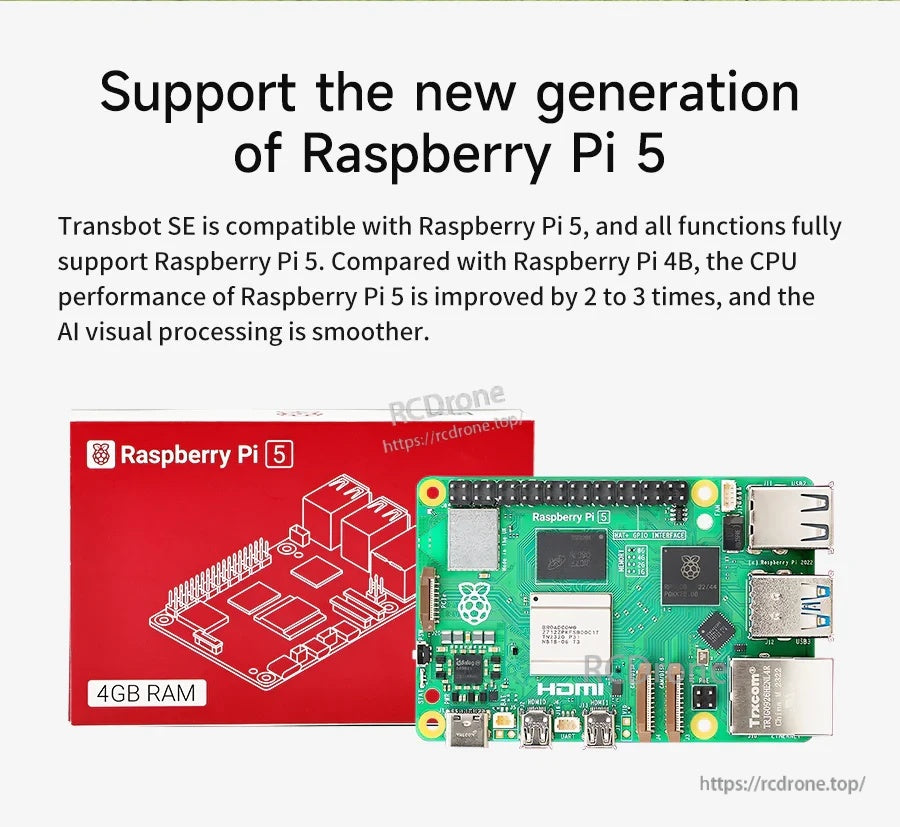
متوافق مع Raspberry Pi 5 لتطوير ROS ومعالجة الرؤية على اللوحة بشكل أكثر سلاسة.
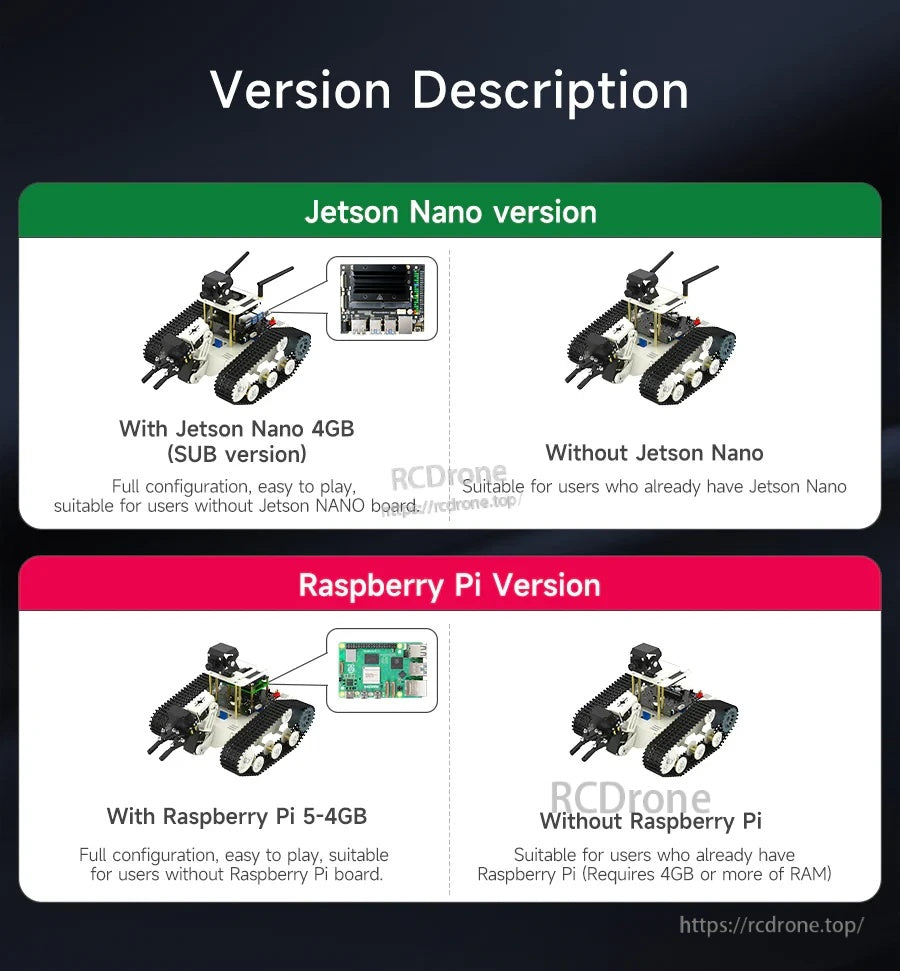
اختر مجموعة مع Jetson Nano أو Raspberry Pi مضمنة، أو نسخة بدون لوحة إذا كان لديك وحدة تحكم خاصة بك.
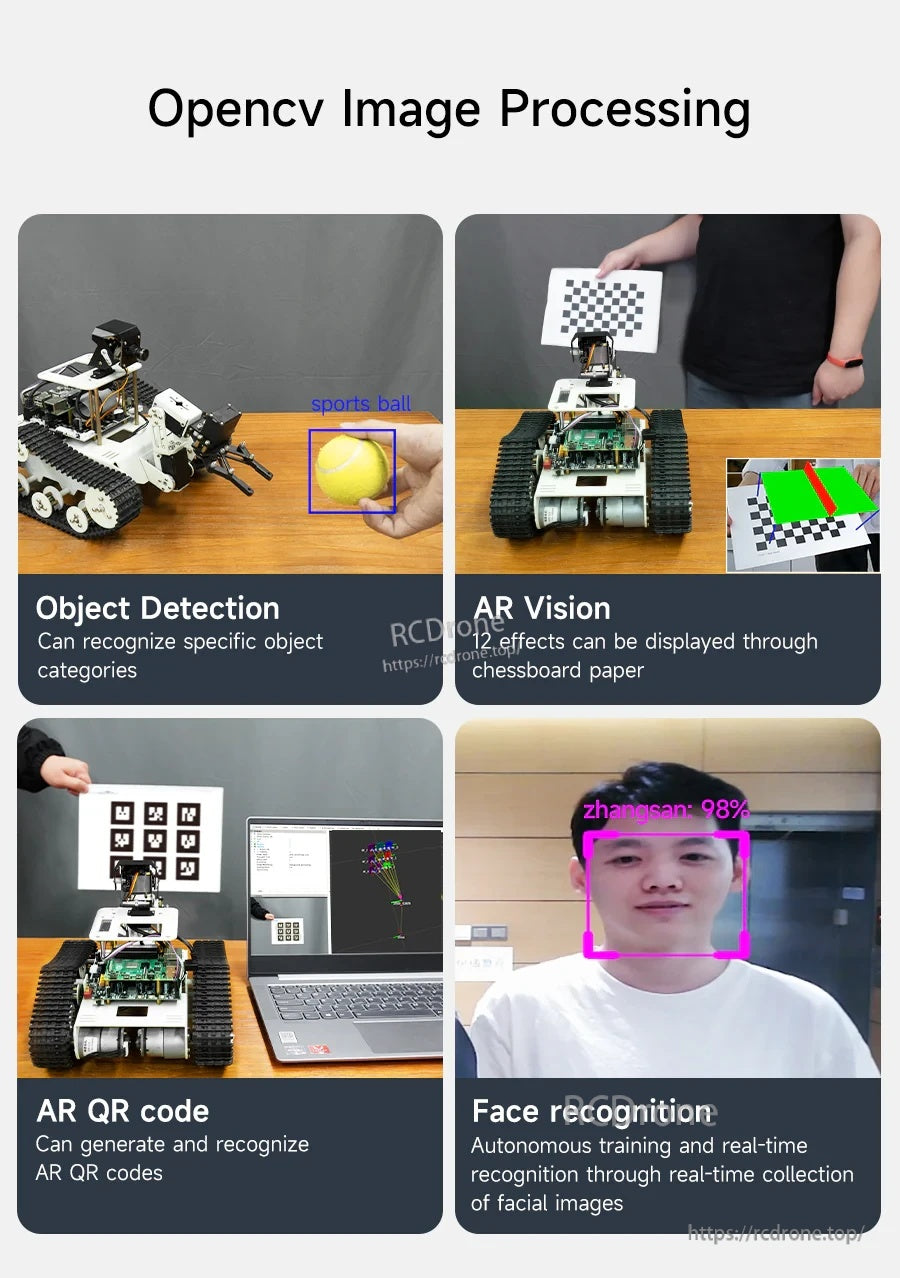
تشمل العروض التوضيحية المدمجة في OpenCV اكتشاف الأجسام، وتأثيرات الواقع المعزز مع اللوحات المميزة، وتوليد/التعرف على رموز QR.
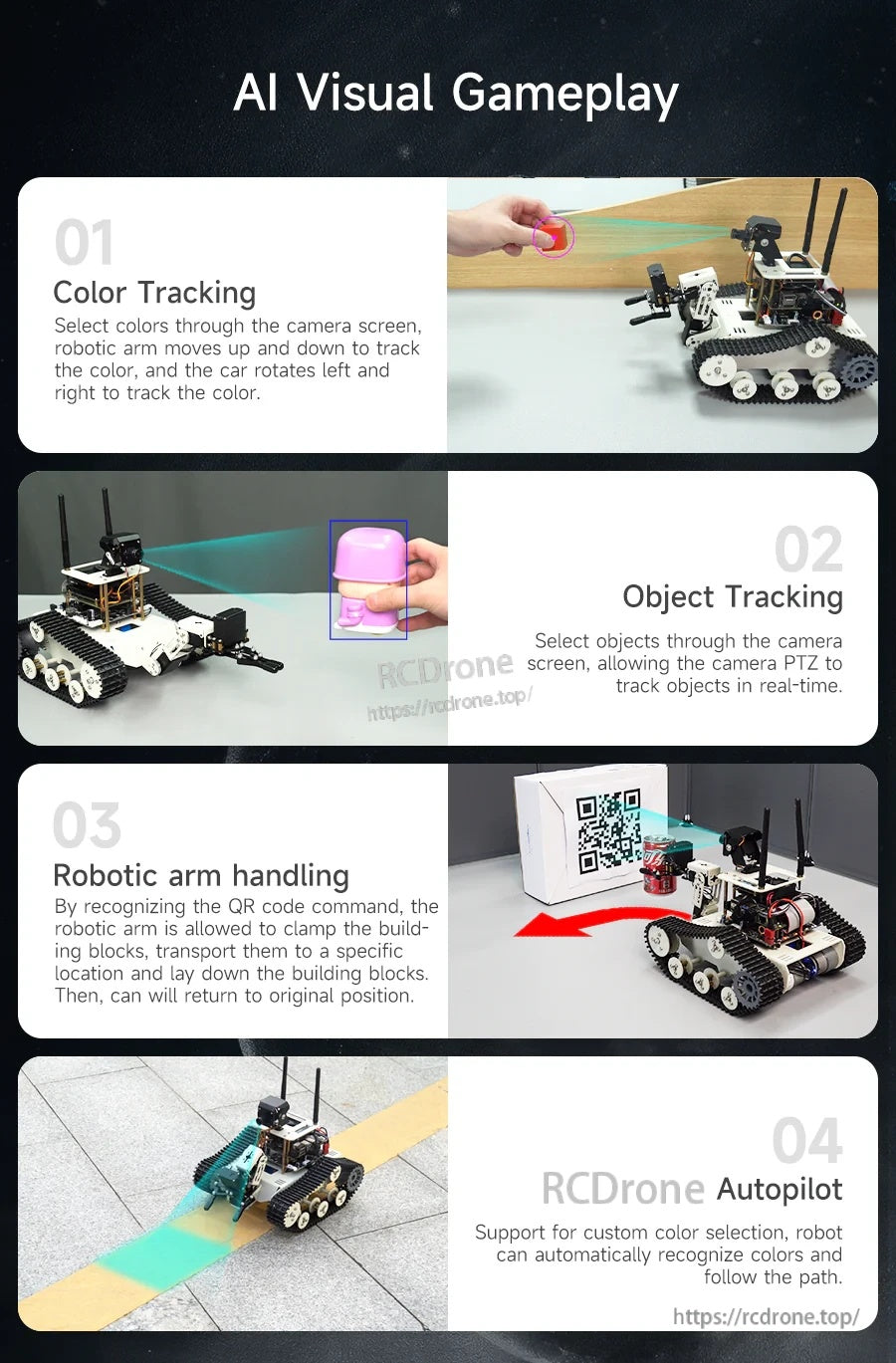
تضيف الألعاب البصرية بالذكاء الاصطناعي تتبع الألوان، وتتبع الأجسام القائم على PTZ، وأوامر QR للالتقاط والوضع، والطيار الآلي لمسار الألوان.
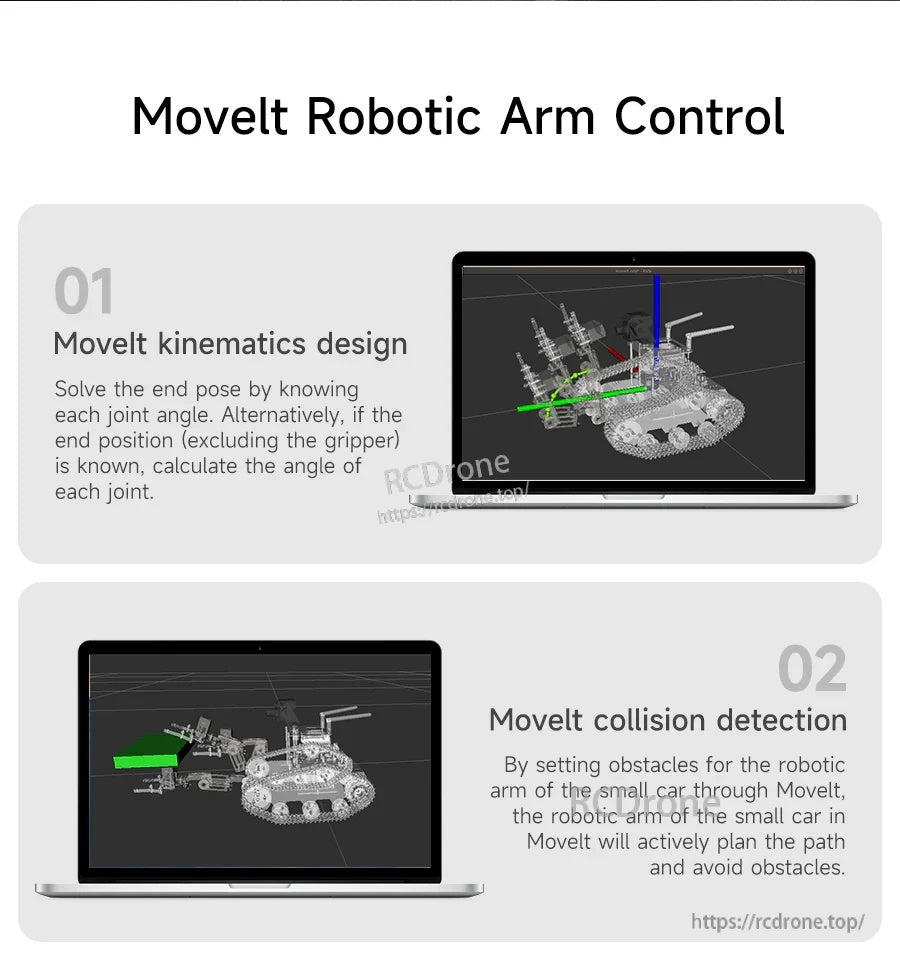
يدعم تكامل MoveIt الحركيات، والتخطيط الكارتيزي، وفحص التصادم لتطوير ومحاكاة الذراع الروبوتية.
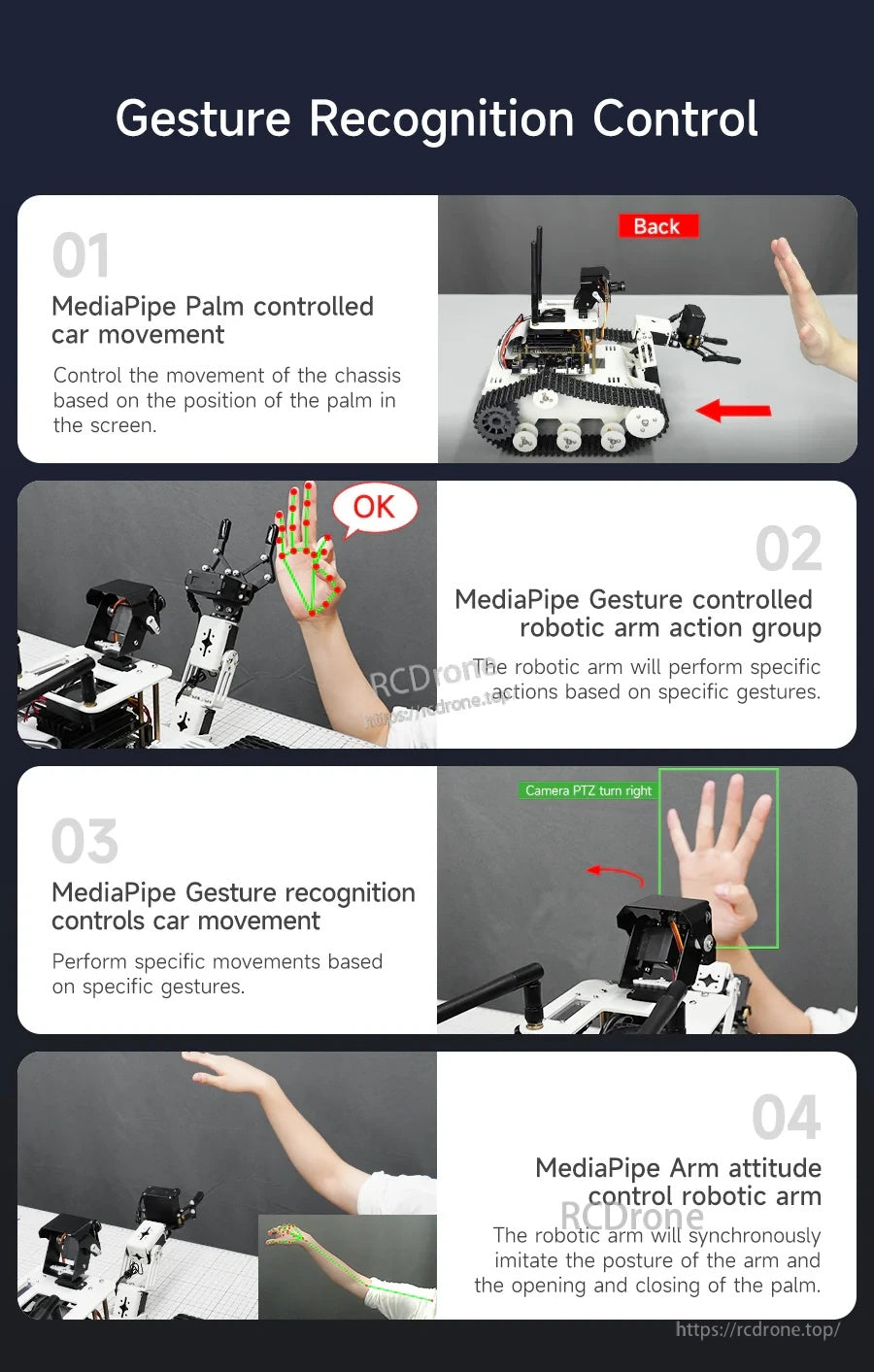
تمكّن تقنية التحكم بالإيماءات MediaPipe من الحركة المدفوعة براحة اليد بالإضافة إلى مجموعات حركة الذراع الروبوتية التي يتم تشغيلها بالإيماءات ومحاكاة الوضعية.
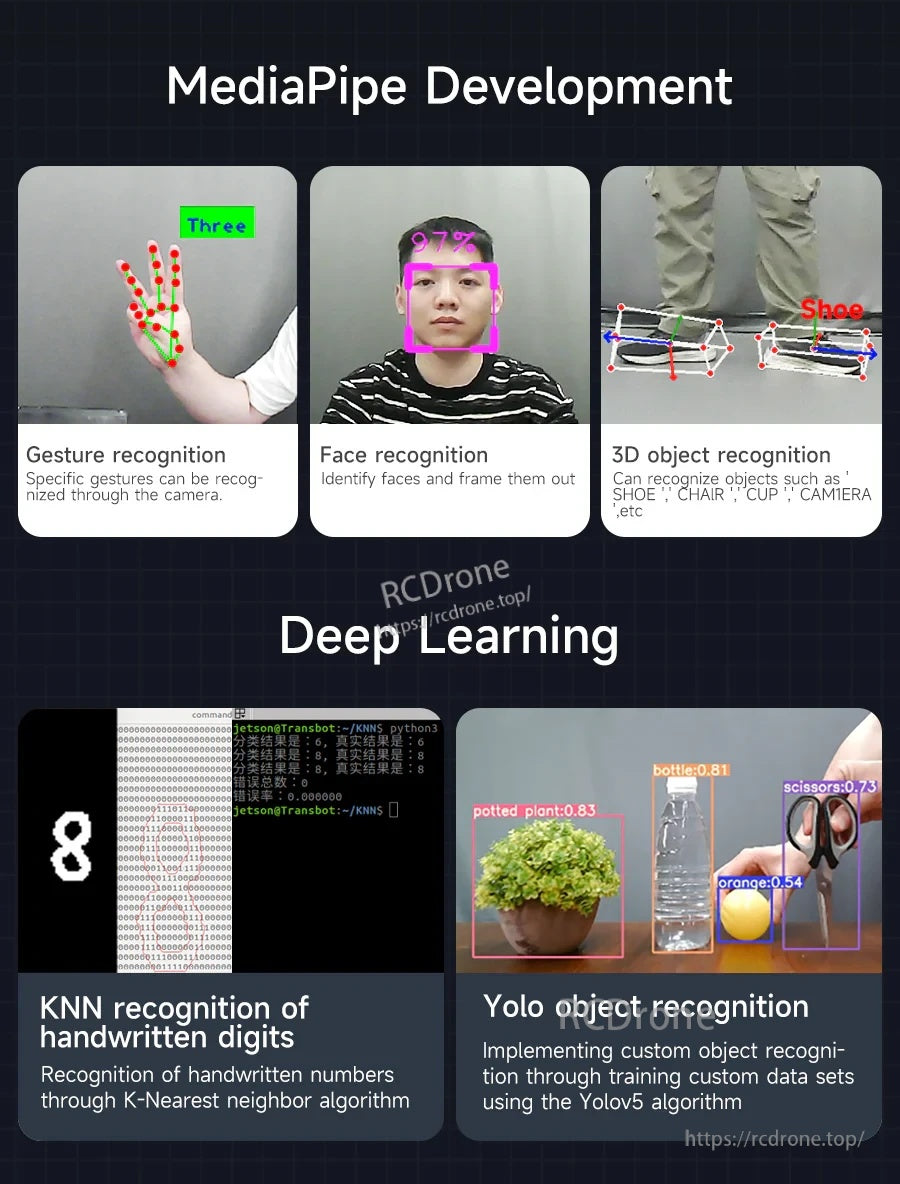
تشمل المشاريع النموذجية التعرف على الإيماءات/الوجه، تسميات الكائنات ثلاثية الأبعاد، التعرف على الأرقام باستخدام KNN، وأمثلة تدريب مجموعة بيانات YOLO.
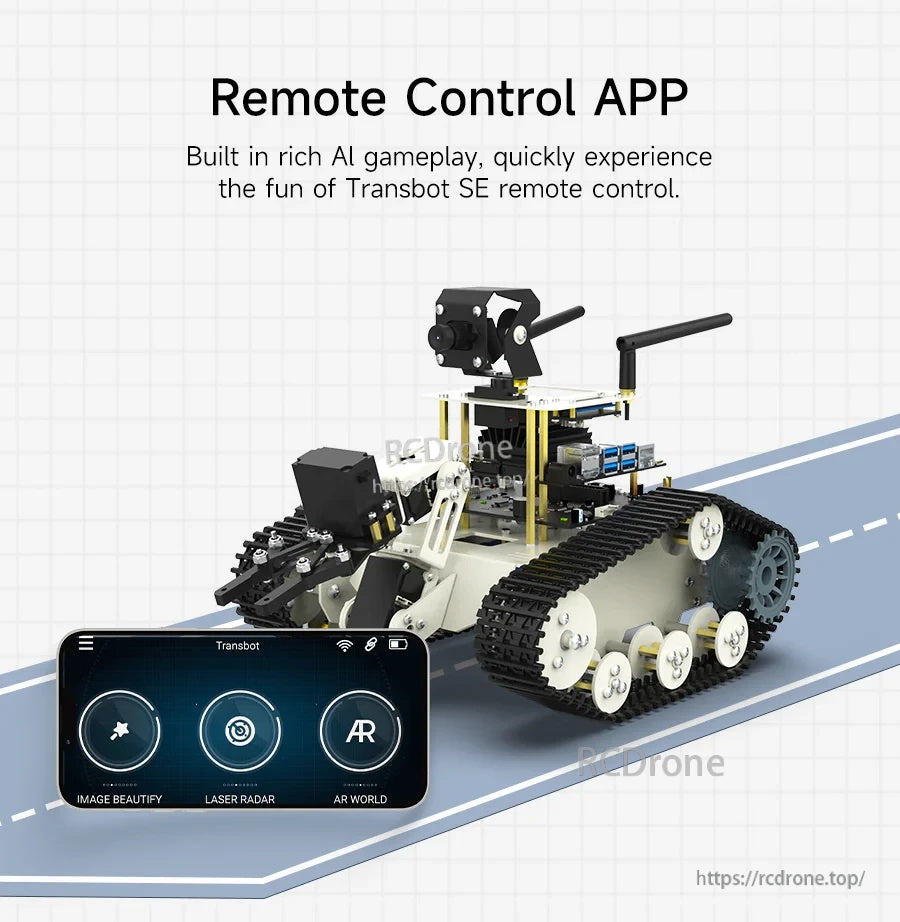
استخدم تطبيق التحكم عن بُعد للقيادة السريعة، ميزات الكاميرا، وأوضاع الذكاء الاصطناعي التفاعلية دون الحاجة إلى إعداد كامل لسطح المكتب.
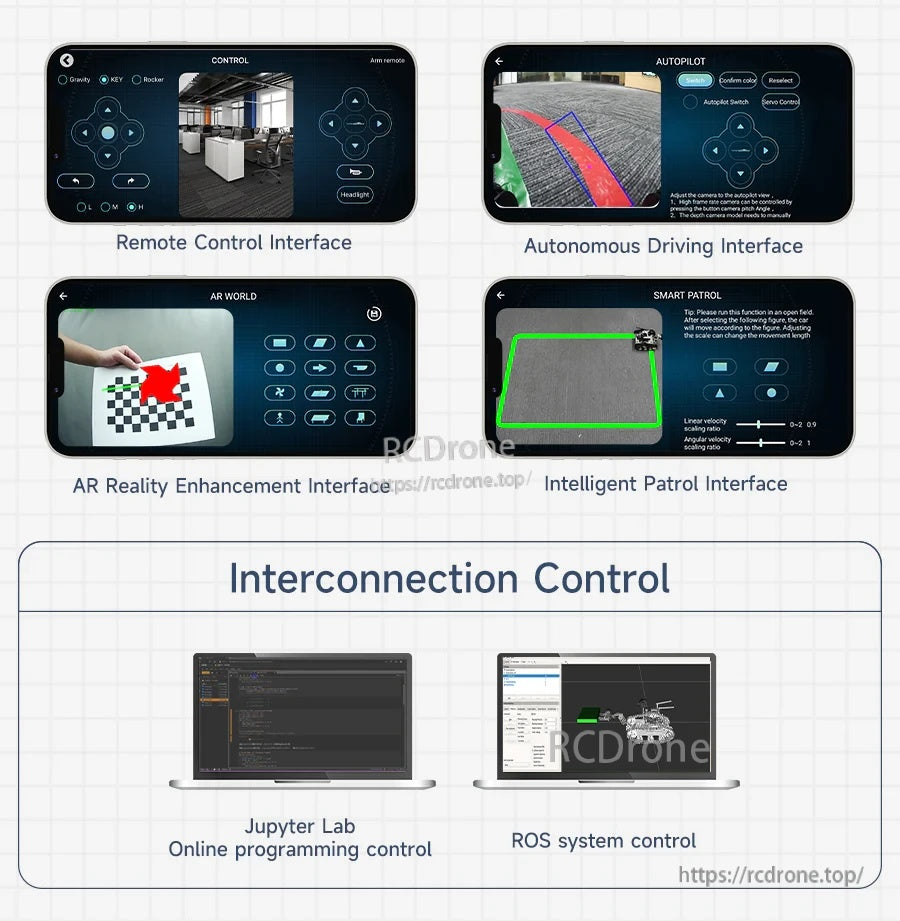
تدعم مسارات تحكم متعددة، بما في ذلك برمجة الويب باستخدام Jupyter، التحكم بنظام ROS، والترابط عبر الأنظمة الأساسية.
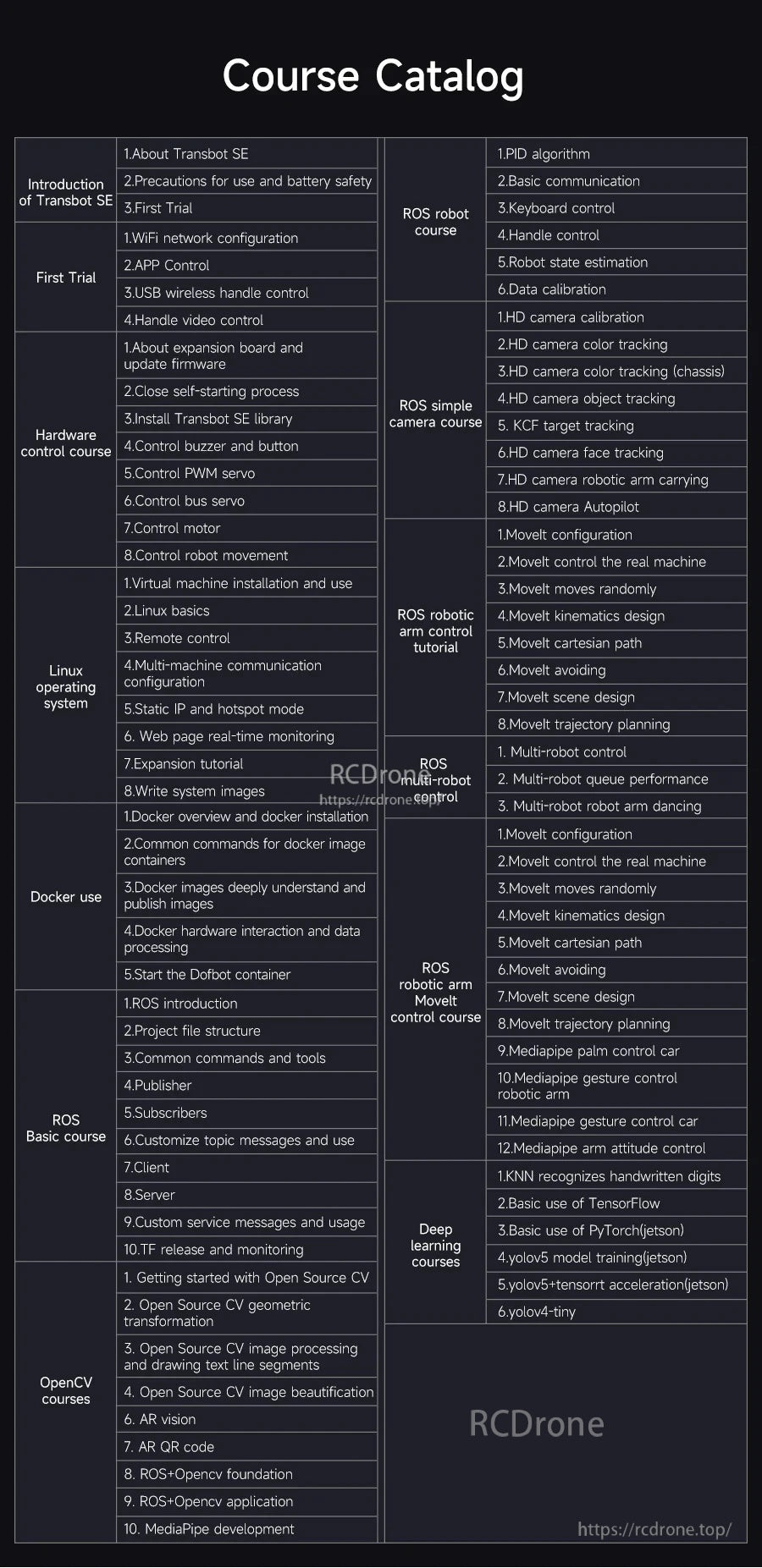
يوجهك كتالوج الدورات المنظم في إعداد النظام، أساسيات ROS، ميزات الرؤية، ومواضيع التحكم المتقدمة.
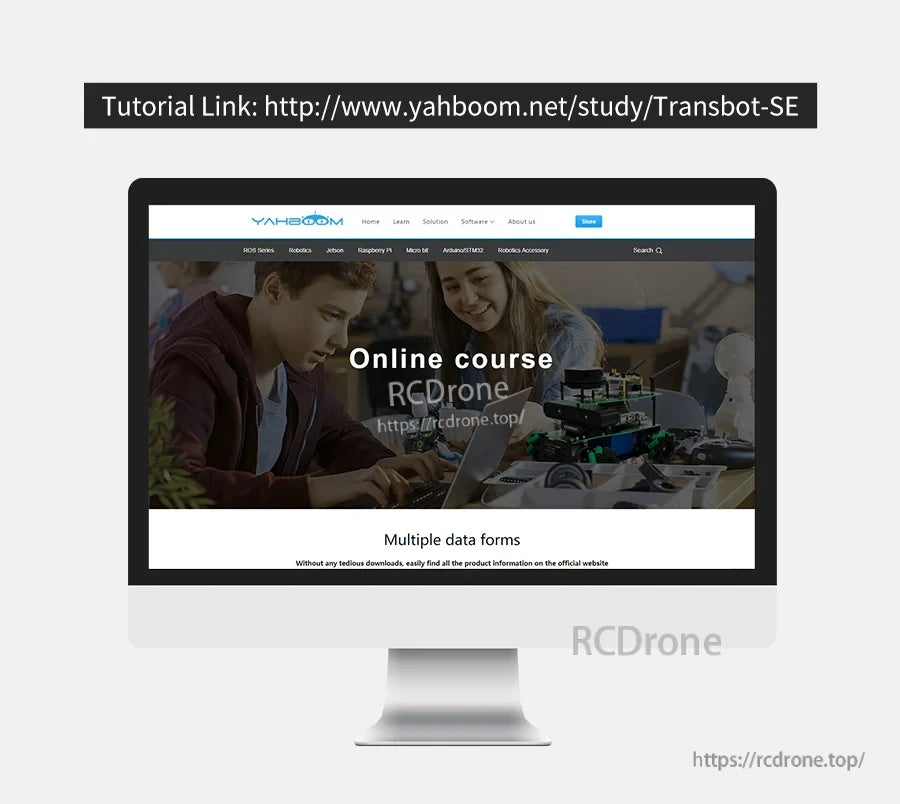
تتوفر موارد تعليمية عبر الإنترنت للمساعدة في بناء بيئة البرمجيات وبدء عروض ROS والرؤية بشكل أسرع.
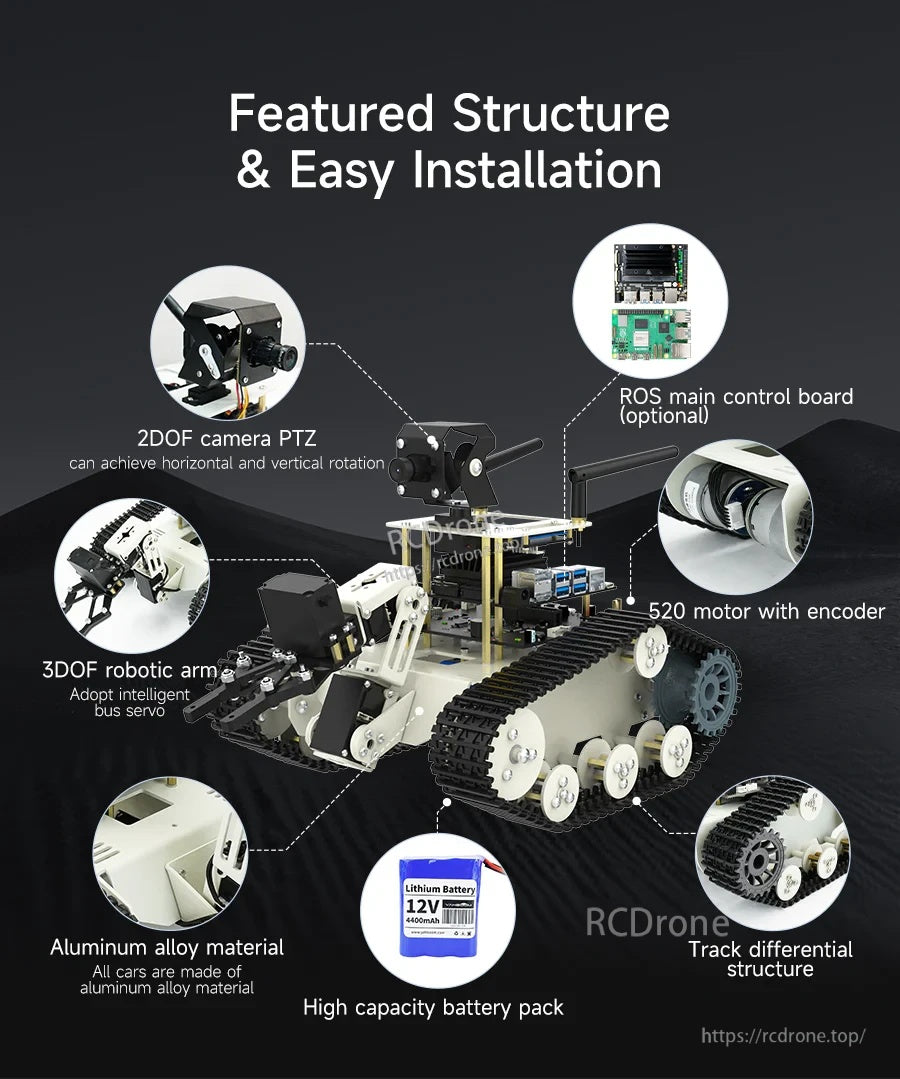
تشمل أبرز ميزات الأجهزة كاميرا PTZ ذات درجتين من الحرية، وذراع تسلسلي ثلاثي الأبعاد، ومحركات مشفرة، ولوحة تحكم رئيسية اختيارية بنظام ROS.
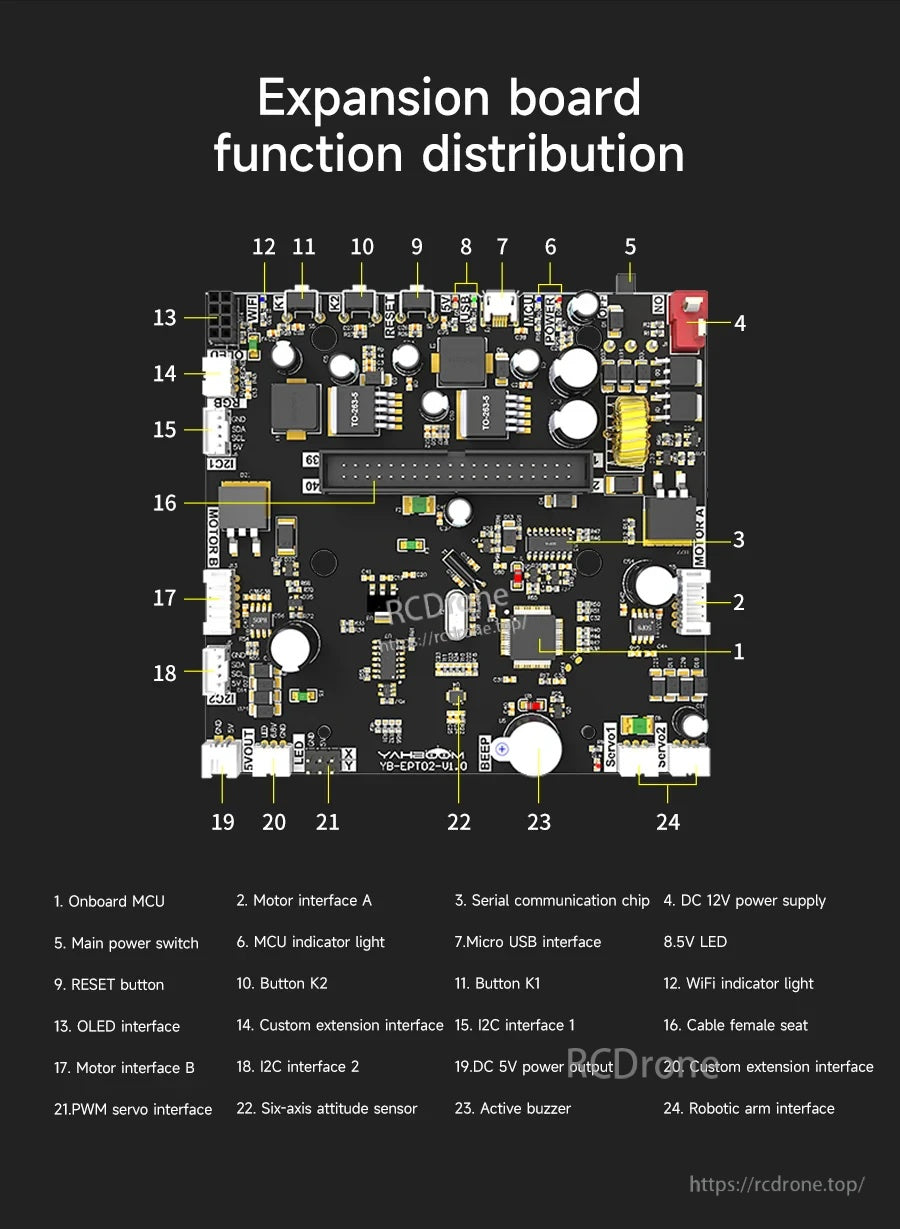
تعمل لوحة التوسعة على تبسيط الأسلاك للمحركات والأجهزة التسلسلية وملحقات USB وأجهزة الاستشعار الشائعة.
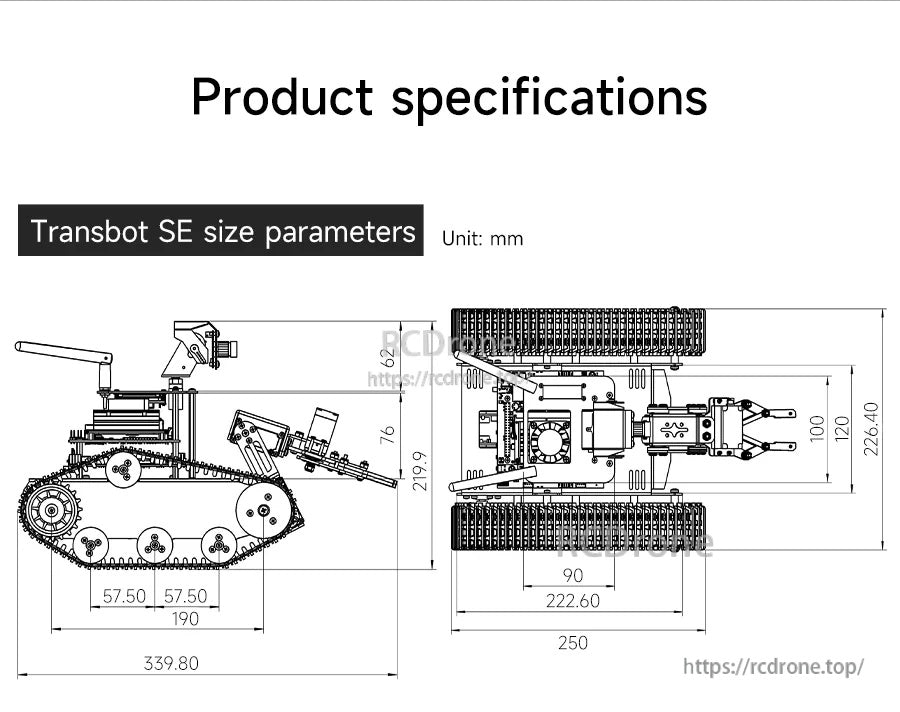
تساعد الأبعاد التفصيلية في تخطيط مساحة التركيب وتخطيطات المختبر ودمج الملحقات.
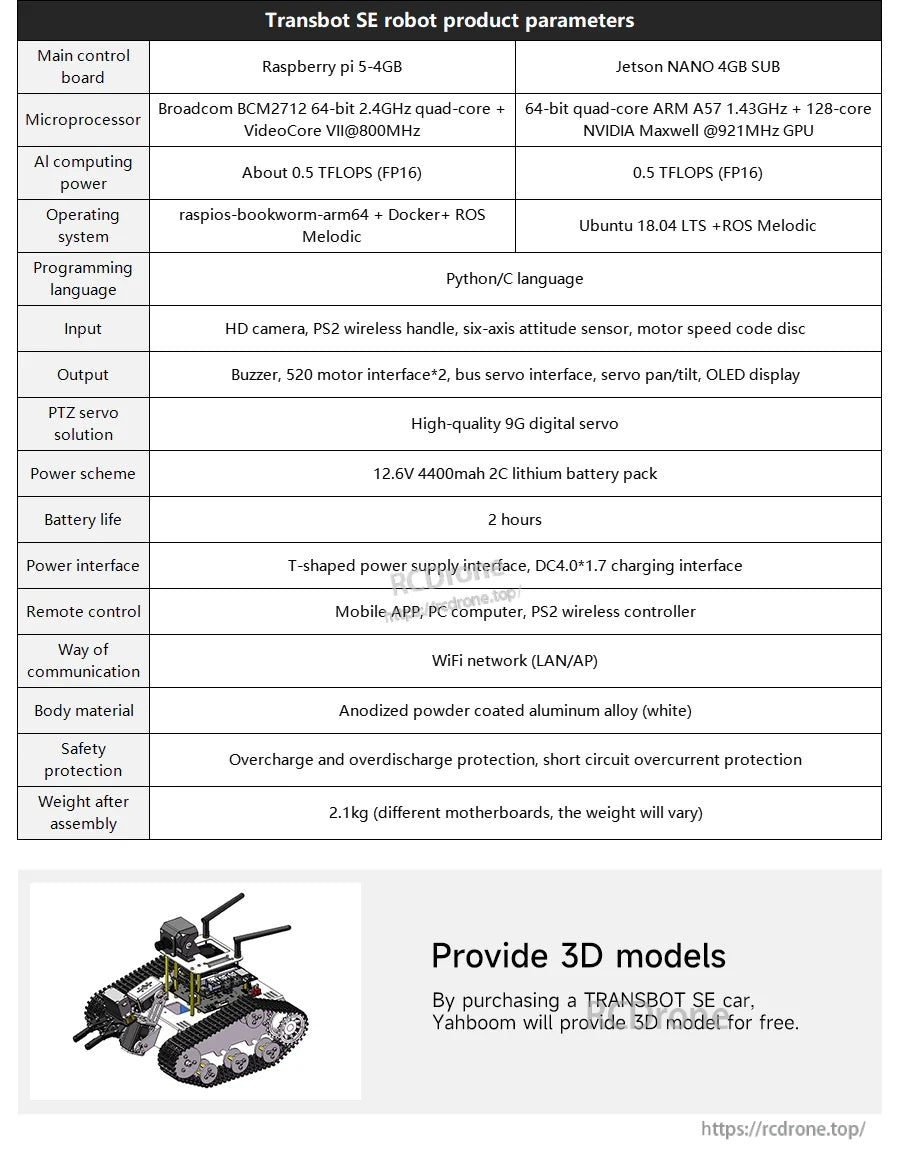
تقوم جدول المعلمات الكامل بمقارنة خيارات وحدة التحكم وتلخيص الطاقة والواجهات ونظام التشغيل وتفاصيل التجميع.
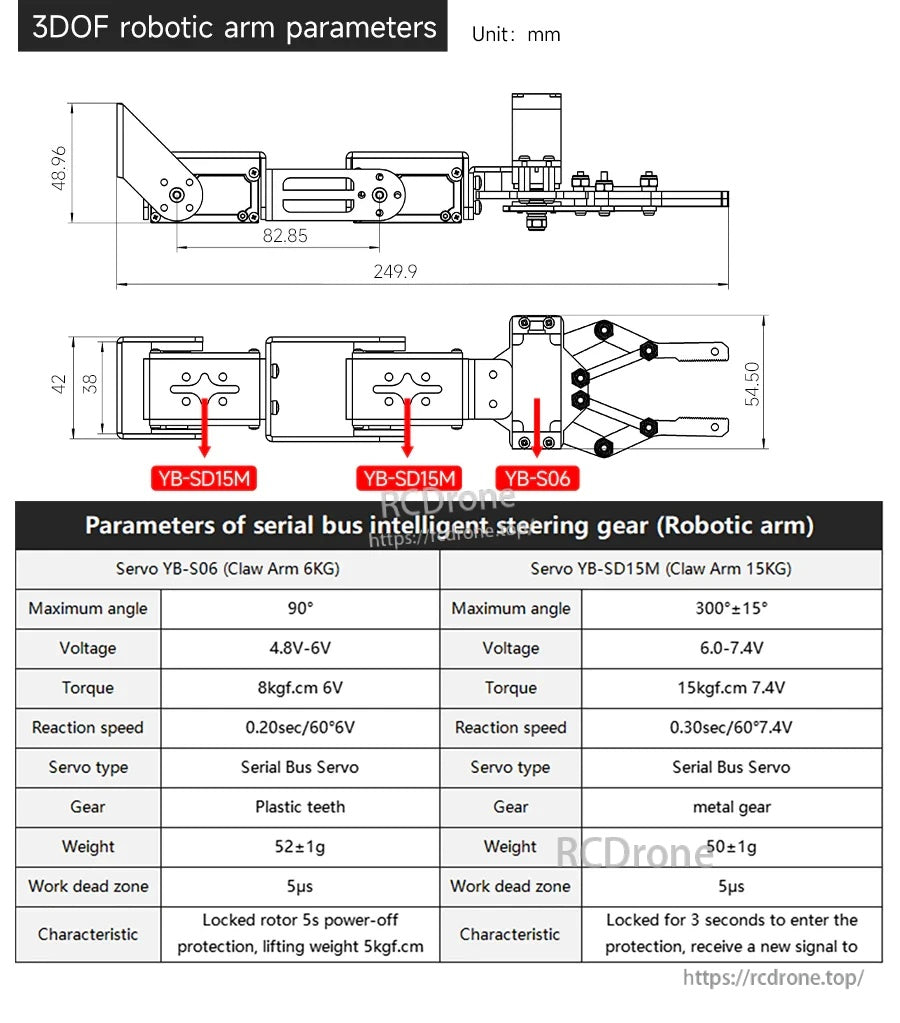
تساعد أبعاد الذراع الروبوتية ثلاثية الأبعاد ومعلمات السيرفو الرئيسية (مفاصل YB-SD15M والمخلب YB-S06) في تخطيط التخطيط واختيار الطاقة.
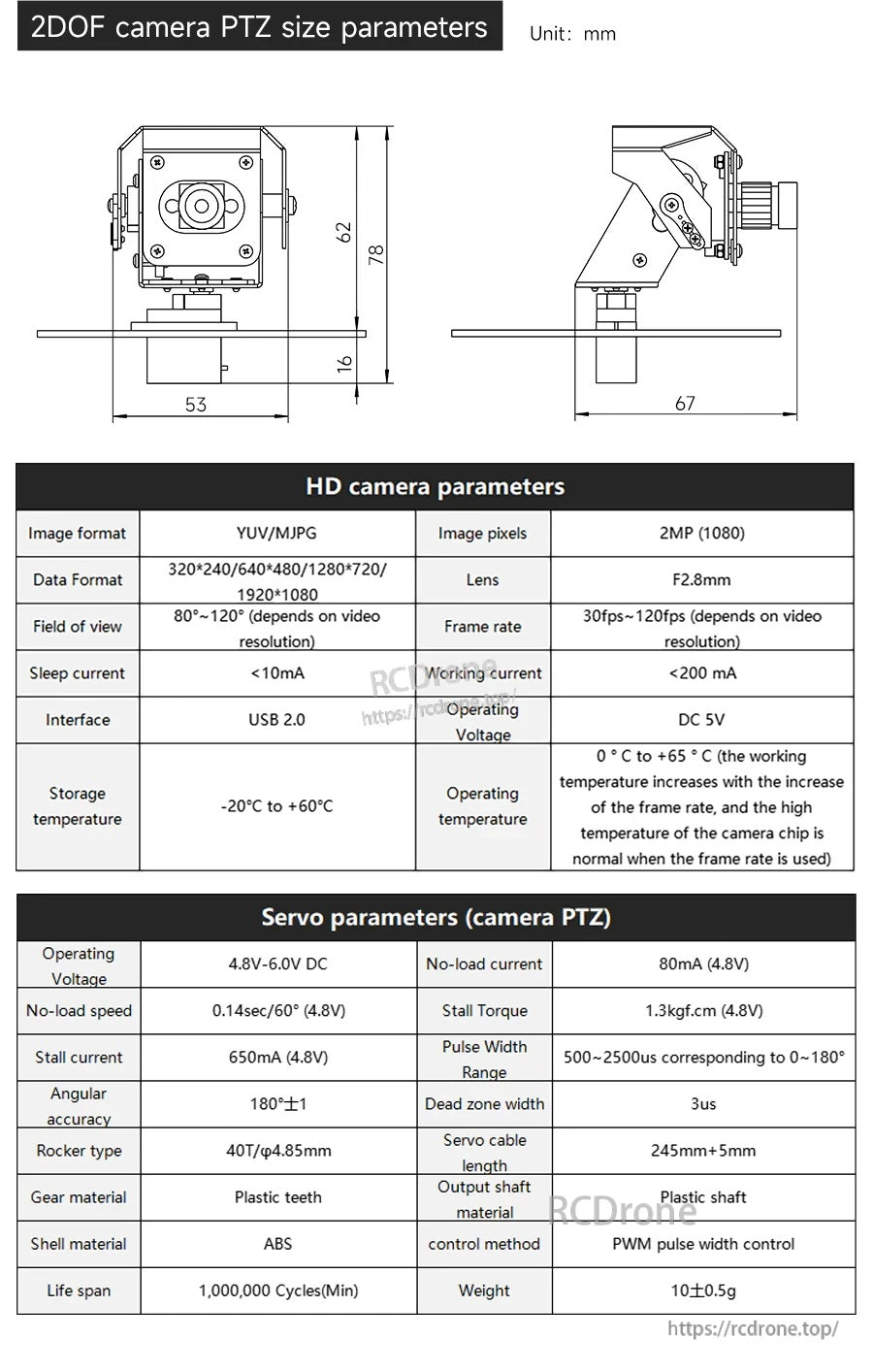
يتضمن وحدة كاميرا PTZ ذات درجتين من الحرية كاميرا USB 2.0 بدقة 2 ميجابكسل 1080p وحامل مدمج مع أبعاد موضحة بالملليمترات لتسهيل الدمج.
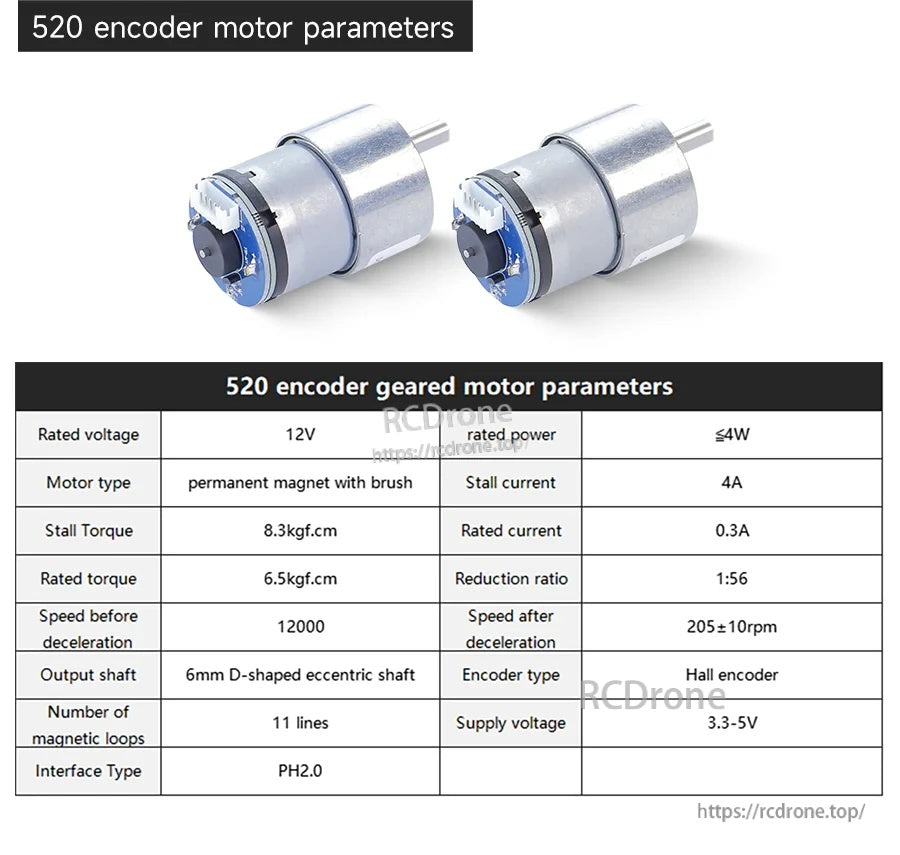
يستخدم محرك التروس المشفر 520 تصميمًا بفرشاة 12 فولت مع نسبة تخفيض 1:56 ومشفر هول (3.3–5 فولت)، ويصنف عند 205±10 دورة في الدقيقة بعد التباطؤ.
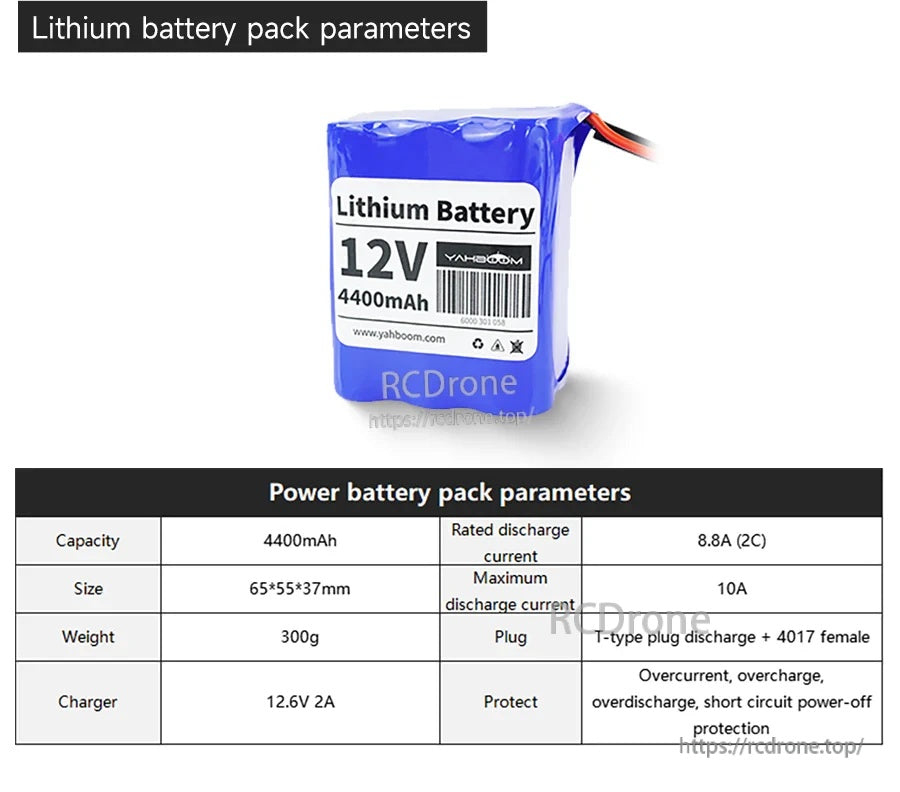
تستخدم حزمة بطارية الليثيوم 12 فولت 4400 مللي أمبير قابس تفريغ من النوع T وتدرج تيار تفريغ مصنف 8.8 أمبير وأقصى تيار 10 أمبير.
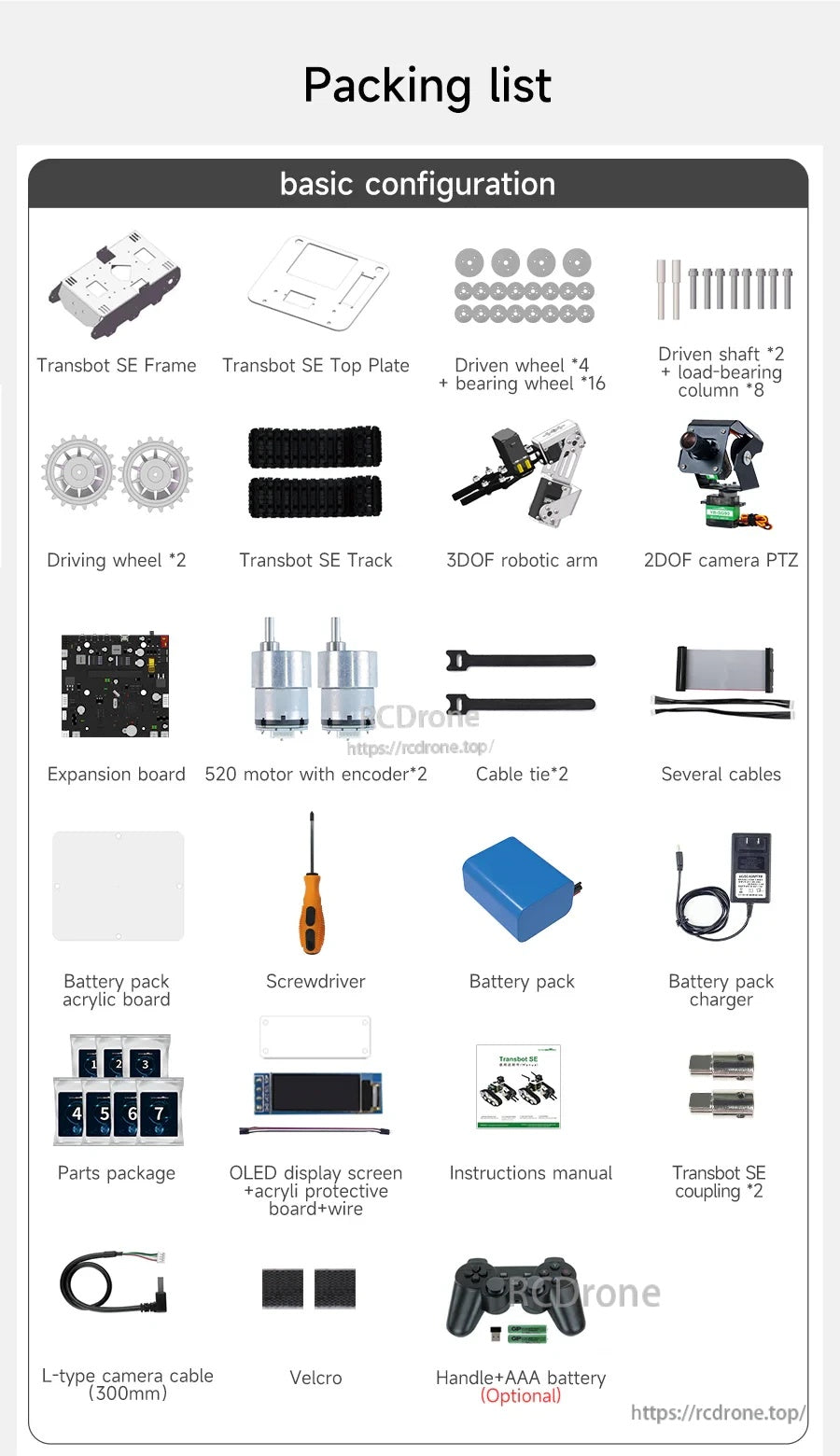
تتضمن مجموعة روبوت Yahboom Transbot SE ROS الإطار واللوحة العلوية، المسارات والعجلات، ذراع روبوتية 3DOF، كاميرا 2DOF PTZ، محركات، بطارية، شاحن، وكابلات.
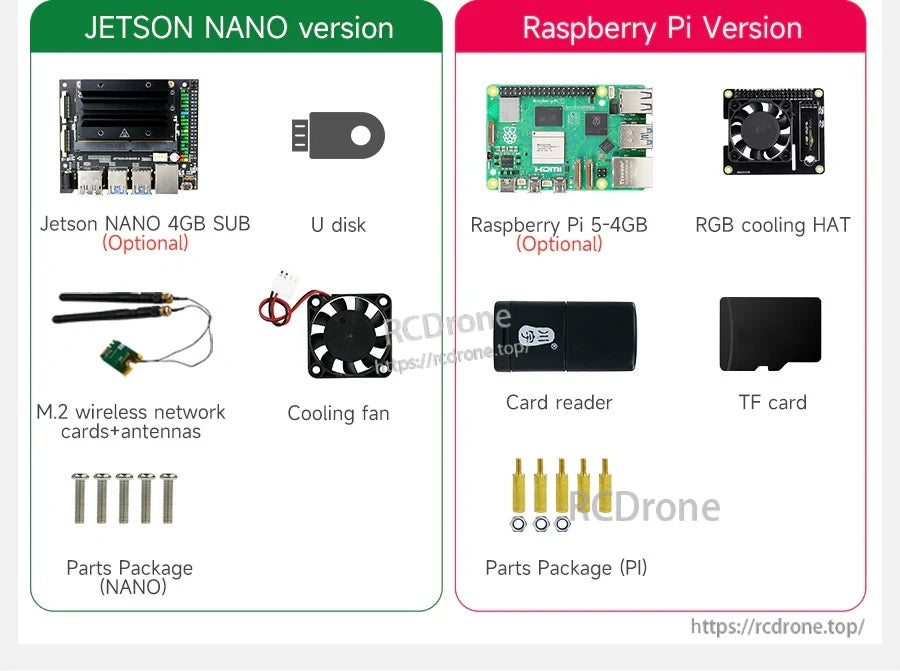
تشمل حزم أجزاء روبوت Transbot SE ROS خيارات Jetson Nano أو Raspberry Pi مع ملحقات مثل مروحة تبريد، هوائيات، وتخزين TF.